00196044-05 - sg x und x4i fse_en.pdf - 第368页
Twin Head Settings Twin Head Parameters S tudent Guide (FSE) SI PL ACE X Series and X4I T win Head Edition 01/2009 EN 368 X Perform a referenc e run for the D-axis. X Do not forget to perform D axis calibration afterward…
Twin Head
Twin Head Parameters Settings
Student Guide (FSE) SIPLACE X Series and X4I
Edition 01/2009 EN Twin Head
367
9.4.3 Twin Head Parameters
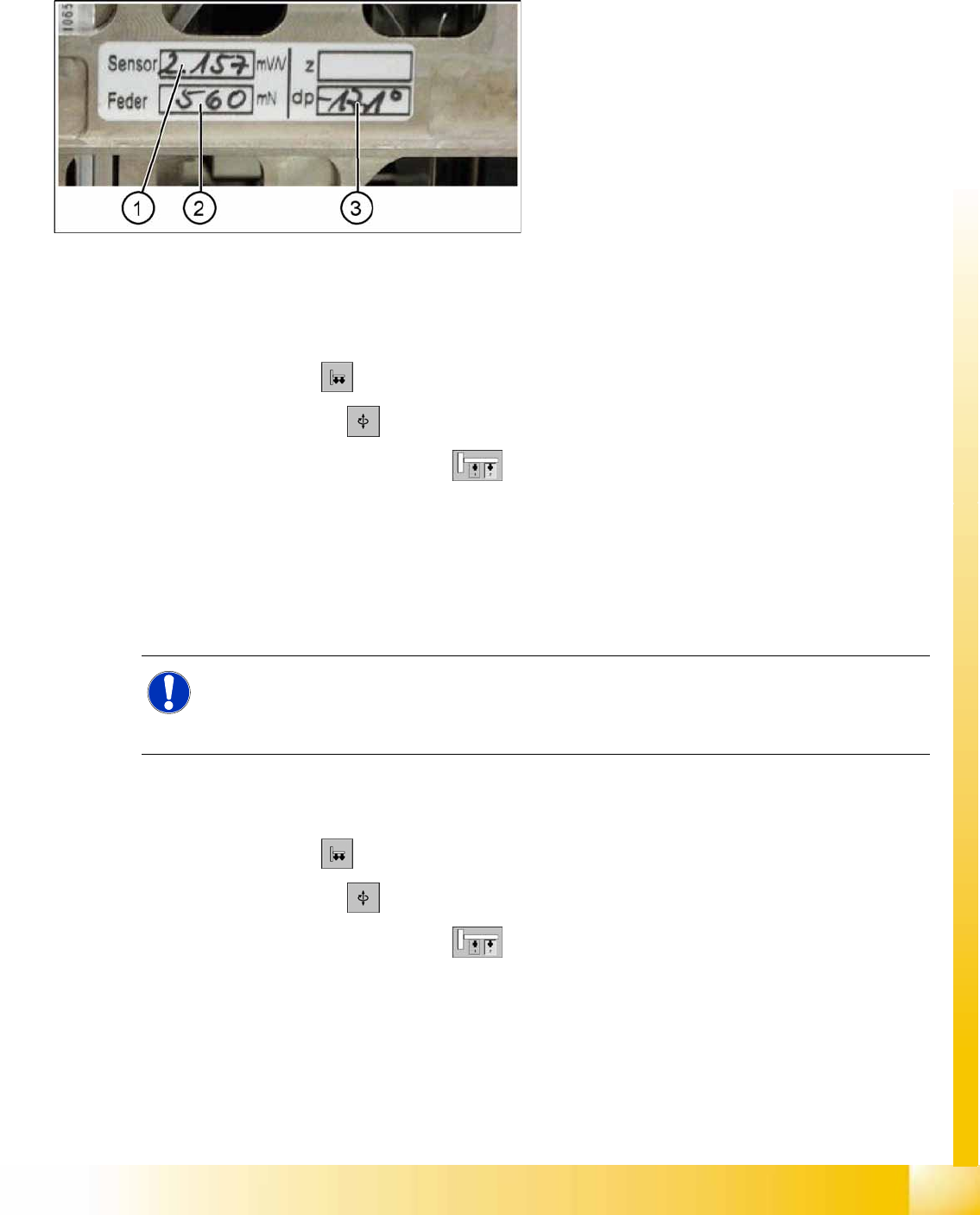
Each module has a label with correction parameters which need to be enetered in SITEST at initial setup
or when the P&P module is replaced.
Parameter force sensor and spring pre-tension
SITEST:
X Select
Twin Head
X Select
Axis functions
X Select the appropriate Twin module.
X Select the checkbox
Z axis
.
X Select the
Parameter...
menu and enter the values
Force sensor comparative value
in [mV/V]. This value is always smaller than 3.0 [mV/V].
and
Spring pretension
in [mN]. This value is between 300 and 700 [mN]).
If these values are not entered in SITEST as specified on the Twin segment, this will result in inaccurate
calculation of the placement force (1 to 15N).
Zero point correction (ZPC) D-axis
SITEST:
X Select
Twin Head
X Select
Axis functions
X Select the appropriate Twin module.
X Select the checkbox
D Axis
X Select
Positions...
X Disable the checkbox
digits
X Specify the relevant ZPC value in 1/100 degrees in line 2. "ZPC from the Label" and select
Accept
.
9-14: Label with D axis correction value and parameters for the TWIN
module.
Legend
1. Sensor (parameters for DMS strips)
2. Spring (spring pre-tension)
3. DP (zero point correction D-axis)
NOTE:
The adjusting screw (fine thread) for the spring pre-tension MUST NOT be adjusted! It is
currently not possible to measure the spring pretension at the customer site, meaning that the
placement head needs to be exchanged.
Twin Head
Settings Twin Head Parameters
Student Guide (FSE) SIPLACE X Series and X4I
Twin Head Edition 01/2009 EN
368
X Perform a reference run for the D-axis.
X Do not forget to perform D axis calibration afterwards. (calibration device [03008862-xx])
Zero point correction (ZPC) Z axis
SITEST:
X Select
Twin Head
X Select
Axis functions
X Select the appropriate Twin module , enable
Z axis
X Select
Positions...
and enter the following values:
(Deactivate ’display in digit’ button)
Maximum position: 57500 µm
Minimum position: -2000 µm
Zero point correction: 0 µm
X ==> Perform a head height calibration (ZPC for the Z axis).
X Calibrate the head height of the Twin module.
NOTE:
With the SW 505 The D axis value applies for Twin modules 1 and 2, if the NPC is entered in
line 2 at Positions. The staiton automatically calcualtes the ZPC for Twin module 1 (ZPC Twin
module 2 + 180° = ZPC for Twin module 1) .
Example for the value shown on the label above:
-17100 (module 2) or
-900 (module 1)
NOTE:
Enter the standard values for the Z axis, only if the reference run or the calibration head height
not successfully.
NOTE:
Make sure that the 517 nozzle is on the Twin head.
NOTE:
The zero point correction, max. and min. travel range of the Z axis are determined when you
calibrate the head height.
Twin Head
Calibrating the D-Axis Settings
Student Guide (FSE) SIPLACE X Series and X4I
Edition 01/2009 EN Twin Head
369
9.4.4 Calibrating the D-Axis
X Place the calibration nozzle for the Twin head by hand on the sleeve of the appropriate P&P module.
Make sure that the two adjust pins of the nozzle fit correctly.
X Perform an axis reference run for the D-axis.
X Now check the alignment of the nozzle:
The drilling on the calibration nozzle must point to the center (SW 505 or higher) of the machine (for
SR/MC 504.0x to machine outside) and the nozzle must be aligned parallel to the PCB conveyor.
X Assign the nozzle "516" for the P&P module to be calibrated:
SITEST:
X Select
Twin Head
X Select the nozzle changer head function.
X Select the appropriate "segment" from the list.
X Select
Edit
==> mark "516" and select
Accept
.
X Enable
Select Segment
.
X Select
Confirm Exchange
.
SITEST:
X Select
Twin Head
X Select
Calibration functions
X Select the appropriate Twin module
X Open the
Calibrate zero point D axis
menu.
X When requested to do so by the SW, connect the D-axis calibration nozzle.
The ZPC will be automatically determined through the angle recognition of the nozzle outline.
Repeat this procedure until the new value does not deviate more than +/- 0.01° from the previous
value.
See also:
J
9.4.4.1 Manual Calculation of the D-Axis Zero Point Correction [
J
370]
NOTE:
The exact zero point correction (ZPC) of the D axis is calibrated automatically on the SIPLACE
HF/HF3 by means of a calibration nozzle.
Correct calibration can only be expected if the ZPC angle differs less than +/- 5 degrees from
the real value.
NOTE:
If the calibration is not successful, you can roughly determine the zero point correction manually
and enter this value. (see Section (9.4.4.1 Manual Calculation of the D-Axis Zero Point Correc-
tion
J
370 ) )