00196044-05 - sg x und x4i fse_en.pdf - 第463页
Modular Conveyor Checks After Mechanical Work on the Conveyor Conveyor Settings S tudent Guide (FSE) SIPL ACE X Series and X4I Edition 01/2009 EN Modular Conveyor 463 1 1.3.8.2 Setting the Lif ting T able Unit [00358684-…
Modular Conveyor
Conveyor Settings Lifting Table Functions
Student Guide (FSE) SIPLACE X Series and X4I
Modular Conveyor Edition 01/2009 EN
462
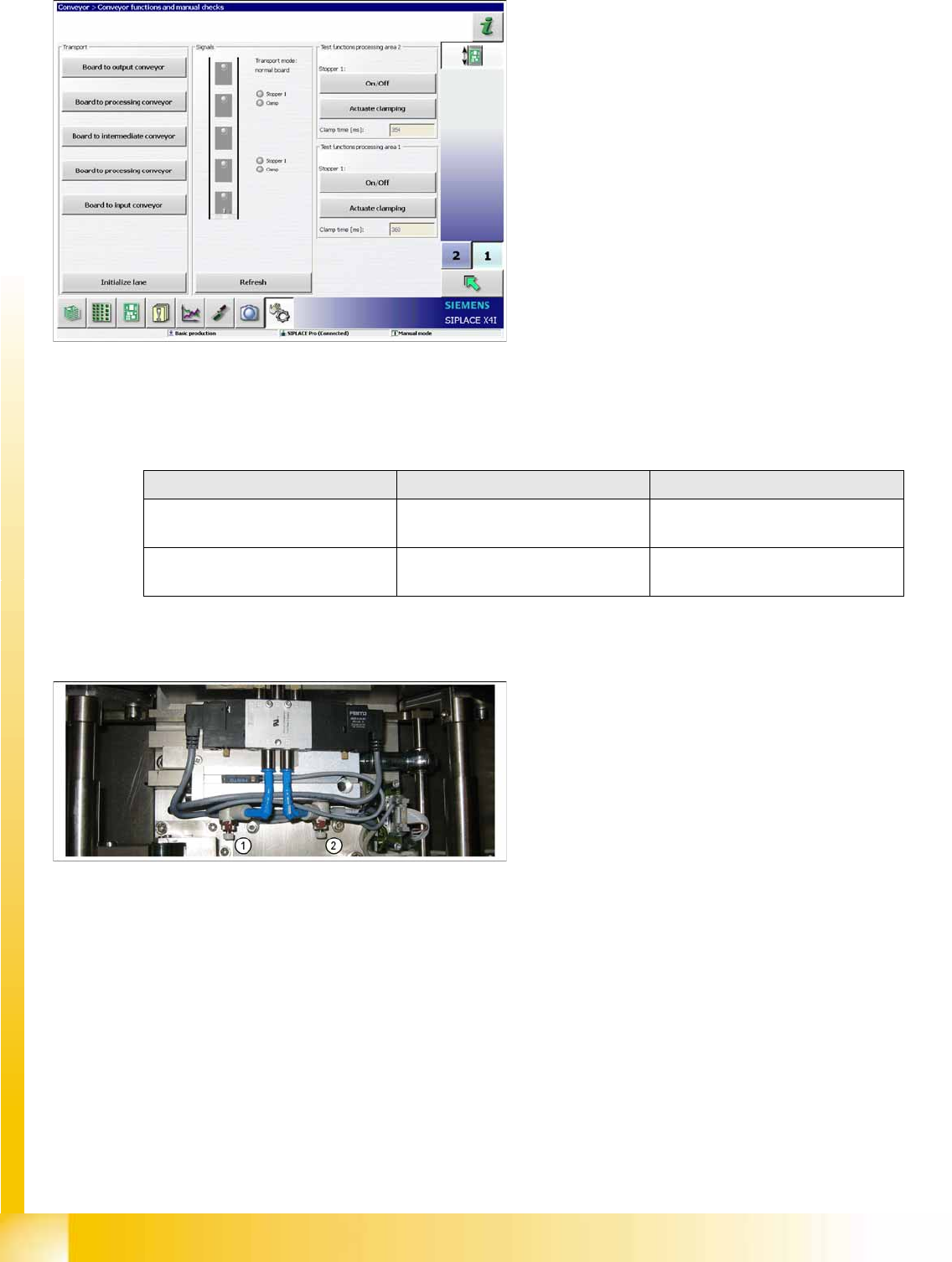
X If the travel times are not inside the tolerance range or if error messages appear during production,
adjust the travel times as follows:
X Adjust the valve on the lifting table cylinder, so that you get the following values:
X If malfunctions occur during the downwards movement or if the board is shaken, reduce the lowering
speed accordingly.
Setting valve anticlockwise: Decrease the lifting table moving time
Setting valve clockwise: Increases the lifting table moving time
11-21: Time needed to move lifting table down with lifting table plate
X The lifting table will be moved up and the travel
time will be displayed (see diagram).
X Press the
Actuate Clamp
button again to
move the lifting table downwards and to view
the travel time for the downwards movement.
Lifting table Move upwards Move downwards
Lifting table (standard)
bumper: 20 mm
520 ms +/- 20 ms 480 ms +/- 20 ms
Lifting table (X4I)
bumper: 35 mm
430 ms +/- 20 ms 400 ms +/- 20 ms
Legend
1. Adjust valve downwards
2. Adjust valve upwards
Modular Conveyor
Checks After Mechanical Work on the Conveyor Conveyor Settings
Student Guide (FSE) SIPLACE X Series and X4I
Edition 01/2009 EN Modular Conveyor
463
11.3.8.2 Setting the Lifting Table Unit [00358684-05]
11.3.9 Checks After Mechanical Work on the Conveyor
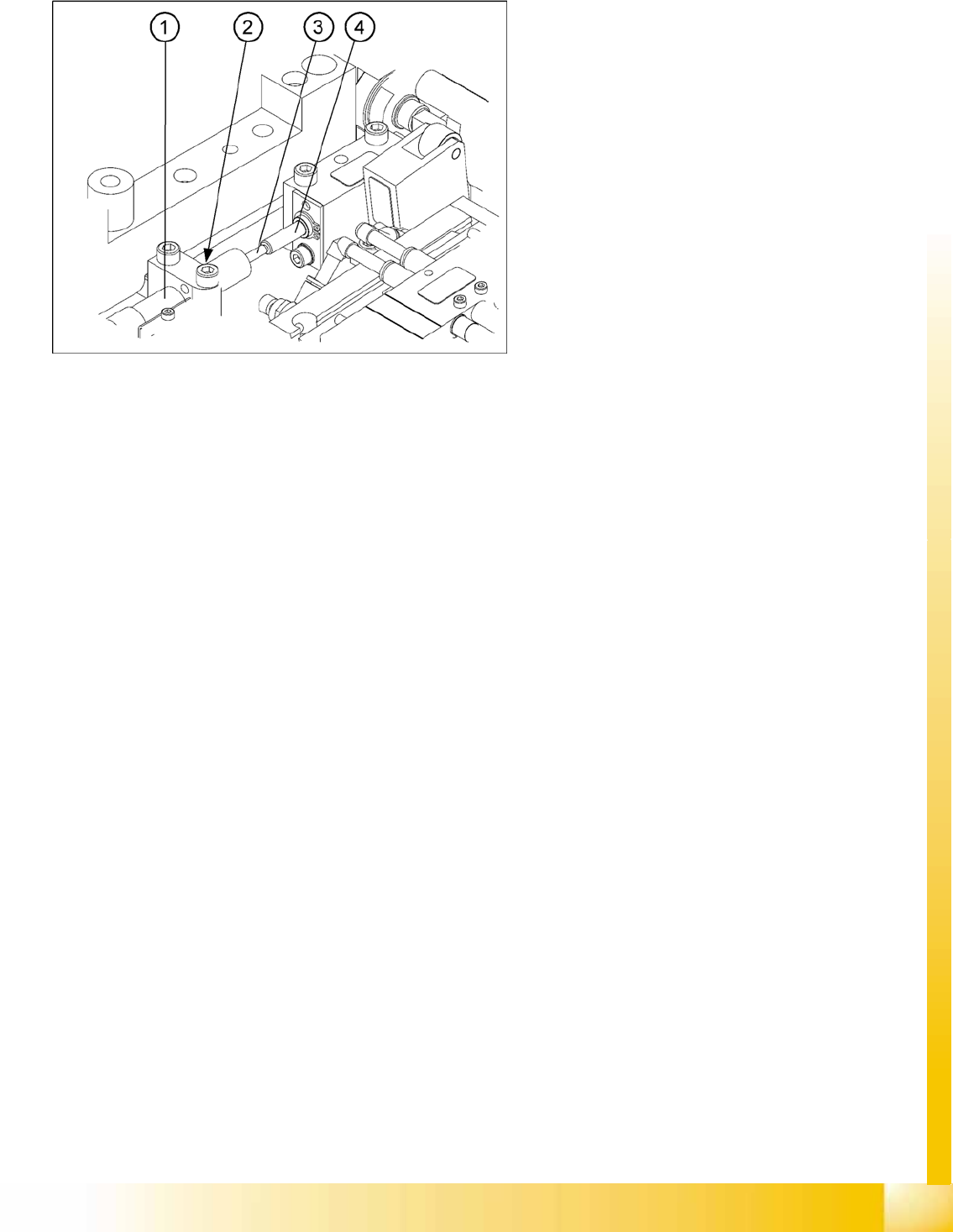
Check: The distance between the top edge of the conveyor belt and the top stop should be 6 mm.
11-22: Setting the damping unit
The damping unit (1) allows the lifting table to
move gently upwards. When the PCB is clamped,
it also prevents excessive bounce by the PCB.
X Check whether the damping unit is fixed with
the locknut (2) in the mounting block and that
the plunger (3) of the damping unit is just
touching the actuator (4). In this default
setting, the lifting table should move up gently.
X If this is not the case, loosen the locknut at the
mounting block and turn the damping unit
approx. one rotation into the mounting block..
X Move the lifting table upwards, with the help of
the software.
X The lifting table should move gently upwards.
The PCB clamping should not engage audibly
and there should be no PCB clamping error
message.
X Check the speed of the lifting table and correct
where necessary.
Modular Conveyor
Conveyor Settings Conveyor Control TSP 301
Student Guide (FSE) SIPLACE X Series and X4I
Modular Conveyor Edition 01/2009 EN
464
11.3.10 Conveyor Control TSP 301
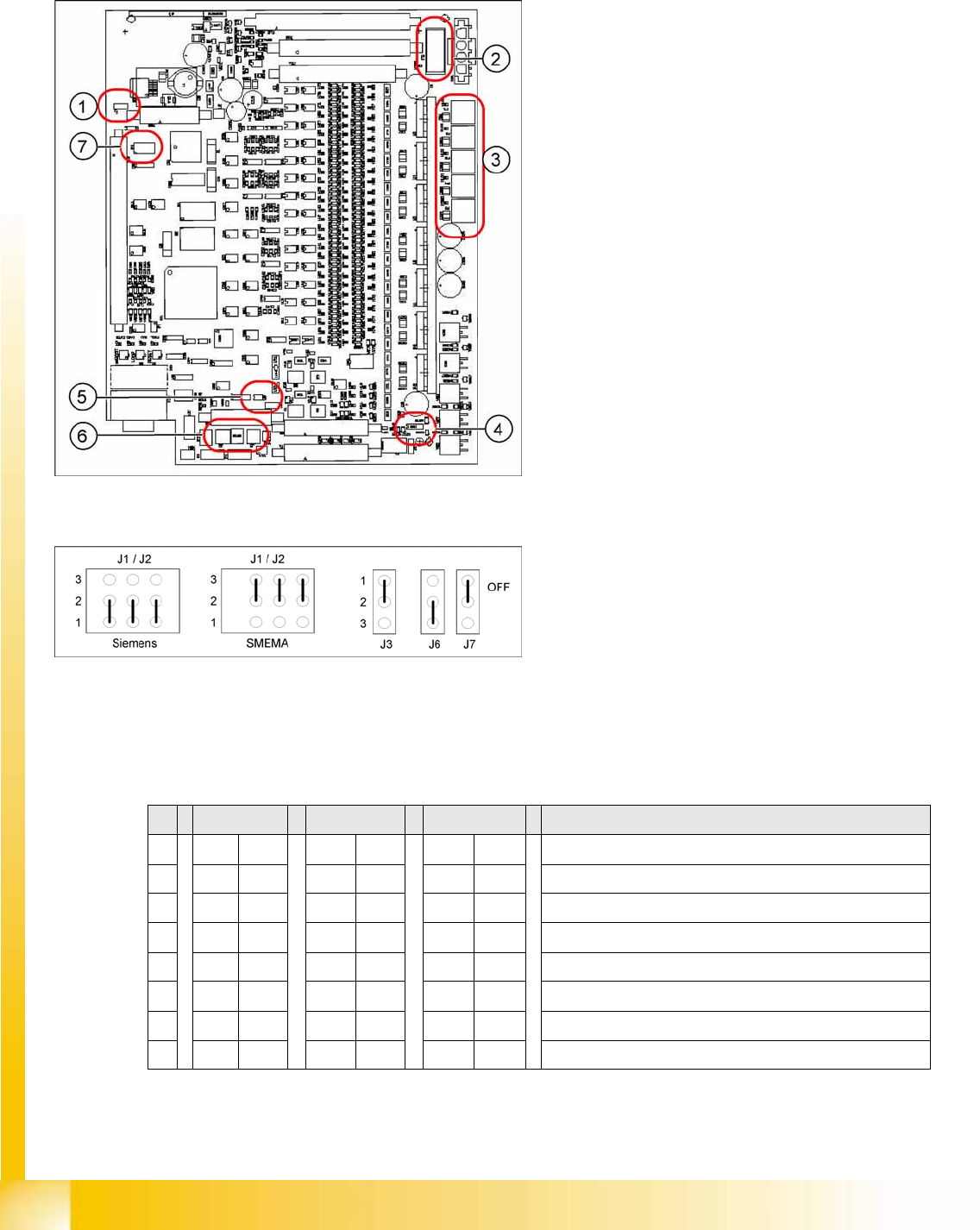
11.3.10.1 Jumper Settings for TSP 301
*Switches 1-2 set the hardware ID 5 for D4 machines and hardware ID 6 for X machines, HF and D3.
11-23: Jumper positions for conveyor control TSP 301
Legend
1. J7 CAN bus 1 terminating resistor
2. F6 Main Fuse TSP 301
3. F1 - F5 Fuses for the conveyor motors
4. J3 interference loop
5. J6 CAN bus 2 terminating resistor (not used)
6. J2, J1 downstream/upstream station
7. S4 DIL switch
11-24: Jumper J1, J2 "downstream/upstream station" at TSP 301
Legend
J1 upstream station
J2 downstream station
J3 interference loop (emergency stop on
productivity lift switches the placement
machine off)
J6 CAN bus 2 terminating resistor (not used)
J7 CAN bus 1 terminating resistor
S X4I D4 X/D3/HF Comments
1ON ON ONON*
2OFF ON OFF ON* = SIPLACE D4, OFF: SIPLACE X, HF, D3
3OFF OFF OFF OFF= clamping sensor is no longer used
4ONOFFOFFON = X4I, OFF: SIPLACE D4, X, HF, D3
5OFF OFF OFF Not in use
6 OFF ON OFF OFF OFF: Standard conveyor, ON: Quad lane
7OFF OFF OFF Not in use
8OFF OFF OFF Not in use