00196044-05 - sg x und x4i fse_en.pdf - 第500页
Calibration Additional Functions Configuring the Conveyor S tudent Guide (FSE) SI PL ACE X Series and X4I Calibration Edition 01/2009 EN 504 12.6.4 Configuring the Con veyor This function can be performed with the user l…

Calibration
Zero Point Correction for Z and Star Axes Additional Functions
Student Guide (FSE) SIPLACE X Series and X4I
Edition 01/2009 EN Calibration
503
12.6.3.1 Function Description:
The Z axis moves up in current sensor mode and sets the position counter to 0.
Then the Z- axis moves down to 18000 digits until the ball bearing of the Z axis is between the
raceway of the star axis.
The star turns left and right and calculated the average value. This is the new zero point correction
(zpc) value of the star axis.
The Z axis moves further down until the ball bearing (segment) is level with the center of the raceway
gap (star).
The star turns right into the gap of the raceway and the Z axis uses the jaws to push the ball bearing
against the raceway. The Z axis position is read.
Now the Z axis position is read out from the left side of the raceway gap, using the same procedure
as that for the right side.
The new zero point correction will now be calculated for the Z axis:
Z position - diameter of ball bearing = thickness of raceway = new ZPC Z axis.
NOTE:
If the function to determine the Z and star axis zero point correction is unsuccessful, use a
setting gauge to adjust the Z axis jaws.
This work may only be performed by Siemens service technicians.
NOTE:
The data is saved in the file for the relevant head, e.g. at
C:\Sirio\Work\Individual\Gantry_1_R.VHS.Indiv.xml
for gantry 1 and is also written to the
head EPROM at the same time.
Calibration
Additional Functions Configuring the Conveyor
Student Guide (FSE) SIPLACE X Series and X4I
Calibration Edition 01/2009 EN
504
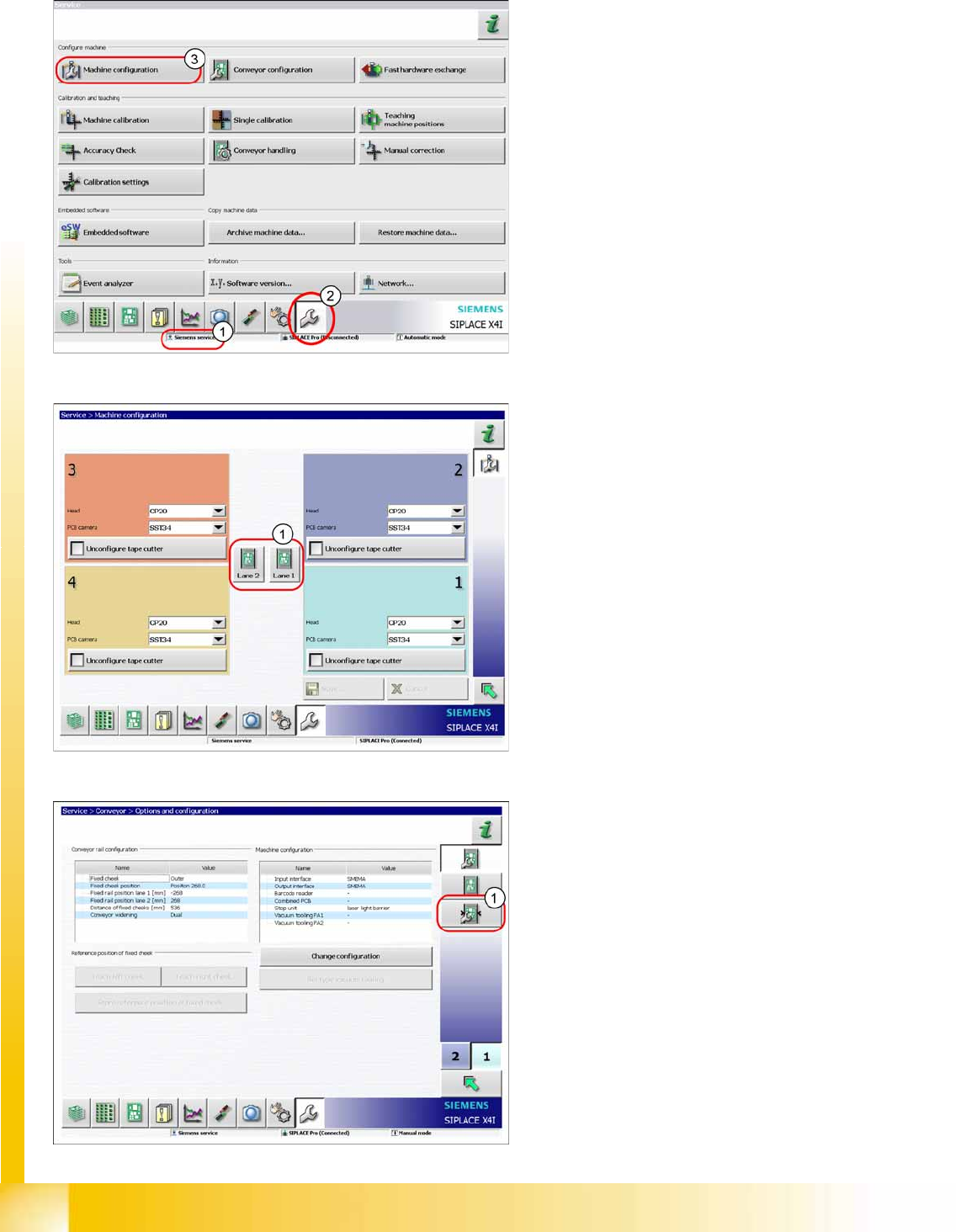
12.6.4 Configuring the Conveyor
This function can be performed with the user level
(1)
Siemens service
.
X Switch over to the menu
Service.
(2).
X Select
Machine configuration
(3).
X Select the lane (1).
X Select
Configuring the Conveyor
(1).
Calibration
Configuring the Conveyor Additional Functions
Student Guide (FSE) SIPLACE X Series and X4I
Edition 01/2009 EN Calibration
505
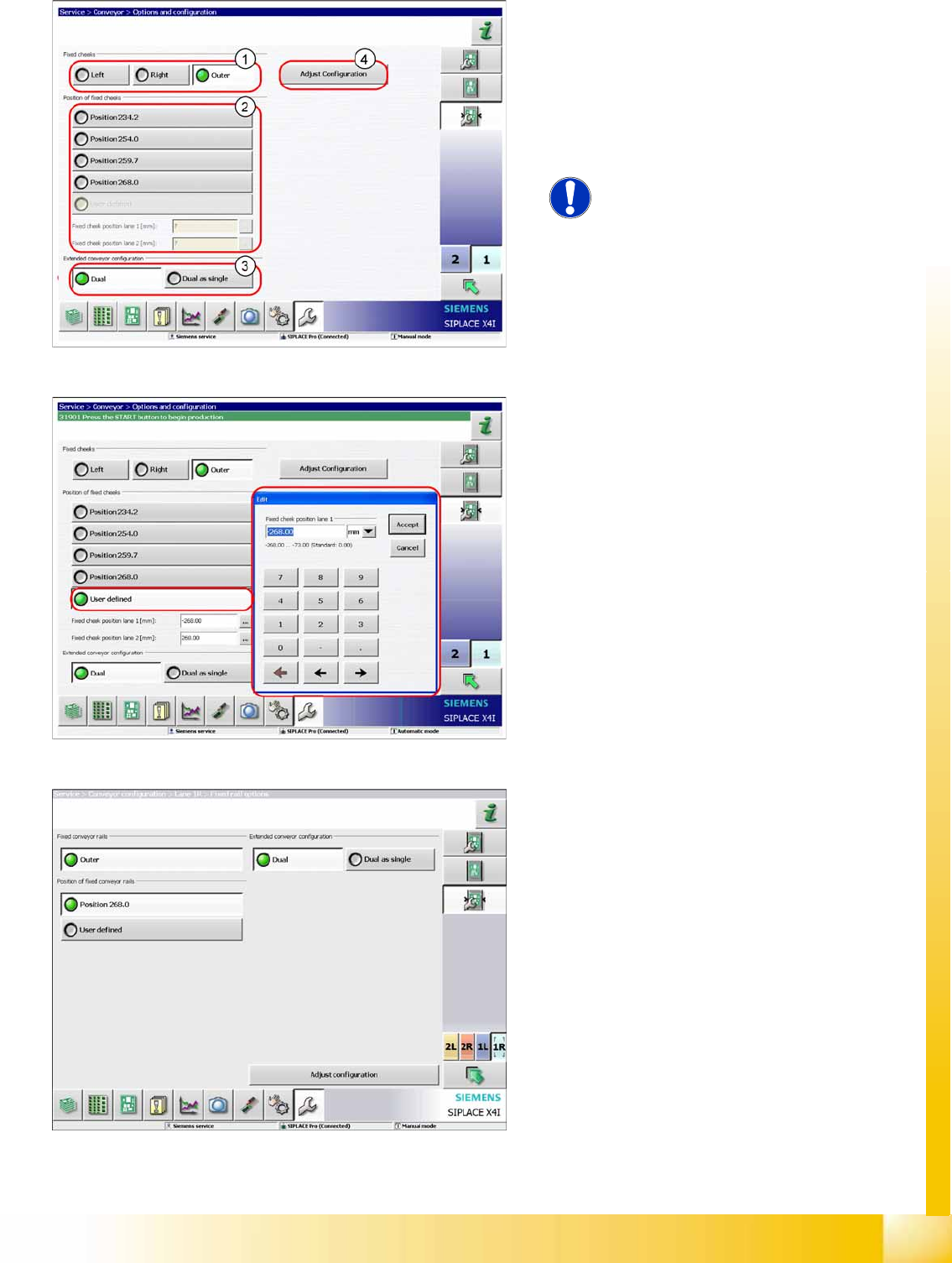
X Select the fixed conveyor side (1) (
Left
,
Right
,
Outer
).
X Select the position of the fixed conveyor side
(2).
X Select the conveyor mode (3).
X Click on
Adjust configuration
(4) button to
adjust the conveyor sides.
NOTE:
This menu appears for both single and
dual conveyors.
X Use the
User Defined
button to set the fixed
conveyor side.
The values are Y values, referring to the
machine coordinate system.
The outer sides of the conveyors are the standard
fixed sides for quad lane conveyor configurations.