00196449-04_UM_FCCS_digital_DE_EN.pdf - 第68页
4 Camera Calibration in Stations from SW705.03 4.4 FCCS in placement line from SW 709.xx 68 Operating Manual / Bedienungsanleitung Camera Calibration FCCS digital Kamerakalibrierung FCCS digital 04/2020 Fig.27: Camera v…
4 Camera Calibration in Stations from SW705.03
4.4 FCCS in placement line from SW 709.xx
Operating Manual / Bedienungsanleitung Camera Calibration FCCS digital Kamerakalibrierung FCCS digital 04/2020 67
FCCS measurement in the placement line
The tray with the white standards shall be transported through those placement stations at which
no FCCS measurement is to be performed.
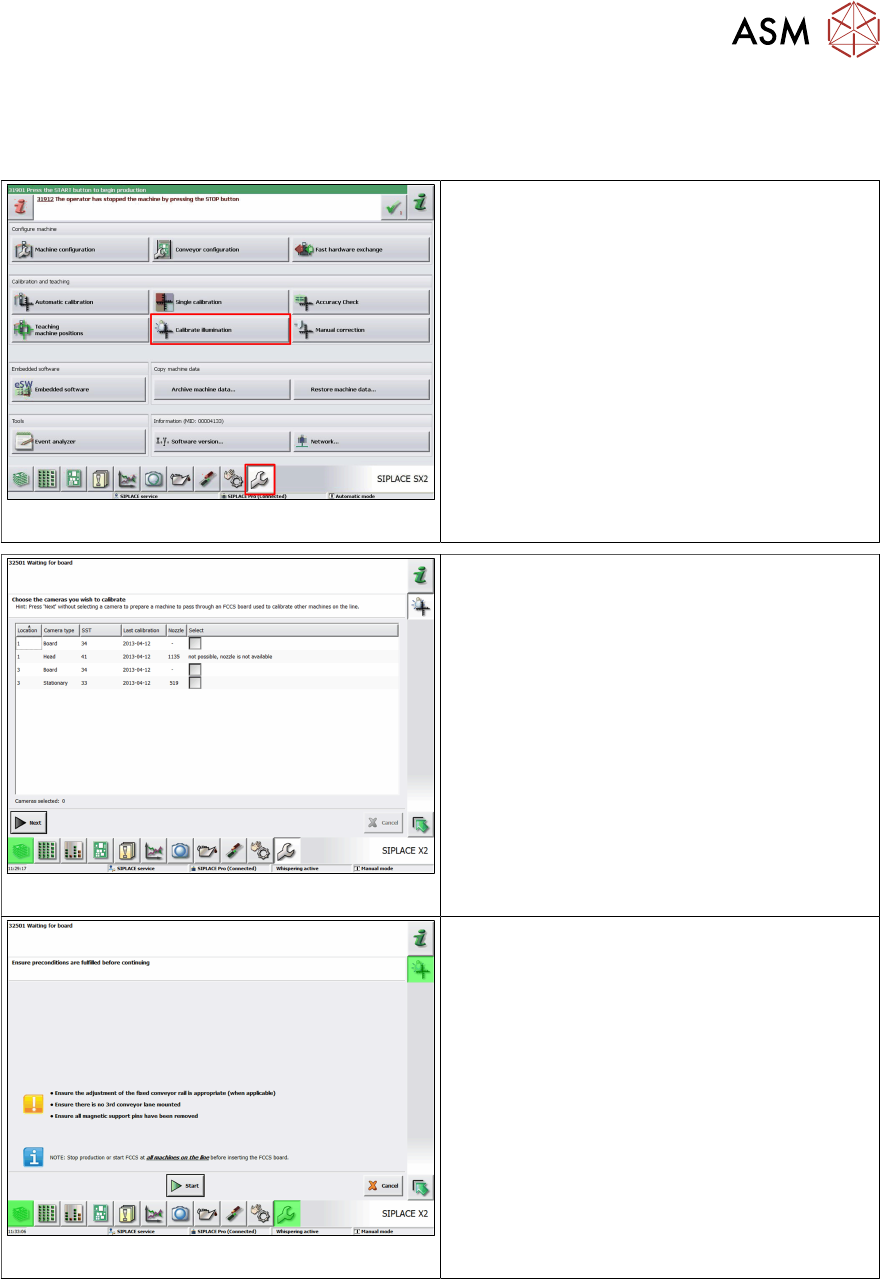
Fig.24: Calibrate illumination
► At these machines, switch over to the Ser-
vice view => Calibrate illumination, to
ensure pass-through.
Fig.25: Select cameras at the machine
► Only select cameras on the machine at
which you want to perform the measure-
ment by clicking on the respective check
box and entering a tick in it. (For the ma-
chines of the stations at which you do not
want to perform measurements, i.e. the
tray will only be passed through, you do
not need to select these machines.)
► Click on Next.
ð The dialog "Ensure preconditions are
fulfilled before continuing" is displayed
(as in the case of the other stations).
Fig.26: Start
► Click on Start.
ð The tray moving in will now be directly
transported through the machine as no
camera has been selected for measure-
ment.
4.4 FCCS in placement line from SW 709.xx
Checking as part of the camera verification (FCCS)
The function "Check for camera soiling" (from SW 712.1) was also integrated into the "Camera
verification (FCCS)" function and is always performed before the actual camera verification.
4 Camera Calibration in Stations from SW705.03
4.4 FCCS in placement line from SW 709.xx
68 Operating Manual / Bedienungsanleitung Camera Calibration FCCS digital Kamerakalibrierung FCCS digital 04/2020
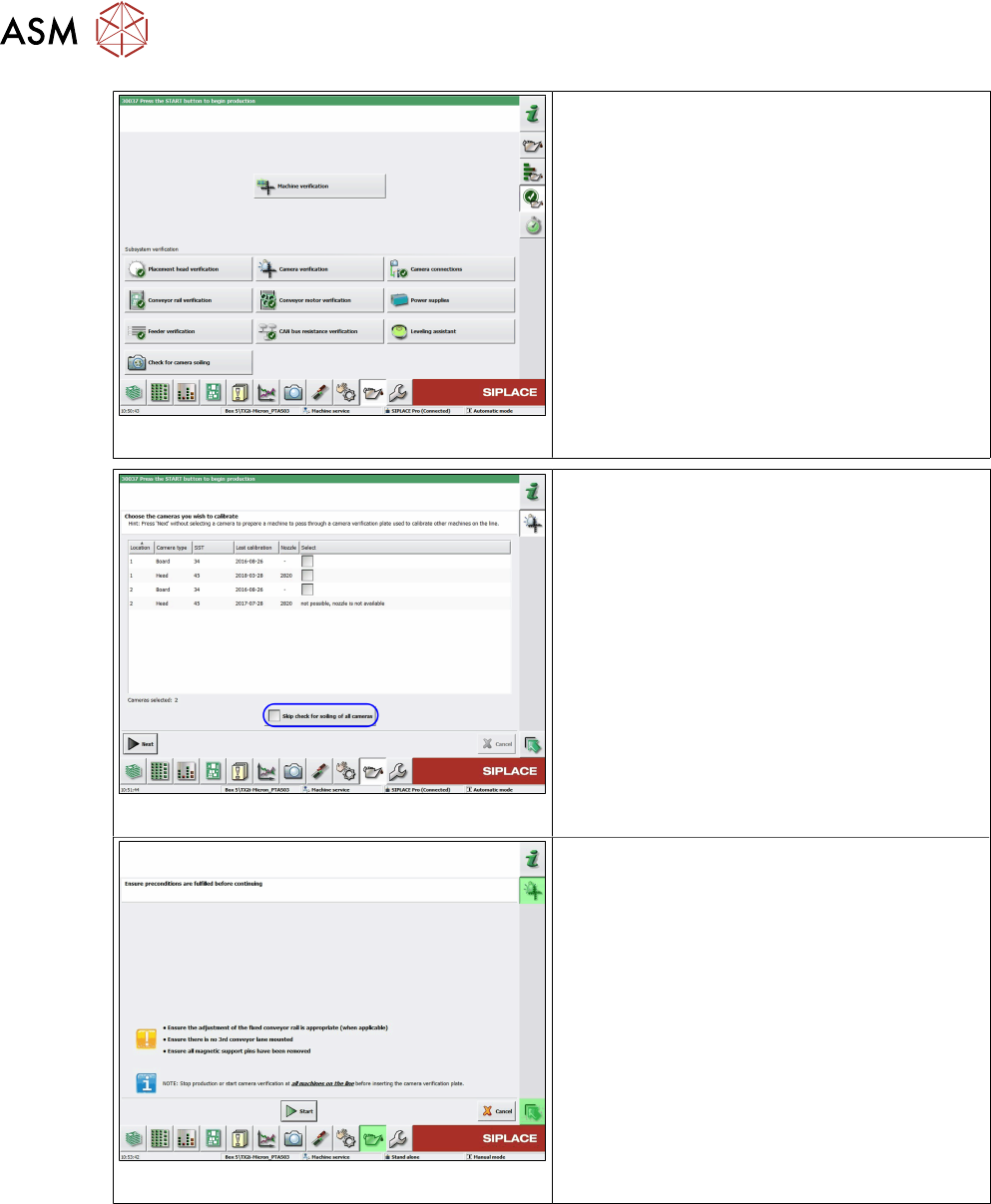
Fig.27: Camera verification
ü You have opened the "Verification" view.
► Select Camera verification in the Verific-
ation view.
ð Pass-through is not guaranteed.
Fig.28: Skip check for soiling of all cameras
► Only select cameras on the machine at
which you want to perform the measure-
ment by clicking on the respective check
box and entering a tick in it. (For the ma-
chines of the stations at which you do not
want to perform measurements, i.e. the
tray will only be passed through, you do
not need to select these machines.)
► Click Next.
ð The dialog "Ensure preconditions are
fulfilled before continuing" is displayed
(as in the case of the other stations).
► Remove the tick at Skip check for soiling
of all cameras.
Fig.29: Start
► Click on Start.
ð The tray moving in will now be directly
transported through the machine as no
camera has been selected for measure-
ment.
4 Camera Calibration in Stations from SW705.03
4.5 Calibration sequence in SW 7xx.xx
Operating Manual / Bedienungsanleitung Camera Calibration FCCS digital Kamerakalibrierung FCCS digital 04/2020 69
4.5 Calibration sequence in SW 7xx.xx
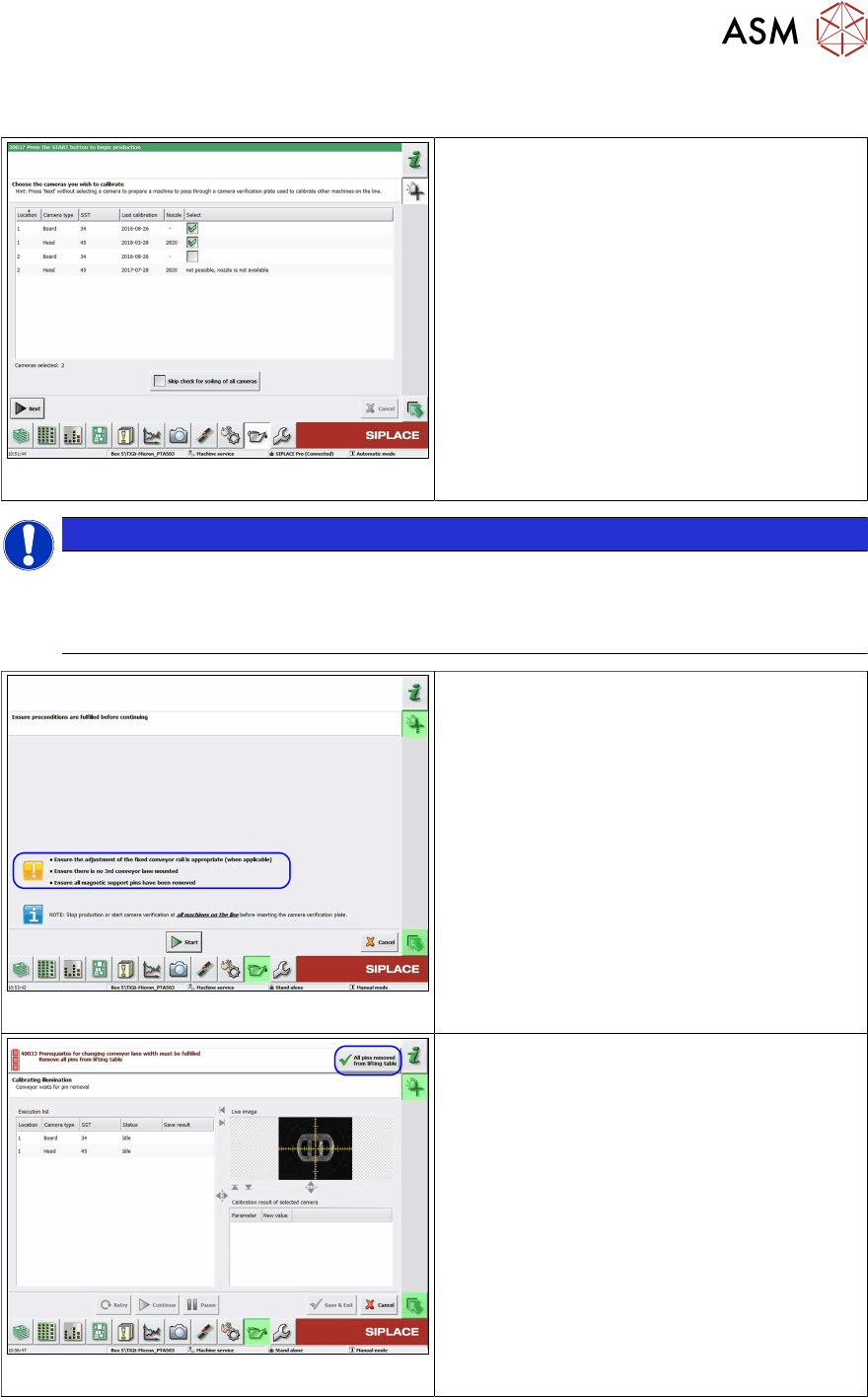
Fig.30: Select the cameras to be calibrated
► Select the cameras to be calibrated.
●
The nozzle types displayed in the column
must be available at the head and in the
nozzle changer. From 712.1 onwards and
when using the FCCS tool "03047943S04
camera calibration plate FCCS digital +",
the camera soiling will be checked before
the cameras are calibrated.
NOTICE
Is it possible to check the degree of soiling?
If an older FCCS tray is inserted, which does not have any pockets for the contrast stand-
ards, the software will recognize this, will not perform soiling checks and will omit this func-
tion without issuing an error message.
Fig.31: Starting conditions
► Before pressing the Start button make
sure that all pre-requisites mentioned
below are met.
Fig.32: All support pins removed from the lifting table
► Confirm that all conveyor pins have been
removed by selecting the All pins
removed from lifting table (top right) but-
ton.
► Now insert the camera calibration tray into
conveyor lane 1.
ð The calibration process will start auto-
matically after the tray has been
clamped in the placement area.