00198150-02_SM_TX_en.pdf - 第242页
10 COT Insert 10.5 Replacing the Feeder Control Unit (FCU) 242 Service Manual SIPLACE TX Series 06/2017 Removal ► Switch off the machine, disconnect it from the power supply and secure it to prevent unauthorized reactiva…
10 COT Insert
10.5 Replacing the Feeder Control Unit (FCU)
Service Manual SIPLACE TX Series 06/2017 241
10.5 Replacing the Feeder Control Unit (FCU)
Parts, Equipment and Tools
●
X-FCU V2, TX-/X-Series [03096377-xx]
Overview
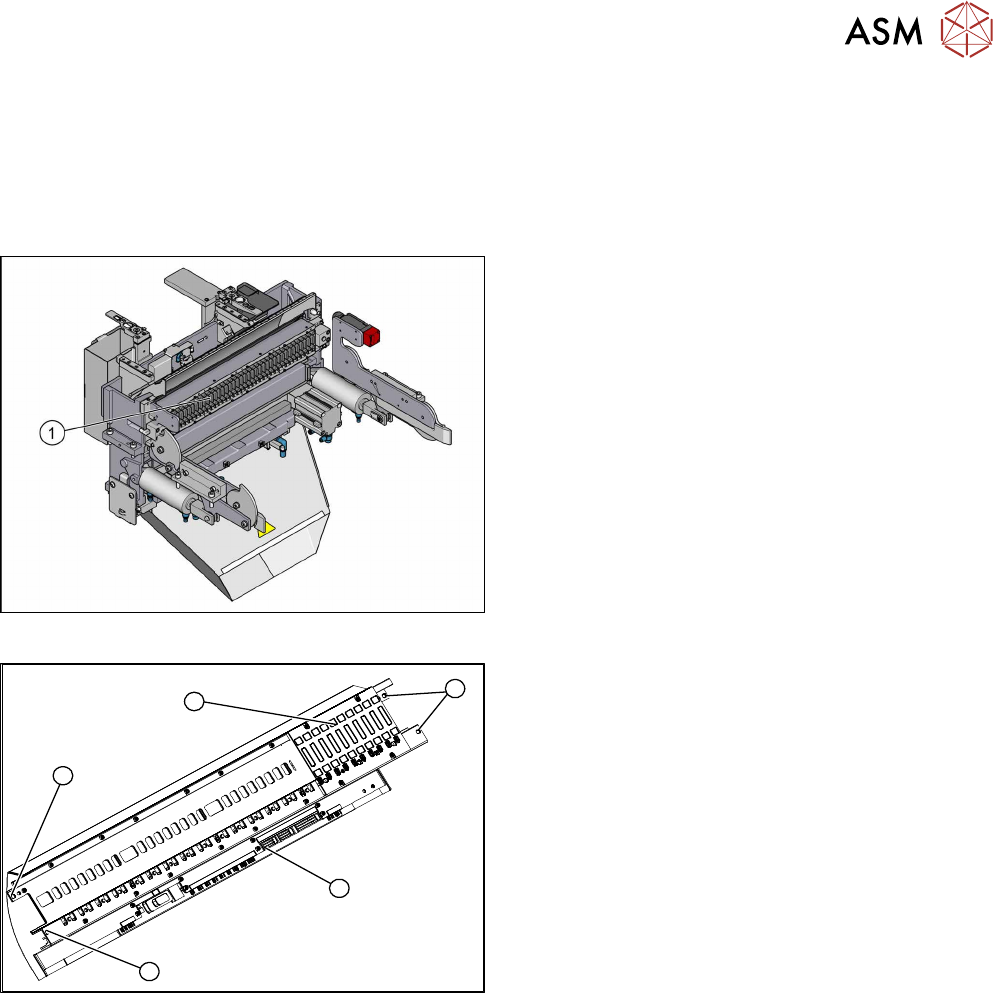
Fig.328: FCU on COTi
1. Feeder control unit
The feeder control unit is installed at the locations in
the COTi.
3
3
1
3
2
Fig.329: FCU Overview
1. Complete FCU
2. Terminal strip
3. Fixing screws of the FCU
Depending on the version, there will be four or six
screws.
10 COT Insert
10.5 Replacing the Feeder Control Unit (FCU)
242 Service Manual SIPLACE TX Series 06/2017
Removal
► Switch off the machine, disconnect it from the power supply and secure it to prevent
unauthorized reactivation. Observe the instructions in section 1.2 "Preparatory Work..." [}15].
► Dismantle the feeder unlock device (see 10.4 "Replacing the 40-Fold Feeder Unlocking
Device [03011582-xx]" [}239]).
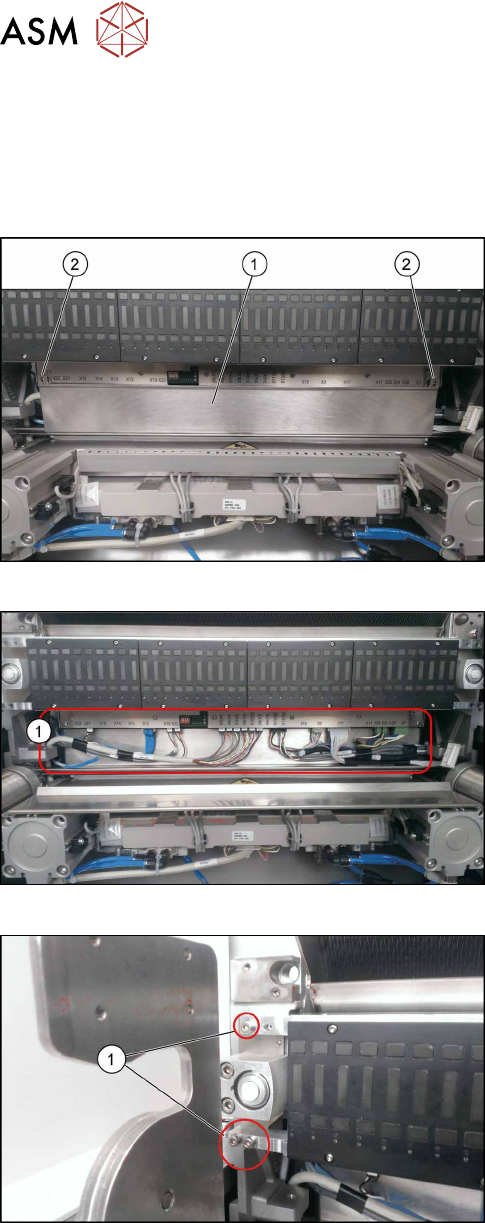
Fig.330: FCU Cover Plate
► Remove the two fixing screws(2) of the FCU
cover plate(1).
Fig.331: Connections
► Unplug all electrical connections from the ter-
minal strip of the FCU.
Fig.332: Fixing Screws
► Remove the fixing screws of the FCU(1) on both
sides.
Depending on the version, there will be four or six
screws.
► Carefully lever the FCU out of the locating pins.
► Remove the earth terminal.
10 COT Insert
10.5 Replacing the Feeder Control Unit (FCU)
Service Manual SIPLACE TX Series 06/2017 243
Installation
► Set the DIP switches on the FCU (see 10.5.1 "Feeder Control Unit (FCU)" [}243]).
► Refit the cover plate and the FCU.
► Place the connection cable in the recess and carefully push in the new FCU. Make sure you
do not pinch any cables.
► Pull the ends of the cables out from under the terminal strip.
► Plug in all electrical connections as labeled on the terminal strip.
► The further installation is performed by following the removal instructions in the reverse order.
10.5.1 Feeder Control Unit (FCU)
●
X-FCU V2, X series [03096377-xx]
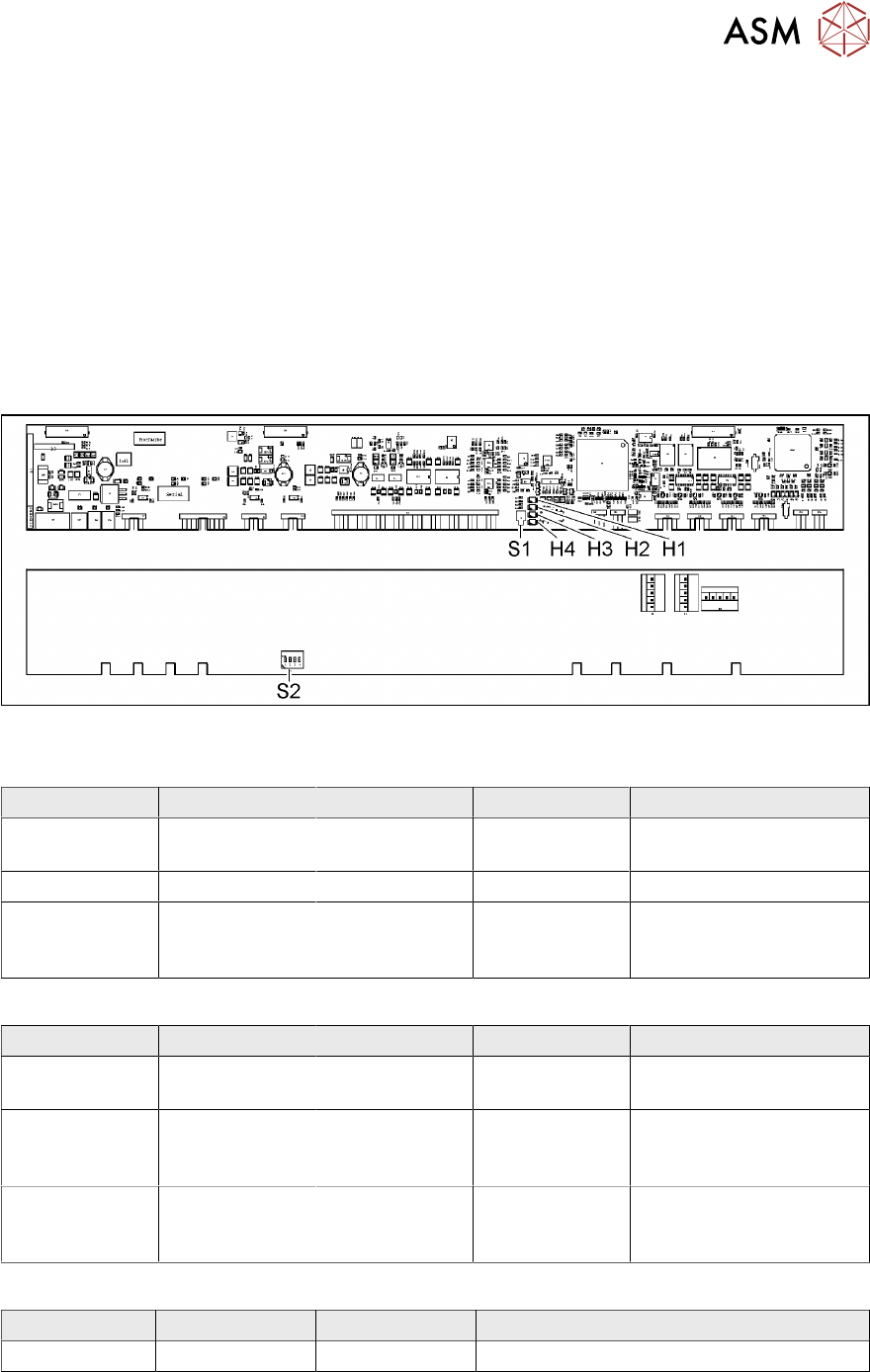
Fig.333: FCU board
LED (test mode for reject box switched off – S2.1 ON) [03059783-04]
LED Color Status Signal Name Description
H1, H2, H3, H4 GN Sequential shift
light
LED1, 2, 3, 4 FCU OK
H1, H2, H3, H4 GN ON LED1, 2, 3, 4 eSW application missing
H1, H2, H3, H4 GN Flashing LED1, 2, 3, 4 FCU error, reboot place-
ment machine or replace
FCU
LED (test mode for reject box switched on – S2.1 OFF) [03059783-04]
LED Color Status Signal Name Description
H1 or H2 or H3
or H4
GN Flashes LED1 or 2 or 3
or 4
No sensor connected for
reject box 1 or 2 or 3 or 4
H1 or H2 or H3
or H4
GN OFF LED1 or 2 or 3
or 4
Sensor for reject boxes 1
or 2 or 3 or 4 connected
and no reject box inserted
H1 or H2 or H3
or H4
GN ON LED1 or 2 or 3
or 4
Sensor for reject boxes 1
or 2 or 3 or 4 connected
and no reject box inserted
Button S1 [03059783-04]
Button Status Function Description
S1 OFF RESET When pressed