00197190-03_VD_SIPLACE_Pro_10_1_SP1_DE_EN - 第37页
SIPLAC E Pro V10. 1 SP1 / Softwar e Version Desc ripti on Ausgabe 02/2013 Edit ion 37 5.12.2 Deletin g Created Rec ipe Copi es Prerequ isit es: The operator nee ds the f ollo wing author izations global ly: – Delete rec …
SIPLACE Pro V10.1 SP1 / Software Version Description Ausgabe 02/2013 Edition
36
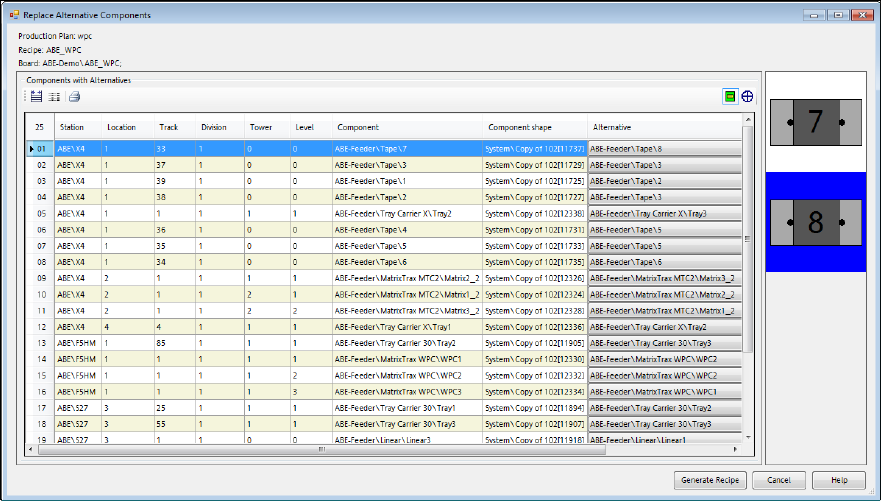
The following dialog is displayed.
Figure 4-23: Creating recipe copy
All components for the selected recipe are displayed with alternatives.
► Select an alternative for each component from the respective selection menu in the Alternative
column.
If a component with alternatives exists on several positions in the setup, the same alternative has
to be used on all positions. Changing an alternative on one track will automatically result in a
change of all other tracks for this component. A mixed setup is not possible. For such tracks, the
Don't use track option may be used. In this case, no component will be set-up on this track.
► Click on the Generate Recipe button to create a recipe copy.
A copy of the entire recipe tree is created from the original recipe with alternative components. All
copied objects and their directory structures are created in the configured target directory. The
objects will be distinctly named according to the setting in the configuration menu.
The components are replaced by the selected alternatives in the copied boards, recipe and setup.
The alternative components list will be deleted from the copied boards.
Depending on the configuration, the created recipe replaces the original recipe in the production
schedule or is added to it.
SIPLACE Pro V10.1 SP1 / Software Version Description Ausgabe 02/2013 Edition
37
5.12.2 Deleting Created Recipe Copies
Prerequisites:
The operator needs the following authorizations globally:
– Delete recipes, setups, tables, boards, placement lists
► Select the Delete Recipe button from the tool bar of the recipe list or under Tools – Delete
Temporary Recipes in the main menu of the Line Control GUI.
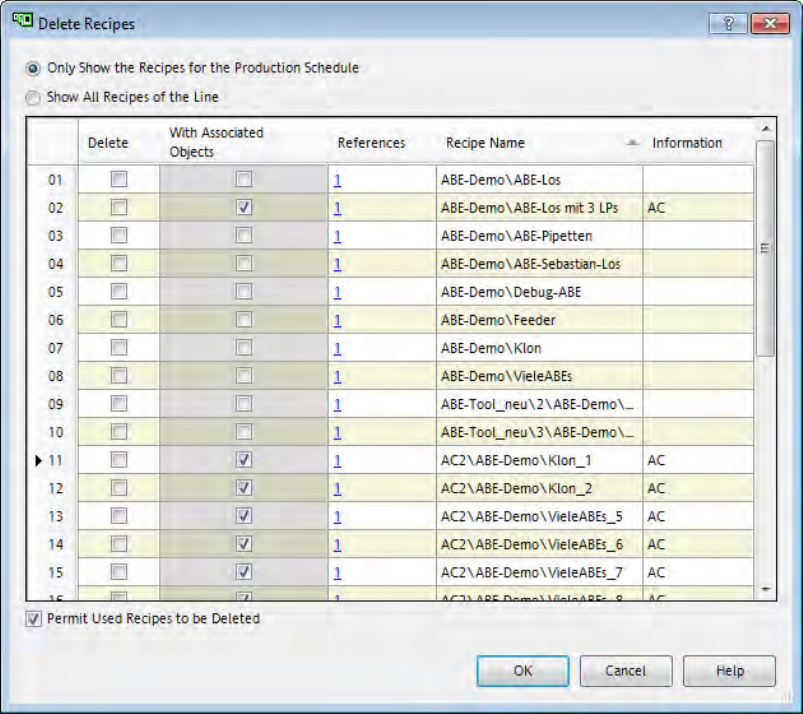
The following dialog is displayed.
Figure 4-24: Deleting recipe copies
In this dialog either all recipes of the production schedule (option: Only Show the Recipes for the
Production Plan) or all recipes of the current line (option: Show All Recipes of the Line) are
listed.
SIPLACE Pro V10.1 SP1 / Software Version Description Ausgabe 02/2013 Edition
38
The following columns are displayed for each recipe:
Delete
Check box to select the objects to be deleted.
With Associated Objects
Permit the used recipes to be deleted.
References
Number of objects that references this recipe.
Recipe Name
Path and recipe name.
Information
Information about the recipe type.
AC is displayed for recipes created by the Alternative Components function.
LED is displayed for recipes created by SIPLACE LED Pairing.
In the list, all recipes without references and created by the Alternative Components function are
automatically selected to be deleted.
► Tag the recipes to be deleted.
► Click on OK to delete the selected recipes.
When the created recipe copies are deleted, the entire tree structure of the recipe will be deleted.
Additionally, the recipes will be removed from all production schedules.
When other recipes are deleted, only the recipe itself will be deleted. Furthermore, the setup of the
recipe and the tables of the setup will also be deleted, if these are not used by other objects in the
database anymore.
5.12.3 Downloading Created Recipes
For recipes created by the Alternative Components function, a machine license "Alternative
Components" is required for all stations in the line. Therefore, the Alternative Components check
box has to be enabled in SIPLACE Pro Desk for each station in the line.