00197190-03_VD_SIPLACE_Pro_10_1_SP1_DE_EN - 第4页
4 5.14 Displaying Precedence Rules – Enhancements .............................................. 43 5.14.1 Creating Filtered List of Precedence Rules for Nozzles ................................... 44 5.14.2 Displaying P…
SIPLACE Pro V10.1 SP1 / Software Version Description Ausgabe 02/2013 Edition
3
Contents
1 Introduction 5
1.1 System Overview .............................................................................................. 5
2 Scope of Delivery 6
2.1 Packages .......................................................................................................... 6
2.2 Languages ........................................................................................................ 7
2.3 Licenses ............................................................................................................ 8
3 Prerequisites 10
3.1 LINUX/ UNIX Line Computer ........................................................................... 10
3.2 Supported Platforms, Station Software Versions and Machine Types ............. 11
3.3 Supported Feeder Types ................................................................................. 13
3.4 New Positions and Supported PCB Widths for Fixed Rails in SX1/SX2 V2 ...... 14
4 Features of SIPLACE Pro 10.1 SP1 15
5 Features of SIPLACE Pro 10.1 16
5.1 SIPLACE X-Series S – X3 S, X4 S, X4i S Placement Machines ...................... 16
5.2 New Conveyor System for SIPLACE X-Series S ............................................. 16
5.3 Station Software Version 706.x ....................................................................... 16
5.4 New TrayStak Feeder AX Feeder Type ........................................................... 17
5.4.1 Behavior at Pick-up Errors ............................................................................... 18
5.5 Placement of Tall Components with Very High Force Pick&Place Head and
WPC5 / WPC6................................................................................................. 19
5.6 SIPLACE GlueFeeder Feeder Type ................................................................ 19
5.7 Simplified Component Shape Editor ................................................................ 20
5.7.1 Automatic Settings when Selecting Pick-up Process ....................................... 20
5.7.2 Revised Display of the Height Entries Meanings ............................................. 21
5.7.3 Specified Pick-up Process for nnn5 and nnn6 Nozzles .................................... 21
5.7.4 Warning at Too Low Number of Re-picks ........................................................
21
5.7.
5 Setting Acceleration Reduction ........................................................................ 22
5.7.6 Lower Pick-up Tolerance Limit for Components .............................................. 23
5.7.7 Lower Limit for Component Shape Dimensions ............................................... 24
5.8 Feeder Parameter Management ...................................................................... 25
5.8.1 Handling Options ............................................................................................. 25
5.8.2 Random Setup Settings ................................................................................... 26
5.8.3 Automatic Calculation of the Pick-up Position for Asymmetrical
Components .................................................................................................... 27
5.8.4 Saving the X-/Y-positions ................................................................................ 28
5.8.5 Specifying User-defined Pick-up Position (PuP) .............................................. 29
5.9 Locking Desk / Line Control GUI Automatically................................................ 30
5.10 Random Setup - Enhancements ...................................................................... 31
5.10.1 Dialog for Missing Components ....................................................................... 31
5.10.2 Support of Station-Wise Download .................................................................. 32
5.11 SIPLACE LED Pairing – Enhancements in SIPLACE Pro ................................ 33
5.12 Alternative Components on <705.xx Platforms ................................................ 35
5.12.1 Creating a Recipe Copy .................................................................................. 35
5.12.2 Deleting Created Recipe Copies ..................................................................... 37
5.12.3 Downloading Created Recipes ........................................................................ 38
5.12.4 Configuring Alternative Components Function ................................................. 39
5.13 SiCluster Professional – Enhancements .......................................................... 41
4
5.14 Displaying Precedence Rules – Enhancements .............................................. 43
5.14.1 Creating Filtered List of Precedence Rules for Nozzles ................................... 44
5.14.2 Displaying Precedence Rules in 3D View ........................................................ 45
5.15 Replacing / Removing Nozzles in Setups with the Data Maintenance Tool ...... 47
5.16 Fixed Nozzle Changer Magazines – Enhancements ....................................... 49
5.17 Whispering of Fiducials – Enhancements ........................................................ 51
5.18 3 Panel Fiducials in the Board Editor ............................................................... 52
6 Restrictions 53
7 Troubleshooting 56
7.1 Problems and Solutions ................................................................................... 56
8 Corrected Errors 59
9 Appendix 60
9.1 SIPLACE Net Error Reporter Service .............................................................. 60
SIPLACE Pro V10.1 SP1 / Software Version Description Ausgabe 02/2013 Edition
5
1 Introduction
SIPLACE® Pro is the programming system for SIPLACE© placement machines under Windows.
The placement programs for the placement lines are prepared, generated and optimized with
SIPLACE Pro.
1.1 System Overview
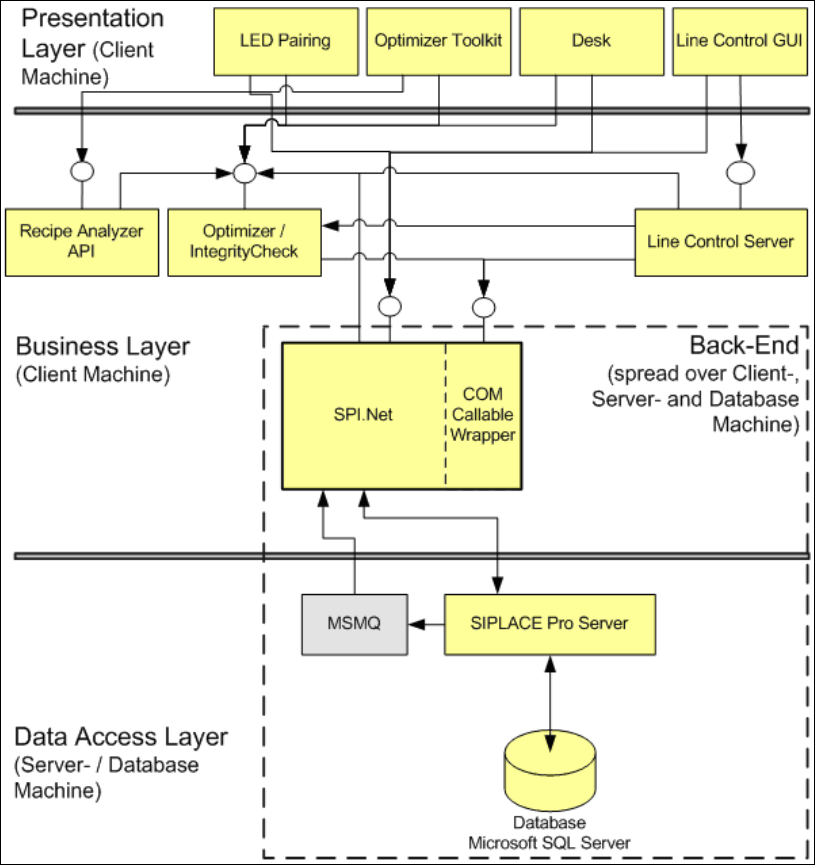
The SIPLACE Pro programming system consists of the following subsystems:
Figure 1-1:System overview
SIPLACE Pro saves all data in a database (Microsoft SQL Server). All clients, such as the Desk,
communicate via the Business Layer with the SIPLACE Pro Server.
The system installation can be distributed across several computers.