00197190-03_VD_SIPLACE_Pro_10_1_SP1_DE_EN - 第45页
SIPLAC E Pro V10. 1 SP1 / Softwar e Version Desc ripti on Ausgabe 02/2013 Edit ion 45 5.14.2 Display ing Precedence R ules in 3D Vie w W hen displaying the prec edence r ules in SIPLAC E Pr o Desk and in th e Prece dence…
SIPLACE Pro V10.1 SP1 / Software Version Description Ausgabe 02/2013 Edition
44
5.14.1 Creating Filtered List of Precedence Rules for Nozzles
With the Precedence Finder in the Optimizer Toolkit you can search for potential nozzle collisions.
For this, the Precedence Finder uses all nozzles that are assigned to the component shapes.
However, as only particular nozzles can be used in the line, it is possible to create a corresponding
filtered list as of this SIPLACE Pro version. Thus, the check for a potential nozzle collision will be
restricted to the nozzles which may be used in the production.
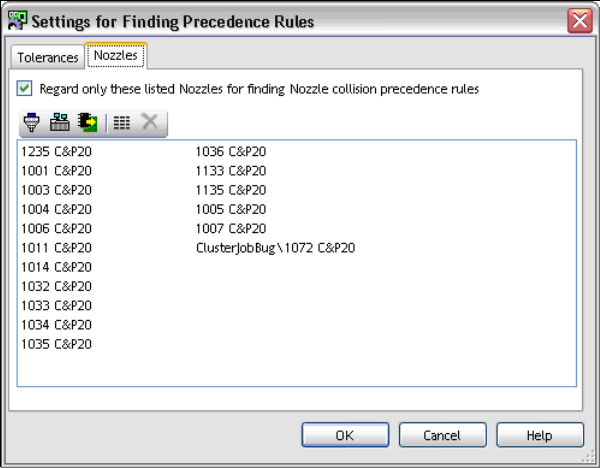
For this, the new Nozzles tab is available under Settings in the Precedence Finder. The hitherto
existing settings are available in the Tolerances tab.
Figure 4-31: Precedence Finder – Nozzles tab
A nozzle list can be created with the tool bar icons in the Nozzles tab.
► Select the nozzles for the list.
If the nozzle icon is selected, a dialog with all nozzles will open. Multiple nozzles can be
selected and confirmed with OK. The selected nozzles will be added to the list.
If the setup icon is selected, a dialog with all setups will open. Multiple setups can be selected
and confirmed with OK. The nozzles which are used on the placement heads and in the nozzle
changers in the selected setups will be added to the list.
If the recipe icon is selected, a dialog with all recipes will open. A recipe can be selected and
confirmed with OK. The nozzles which are used in the recipe will be added to the list.
If the list icon is selected, all selected nozzles will be displayed. Nozzles can be deleted from
the list with the delete icon.
► Tag the Regard only these listed Nozzles for finding Nozzle collision precedence rules
setting to enable the function.
If the function is enabled, a red nozzle will be displayed at the bottom of the main menu in the
Precedence Editor.
► Click on OK to save the list.
► Start the search run in the Precedence Editor.
Only the nozzles that are contained in the list and for which potential nozzle collisions are found will
be displayed.
SIPLACE Pro V10.1 SP1 / Software Version Description Ausgabe 02/2013 Edition
45
5.14.2 Displaying Precedence Rules in 3D View
When displaying the precedence rules in SIPLACE Pro Desk and in the Precedence Finder, it is
possible to switch into the 3D view.
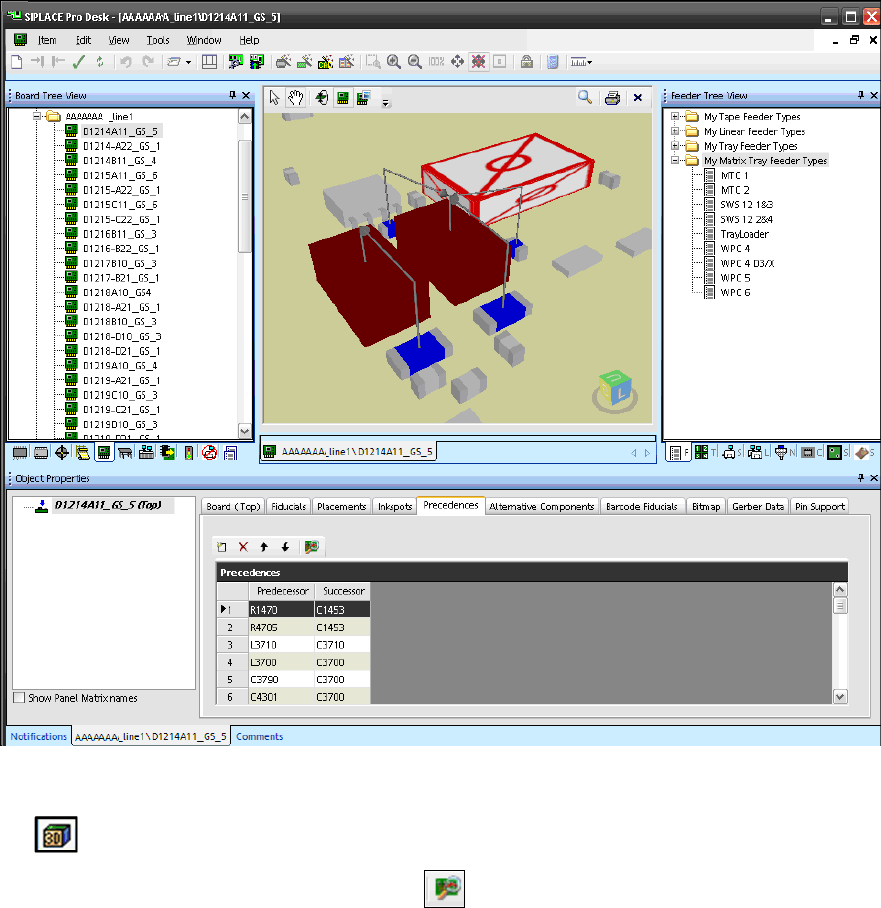
SIPLACE Pro Desk – Board Editor
Figure 4-32: Precedences for board in 3D view
If the Precedences are displayed in the Board Editor, the 3D view of the board can be started with
the icon in the tool bar.
The Precedence Finder can be started with the icon in the Precedences window.
SIPLACE Pro V10.1 SP1 / Software Version Description Ausgabe 02/2013 Edition
46
Precedence Finder
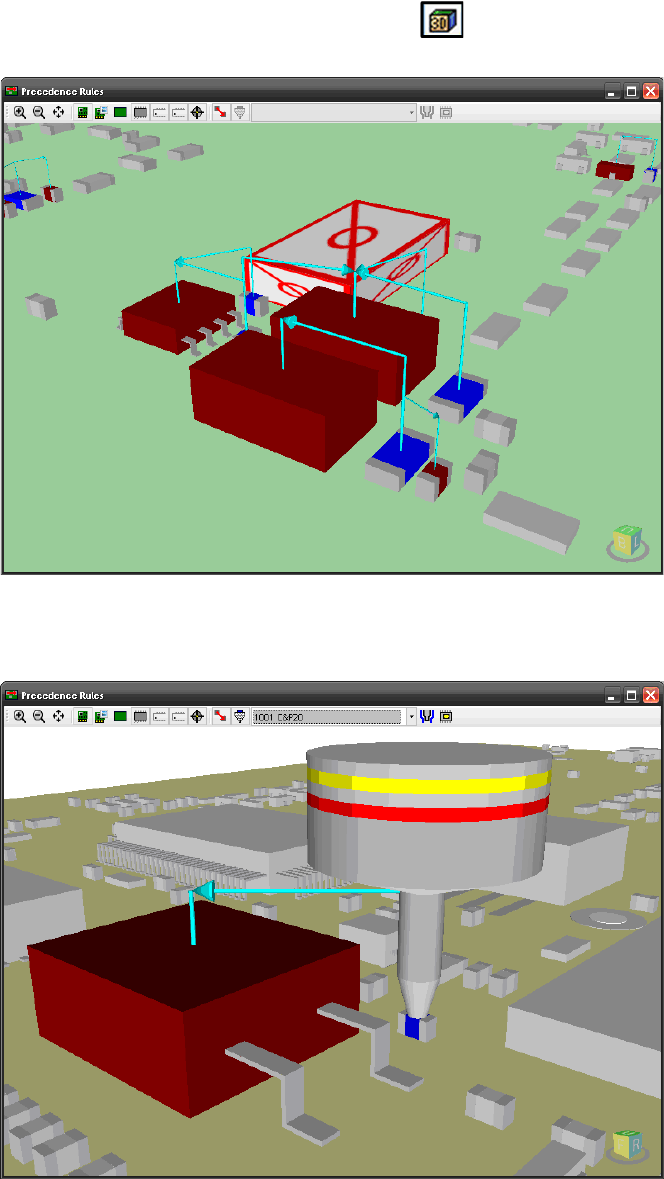
The 3D view of a board can be started with the icon in the tool bar of the main menu, too. The
3D view will be displayed in a separate window.
Figure 4-33: 3D view of the board in the Precedence Finder
If only a precedence rule of type "Nozzle collision" is selected in the main menu, the nozzle will
also be displayed.
Figure 4-34: 3D view of nozzle in the Precedence Finder
Optionally, settings can be made in the 3D window to display the tolerance radius for the nozzle
and the pick-up position in the 3D view.