User Manual E-by-SIPLACE 用户手册.pdf - 第138页
3 Technical data and assemblies User manual E by SIPLACE 3.6 PCB conveyor system From software version SC 712.1 Edition 0 5/2019 138 3.6.2 Design of the PCB single conveyor 3 Fig. 3.6 - 1 Design of the PCB single conveyo…
User manual E by SIPLACE 3 Technical data and assemblies
From software version SC 712.1 Edition 05/2019 3.6 PCB conveyor system
137
3.6 PCB conveyor system
3.6.1 Description
The PCB conveyors are designed as three-part conveyors with input, processing and output con-
veyor sections. The input and output conveyor areas act as bumper zones for the boards in the
event of short waiting periods. For PCB-Detection sonar sensors are provided in the input, pro-
cessing and output area.
The PCB is stopped respectively in each area (processing area as well as buffers) by mechanical
stoppers, which are mounted along the conveyor rail. The conveyor rail can be rotated 180° and
use for opposite PCB flow direction. Right side or left side fixed is achieved by rotating the ma-
chine with 180° and changing the moving direction of the boards.
Item no. 03108391-xx Fixed conveyor rail right E
Item no. 003110457-xx Fixed conveyor rail left E
As soon as the circuit board has reached its target position, the conveyor belt is stopped and the
board is clamped.
The width of the circuit board conveyor is set and monitored by the station software.
The conveyor height can be selected on the machine to allow the machines to be integrated into
lines with a conveyor height of, 900 to 930 or 950 mm. The standard height is 930 mm.
The PCB conveyors communicate with the individual machines via the SMEMA interface.
3 Technical data and assemblies User manual E by SIPLACE
3.6 PCB conveyor system From software version SC 712.1 Edition 05/2019
138
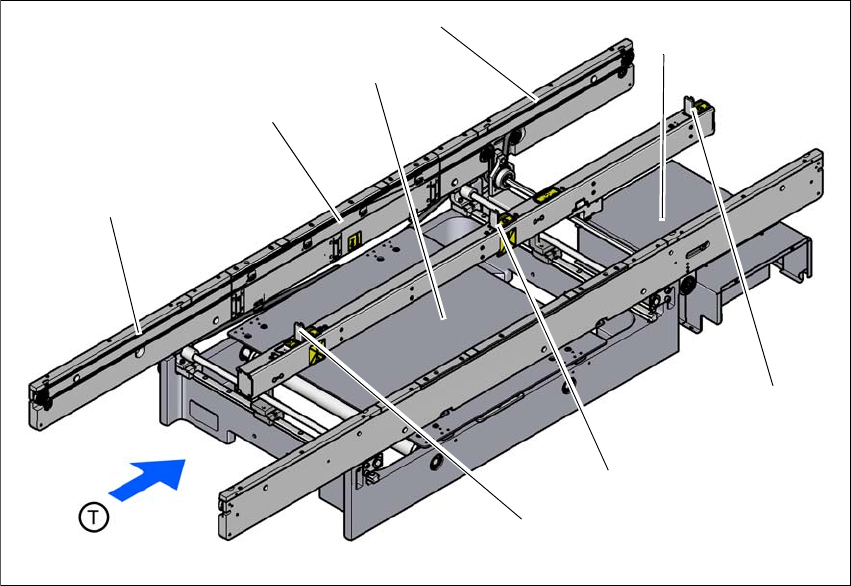
3.6.2 Design of the PCB single conveyor
3
Fig. 3.6 - 1 Design of the PCB single conveyor
(1) Input conveyor
(2) Processing conveyor
(3) Lifting table
(4) Output conveyor
(5) Conveyor control (under the cover)
(6) Output stopper
(7) Processing topper
(8) Input stopper
(1)
(3)
(4)
(2)
(5)
(7)
(8)
(6)
User manual E by SIPLACE 3 Technical data and assemblies
From software version SC 712.1 Edition 05/2019 3.6 PCB conveyor system
139
3.6.3 Controlling and width adjustment
3.6.3.1 Controlling using the Single Functions menu
The online help contains information on controlling the PCB conveyor system and on the Single
Functions menu.
3.6.3.2 Automatic width adjustment
When the command is received, the conveyor belts are set to the desired width.
See the Online Help for detailed information about changing the conveyor track width.