User Manual E-by-SIPLACE 用户手册.pdf - 第206页
5 Working with the machine User manual E by SIPLACE 5.3 Switching on the Machine From software version SC 712.1 Edit ion 05/2019 206 5.3 Switching on the Machine 5.3.1 What to consider before switching on the station 5 …

User manual E by SIPLACE 5 Working with the machine
From software version SC 712.1 Edition 05/2019 5.2 Controls and displays
205
Keyboard 5
The keyboard is located beneath the monitor.
5
Optional indicator lamp with buzzer - three color (red/yellow/green) 5
The sequence of colors of the indicator lamps is red - yellow - green. These lamps are used to
signal operating statuses and malfunctions of the machine. The buzzer indicates when an alert
has occurred. See also Section 5.8 on page 222.
Indicator lamp with buzzer - two color (white/green) - optional 5
The sequence of colors of the indicator lamps is white - green. These lamps are used to signal
operating statuses and malfunctions of the machine. The buzzer indicates when an alert has oc-
curred. See also Section 5.8 on page 222.
CAUTION
Risk of collision on the monitor with keyboard
When working on the changeover table, there is risk that you could collide with the monitor
and keyboard.
Turn the monitor and keyboard away to the side.
Make sure that you are not under the monitor and keyboard with your head.

5 Working with the machine User manual E by SIPLACE
5.3 Switching on the Machine From software version SC 712.1 Edition 05/2019
206
5.3 Switching on the Machine
5.3.1 What to consider before switching on the station
5
Check whether the station is connected to the power and compressed air supplies.
Perform a sight check of the station. Make sure that there are no obstacles in the travel range
of the gantries.
Make sure that the Z axes of all heads are in their uppermost end positions.
5.3.2 User classification
Certain functions or menus may only be executed. A differentiation is made between the following
operator levels:
– Basic production
– Advanced production
– Machine service
The operator levels Advanced production and Machine service can be password protected.For a
detailed description of the user classification, refer to section 5.1
, page 199.
5.3.3 Switching on the station and starting the station software user interface
Switch the station on at the main power switch.
After switching on, check whether the manometers show the required operating pressure.
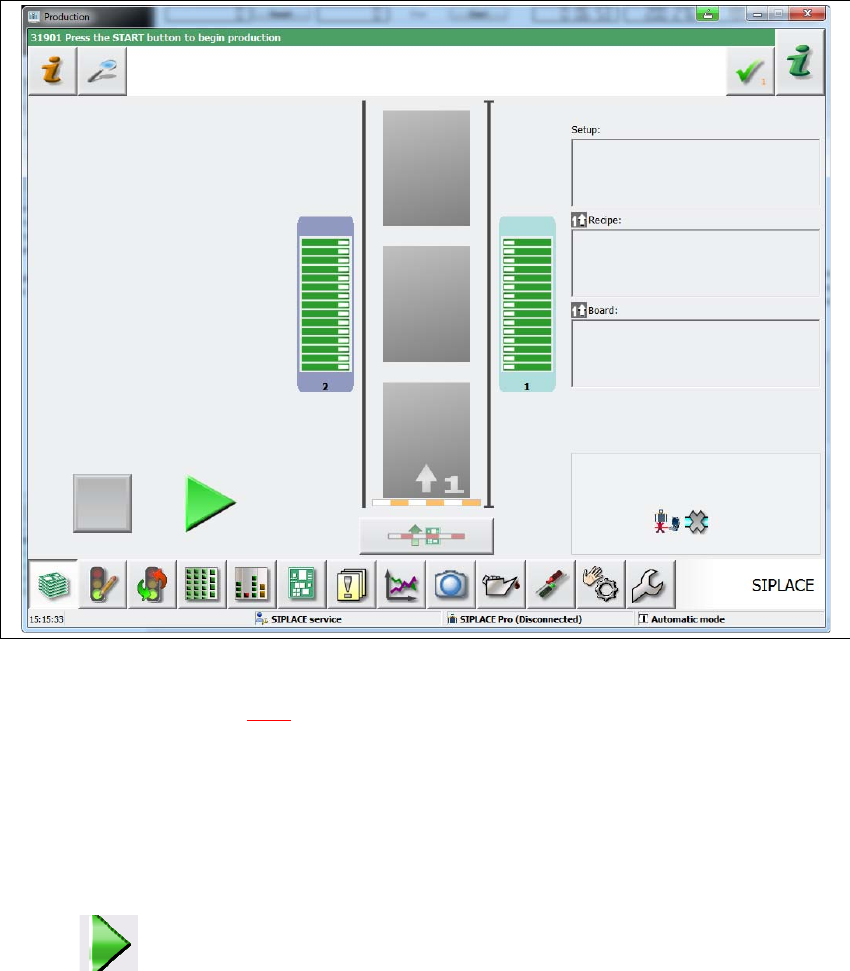
– The station computer software is loaded and the "Production" view of the station software
is shown (see following diagram).
CAUTION
Before you switch on the station, please perform the following steps.
User manual E by SIPLACE 5 Working with the machine
From software version SC 712.1 Edition 05/2019 5.3 Switching on the Machine
207
5
Fig. 5.3 - 1 "Production" view after loading the station software (example of SIPLACE E1 shown)
The status field (see section 5.6.1, page 211) shows the current status of the station and the action
to be performed.
Press the start button on the HMI when you see the request "Press the Start button to begin
production".
A reference run will be performed. After completion of this reference run, the station is ready
for operation.
The icon will be shown in the working area of the user interface (enabled).