User Manual E-by-SIPLACE 用户手册.pdf - 第263页
User manual E by SIPLACE 6 Station extensions From software version SC 712.1 Edition 05/2019 6.1 Nozzle change r 263 6 Press the magazine down evenly so that the snap fastener balls engage in all the sn ap fas - teners…
6 Station extensions User manual E by SIPLACE
6.1 Nozzle changer From software version SC 712.1 Edition 05/2019
262
6
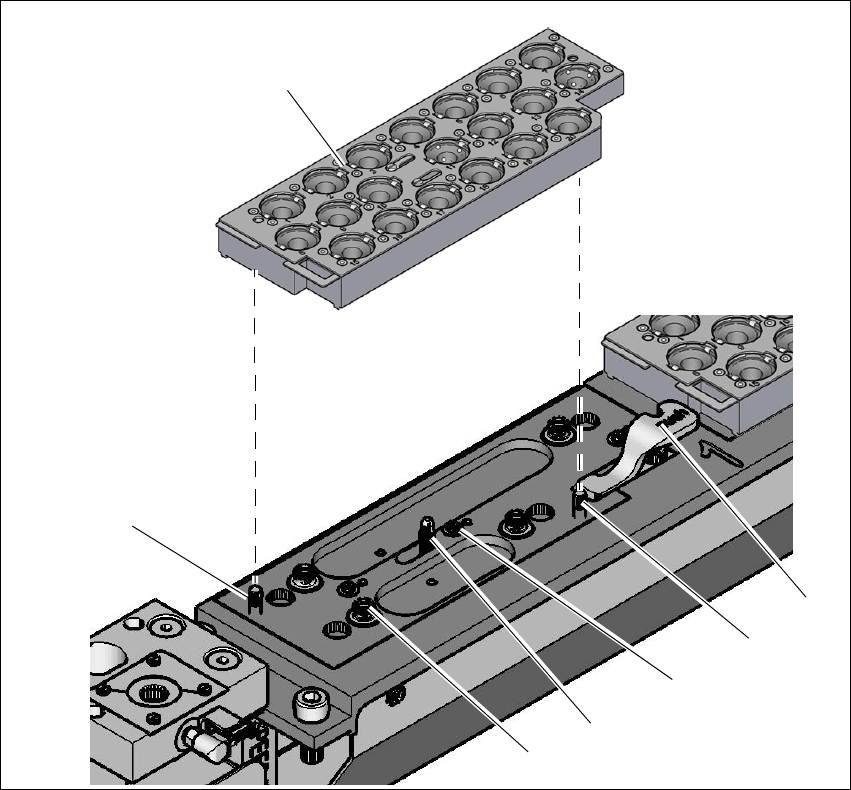
Fig. 6.1 - 5 Nozzle changer for the SIPLACE CP14 - changing the magazine
(1) Lever for raising the magazine
(2) Parallel pin, engages in the hole in the magazine
(3) Spring pin (3 x) for triggering the microswitch
(4) Pin of the slide mechanism, moves the locking plate
(5) Ball of snap fastener
(6) Parallel pin, engages in the slot in the magazine
(7) Magazin
Place the magazine on the snap fastener balls (item 5 in fig. 6.1 - 5, page 262).
(1)
(3)
(4)
(5)
(7)
(6)
(2)

User manual E by SIPLACE 6 Station extensions
From software version SC 712.1 Edition 05/2019 6.1 Nozzle changer
263
6
Press the magazine down evenly so that the snap fastener balls engage in all the snap fas-
teners at the same time.
PLEASE NOTE
Before inserting, align the magazine so that the centering pins (items 2 and 6 in fig.
6.1 - 5, page 262) slide into the centering holes and slot.
6 Station extensions User manual E by SIPLACE
6.1 Nozzle changer From software version SC 712.1 Edition 05/2019
264
6.1.2 Nozzle changer for the SIPLACE TH/SIPLACE PP
Item no. 03108343-xx Nozzle changer SIPLACE TH, E by SIPLACE, location 1
Item no. 03113120-xx Nozzle changer SIPLACE TH, E by SIPLACE, location 2
Item no. 03103613-xx Magazine for 2 nozzles P&P
Item no. 03109863-xx Magazine for 1 nozzle P&P
6
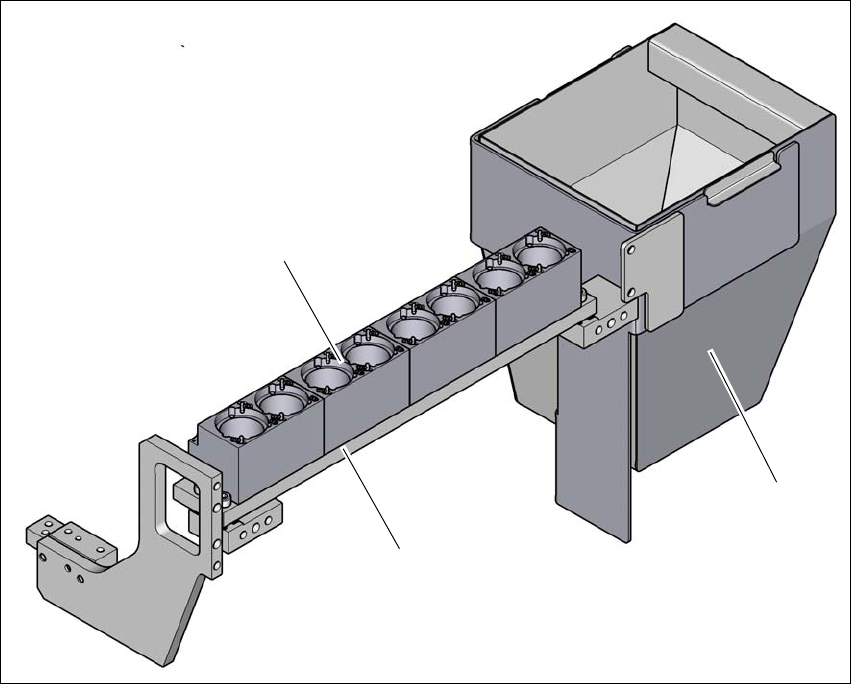
Fig. 6.1 - 6 Nozzle changer for the SIPLACE TH/SIPLACE PP (example)
(1) Nozzle changer magazin (2 nozzles P&P)
(2) Component reject bin
(3) Nozzle changer
(3)
(2)
(1)