User Manual E-by-SIPLACE 用户手册.pdf - 第95页
User manual E by SIPLACE 2 Operational safety From software version SC 712.1 Edition 05/2019 2.10 Lock out and tag out procedure 95 2.9.1 Compressed air conditions in the machine after switching o ff at the ma in power s…
2 Operational safety User manual E by SIPLACE
2.9 Disabling the compressed air supply and discharging the pressure From software version SC 712.1 Edition 05/2019
94
2
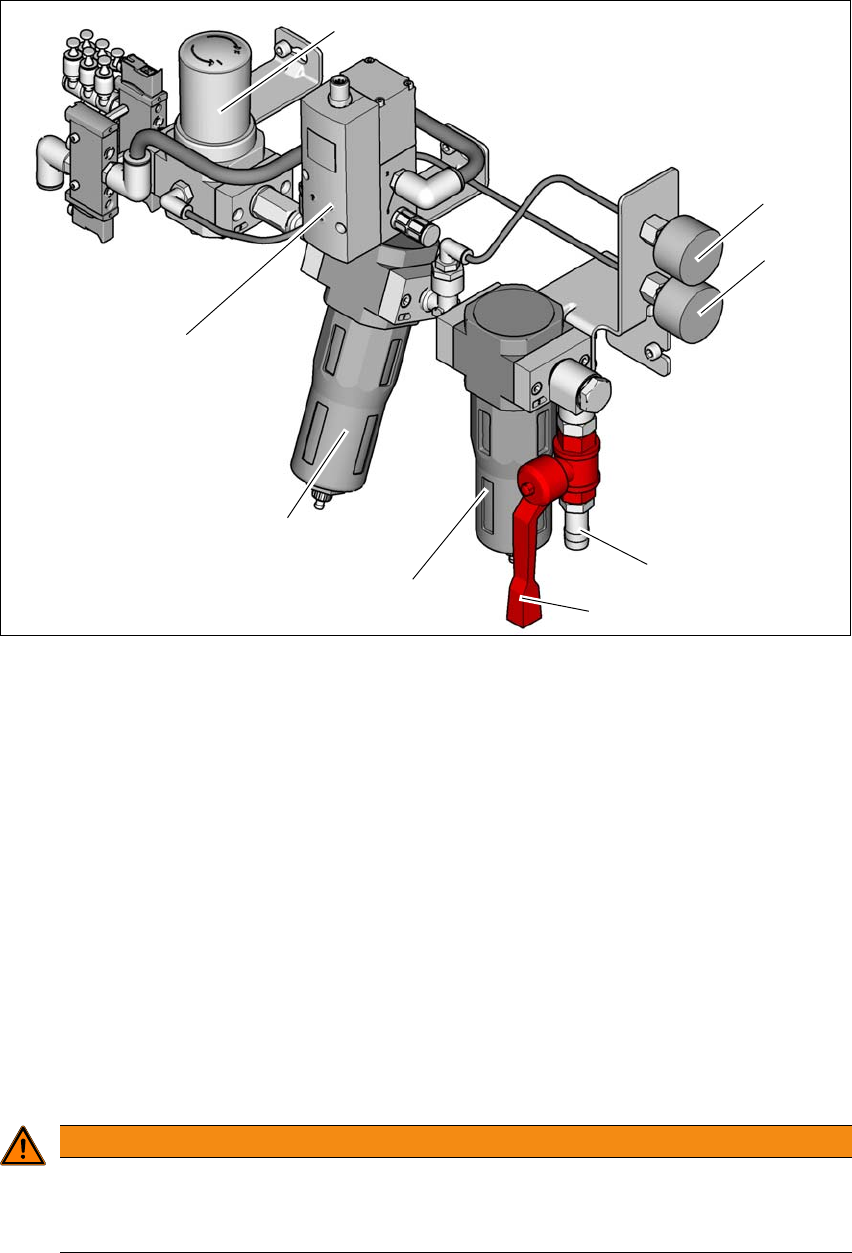
Fig. 2.9 - 1 Compressed air unit on the machine
(1) Regulator for supplying a regulated air source to the tape cutter, nozzle changer and
component table
(2) Manometer for inlet pressure
Target pressure: 0.5 - 1.0 MPa, 5.0 - 10.0 bar (display range: 0 - 1.0 MPa, 0 - 10 bar)
(3) Manometer shows the pressure of the regulator (Pos.1),
Target pressure: 0.45 - 0.5 MPa, 4.5 - 5.0 bar (display range 0 - 0.6 MPa, 0 - 6 bar)
(4) Compressed air connection
(5) Stop valve in the "OPEN" position
(6) Primary fine filter with 5um filter element for achieving output air quality
ISO8573-1:2010 [2:7:3]
(7) Secondary carbon filter for achieving output air quality ISO8573-1:2010 [1:4:1]
(8) Proportional Valve: Input (0.0 - 1.0 MPa, 0-10.0 bar) and output (0.46 - 0.5 MPa, 4.6-5.0 bar)
2
WARNING
Risk of injuries!
Risk of injuries from pressurized compressed air lines.
NEVER detach compressed air lines while they are still pressurized.
(6)
(1)
(2)
(3)
(4)
(5)
(7)
(8)

User manual E by SIPLACE 2 Operational safety
From software version SC 712.1 Edition 05/2019 2.10 Lock out and tag out procedure
95
2.9.1 Compressed air conditions in the machine after switching off at the main power
switch
When you switch off the main switch (item 1 in fig. 2.8 - 1, page 90) or if the mains supply to the
machine fails, the electrically controlled main valve of the compressed air unit (item 1 in fig. 2.9 -
1, page 94 ) will become closed.
2.10 Lock out and tag out procedure
2.10.1 Purpose and scope
Before performing any cleaning and checking work or service work, a procedure of locking and
tagging must be followed. The procedure, when followed correctly eliminates the possibility of an
employee being injured.
2
2.10.2 Description
Whenever it becomes necessary to isolate, control and release energy, the following procedure
is to be followed
Notify affected employees.
Shut down the equipment. Carry out all normal stopping procedures:
– Press the stop button.
– Shut down the control computer.
– Switch the machine off at the main power switch.
Isolate the machine from all its energy sources:
– Shut off the compressed air supply
– Disconnect the mains voltage supply
Lock out the machine.
– Attach a lock whenever possible (e.g. to the main switch).
PLEASE NOTE
Minimum requirements
These procedures represent the minimum lock/tag out requirements for the cleaning and
checking or service work. Any additional safeguards needed to complete work safely can
be specified by facilities supervision, the safety officer, the safety committee and the
health department.
2 Operational safety User manual E by SIPLACE
2.10 Lock out and tag out procedure From software version SC 712.1 Edition 05/2019
96
2
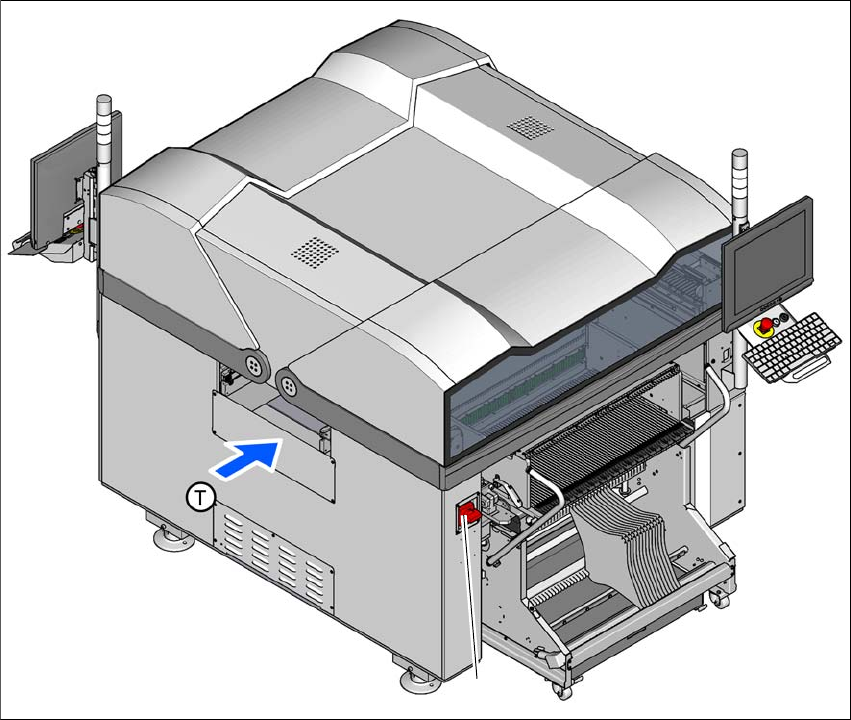
Fig. 2.10 - 1 Position of the main switch
2
(1) Main switch
Alternatively: tag out procedure
If a machine can be locked out, it must be. However, there are situations where energy iso-
lating devices cannot accommodate locks. In these cases, the energy isolating devices must
be tagged to warn employees that the machine is de-energized for servicing. The tag must
be securely fastened, it must be placed in a position visible to all and it may only be removed
by the person who attached it. 2
(1)