00198382-03_UM_SIPLACE-CA4-V2_EN.pdf - 第190页
4 Setting up and commissioning Instruction manual SIPLACE CA4 V2 4.6 Commissioning the placement m achine From software version 713.0 Edition 12/2019 190 4 Fig. 4.6 - 2 Service tools => automatic calibration => cal…
Instruction manual SIPLACE CA4 V2 4 Setting up and commissioning
From software version 713.0 Edition 12/2019 4.6 Commissioning the placement machine
189
4.6.2.1 Performing initial calibration
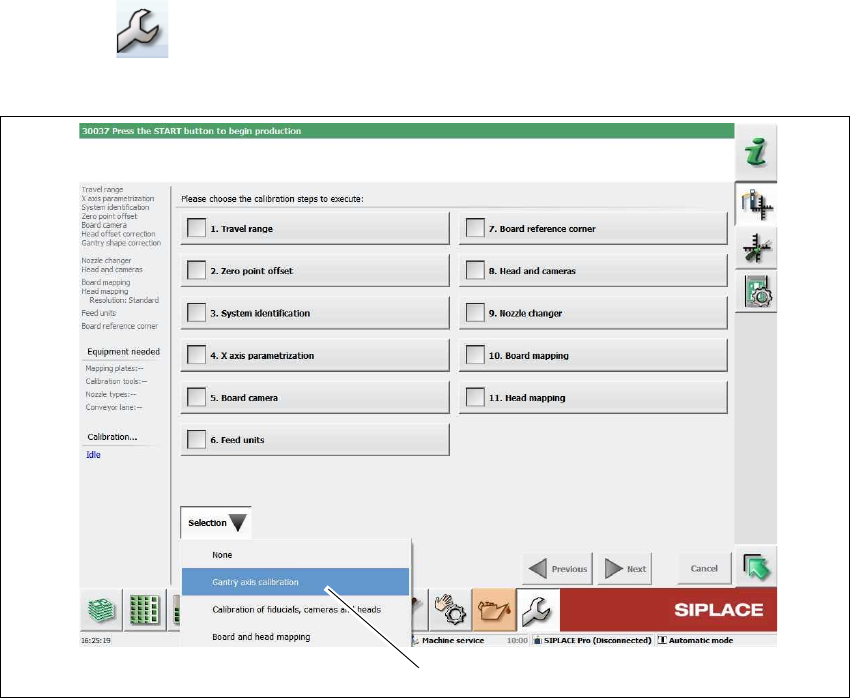
Click on "Service Tools" in the toolbar.
Click on the Automatic calibration button.
4
Fig. 4.6 - 1 Service tools => automatic calibration (example)
Select Selection => Gantry axis calibration (1).
(1)
4 Setting up and commissioning Instruction manual SIPLACE CA4 V2
4.6 Commissioning the placement machine From software version 713.0 Edition 12/2019
190
4
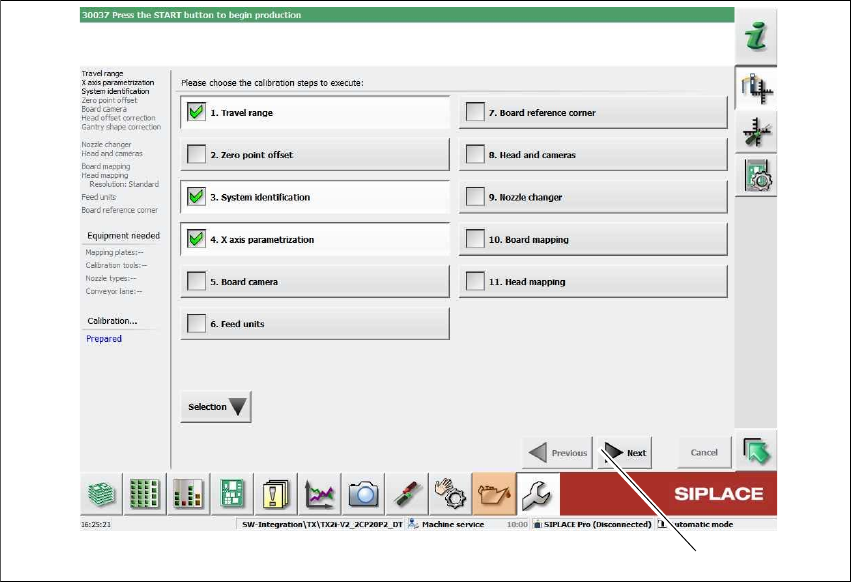
Fig. 4.6 - 2 Service tools => automatic calibration => calibrating the gantry axes (example)
The following calibration steps are enabled:
– 1. Travel range
– 3. System identification
– 4. Parameterization X axis
Click on Next (1).
The calibration must be completed without errors.
4.6.3 Instructing the customer's personnel
Explain all customer-specific installed options, in particular software / software compatibility.
Explain the SIPLACE Pro editors to programmers.
Instruct the operators and line engineers in using the station software.
Explain about password protection.
Instruct the customer's personnel according to the instruction manual and the preventive
maintenance.
(1)
Instruction manual SIPLACE CA4 V2 4 Setting up and commissioning
From software version 713.0 Edition 12/2019 4.6 Commissioning the placement machine
191
4.6.4 A test run or starting production
Test the line using the test PCB or a PCB provided by the customer.
Record the customer product and performance data, prepare the data and document the data
in the installation report.
Secure the data and give the customer security copies.