00198382-03_UM_SIPLACE-CA4-V2_EN.pdf - 第210页
5 Tasks at the placement machine Instruction manual SIPLACE CA4 V2 5.5 The user interface From software version 713.0 Edition 12/201 9 210 5.5.6 Application-oriented opera tion via color-coding markings Icons, buttons an…
Instruction manual SIPLACE CA4 V2 5 Tasks at the placement machine
From software version 713.0 Edition 12/2019 5.5 The user interface
209
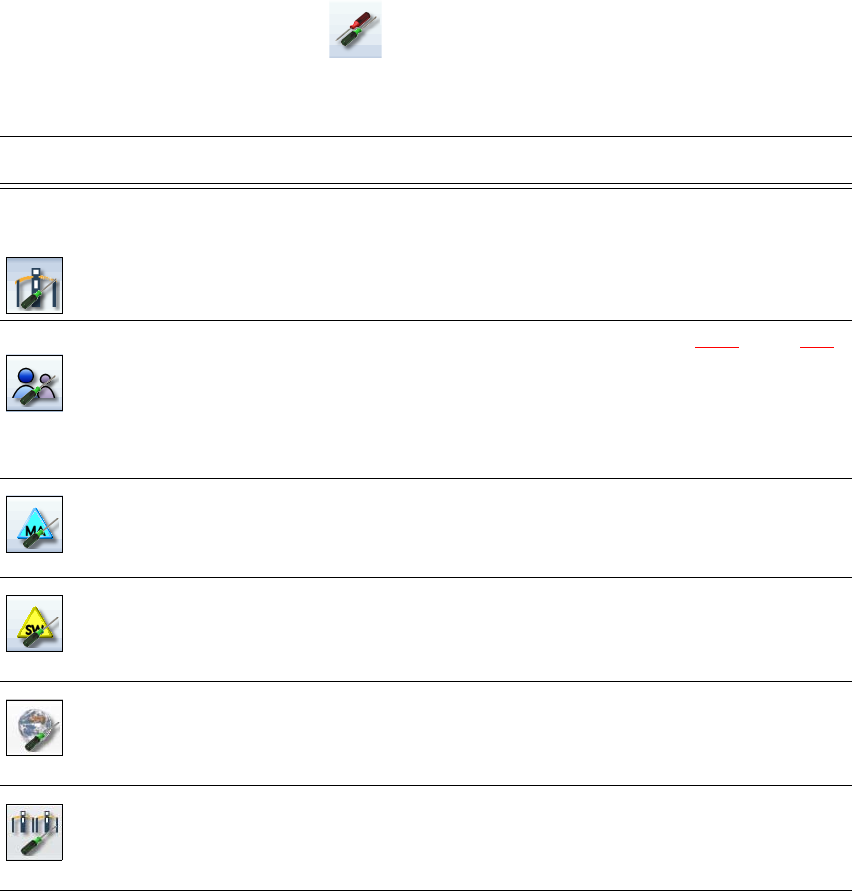
5.5.5 Settings
The "Settings" view allows you to change the various user settings, software options and machine
options.
Click on "Settings" in the toolbar .
The right-hand side shows an additional toolbar. The following table briefly describes the icons
and settings.
Icon Settings Description
Machine settings Only for "Advanced Production" or "Service Customer".
Allows you to set the operating mode and options (e.g. running
options).
Allows you to shut down the machine
Allows you to change over to the operating system.
User Allows you to set the operator level (see section 5.3.2
, page 199).
Allows you to set the language. As a default, English or German
can be selected. A language CD is provided for installation of other
languages.
Further options can be set from the "Advanced production" operator
level.
Machine options No options can be changed in the "Production" level.
Configuration of machine options.
Software options Only for "Service Customer"
Various test functions can be enabled here.
Overview of con-
nected external
systems
Shows all connected external systems (e.g. OIS, SetupCenter).
Shows the connection status and the memory used or deletes the
connected systems.
Adjacent ma-
chines
Display of adjacent machines.
5 Tasks at the placement machine Instruction manual SIPLACE CA4 V2
5.5 The user interface From software version 713.0 Edition 12/2019
210
5.5.6 Application-oriented operation via color-coding markings
Icons, buttons and views can be highlighted in color. These color-coded highlights give you a clear
overview of when operator action is required or when warnings have been issued.
The station software uses the following color coded highlights:
5
Color State Meaning
Red Alert Operator action required.
Only available in the "Feeder module, components and noz-
zles" view.
Orange WARNING Operator notification is present.
Immediate operator action is not required.
Only available in the "Feeder module, components and noz-
zles" view.
Green In progress Icon or button has placement machine under control and the
state is OK.
Only available in the "Production", "Feeder modules, compo-
nents and nozzles", "Boards", "Check sensors and functions"
and "Service" views.
Instruction manual SIPLACE CA4 V2 5 Tasks at the placement machine
From software version 713.0 Edition 12/2019 5.6 Alert information
211
5.6 Alert information
5.6.1 Alert messages with detailed troubleshooting
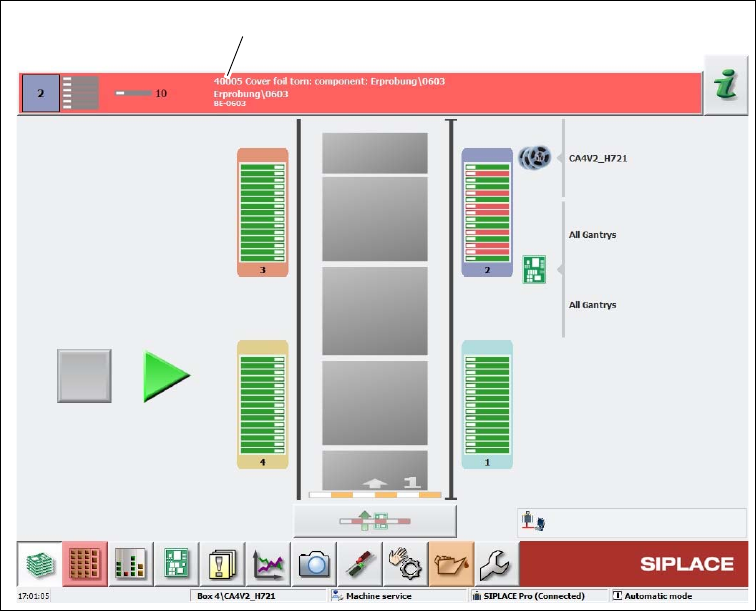
If alerts occur during placement machine operations, the alert message in the status field of the
user interface will be shown in red.
The button highlighted in red in the toolbar indicates that operator action is required.
5
Fig. 5.6 - 1 "Production" with alert notification view(example)
Legend for fig. 5.6 - 1
(1) Alert number with brief information about the alert
Click in the red area with the alert number with brief information and you will be taken to more
details and actions.
(1)