00198382-03_UM_SIPLACE-CA4-V2_EN.pdf - 第288页
7 Station extensions Instruction manual SIPLACE CA4 V2 7.1 Nozzle changer From software version 713.0 Edition 12/2019 288 7.1.2.6 Configuration example CPP for SIPLACE CA4 V2 Locations 1, 2, 3 and 4 can each accommodate …

Instruction manual SIPLACE CA4 V2 7 Station extensions
From software version 713.0 Edition 12/2019 7.1 Nozzle changer
287
7.1.2.5 Technical data
7
Nozzle changer for the SIPLACE MultiStar
Number of magazines
*a
SIPLACE CA4 V2 7 6
Number of nozzle garages
SIPLACE CA4 V2 7 72
Standard configuration
SIPLACE CA4 V2 7
7
5 magazines with 60 x 20xx nozzle garages
c
1 magazine with 9 x 28xx nozzle garages
Option: Nozzle changer "row 2" 6 magazines with 72 x nozzle garages*
c
Nozzle types 20xx, 28xx
Compressed air connection 0.45 MPa (4.5 bar)
*)a All magazines in the nozzle changer must be configured.
7 Station extensions Instruction manual SIPLACE CA4 V2
7.1 Nozzle changer From software version 713.0 Edition 12/2019
288
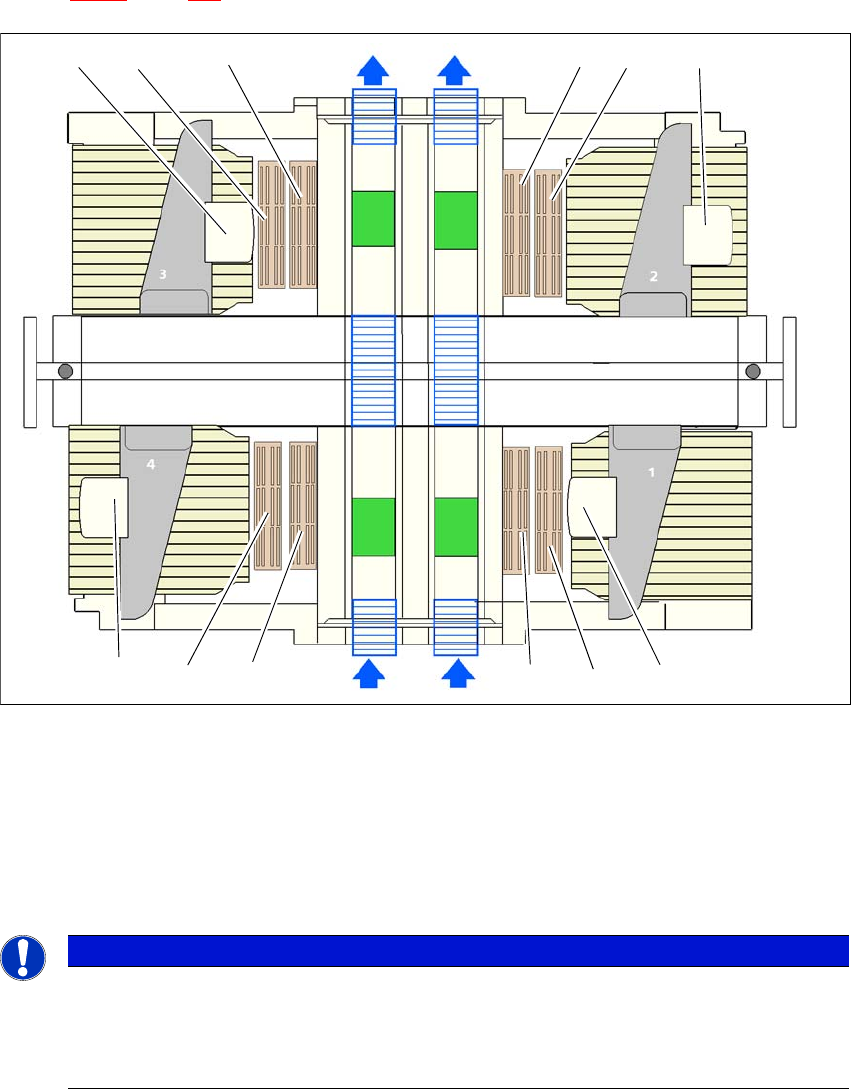
7.1.2.6 Configuration example CPP for SIPLACE CA4 V2
Locations 1, 2, 3 and 4 can each accommodate up to two nozzle changers for the CPP head (item
1 in fig. 7.1 - 8
, page 288).
7
Fig. 7.1 - 8 Position of nozzle changer for the SIPLACE SpeedStar machine - configuration example (SIPLACE CA4
V2)
7
7
(1) Nozzle changer
(2) Nozzle changer row 2 (optional)
(3) SIPLACE MultiStar
PLEASE NOTE
The placement machine stops if magazines are missing
The safety circuit stops the placement machine if magazines are missing or not fitted cor-
rectly.
Use all magazine places.
(1)
(2)
(2)(1)
(2)(1)
(1)
(2)
(3)
(3)
(3)
(3)
Instruction manual SIPLACE CA4 V2 7 Station extensions
From software version 713.0 Edition 12/2019 7.1 Nozzle changer
289
7.1.3 Assembling the nozzle changer for the C&P20 M2 / CPP M
The nozzle changers are fixed in each case to the COT insert.
Align the nozzle changer so that the sloping side points towards the COT insert.
7
7.1.3.1 Notes on operation
When you fill a magazine with a certain nozzle type for the first time, attach an adhesive label
to identify the type.
7
Open the locking plate and place the nozzles in the nozzle holders.
Close the locking plate so that the nozzles cannot drop out of the magazines.
7
7
Programming the nozzle changer is described in the SIPLACE Pro instruction manual.
WARNING
Risk of head crashes with mixed configurations!
There is a risk of head crashes with mixed configurations.
Only install the corresponding nozzle changer for each placement head, with the
nozzle magazines for the respective placement head.
PLEASE NOTE
7
Fill the magazines outside the placement machine and only replace complete mag-
azines.
CAUTION
Filling up magazines!
Before you fill magazines, make sure that all the nozzles on the Collect&Place head
have
been returned to their magazines.
PLEASE NOTE
Risk of jamming!
If components fall onto magazines, there is a risk that the locking plate could jam.
Do not allow components to drop onto the magazines.
You should therefore regularly clean the magazines and free locations.