EUKYX-199-2100_G5S2_Instruction_Vol2_E.pdf - 第101页
EUKYX 1-51 199-2100 4.2. 1 1 Flux spread When the [ Fl ux spread] but ton is p ressed on t he "Opr . M ode" t ab sheet, the foll owi ng window appears. F2A41A It is set when the flux app l icati on unit (option…
EUKYX
1-50199-2100
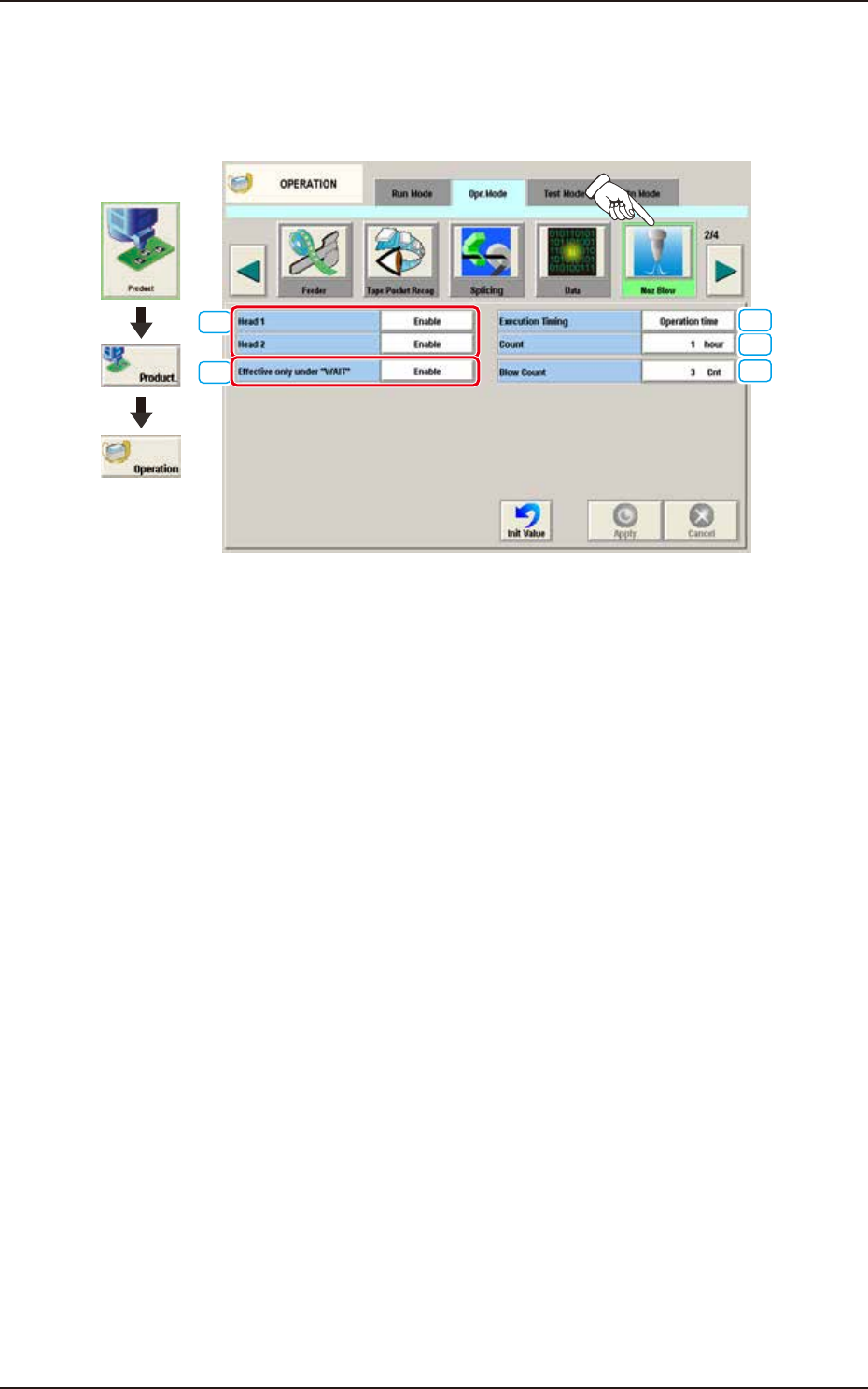
4.2.10 Noz Blow
This function
prevents the nozzle clogging. This function can extend the nozzle maintenance
interval. When the [Noz Blow] button is pressed on the "Opr. Mode" tab sheet, the following
window appears.
[2]
[1]
[4]
[3]
[5]
Graphic
Development
F2A40A
[1] Head 1, Head 2
Disable
When this button is selected, the nozzle air blowing function is not activated.
Enable
When this button is selected, the nozzle air blowing function is activated.
[2] Effective only under "WAIT"
Disable
The nozzle air blowing function is used during the Machine (STANDBY) mode.
Enable
The nozzle air blowing function is used based on the set timing.
[3] Execution Timing
Specify the timing to execute the air blowing.
Operation time
Select this button to specify the timing of the execution based on the running time.
PCB Count
Select this button to specify the timing of the execution based on the number of PCBs.
[4] Count
The set value is designated based on the item selected in executive timing.
When the [Run Time] is selected, the interval from the automatic operation start to the air blow
execution is set based on time.
When the [PCB Counter] is selected, the interval from the automatic operation start to the air blow
execution is set based on the completed number of PCBs.
[5] [Blow Count] Button
Specify the number of blowing times.
4.2 "Opr.Mode" Tab Sheet
EUKYX
1-51199-2100
4.2.11 Flux spread
When the [Flux spread] button is pressed on the "Opr. Mode" tab sheet, the following window appears.
F2A41A
It is set when the flux application unit (option) is used.
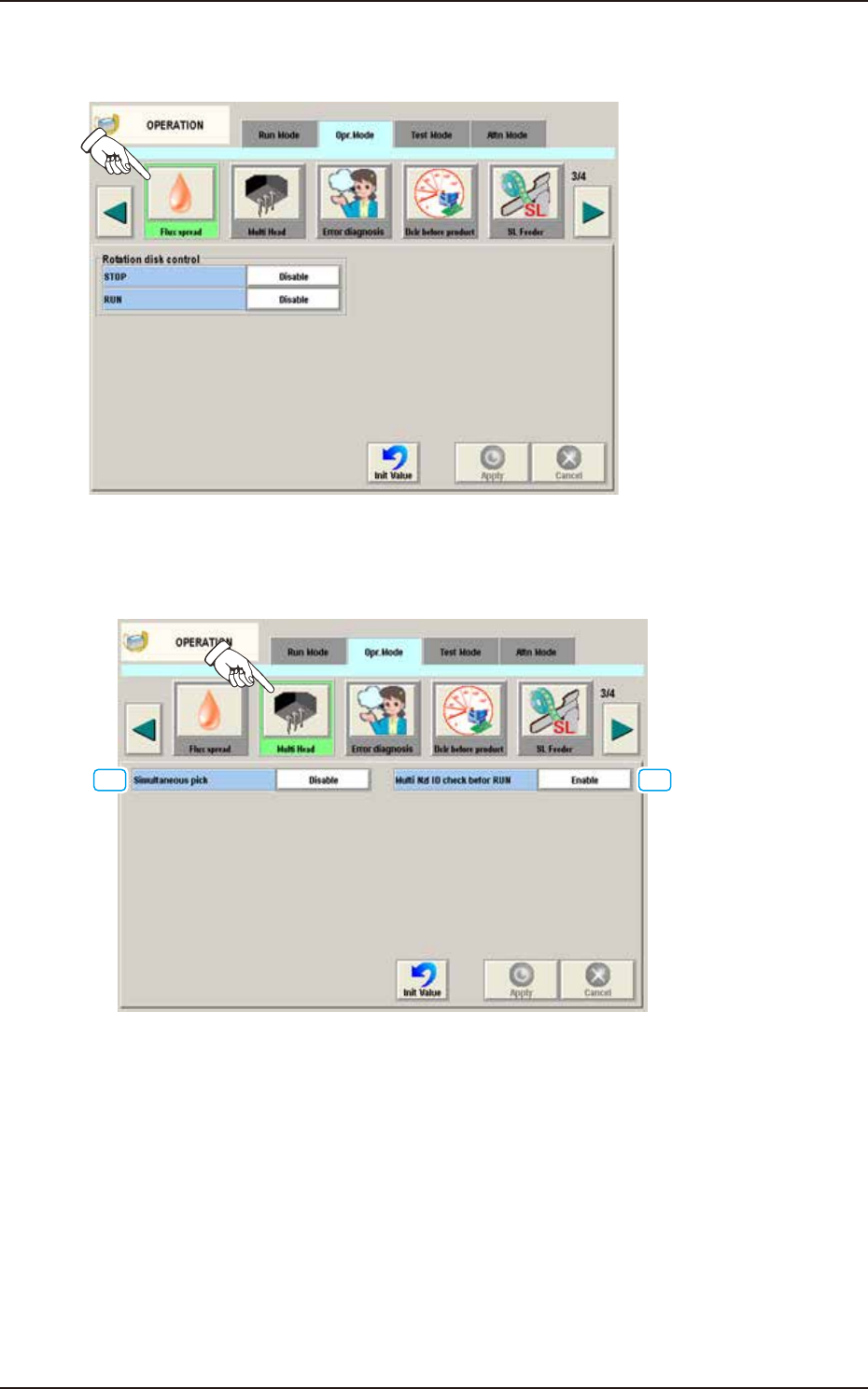
4.2.12 Multi Head
When the [Multi Head] button is pressed on the “Opr. Mode” tab sheet, the following window appears.
[1] [2]
F2A42A
[1] Simultaneous pick
The multi-functional head is used when the nozzle pitch of head agrees with the tape feeder pitch
for component pickup.
Enable : When selected, the component simultaneous pickup is performed.
Disable : When selected, the component simultaneous pickup is not performed.
[2] Multi Nzl ID check befor RUN
Enable : When selected, the ID of the nozzle housed in the nozzle stocker for the multi-
functional nozzle, is identified and the data is re-written in the case that the
identification result is not the same as that on the placement nozzle/head data.
Also, it is checked whether if all the nozzles required for the production, have
been prepared.
Disable : When selected, the nozzle ID recognition function is not used.
4.2 "Opr.Mode" Tab Sheet
EUKYX
1-52199-2100
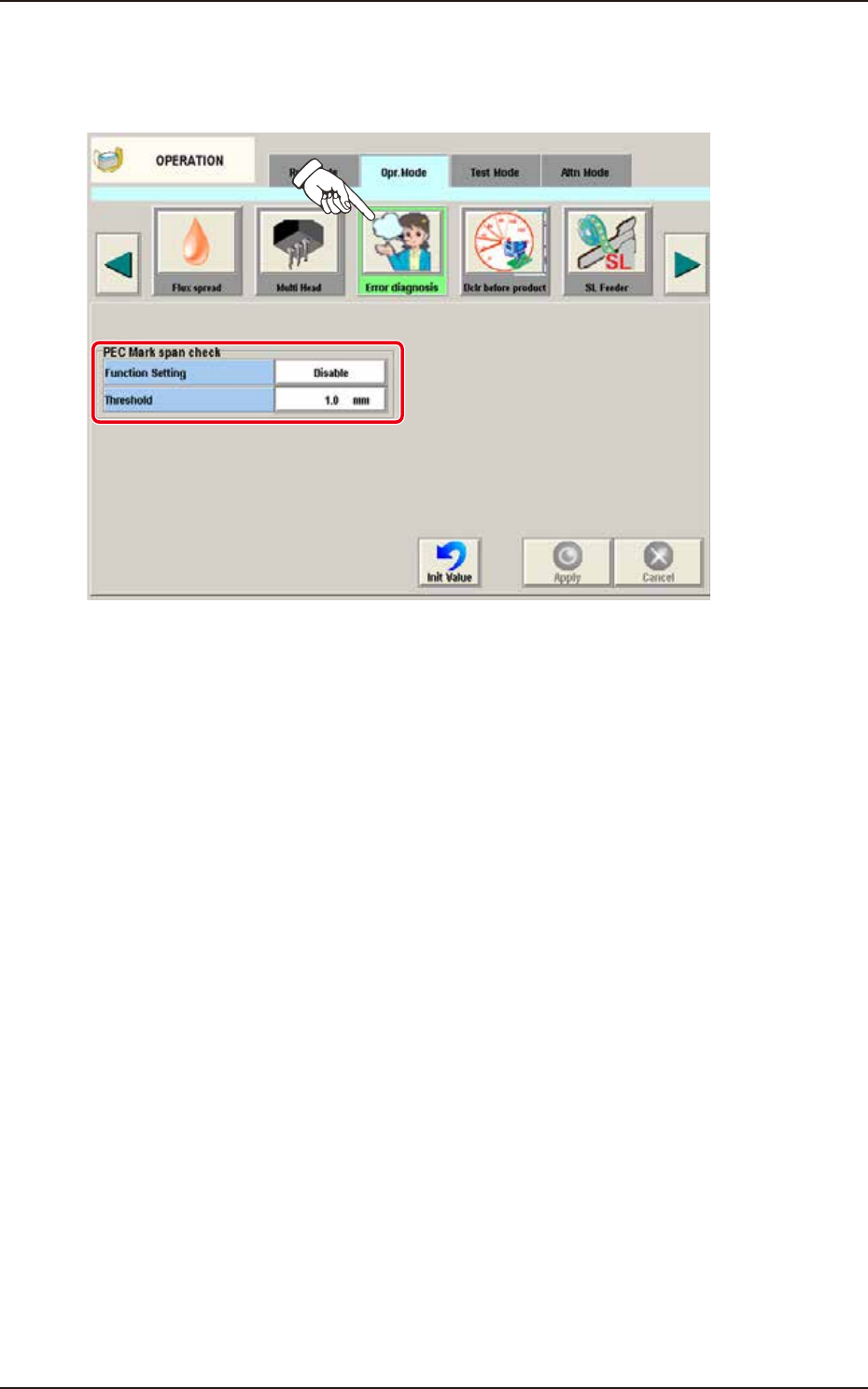
4.2.13 Error diagnosis
When the [Error diagnosis] button is pressed on the "Opr. Mode" tab sheet, the following window
appears.
F2A42B
►
PEC Mark span check
Function Setting
Select “Enable” or “Disable” for the function of abnormal stop when the distance between the PEC
Mark span exceeds the threshold.
Disable
Select this when PEC Mark span check is not used.
Enable
Select this when PEC Mark span check is used.
Threshold
Set the tolerance of the distance between PEC Mark span.
4.2 "Opr.Mode" Tab Sheet