EUKYX-199-2100_G5S2_Instruction_Vol2_E.pdf - 第140页
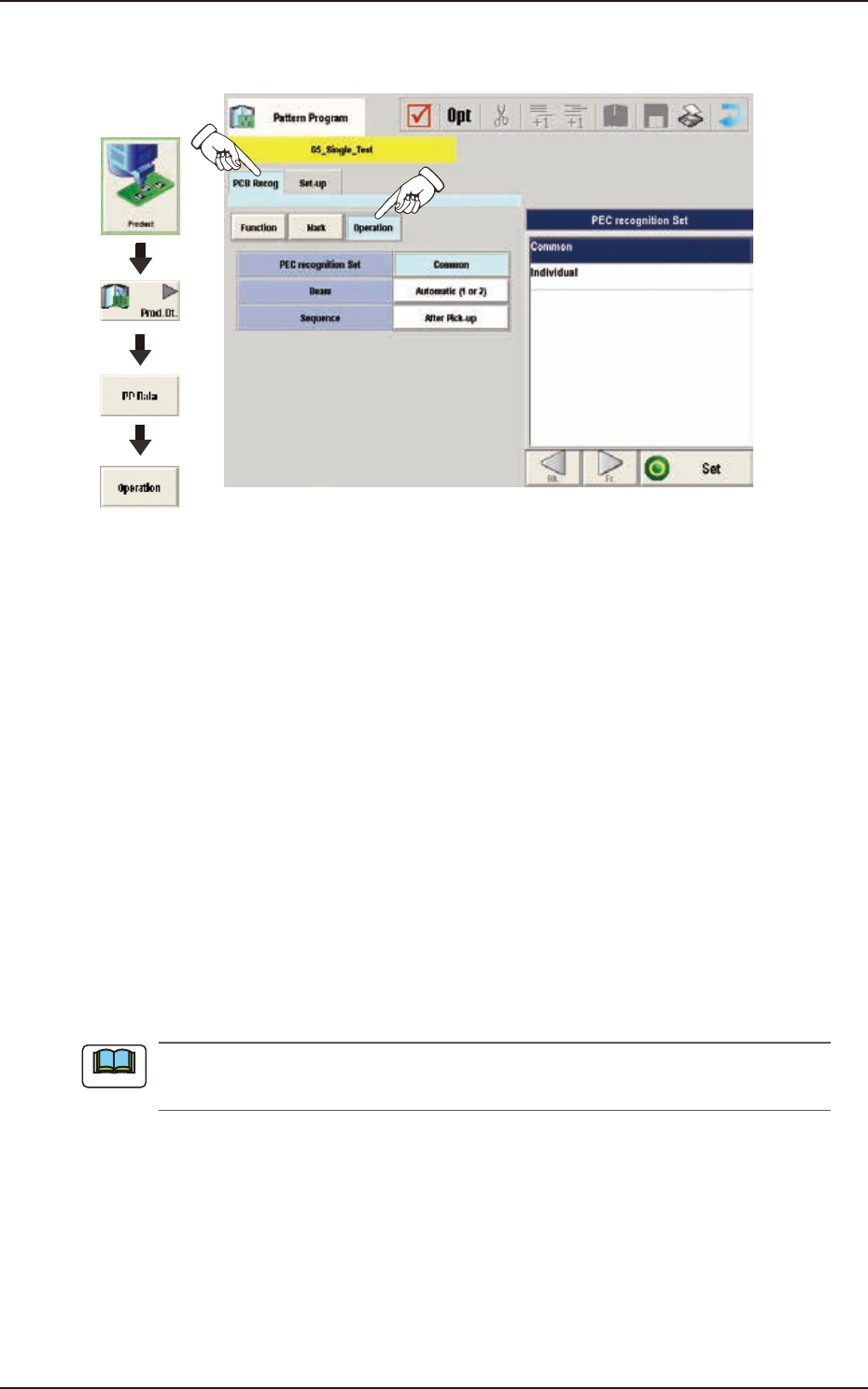
EUKYX 2-27 199-2100 3.3 Operation (C03) Operation D ata When the [ Op erati on] but ton is pressed in the "Operation " wi ndow , the foll owi ng window appears. Graphic Development F2B23 ( C 0 3 _ 01) PEC recog…

EUKYX
2-26199-2100
3.3 Operation
(C02_06)
Mark Level
Set the threshold levels of the fiducial marks. In normal cases, set "High".
High
: Both identity and similarity between the shape of a fiducial mark and the real image are
detected on a high level.
Middle : Either identity or similarity between the shape of a fiducial mark and the real image are
detected on a middle level.
Low : Both identity and similarity between the shape of a fiducial mark and the real image are
detected on a low level.
(a)
Identity
: Degree of identity between the shapes of the specified mark and the real
image (including the size)
(b)
Similarity
: Degree of similarity between the shapes of the specified mark and the real
image
(C02_07)
Angle [deg]
Set the angle at which a fiducial mark should be turned clockwise.
• Data Input Range: 0°, 90°, 180°, 270°
(a) A numerical value must be entered in increments of 90°.
When a value other than the specified increments is entered, the "Information" window
appears, indicating that the entered value (angle) is changed to "0°", "90°", "180°" or
"270°".
(b) When "Thru Hole / Land" is selected in the "Mark Type" (C02_02) combo box, the color
of the angle cell is highlighted and "0 deg" is set in the "Angle [deg]" text box.
(C02_08)
Lighting Level
Coax, Ring, Option
The brightness level for each lighting is selected from the following items.
Off Std -80% -60% -40% -20%
+20% +40% +60% +80% Auto
Note
Note
EUKYX
2-27199-2100
3.3 Operation
(C03) Operation Data
When the [Operation] button is pressed in the "Operation" window, the following window appears.
Graphic
Development
F2B23
(C03_01)
PEC recognition Set
Common : When selected, the PEC recognition is performed with the common setting to the
both lines.
Individual : When selected, the PEC recognition is performed with different setting for each
machine.
(C03_02)
Beam
It can be determined which beam should be used for the global and image PEC recognition
operations.
Beam 1 : Select this when only Beam 1 should be used for PEC recognition operations.
Beam 2 : Select this when only Beam 2 should be used for PEC recognition operations.
Automatic (1 or 2)
: The machine determines which beam (Beam 1 or 2) is more suitable for PEC
recognition operations and selects the better one.
Both Beam : Select this when both beams (Beams 1 and 2) should be used for PEC recognition
operations.
As for the local PEC recognition, the PEC recognition operations are performed with the beam
by which components are placed regardless of this designation of the PEC recognition beams.
Note

EUKYX
2-28199-2100
3.3 Operation
(C03_03)
Sequence
Set one of the following options to specify the timing of PEC recognition implementation. It is
recommended that "After Pick-up" should be set in normal cases.
The components must meet the following requirements.
When "After Pick-up" is selected, a component is picked up and the component recognition is
performed on the component while the PCB is being transferred to the PCB positioning section.
Since the component is already picked up, it can be placed soon after the PEC recognition
operation is performed, shortening the time to finish a PCB.
After Pick-up: The PEC recognition operation is performed after a component is picked up.
Before Pick-up: The PEC recognition operation is performed before a component is picked up.
This parameter should be selected when the PEC recognition operation cannot
be performed with a component being picked up.
Note