EUKYX-199-2100_G5S2_Instruction_Vol2_E.pdf - 第170页
EUKYX 2-57 199-2100 3.7 Placement (G0 4) O - D at a When the [ O -Data] but ton is pressed in the "Pl acement" windo w , the fol lowi ng tab sheet appe ars. Graphic Development F2B53 ( G 0 4 _ 01 ) Ono. Shown a…
EUKYX
2-56199-2100
3.7 Placement
(G03_08)
C
Enter some of the following control commands.
If a control command other than the following ones is used, the step becomes invalid.
- (Hyphen) : This command handles the steps as those for component placement.
S : This command invalidates the steps specified as those for component placement.
C : This command invalidates the steps specified as those for component placement.
Note: As for dispensers, these steps become valid.
D : This command handles the steps as those for component placement.
Note: As for dispensers, these steps become invalid.
E : This shows the end of the placement data (O). When placement data (O) is not
created, this shows the end of the steps in the placement data (P).
P, Q : This shows the end of the placement data (P) of a repetitive pattern program.
B : When the unit PCB BBR function (option) is used, set this control command for
P-No. 1. See Note (b).
0, 1, 2, 3, 4, 5, 6, 7, 8, 9: These control commands are used to enable the block sorting function.
See Note (a).
Note
(a) When the block sorting function is used in the following case, the productivity will be
improved because components are placed on the specified areas of unit PCBs.
•
It is required to change the nozzles in the nozzle stocker for component placement on
a certain unit PCB according to the repetitive pattern program.
(b) Do not set the B command in any lines except "P-No. 1".
(c) Confirm that "0" (zero) is set in the "X [mm]", "Y [mm]", "Z=theta [deg]", "H", and "Fdr
No." text boxes of the last line (last step No.) and set "E", "P", or "Q".
(G03_09)
Comment
Set a comment for each step No. Alphanumeric characters and symbols can be used. Up to 32
characters can be used.
(a) The automatic operation is not affected by these comments.
(b) The comments can be used to check "Ref. No." printed on the upper surfaces of PCBs.
Note
Note
EUKYX
2-57199-2100
3.7 Placement
(G04) O-Data
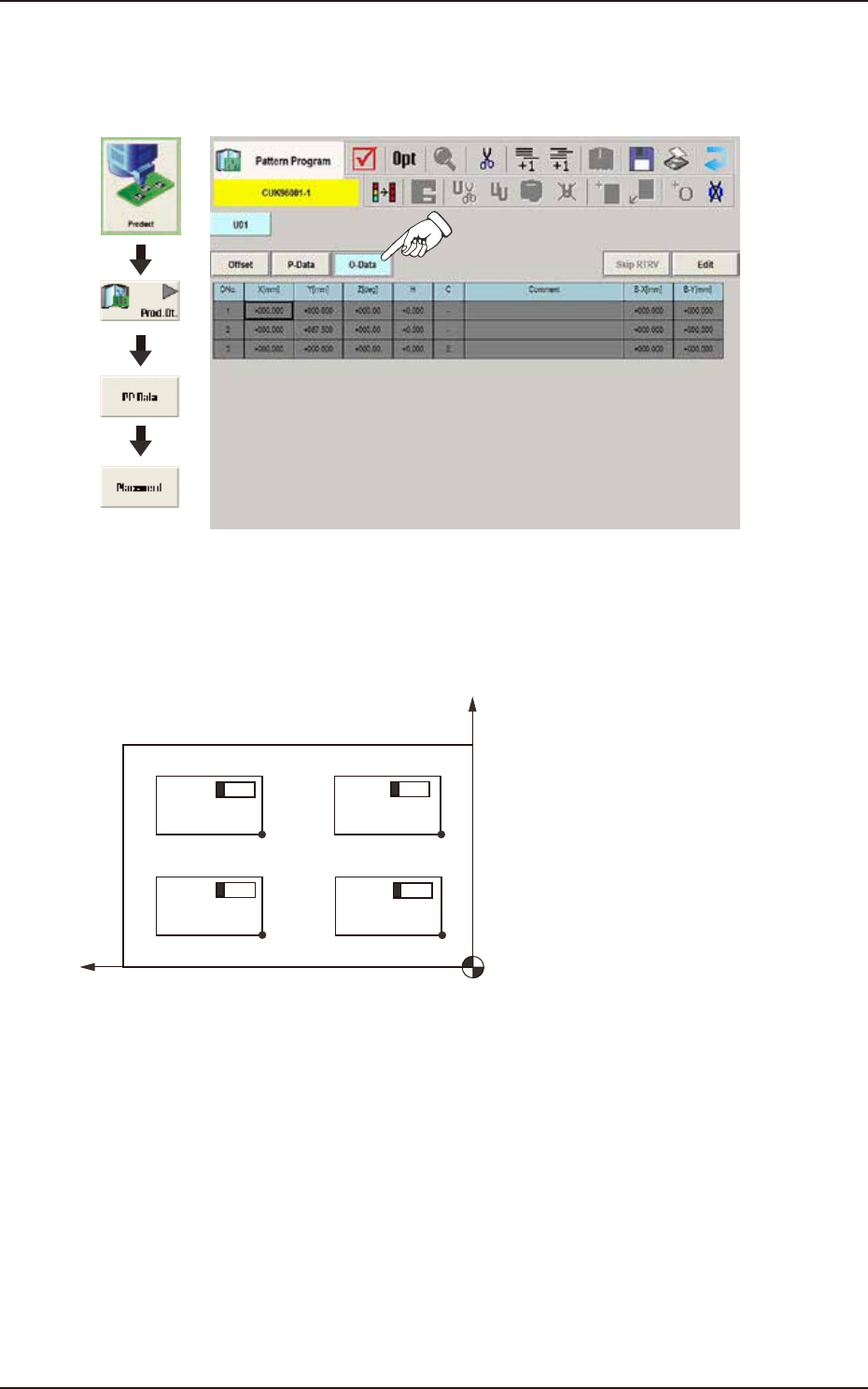
When the [O-Data] button is pressed in the "Placement" window, the following tab sheet appears.
Graphic
Development
F2B53
(G04_01)
Ono.
Shown are the step Nos. of the placement data (O). These step Nos. are regarded as repetitive
pattern Nos. Parameters must be entered in each line (pattern).
O-No.1
O-No.2
O-No.3
O-No.4
Pattern 4
Pattern 2 Pattern 1
Pattern 3
F2B54
EUKYX
2-58199-2100
3.7 Placement
(G04_02)
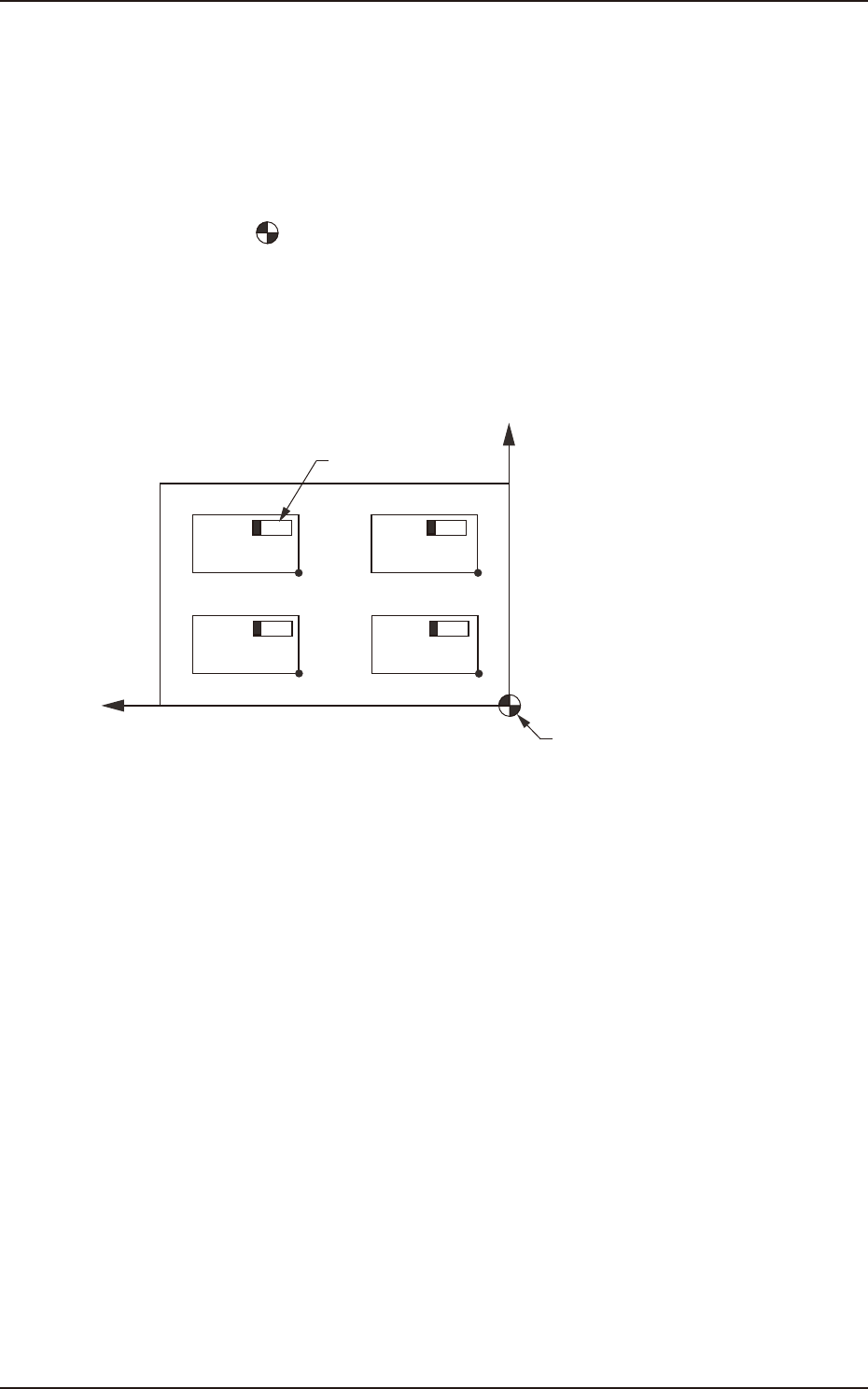
X [mm] and Y [mm]
Set the coordinates of each pattern origin (O01 through On) based on the placement coordinate
reference (N0). A pattern origin refers to the reference coordinates of a repetitive pattern.
The pattern origins (coordinate reference of repetitive patterns) must be determined, regarding the
"Z=theta [deg]" data as "0°" (described in "G04_03") and located at corners on the same side as the
placement coordinate reference (N0).
N
0
: The center of is the placement coordinate reference.
O
01
: Pattern Origin of Pattern 1
O
02
: Pattern Origin of Pattern 2
O
03
: Pattern Origin of Pattern 3
O
04
: Pattern Origin of Pattern 4
O04
O03
O02
O01
X
Y
Placement Coordinate
Reference (No)
Component
Pattern 4 Pattern 3
Pattern 2 Pattern 1
F2B55