EUKYX-199-2100_G5S2_Instruction_Vol2_E.pdf - 第192页
199-2100 Chapt er 4 Management Data This chapter describes the display contents and operation procedures for the Management Data, Current Pattern Program Management, Feeder/Nozzle Message Rate and Component Handling Rate…
EUKYX
3-15199-2100
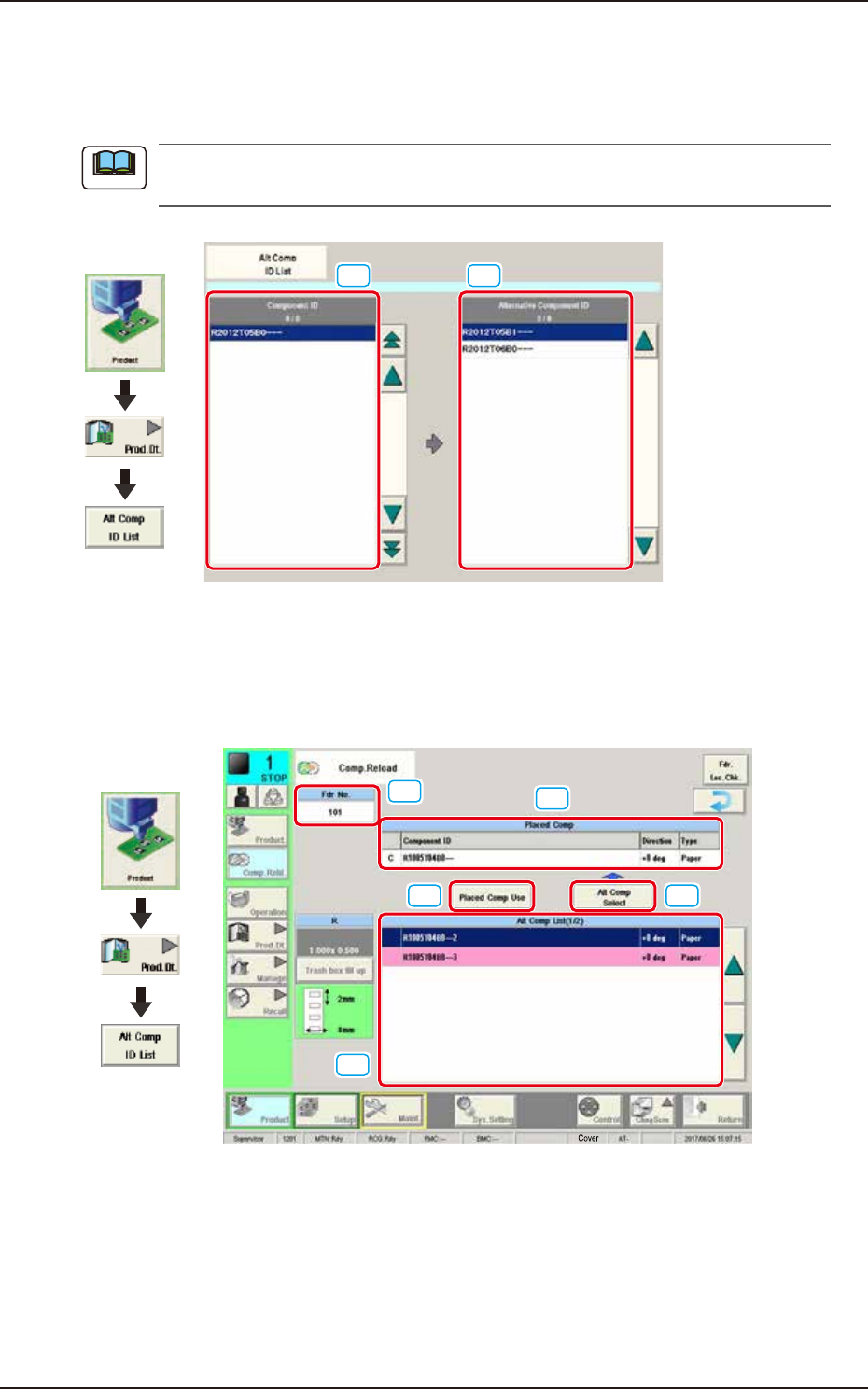
3. “Alt Comp ID List” Window
3. “Alt Comp ID List” Window
Refer to the Alt Comp ID List in the PP check during the pattern program change.
Check if the data of the alternative component can be replaced.
The [Alt Comp ID List] button is activated by opening [Sys. Setting] - [General] tab and select
"Enable" for "Altn Comp ID List".
[1]
[2]
Graphic
Development
F2C20
[1] Component ID
The Component ID that “Alt Comp ID List” is set is displayed in a list.
[2] Alternative Component ID
The Component ID that is set as "Alt Comp ID" is displayed in a list. When the “Alt Comp ID“ is
activated, the “Comp.Reload“ window is displayed as below during operation.
[1]
[2]
[3] [4]
[5]
Graphic
Development
F2C20A
[1] Fdr No.:
Displays the feeder No.
[2] Placed Comp:
Displays the information of the component being placed.
[3] Placed Comp Use:
Uses the component being placed continuously.
[4] Alt Comp Select:
Replaces with the component selected from the “Alternative List“.
[5] Alt Comp List:
Displays the alternative components. NG component is displayed in red and
cannot be replaced.
Note

199-2100
Chapter 4
Management Data
This chapter describes the display contents and operation
procedures for the Management Data, Current Pattern Program
Management, Feeder/Nozzle Message Rate and Component
Handling Rate Data, etc.
1. Outline of Management Data
2. “MNG.DT.” Window
3. “CRNT.PP.MNG.DT” Window
4. “MESSAGE.RATE.DT” Window
EUKYX
EUKYX
4-1199-2100
1. Outline of Management Data
1. Outline of Management Data
Graphic
Development
F2D1
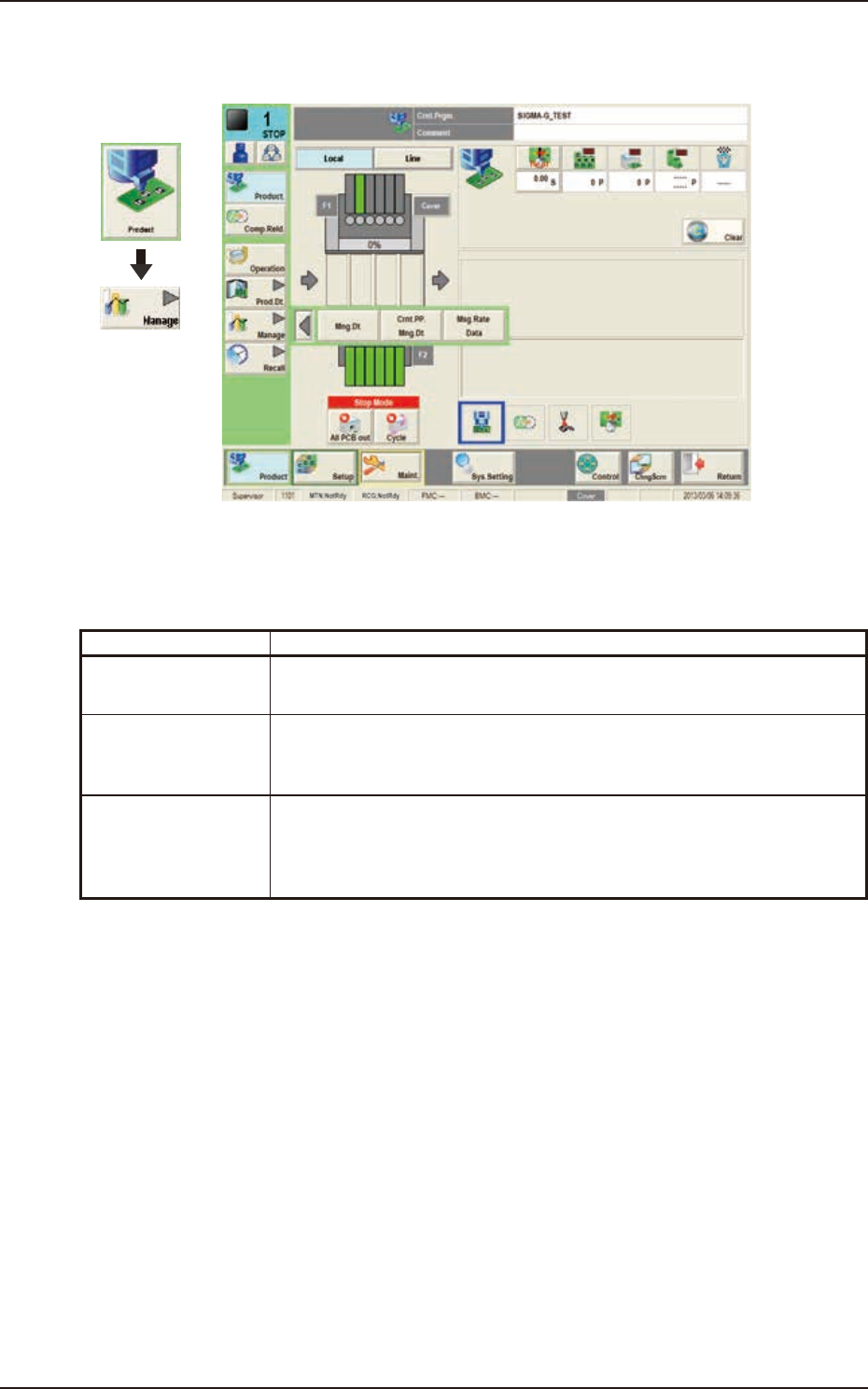
The "Manage" menu is provided with the following three buttons.
When a button is pressed, the corresponding window opens.
Buttons Description
Mng.Dt. When pressed, the "MNG.DT." window is displayed and operated for totaling
the management data for the whole system.
Crnt.PP.Mng.Dt When pressed, the "CRNT.PP.MNG.DT" window is displayed and operated for
totaling the current pattern program management data for each pattern
program.
Msg Rate Data When pressed, the "MESSAGE.RATE.DT." window is displayed and operation
for displaying the component handling error rate managed for each feeder or
nozzle based on each component handling error rate specified in the operation
parameter setting.