EUKYX-199-2100_G5S2_Instruction_Vol2_E.pdf - 第194页
EUKYX 4-2 199-2100 2. "MNG.DT ." Window 2. " MNG .D T . " Wind o w The correspondin g wi ndow enab les the operator to con firm the production per formanc e data cov erin g the whole mac hine per form…
EUKYX
4-1199-2100
1. Outline of Management Data
1. Outline of Management Data
Graphic
Development
F2D1
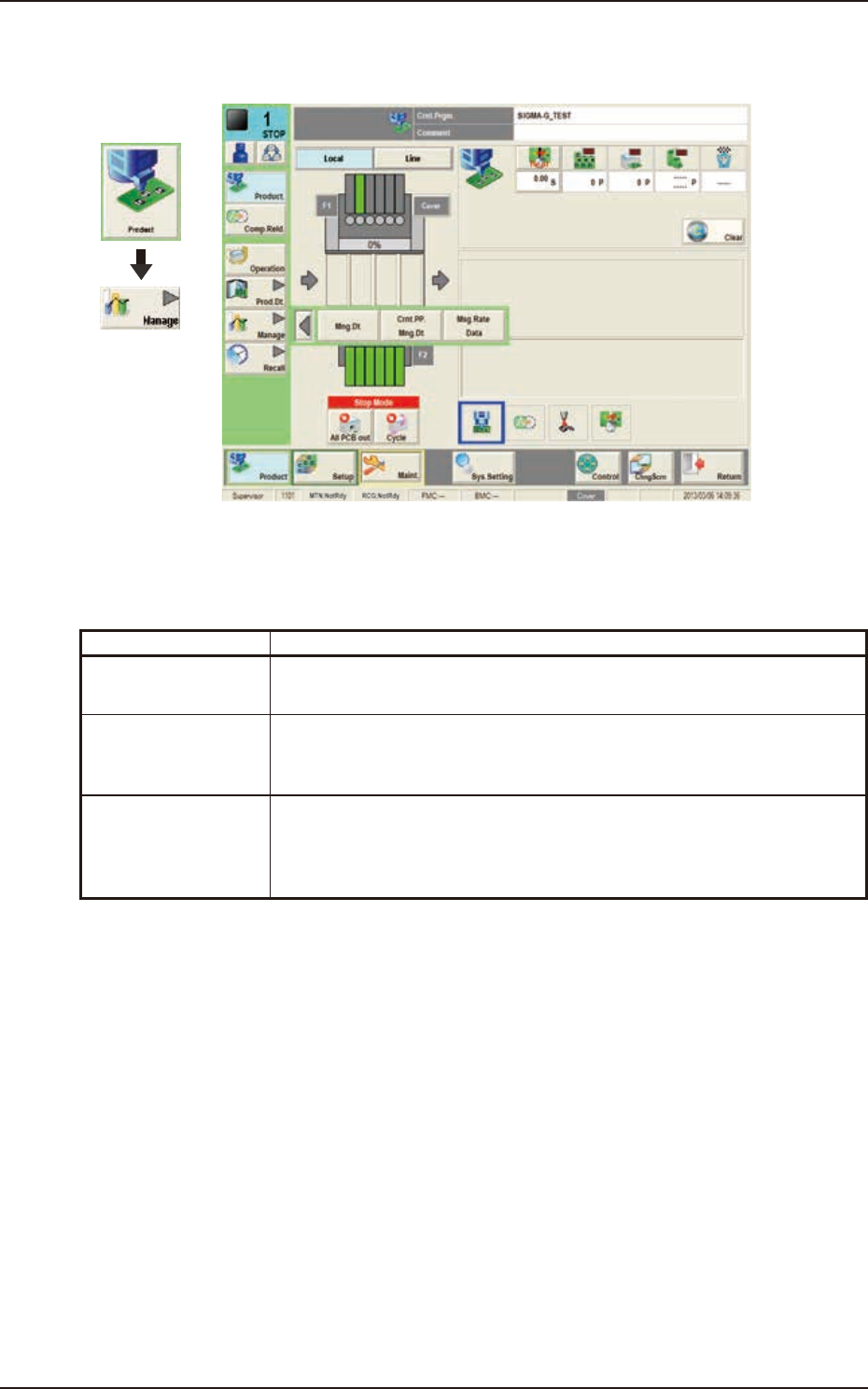
The "Manage" menu is provided with the following three buttons.
When a button is pressed, the corresponding window opens.
Buttons Description
Mng.Dt. When pressed, the "MNG.DT." window is displayed and operated for totaling
the management data for the whole system.
Crnt.PP.Mng.Dt When pressed, the "CRNT.PP.MNG.DT" window is displayed and operated for
totaling the current pattern program management data for each pattern
program.
Msg Rate Data When pressed, the "MESSAGE.RATE.DT." window is displayed and operation
for displaying the component handling error rate managed for each feeder or
nozzle based on each component handling error rate specified in the operation
parameter setting.
EUKYX
4-2199-2100
2. "MNG.DT." Window
2. "MNG.DT." Window
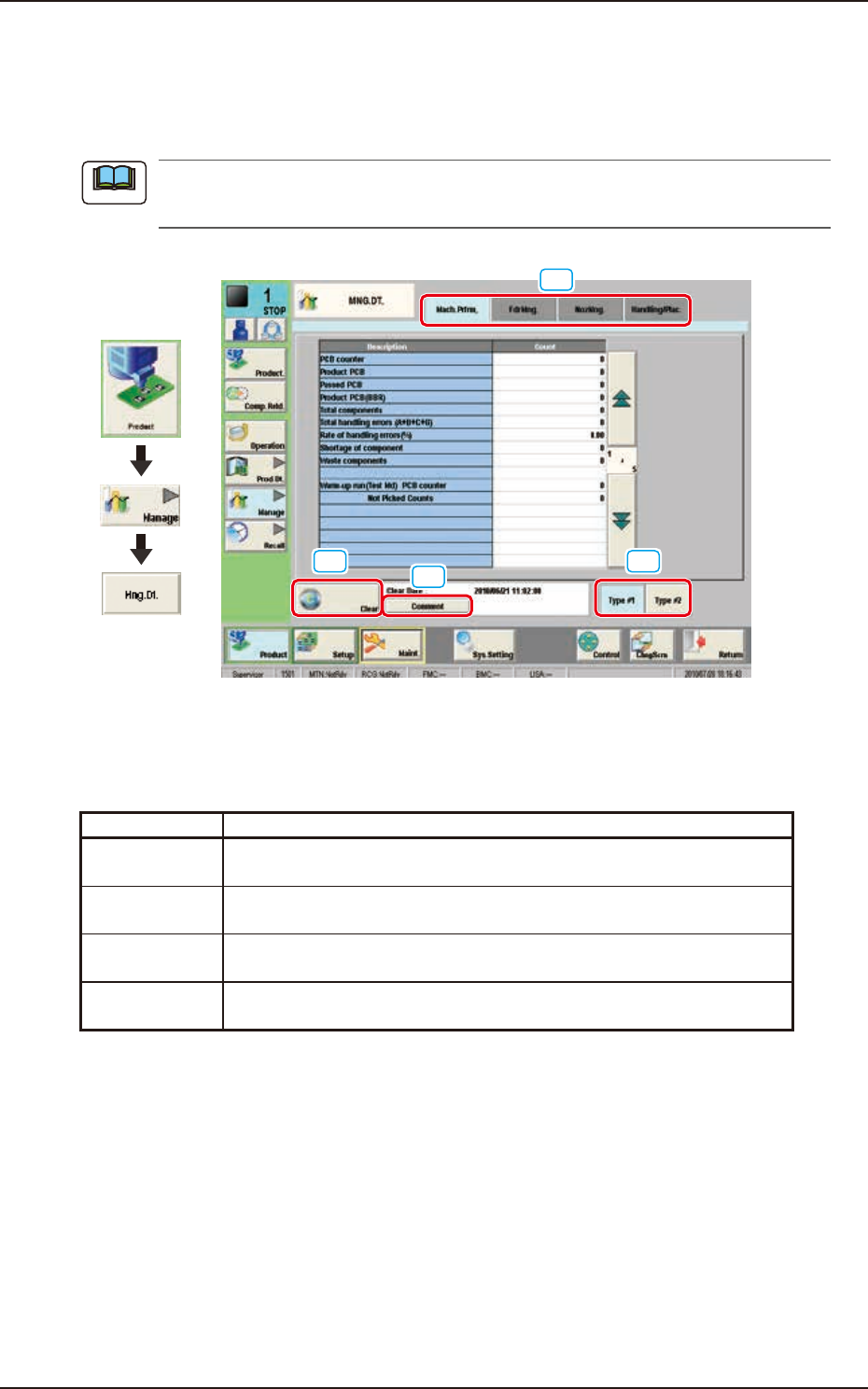
The corresponding window enables the operator to confirm the production performance data
covering the whole machine performance.
The contents of "Type #1" are almost the same as "Type #2". To use the required items, the
management spans must be distinguished.
[2]
[3]
[4]
[1]
Graphic
Development
F2D2
[1] Tabs and Tab Sheets
The "MNG.DT." window is provided with the following four tabs. When each tab is pressed, the
corresponding tab sheet appears inside the window.
Buttons Description
Mach.Prfrm, The corresponding tab sheet enables the operator to view various counts
(results of accumulated data) as machine performance data.
FdrMng. The corresponding tab sheet enables the operator to view the pickup data
of each individual feeders.
NozMng. The corresponding tab sheet enables the operator to view various counts
(results of accumulated performance data) of each individual nozzles.
Handling/Plac. The corresponding tab sheet enables the operator to view the component
pickup and placement data.
[2] [Clear] Button
When this button is pressed, all the data items in "Type #1" or "Type #2" in the "MNG.DT." are
cleared and the date and time are changed.
[3] Information on Totalization File
This field displays “Clear Date” and “Comment” of the totalization file.
[Comment] Button
When this button is pressed, the on screen keyboard appears. In this window, the comment
for “Type #1” or “Type #2” can be input.
[4] [Type #1] and [Type #2] Button
This icon displays the “Type #1” or “Type #2” window.
Note
EUKYX
4-3199-2100
2.1 "Mach.Prfrm," Tab Sheet
2.1 "Mach.Prfrm," Tab Sheet
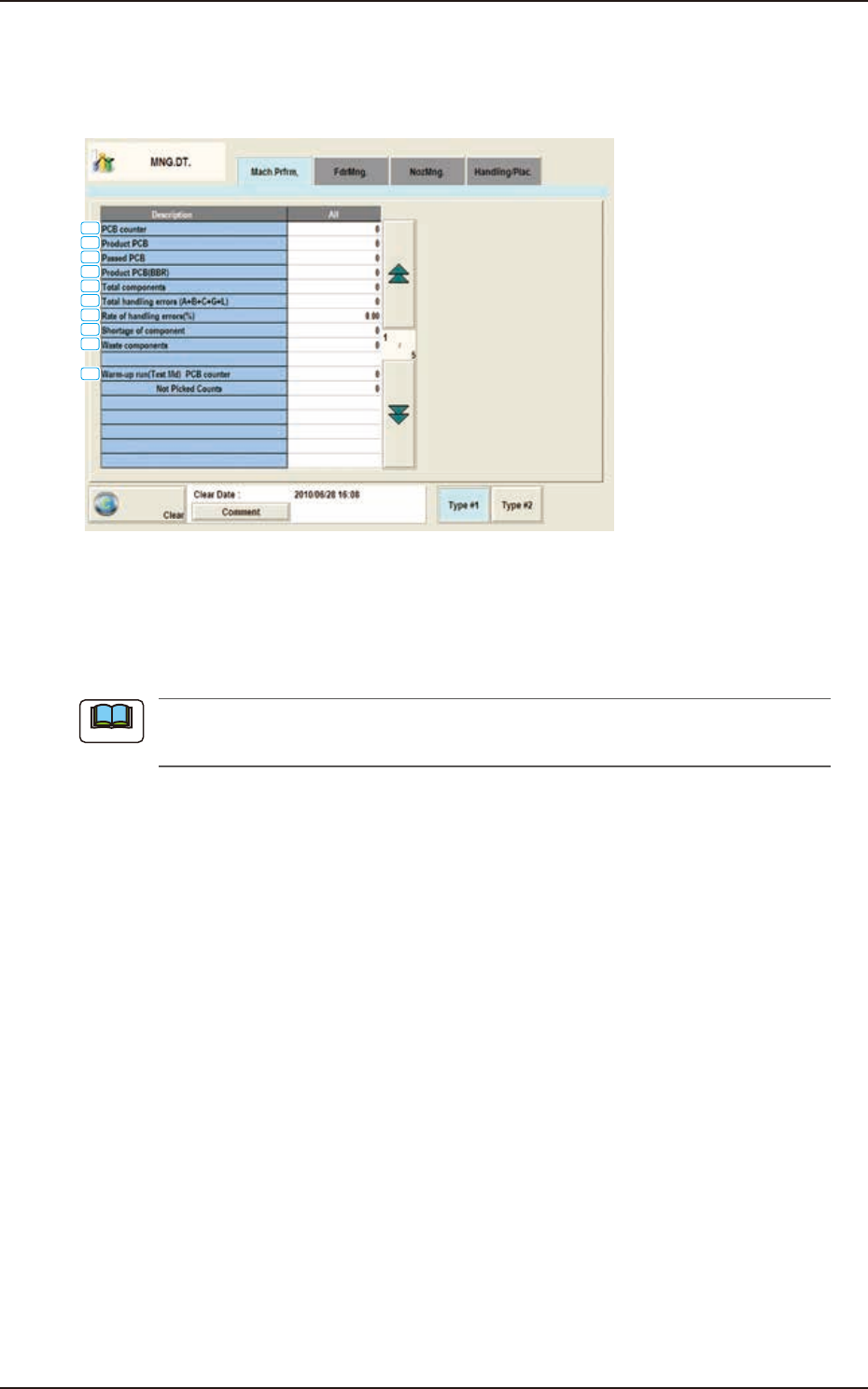
When the [Mach.Prfrm,] tab is pressed in the "MNG.DT." window, the following tab sheet appears
inside the window.
[1]
[2]
[3]
[4]
[5]
[6]
[7]
[8]
[9]
[10]
F2D3
[1] PCB counter
Shown is the number of produced PCBs.
Counting is implemented when the X/Y table is zeroed after component placement operation (when
a PCB is finished).
When a particular pattern program is set several times for production, the
sum total is computed.
[2] Product PCB
The number of produced unit PCBs on multi-unit PCB is summed up. Counting is implemented
when the X/Y beam is zeroed after component placement operation (when a unit is finished).
When the bad board reject (BBR) function is used, defective unit PCBs are excluded.
[3] Passed PCB
The number of passed PCBs is counted when the machine is set in the "PASS" mode.
Counting is implemented when the PCB transfer starts (when the PCB on the PCB positioning
section is transferred to the output conveyor).
[4] Product PCB (BBR)
Shown is the number of defective PCBs summed up when the bad board reject function (option) is
used.
[5] Total components
Shown is the number of picked components (the number of pickup operations).
[6] Total handling errors (A+B+C+G+L)
Shown is the total number of component handling errors.
[7] Rate of handling errors(%)
Shown is the percentage of handling errors per total number of picked components.
[8] Shortage of component
Shown is the total number of detected component shortage errors.
Note