EUKYX-199-2100_G5S2_Instruction_Vol2_E.pdf - 第207页
EUKYX 4-15 199-2100 3. "CRNT .PP .MNG.DT" Window 3 . "CRNT .P P . MNG .D T " Wind o w Thi s wi ndow enab les the operator to con firm the production man agement d ata for the curren t pat tern pro gra…
EUKYX
4-14199-2100
2.4 "Handling/Plac." Tab Sheet
[2] Component chuck
[((*Z-(*A+*B+*C+*G+*L))/*Z) × 100] (%)
The value (%) is determined by the following formula.
{# of Picks - (Counts in "A" + Counts in "B" + Counts in "C"+ Counts in "G" + Counts in "L")}
/ # of Picks×100
[3] Component placement
[((*Z-(*A+*B+*C+*D+*E+*F+*G+*H+*K+*L))/*Z) × 100] (%)
The value (%) is determined by the following formula.
{# of Picks - (Counts in "A" + Counts in "B" + Counts in "C"+ Counts in "D"+ Counts in "E"+
Counts in "F"+ Counts in "G+ Counts in "H"+ Counts in "K" + Counts in "L")}/# of Picks×100
About Data Counting (Counting of "*A: component missing [sensor]" and "*B: component
missing [recognition]")
The machine stops in an error condition according to the number of times (the number of
continuous component missing errors to be counted to stop the machine in an error condition)
set in the "1" text box of "Error process" in the "Control Data" tab sheet of a "Component
Library" window.
In this case, the number of missing component errors is not added to the number of picks and
the number of chuck errors.
Note
EUKYX
4-15199-2100
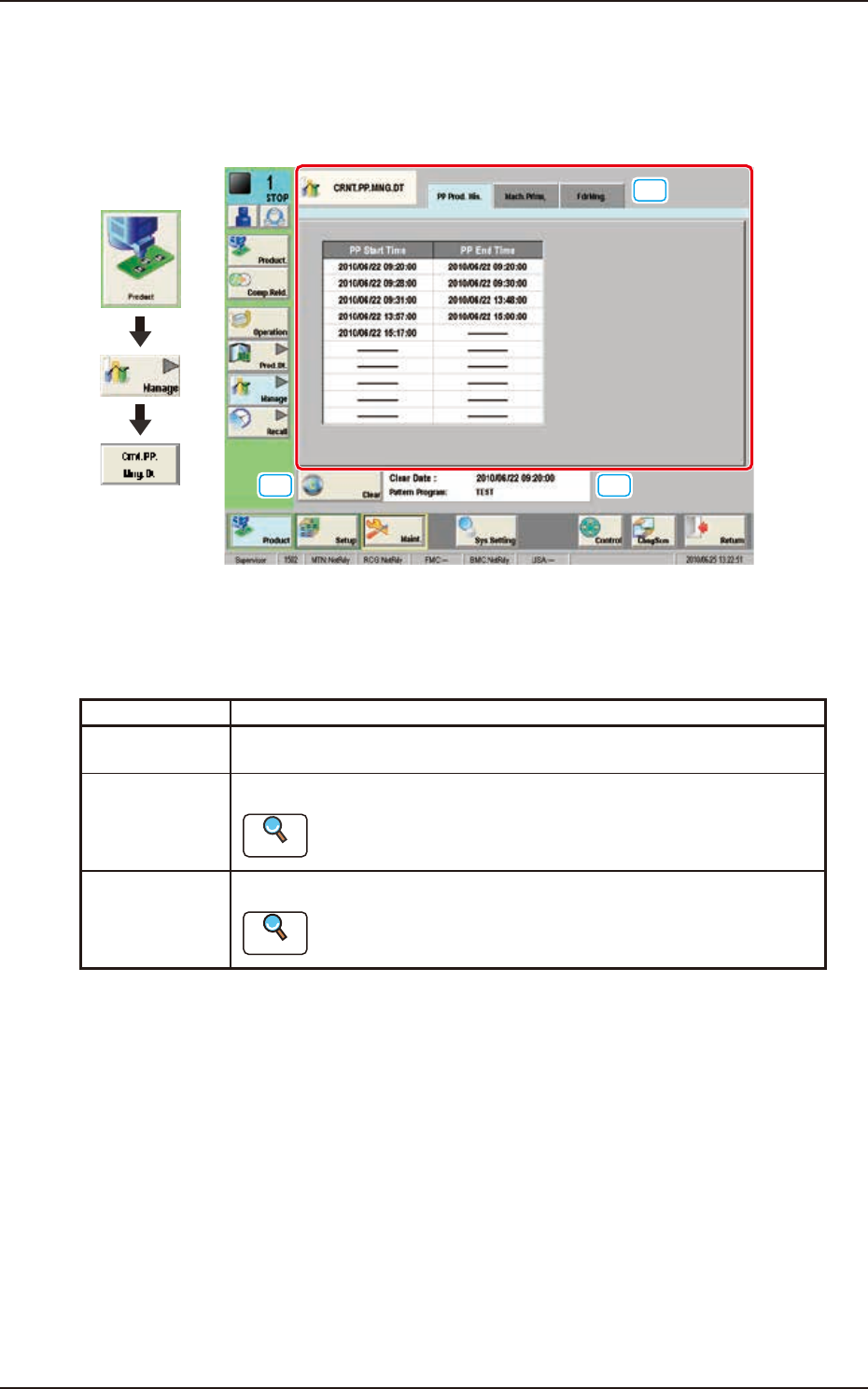
3. "CRNT.PP.MNG.DT" Window
3. "CRNT.PP.MNG.DT" Window
This window enables the operator to confirm the production management data for the current
pattern program.
[2]
[1]
[3]
Graphic
Development
F2D13
[1] Tabs and Tab Sheets
There are three tab sheets for the "CRNT.PP.MNG.DT" window. When any tab is pressed, the
corresponding tab sheet appears.
Buttons Description
PP Prod. His. In this tab sheet, the automatic operation starting date and time and ending
date and time are recorded.
Mach.Prfrm. In this tab sheet, the device management result data is displayed.
Reference
Refer to “2.1 “Mach.Prfrm,” Tab Sheet” for each item.
FdrMng. In this tab sheet, the pick-up data for each feeder is displayed.
Reference
Refer to “2.2 “FdrMng.” Tab Sheet” for each item.
[2] [Clear] Button
When this button is pressed, all the data parameters are deleted in each tab sheet for the "CRNT.
PP.MNG.DT" window.
[3] Information on Totalization File Information
The update date and time for the totalization file and pattern program are displayed in this area.
EUKYX
4-16199-2100
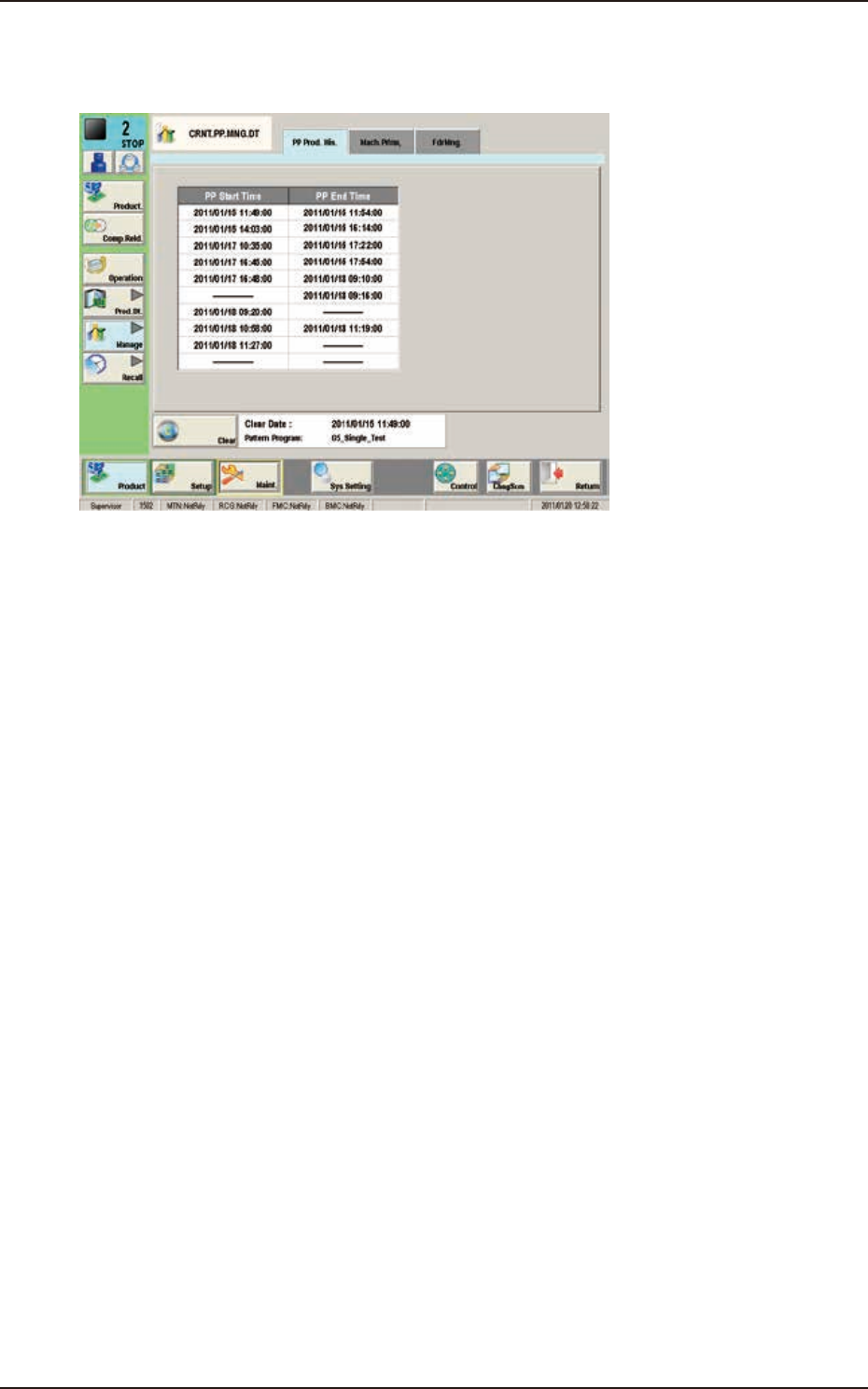
3.1 "PP Prod. His." Window
3.1 "PP Prod. His." Window
The PCB production start date and time, and end date and time are recorded.
F2D14