EUKYX-199-2100_G5S2_Instruction_Vol2_E.pdf - 第209页
EUKYX 4-17 199-2100 3.2 "Mach.Prfrm," T ab Sheet 3. 2 "Mach.Pr fr m, " T ab Sheet When the "Mach .Prfr m, " t ab is pressed in the "Mana ge" window , the fol low in g tab sheet app…
EUKYX
4-16199-2100
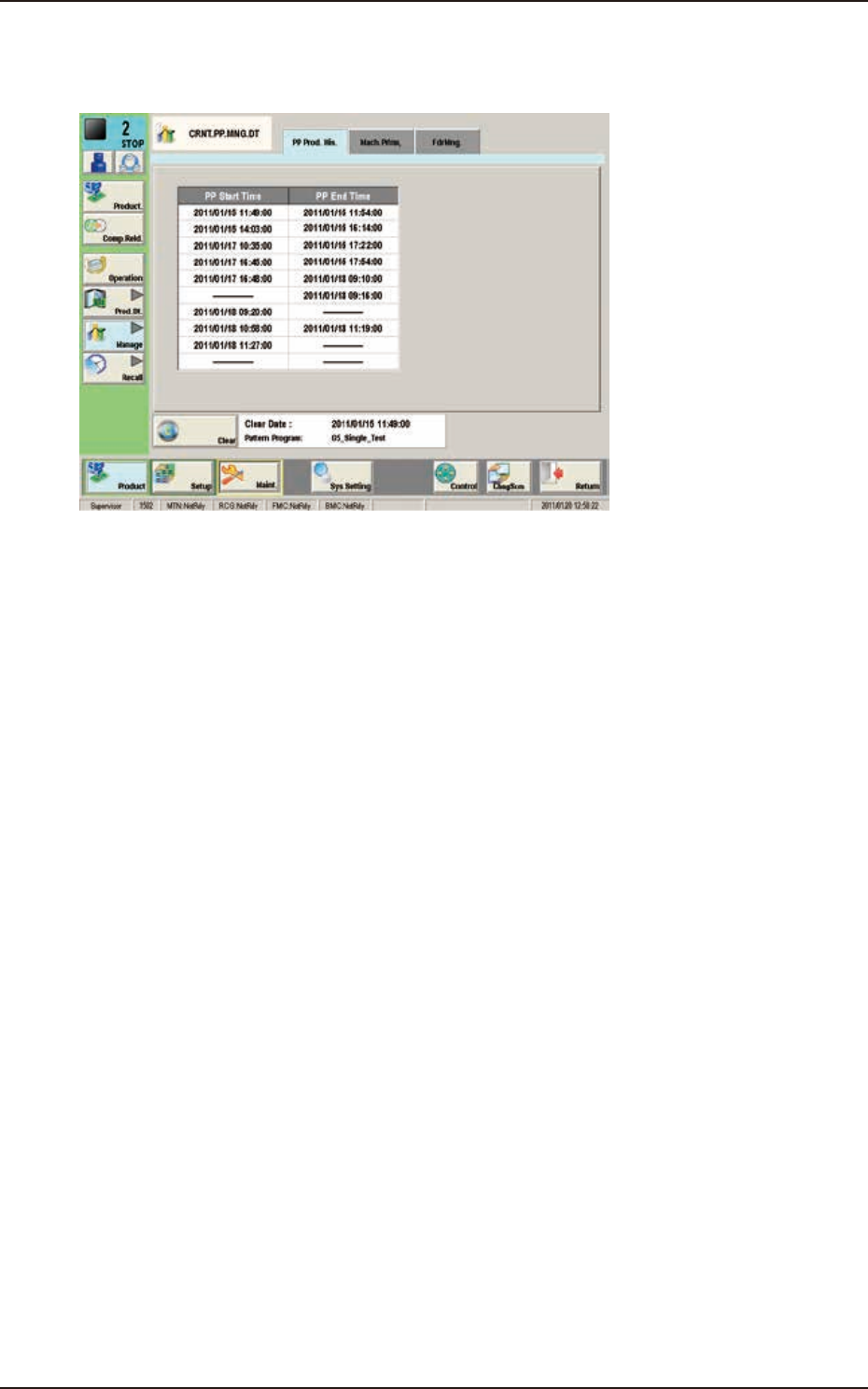
3.1 "PP Prod. His." Window
3.1 "PP Prod. His." Window
The PCB production start date and time, and end date and time are recorded.
F2D14
EUKYX
4-17199-2100
3.2 "Mach.Prfrm," Tab Sheet
3.2 "Mach.Prfrm," Tab Sheet
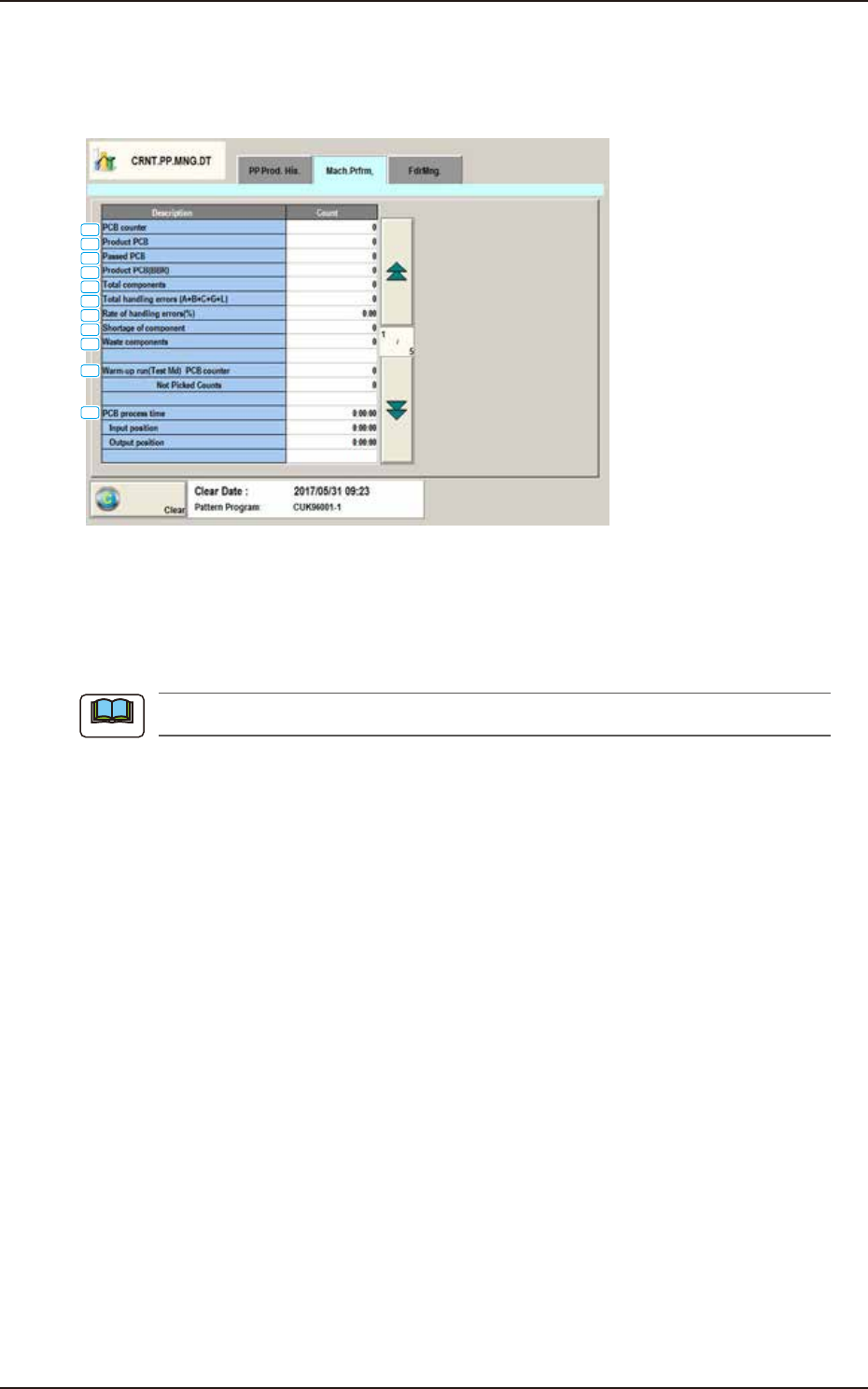
When the "Mach.Prfrm," tab is pressed in the "Manage" window, the following tab sheet appears
inside the window.
[1]
[2]
[3]
[4]
[5]
[6]
[7]
[8]
[9]
[10]
[11]
F2D15A
[1] PCB counter
Shown is the number of produced PCBs.
Counting is implemented when the X/Y beam is zeroed after component placement operation (when
a PCB is finished).
When a particular pattern program is set several times for production, the sum total is computed.
[2] Product PCB
The number of produced unit PCBs on multi-unit PCB is summed up. Counting is implemented
when the X/Y beam is zeroed after component placement operation (when a unit is finished).
When the bad board reject (BBR) function is used, defective unit PCBs are excluded.
[3] Passed PCB
The number of passed PCBs is counted when the machine is set in the "PASS" mode.
Counting is implemented when the PCB transfer starts (when the PCB on the PCB positioning
section is transferred to the output conveyor).
[4] Product PCB (BBR)
Shown is the number of defective PCBs summed up when the bad board reject function (option) is
used.
[5] Total components
Shown is the number of picked components (the number of pickup operations).
[6] Total handling errors (A+B+C+G+L)
Shown is the total number of component handling errors.
[7] Rate of handling errors(%)
Shown is the percentage of handling errors per total number of picked components.
[8] Shortage of component
Shown is the total time of the detected “Component Shortage”.
Note
EUKYX
4-18199-2100
3.2 "Mach.Prfrm," Tab Sheet
[9] Waste components
Shown is the total number of components that were picked up but not placed.
The indicated number of components represents the components that were not placed due to a
vertical component error (sensor), a component recognition error, a component thickness error,
interrupted production, the detection (Bad Board Reject Function: Option) of a defective unit
PCB., etc.
[10] Warm-up run(Test Md)
The data of the warm-up run (dry cycle) is counted.
PCB counter
The number of PCBs is counted when the machine is operated under the following condition.
• “Test Mode” is enabled on the “Operation” window.
• The “PCB Transfer” is set to “Disable”. (State in which no PCB is put in and out)
Not Picked Counts
The number of non-handling/non-placed actions is counted when the machine is operated
under the following condition.
• “Test Mode” is enabled on the “Operation” window.
• The “Handling/Place” is set to “Disabled” or the “Vacuum/Blower is set to “Disabled”.
The number of non-handling and placement actions is counted although the X/Y beam takes
running actions.
[11] PCB process time
The time period for the production of a single PCB is counted.
Note
Note