EUKYX-199-2100_G5S2_Instruction_Vol2_E.pdf - 第240页
EUKYX 6-3 199-2100 3. "PP CHANGE" W indow 3 . "P P CHANGE " Win do w The "PP CHANGE" w indow a ppears. [1] [3] [4] [5] [6] [7] [8] [2] Graphic Development F2F4A [ 1 ] Cmt PP The pattern prog…
EUKYX
6-2199-2100
2. Setup
2. Setup
[1]
Graphic
Development
F2F2A
[1] "Setup" Main Menu Bar
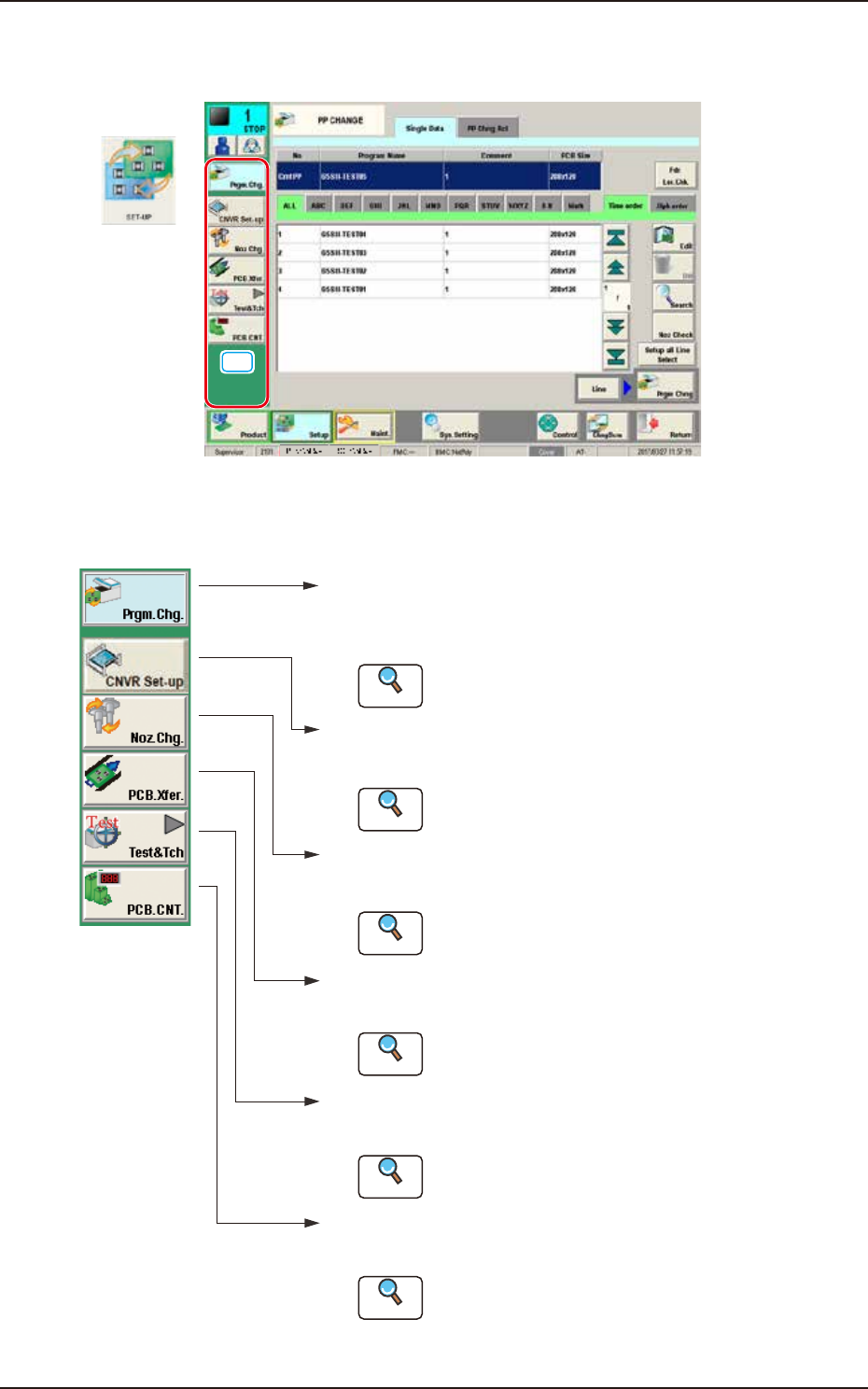
The following buttons are arranged on the "Setup" main menu bar.
[Prgm.Chg.] Button :
Opens the "PP CHANGE" w indo w .
In normal cases, this window opens as an initial one.
[CNVR set-up] Button :
Opens the "CNVR set-up" window.
[Noz.Chg.] Button :
Opens the "NOZ.CHG." windo w .
[PCB.Xfer.] Button :
Opens the "PCB XFER" windo w .
[Test&Tch] Button :
Opens the "Test&Tch" menu.
Reference
Reference
Reference
Reference
Reference
Refer to "3. "PP CHANGE" Window"
for details.
Refer to "4. "
CNVR set-up" window for details.
Refer to "5. "NOZ.CHG." Window" for details.
Refer to "6. "PCB XFER" Window" for details.
Refer to "7. "Test&Tch" Submenu" for details.
[PCB.CNT.] Button :
Opens the "PCB.CNT." windo w .
Reference
Refer to "8. "PCB.CNT." Windo w " for details.
F2F3
EUKYX
6-3199-2100
3. "PP CHANGE" Window
3. "PP CHANGE" Window
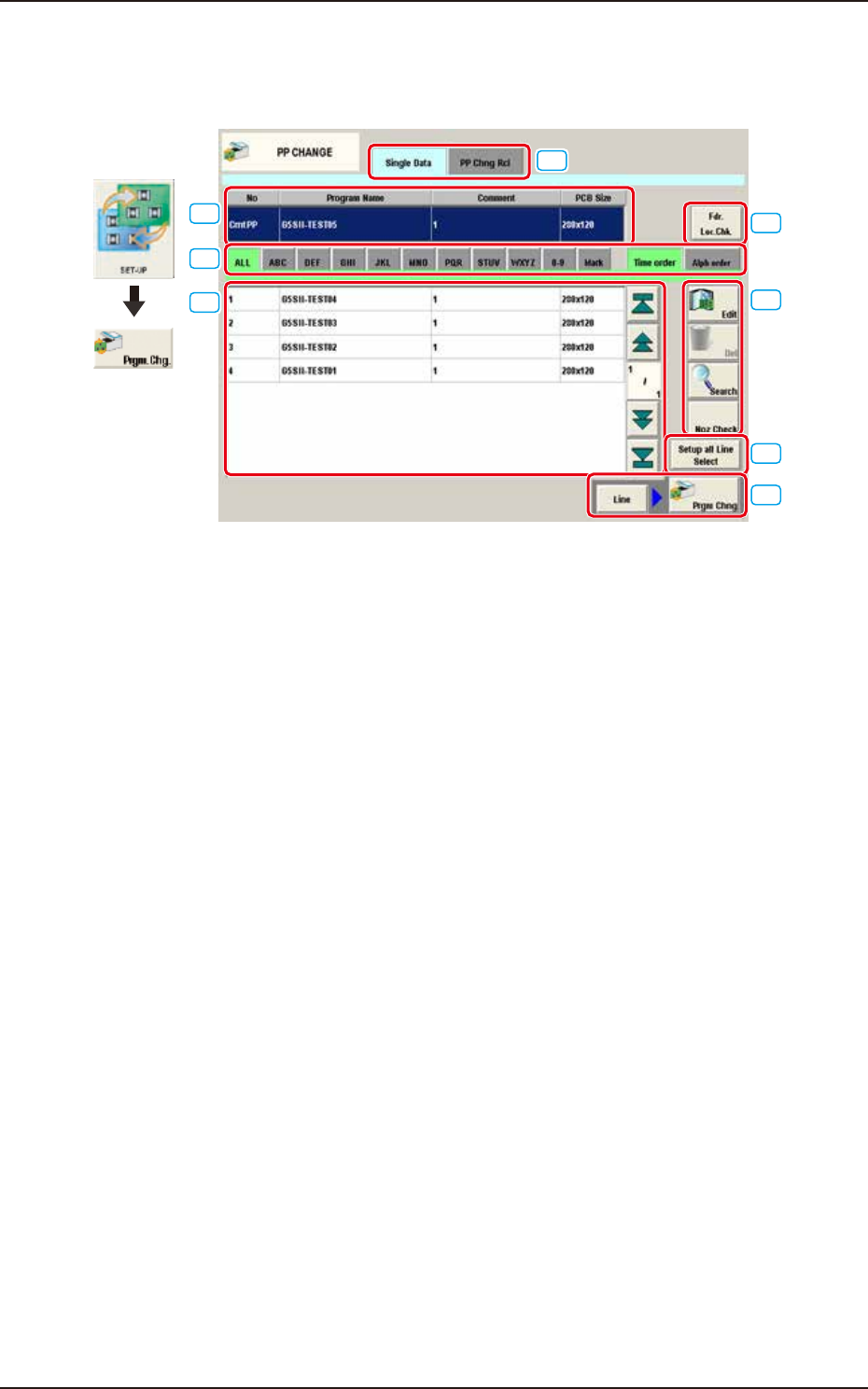
The "PP CHANGE" window appears.
[1]
[3]
[4]
[5]
[6]
[7]
[8]
[2]
Graphic
Development
F2F4A
[1] Cmt PP
The pattern program currently selected is displayed in this section.
[2] Pattern Program Select tabs
The data items displayed in "[3] Pattern Program List" are divided into the tab sheet items and
displayed.
[3] Pattern Program List
The registered pattern programs are displayed as a list.
[4] [Edit] Button, [Del] Button, [Search] Button, and [Noz Check] Button
[Edit] Button : When pressed, the pattern program selected in the "[3] Pattern Program
List" is edited.
[Del] Button : When pressed, the pattern program selected in the "[3] Pattern Program
List" is deleted.
[Search] Button : When pressed, the pattern program is searched from the Pattern Program
List.
[Noz Check] Button : When pressed, the deficient number of nozzles to be used for the
pattern program selected in the "[3] Pattern Program List" or nozzles
located on the machine are displayed.
EUKYX
6-4199-2100
3. "PP CHANGE" Window
[5] [Fdr. Loc. Chk] Button
Using this button, the feeder locations specified in the Cmt PP and the feeder type are displayed.
Refer to Chapter 1, “3. “Comp.Reload” Window”, [13] [Fdr.Loc.Chk.] button for the details of
the “Fdr.Loc.Chk.” window.
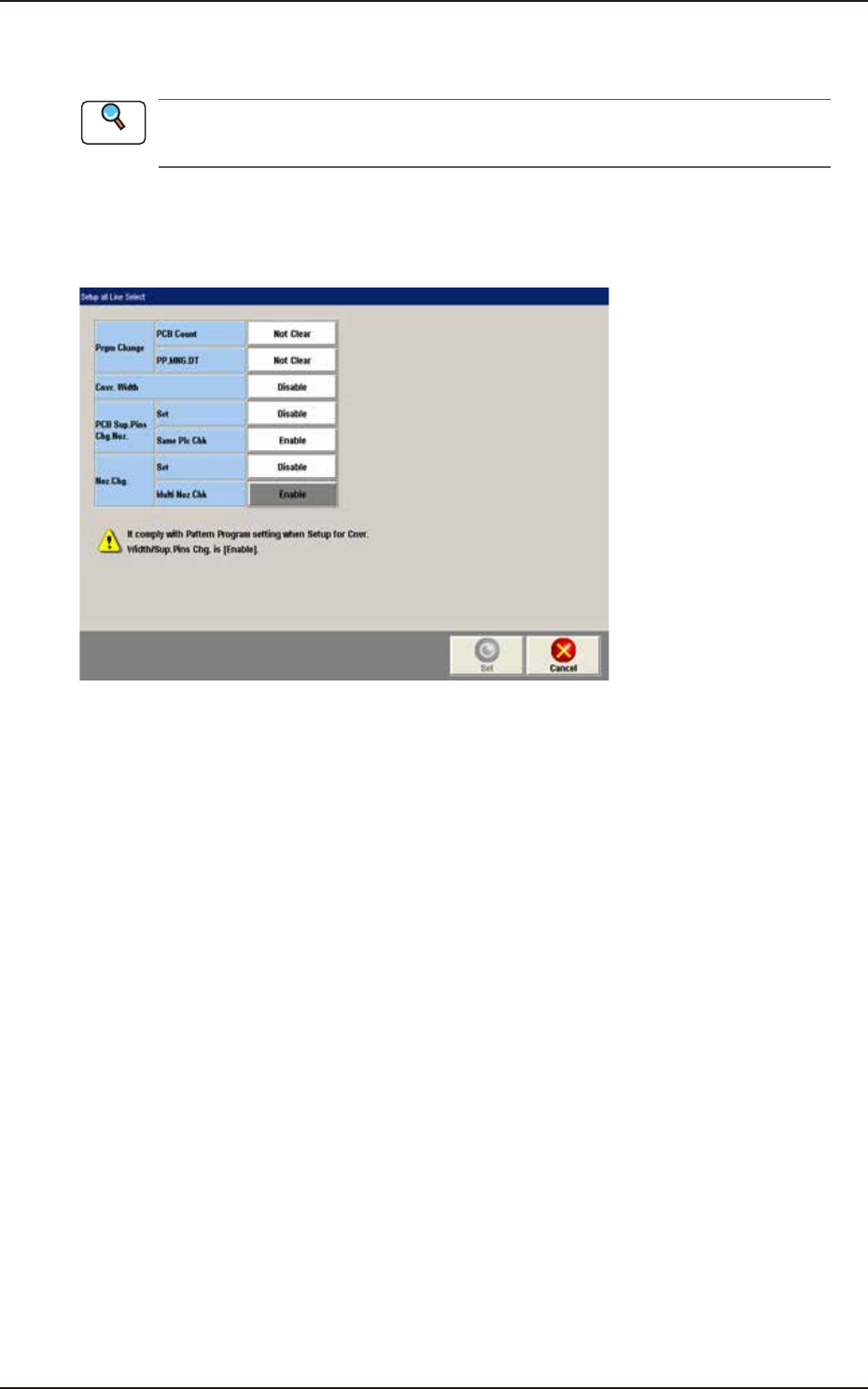
[6] [Setup all Line Select] Button
Using this button, the setup setting in the pattern program change is performed. Whether or not the
conveyor width, support pin or nozzle is changed, is set.
F2F5A
►
Prgm Change
PCB Count : Whether or not the number of PCBs to be produced is cleared, is set in this
selection box.
PP.M NG.DT : Whether of not the pattern program management data is cleared, is set in this
selection box.
►
Cnvr.Width
Whether or not the conveyor width is setup, is set in this selection box.
►
PCB Sup.Pins Chg.Noz.
Whether or not the support pins are changed automatically, is set in this selection box.
• Set
Select “Disable”, “Enable” or “Store” for the automatic exchange of support pins when changing
program.
Disable : The support pins are not changed automatically when changing program.
Enable : The support pins are changed automatically when changing program.
Storage : The support pins are stored when changing program.
• Same Plc Chk
Select “Disable” or “Enable” for the support pin arrangement check if the arrangement of the
support pins when changing program is same as the previous one.
Enable : The support pin arrangement check is performed if the arrangement of the
support pins when changing program is same as the previous one.
Disable : The support pin arrangement check is not performed if the arrangement of the
support pins when changing program is same as the previous one.
Reference