EUKYX-199-2100_G5S2_Instruction_Vol2_E.pdf - 第277页
EUKYX 6-40 199-2100 7.3 "COMP RCG" T est Window [ 6 ] [Delete ] Button When this button is pressed, the component ID sel ec ted in [3] i s deleted. [ 7 ] [Add t o Comp ID] Butto n When this button is pressed, t…
EUKYX
6-39199-2100
7.3 "COMP RCG" Test Window
7.3.1 "Select from list" Tab Sheet
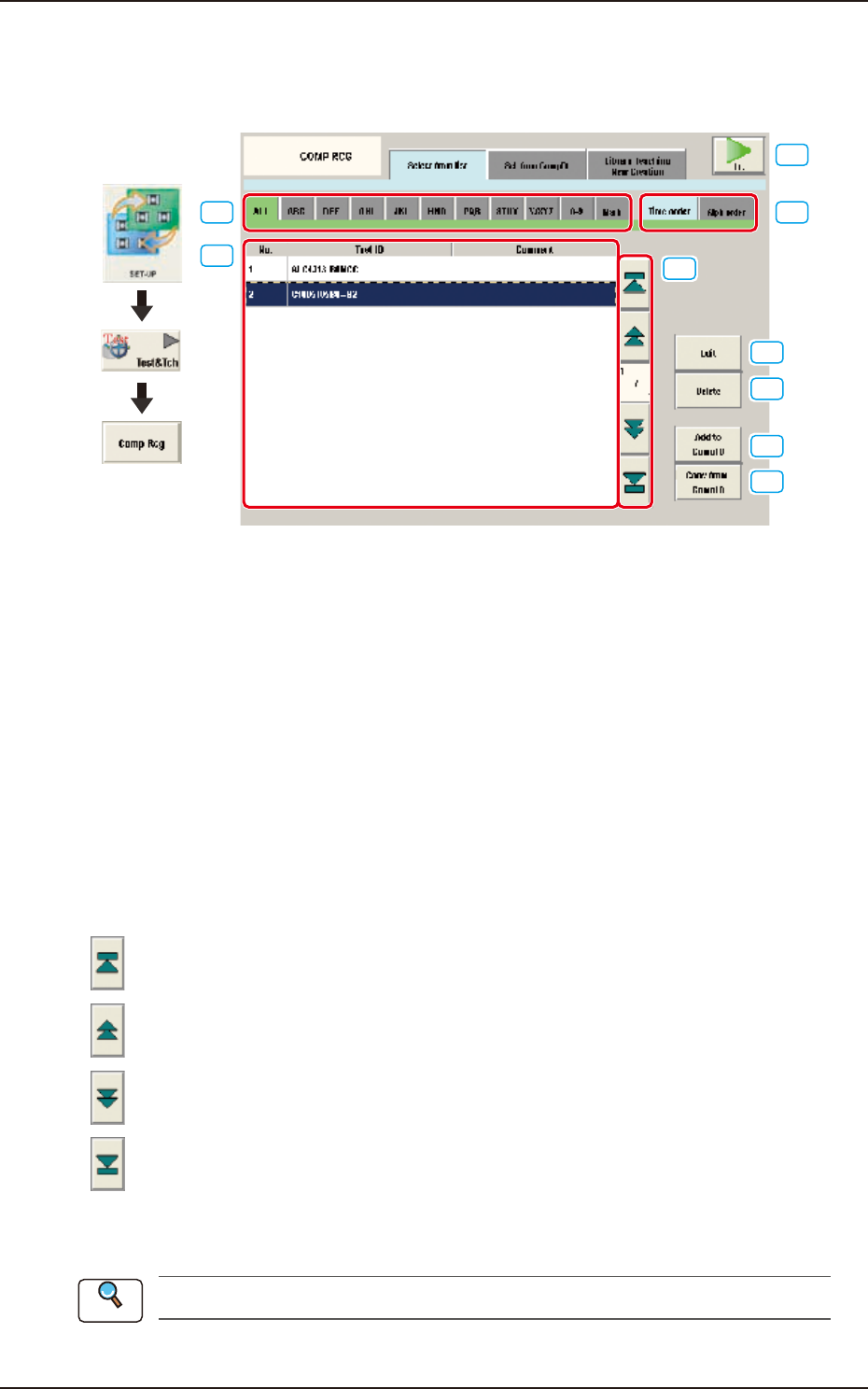
When the [Select from list] tab is pressed on the "COMP RCG" test window, the following tab sheet
appears.
[1]
[3]
[2]
[4]
[5]
[6]
[7]
[8]
[9]Graphic
Development
F2F45
[1] Test ID Selection Tabs
ALL : All the test IDs are displayed.
A to Z : The test IDs with an alphabetical first character are displayed.
0 to 9 : The test IDs with a numerical first character are displayed.
Mark : The test IDs with a symbolic first character are displayed.
[2] Test ID Display Change Tabs
Using these tabs, the indication in the Test ID List is changed.
Time order : The test IDs are displayed in the order of saving date starting from new one.
Alph order : The test IDs are displayed in alphabetical order.
[3] Component ID List
The test ID for which the component recognition test is performed, is selected in this pane.
[4] Page Change Button
[
] Button : When pressed, the top page is displayed.
[
] Button : When pressed, the previous page is displayed.
[
] Button : When pressed, the next page is displayed.
[
] Button : When pressed, the last page is displayed.
[5] [Edit] Button
When this button is pressed, the test ID selected in [3] is edited.
Refer to “Chapter 3 Component Library” for the editing procedure.
Reference
EUKYX
6-40199-2100
7.3 "COMP RCG" Test Window
[6] [Delete] Button
When this button is pressed, the component ID selected in [3] is deleted.
[7] [Add to Comp ID] Button
When this button is pressed, the test ID edited in [5] is registered in the component ID list.
[8] [Copy from Comp ID] Button
When this button is pressed, the component ID is copied and inserted in the Test ID list.
[9] [Fr.] Button
When this button is pressed, the component recognition test for the test ID selected in [3] is
performed.
Refer to “7.3.4 “Component Recognition Test Execution” Window” for the editing procedure.
Reference
EUKYX
6-41199-2100
7.3 "COMP RCG" Test Window
7.3.2 "Sel. from CompDt" Tab Sheet
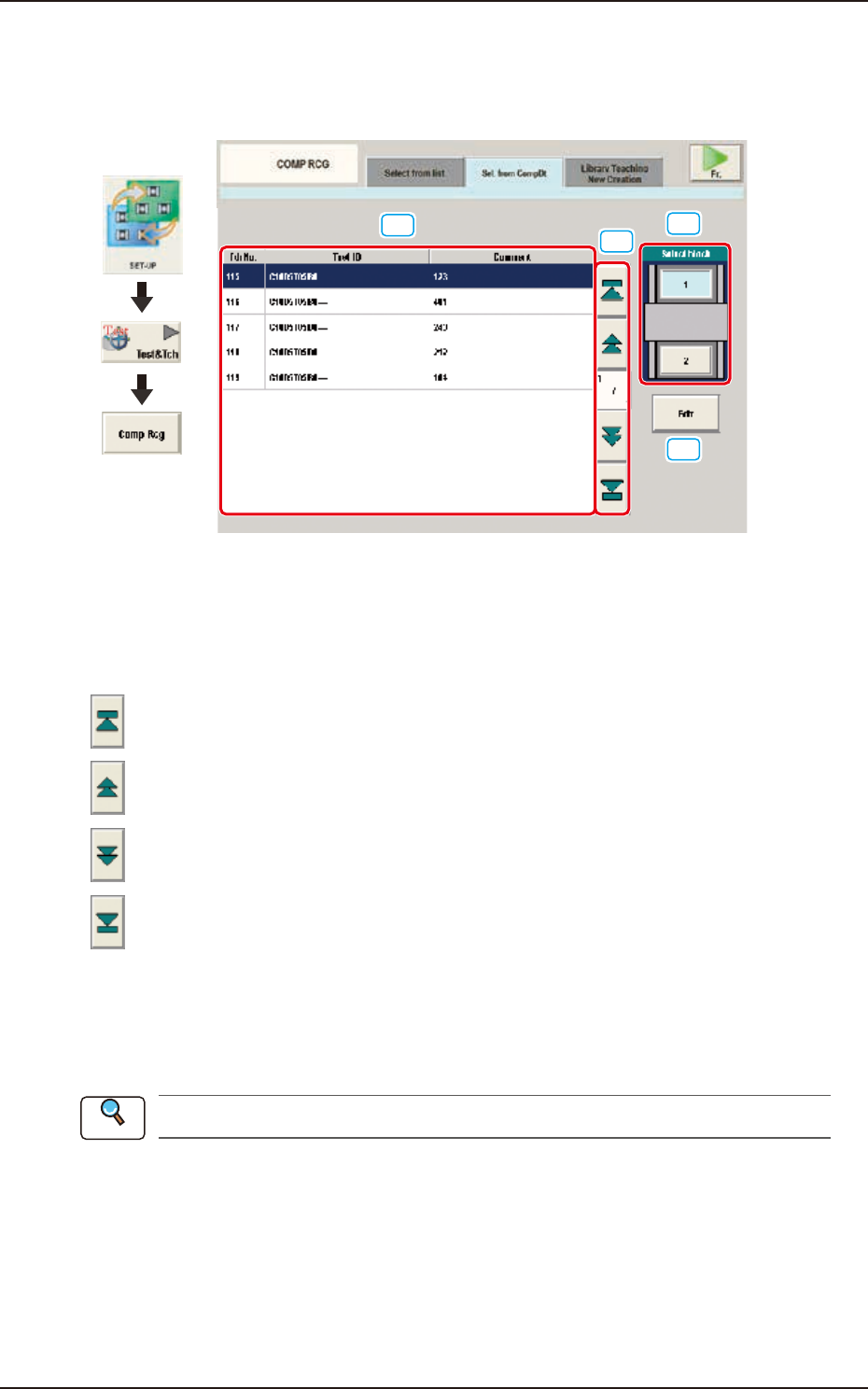
When the [Sel. from CompDt] tab is pressed in the "COMP RCG" test window, the following tab
sheet appears.
[1]
[2]
[3]
[4]
Graphic
Development
F2F46
[1] Test ID Selection Tabs
The corresponding tab sheet enables the operator to display the test IDs registered for the block
selected in [3].
[2] Page Change Button
[
] Button : When pressed, the top page is displayed.
[
] Button : When pressed, the previous page is displayed.
[
] Button : When pressed, the next page is displayed.
[
] Button : When pressed, the last page is displayed.
[3] [Select block] Button
Using this button, the block is selected.
[4] [Edit] Button
When this button is pressed, the test ID selected in [1] is edited.
Refer to “Chapter 3 Component Library”, for the editing procedure.
Reference