EUKYX-199-2100_G5S2_Instruction_Vol2_E.pdf - 第93页
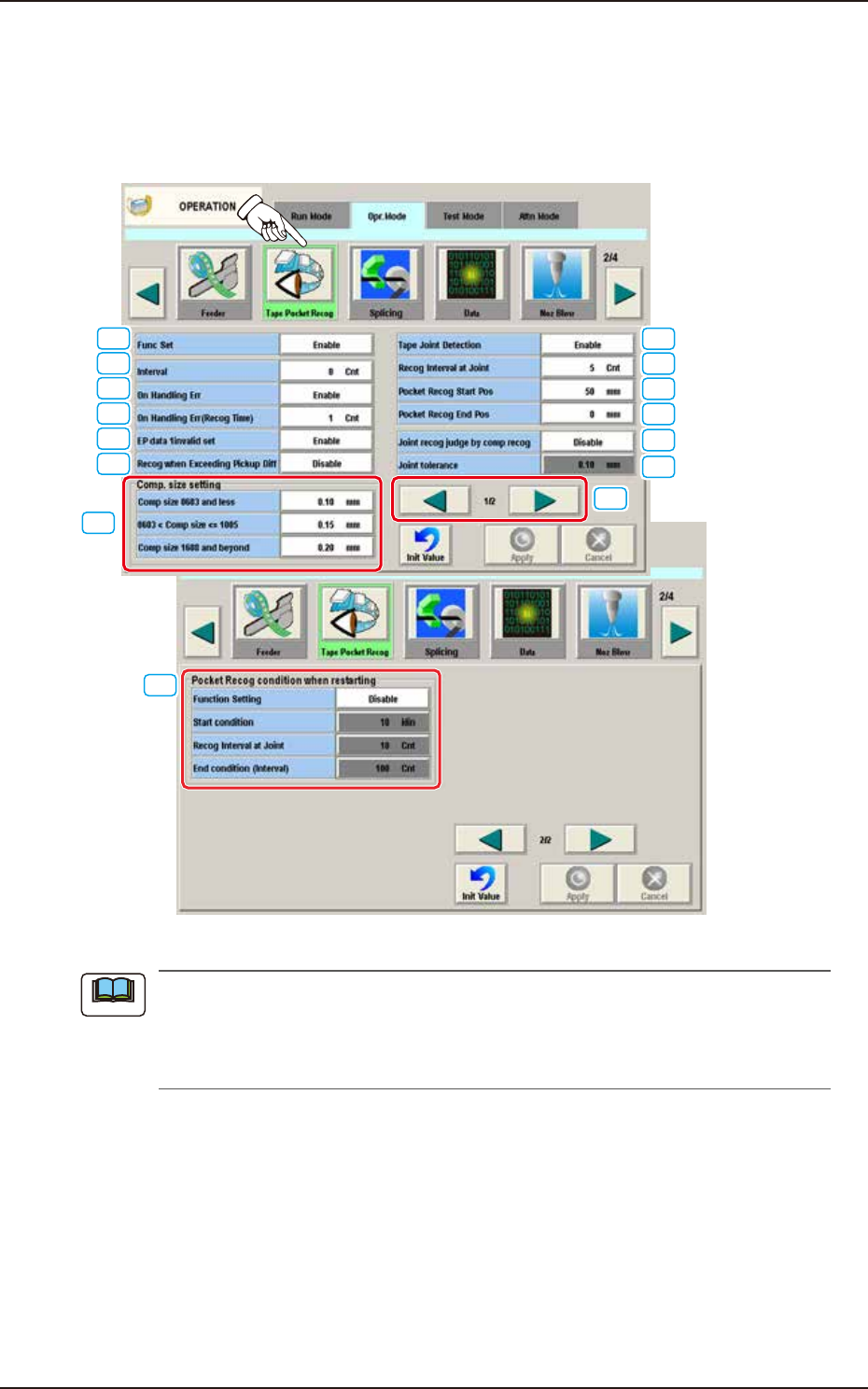
EUKYX 1-43 199-2100 [ 1 ] Func Set "Enab le" or "Di sable" can be selected to determine whether or not the aut omati c teachi ng function shou ld be use d for the feeder po ck et recogniti on. [Disabl…
EUKYX
1-42199-2100
4.2.7 Tape Pocket Recog
When the [Tape Pocket Recog] button is pressed on the "Operation Mode" tab sheet, the following
window appears.
This function recognizes the pocket edge section, finds the pocket center and feedbacks the result
to the feeder offset (B) value.
[15]
[6]
[2]
[3]
[4]
[5]
[8]
[9]
[10]
[11]
[7]
[1]
[12]
[13]
[14]
F2A33A
(a) This function can be used for the components (size: 2012 or less) packaged in a paper
tape.
(b) In the case that the actual component size is out of the range of ±25% of the component
size set in the component library, the "Machine Information" window appears.
Note
4.2 "Opr.Mode" Tab Sheet
EUKYX
1-43199-2100
[1] Func Set
"Enable" or "Disable" can be selected to determine whether or not the automatic teaching
function should be used for the feeder pocket recognition.
[Disable] Button
Select this button not to use the automatic teaching function for the feeder pocket
recognition.
[Enable] Button
Select this button to use the automatic teaching function for the feeder pocket recognition.
When the [Enable] button is selected for "Func Set" (automatic teaching of feeder pocket
recognition) in the "Tape Pocket Recog" group box, the following buttons become available.
[2] Interval
When this button is pressed, the "Interval" window opens, enabling you to specify the number of
automatic teaching operations to be performed periodically according to the number of tape feeding
times for the feeder pocket recognition.
[3] On Handling Err
One of the following buttons can be selected to determine whether or not an automatic
teaching operation should be performed on the feeder pocket recognition after a pickup
error has occurred.
Disable
Select this button not to perform an automatic teaching operation on the feeder pocket
recognition after a pickup error has occurred.
Enable
Select this button to perform an automatic teaching operation on the feeder pocket
recognition after a pickup error has occurred.
This function is not available unless the "On Handling Err (Recog Time)" is set to "1" or more.
[4] On Handling Err (Recog Time)
Set the feeder pocket recognition times when the "On Handling Err" has been set to "Enable".
[5] EP Data 1 invalid set
Enable
When the number of handling errors reaches the value set in [4], the production is stopped.
Disable
The EP data 1 count becomes invalid and the pick-up operation is continued without
stopping the production.
[6] Recog when Exceeding Pickup Diff
Enable
When this button is selected, the component recognition determination is performed. When
the component pickup difference is larger than the value set in the “[7] Comp size setting”,
the pocket recognition is performed.
Disable
When this button is selected, the component recognition determination is not performed.
Note
Note
4.2 "Opr.Mode" Tab Sheet

EUKYX
1-44199-2100
[7] "Comp. size setting" Group Box
The allowance of the component pickup difference in above "[6] Comp. Recog. Detn" is set
in this text box.
Comp size 0603 and less
The component size smaller than that of 0603 component, is set in this text box.
0603 < Comp size <= 1005
The component size larger than that of 0603 component and smaller than that of 1005
component, is set in this text box.
Comp size 1608 and beyond
The component size larger than that of 1608 component, is set in this test box.
[8] Tape Joint Detection
One of the following buttons can be selected to determine whether or not an automatic
teaching operation should be performed on the feeder pocket recognition after a tape joint
line has been detected.
Disable
Select this button not to perform an automatic teaching operation on the feeder pocket
recognition after a tape joint line has been detected.
Enable
Select this button to perform an automatic teaching operation on the feeder pocket
recognition after a tape joint line has been detected.
[9] Recog Interval at Joint
When the operation is re-started, the interval time is set up in this data box in the case that
the feeder pocket recognition automatic teaching is performed periodically, based on the
tape feeding times.
[10] Pocket Recog Start Pos
The pocket recognition starting position is setup in this data box.
[11] Pocket Recog End Pos
The pocket recognition ending position is setup in this data box.
[12] Joint recog judge by comp recog
“Enable” or “Disable” is selected for the spliced tape joint detection function in this
selection box.
Disable
It is selected when the joint detection is not used.
Enable
It is selected when the joint detection is to be used.
[13] Joint tolerance
The joint allowance is setup in this data box, in the case of using the “Joint Recognition Judgment”
function.
[14] [ ]/[ ] Page change buttons
Changes the page of “Tape Pocket Recog“ window.
4.2 "Opr.Mode" Tab Sheet