EUKYX-199-2100_G5S2_Instruction_Vol2_E.pdf - 第96页
EUKYX 1-46 199-2100 4.2 . 8 Splici ng When the [ Spl ic ing] but ton is pressed on the "O pr .M ode" tab she et, the fol low in g windo w appears. [3] [2] [1] [4] F2A35A [ 1 ] Splicing t ape l ength The spl ici…

EUKYX
1-45199-2100
[15] Pocket recog condition when restarting
The conditions for pocket recognition when the machine operation is re-stared, are setup in
this section.
Function Setting
"Enable" or "Disable" is selected for the pocket recognition condition in the re-start
operation, in this selection box.
Start condition
The time period from the machine stop (standby, stop or pause) mode to machine operation
start mode, is setup in this data box.
Recog Interval at Joint
The intervals for the automatic teaching to be performed periodically for the feeder pocket
recognition based on the number of tape feeding times when the machine operation is
re-started, are setup in this data box.
End condition (Interval)
The number of tape feeding times until the pocket recognition end, is setup in this data box.
4.2 "Opr.Mode" Tab Sheet
EUKYX
1-46199-2100
4.2.8 Splicing
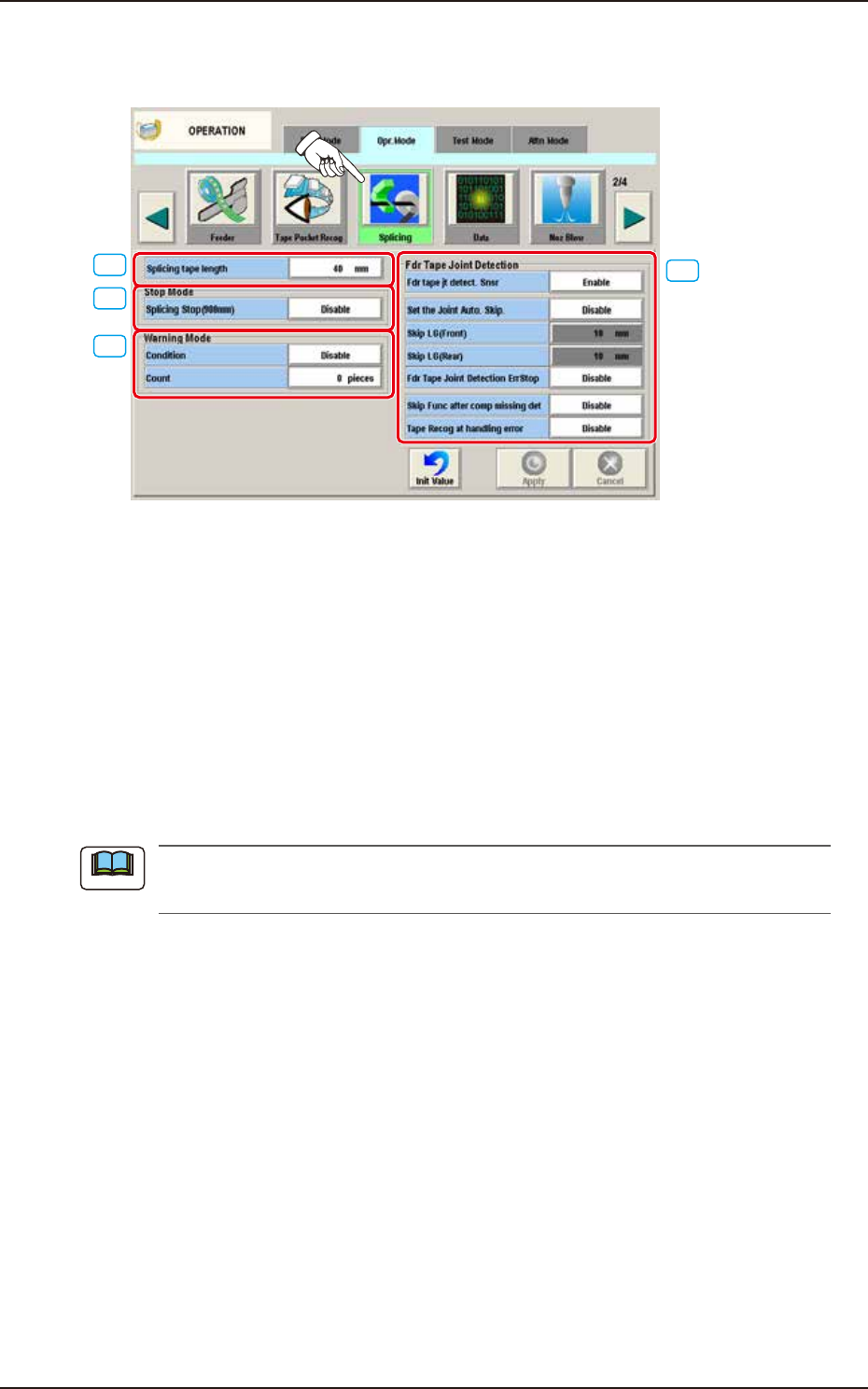
When the [Splicing] button is pressed on the "Opr.Mode" tab sheet, the following window appears.
[3]
[2]
[1]
[4]
F2A35A
[1] Splicing tape length
The splicing tape length is set in this text box.
[2] "Stop Mode" Group Box
Splicing Stop (900 mm)
The [Enable] or the [Disable] button can be selected to determine whether or not the
machine should be stopped for tape splicing required when the length of the remaining tape
becomes shorter than 900 mm.
[3] “Warning Mode “ Group Box
The following conditions can be added to the criterion (Length of Remaining Tape: 900 mm) to set
the time to issue a warning of splicing need.
It cannot be specified to issue a splicing warning message with the length of the remaining
tape is shorter than 900 mm.
►
900 mm + Condition
The condition of displaying splicing warning is selected from the following items.
Tape Length
The condition for displaying the alarm for splicing, is set based on the remaining tape length.
PCB Count
The condition for displaying the alarm for splicing, is set based on the number of producible PCBs.
►
[Count] Button
When this button is pressed, it becomes possible to set the number of PCBs (PCBs that can be
produced) as a condition to issue a splicing warning message.
Note
4.2 "Opr.Mode" Tab Sheet

EUKYX
1-47199-2100
[4] "Fdr Tape Joint Detection" Group Box
Fdr tape jt detect. Snsr
"Enable" or "Disable" is selected for the joint seam detection sensor.
Set the joint Auto. Skip.
"Enable" or "Disable" is selected for the "Set the joint Auto. Skip".
Skip LG (Front)
The skip start position from the joint is set.
Skip LG (Rear)
The skip end position from the joint is set.
Fdr Tape Joint Detection ErrStop
When an error (E3) is caused in the tape feeder, the machine is stopped.
Refer to "SIGMA-G4/G5 Tape Feeder Instruction Manual" for the derails of the error codes for
the tape feeder.
Skip Func after comp missing det
"Enable" or "Disable" for the Skip after "No Component" detected is selected.
Tape Recog at handling error
“Enable” or “Disable” is selected for “Tape Recog at handling error”.
Reference
4.2 "Opr.Mode" Tab Sheet