m220_383_02_process_manual工艺手册.pdf.pdf - 第23页
PROCESS SETUP AND ACCEPTANCE P ROCESS M ANU AL As the DPC has been designed to reme mber the last setti ngs until they are changed, it is vital to verify the settings in the step one branches to. For example, in ste p 3 …

PROCESS SETUP AND ACCEPTANCE
P
ROCESS MANUAL
3.3 Alarm handling with Branch and Abort commands
3.3.1 Introduction
The Tempress Systems, Inc. process controller, DPC, has some special features that allow alarm
conditions to be handled automatically.
A process recipe is made of steps, and within one step several commands can be programmed.
Alarm conditions can be set, and when these conditions are compromised a very specific alarm message is
generated. It is up to the process engineer to decide whether or not action is required on the specific alarm
message.
Three options are available to the process engineer:
1) do nothing, the process recipe continues as programmed
2) branch to another step within the process recipe
3) abort the process recipe, which brings the tube back to step 0 of that process recipe.
The Branch on Alarm command is issued after 3 seconds of consecutive alarm condition and jumps to the
designated step within the same process recipe.
The Abort on Alarm command is issued after 30 seconds of consecutive alarm condition and aborts the
process recipe, either directly into step 0 of that process recipe, or via an assigned Abort Recipe.
3.3.2
Do nothing with an alarms
Some types of alarm conditions are not important enough to stop a running process. These alarms still
need to be fixed, though, and can be traced in long term history using the Tempress Systems, Inc. host
computer system TSC-2 and short term history using the touchscreen alarm status screen.
An example of this type of alarm is a temperature limit alarm during ramping, or a bubbler level alarm
while the bubbler is not used in this particular process recipe.
3.3.3
Handling alarms with the Branch command
Any kind of alarm can be handled by the Branch command. It is often used to finish a process recipe
trying to save valuable process wafers.
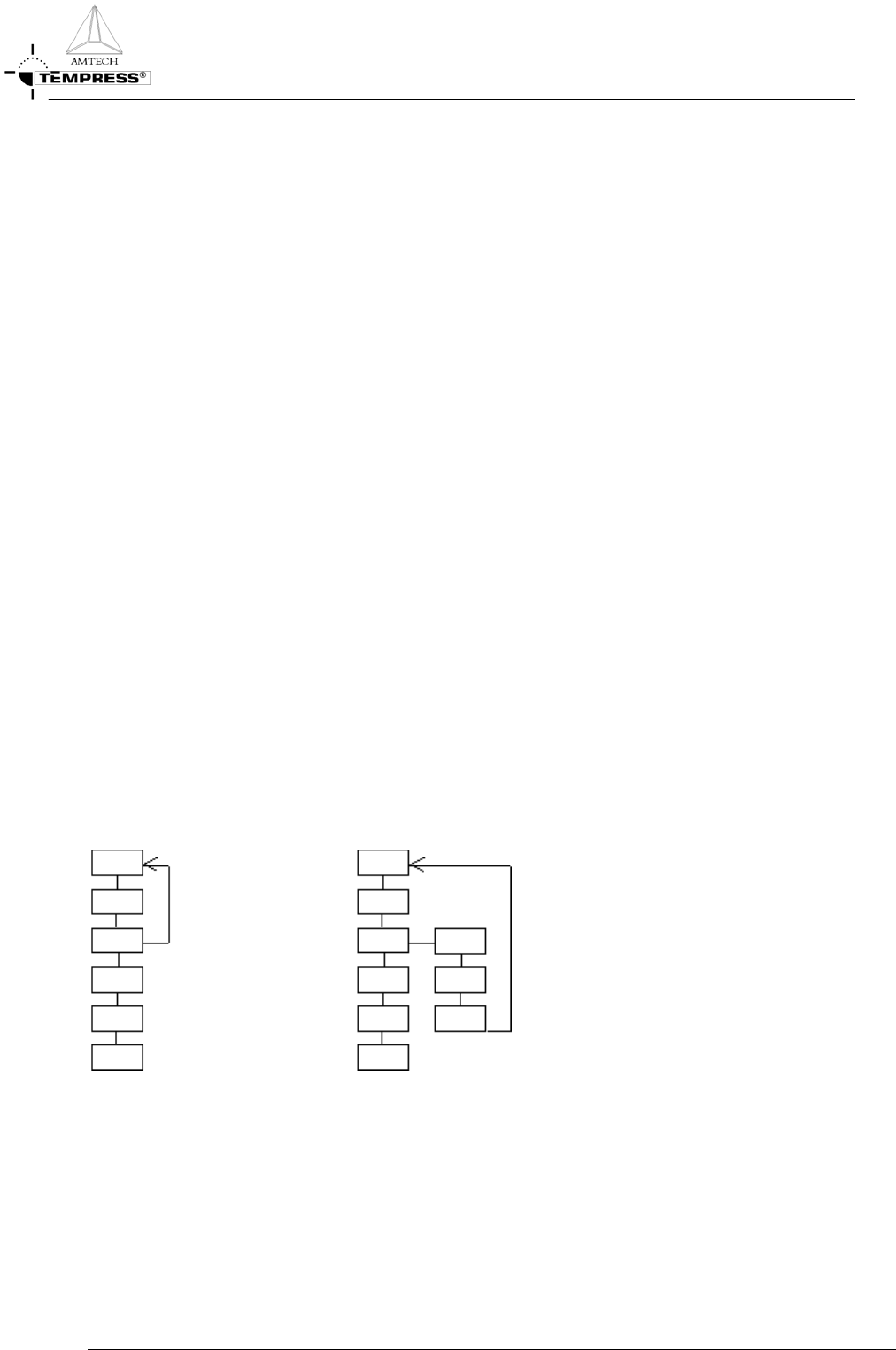
Figure 3-1: Branch command jumps to a specified step number
3.3-1
PROCESS SETUP AND ACCEPTANCE
P
ROCESS MANUAL
As the DPC has been designed to remember the last settings until they are changed, it is vital to verify the
settings in the step one branches to.
For example, in step 3 of the schematic above a Branch on Alarm y has been programmed. If this Alarm y
occurs for more than 3 consecutive seconds then the DPC will branch to step 5. While branching it
bypasses any changes programmed in step 4.
3.3.4
Handling alarms with the Abort command
An Abort command can be issued in two ways:
1) programmed in a process recipe in a specific step
2) manually by an operator at any time
If any Abort command is issued the DPC will stop the running process recipe. The DPC will return to
step 0 of the process recipe, either directly or via an Abort Recipe. An Abort recipe also contains steps
and is used to bring the tube in a safe condition.
Note: An Abort recipe must be programmed such that a tube is automatically brought to a SAFE
situation.
As step 0 of the process recipe is the target of an Abort command it should be programmed to contain a
safe condition. In some applications however, such as in a 24hr production environment, this is likely not
the case.
Therefore, the use of an Abort recipe must be applied as soon as in the process recipe potentially
dangerous situations occur when that process recipe is aborted and brought back to step 0.
3.3.4.1 Abort command in a specific step
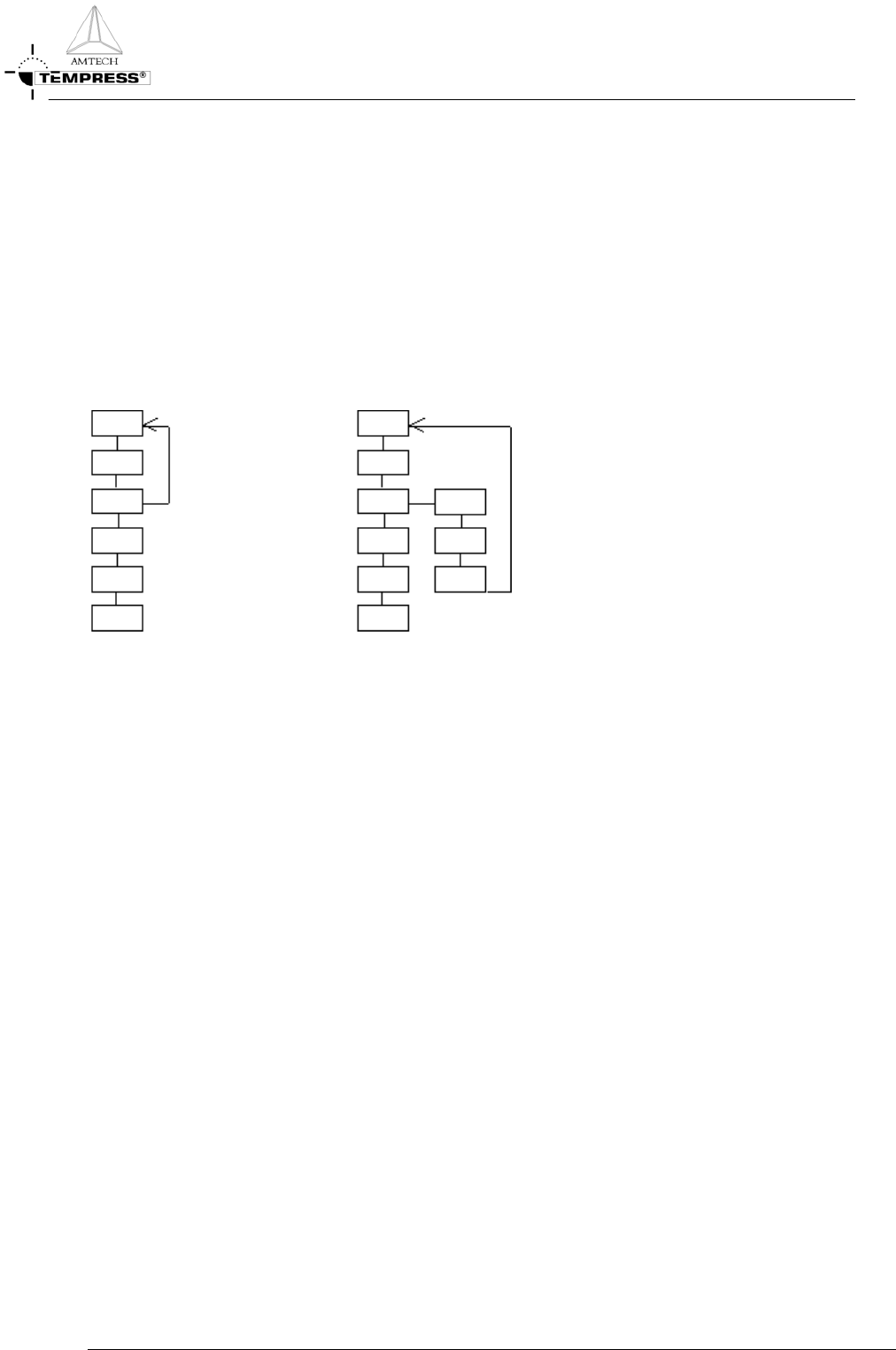
The programmed Abort command can be used similarly to the Branch on Alarm command. In fact, an
Abort command could be interpreted as a Branch on Alarm to Step 0 command.
Figure 3-2: Abort command initiated from a specific alarm condition without (left) and with (rightt) the use of an
Abort recipe
3.3-2
PROCESS SETUP AND ACCEPTANCE
P
ROCESS MANUAL
3.3.4.2 Manual abort command at any time
A manual Abort command can be issued at any time by an operator and should be used only if a potentially
dangerous or damaging situation is likely to occur that can only be prevented by aborting the running
process quickly.
Also, the manual Abort command is used to stop a process recipe with an endless loop.
Because the manual Abort command can be issued at any time, the use of an Abort recipe must be applied
as soon as in the process recipe potentially dangerous situations occur when that process recipe is aborted
and brought back to step 0.
Figure 3-3: An operator initiated Abort command without (left) and with (right) the use of an Abort recipe
3.3.5
Recipe example: LPCVD Nitride abort recipe
1 00 EVACUATE
2 Message ABORTED !!! [16]. Sonalert alarm No
3 Time: 000:15:00 (hr:min:sec) Variable Command: No
4 Normal recipe 00 Zone1 800.0 °C Slope 10.00 °C/min Zone2 800.0 °C Slope 10.00 °C/min
Zone3 800.0 °C Slope 10.00 °C/min Zone4 800.0 °C Slope 10.00 °C/min Zone5 800.0 °C Slope
10.00 °C/min , profile table A
5 Boat to 2000.0 mm at 300.0 mm/min with oscillation speed of 0.0 mm/min. Variable Command:
No
6 Gas N2 [1] at 0.00 [SLM ] Variable Command: No
7 Gas DCS 1 [2] at 0.0 [SCCM] Variable Command: No
8 Gas DCS 2 [3] at 0.0 [SCCM] Variable Command: No
9 Gas NH3 [4] at 0 [SCCM] Variable Command: No
10 Gas PRESSURE [8] at 0 [MTOR] Variable Command: No
11 Digital out ,,,,,,,WATERVLV[8] = ON Variable Command: No
12 Digital out N2 PURGE[9] = OFF,N2PROCES[10] = ON,PROCESS[11] =
ON,EVACDCS1[12] = OFF,EVACDCS2[13] = OFF,EVACNH3[14] = OFF,SOFTSTRT[15] =
ON,MAINVAC[16] = ON Variable Command: No
13 Alarm Limit Setting for All Analog Output Channel at 0 %
14 Alarm on digital in PRESS N2[1] = ON,PRESSAIR[2] = ON,DOORCLSD[3] =
ON,VACFAIL[4] = ON,WATRCOOL[5] = ON,,TEMP SCR[7] = ON,EXCESS[8] = ON
15 Alarm on digital in FANCONTR[9] = ON,,,OPERATE[12] = ON,WARNING[13] =
ON,FAILURE[14] = ON,,
16 01 PURGE
3.3-3