00198622-04_IM_WES7_WIN10_EN-DE - 第20页
WES7 / Win10 - Inst allation Manual 09/2020 Edition 20 Un der Windows 10 IoT , you must w ait for the followin g window (takes a few seco nds ): Figure 4-9:Confirming Registry se ttings Win10 ► Click OK . The following w…
WES7 / Win10 - Installation Manual 09/2020 Edition
19
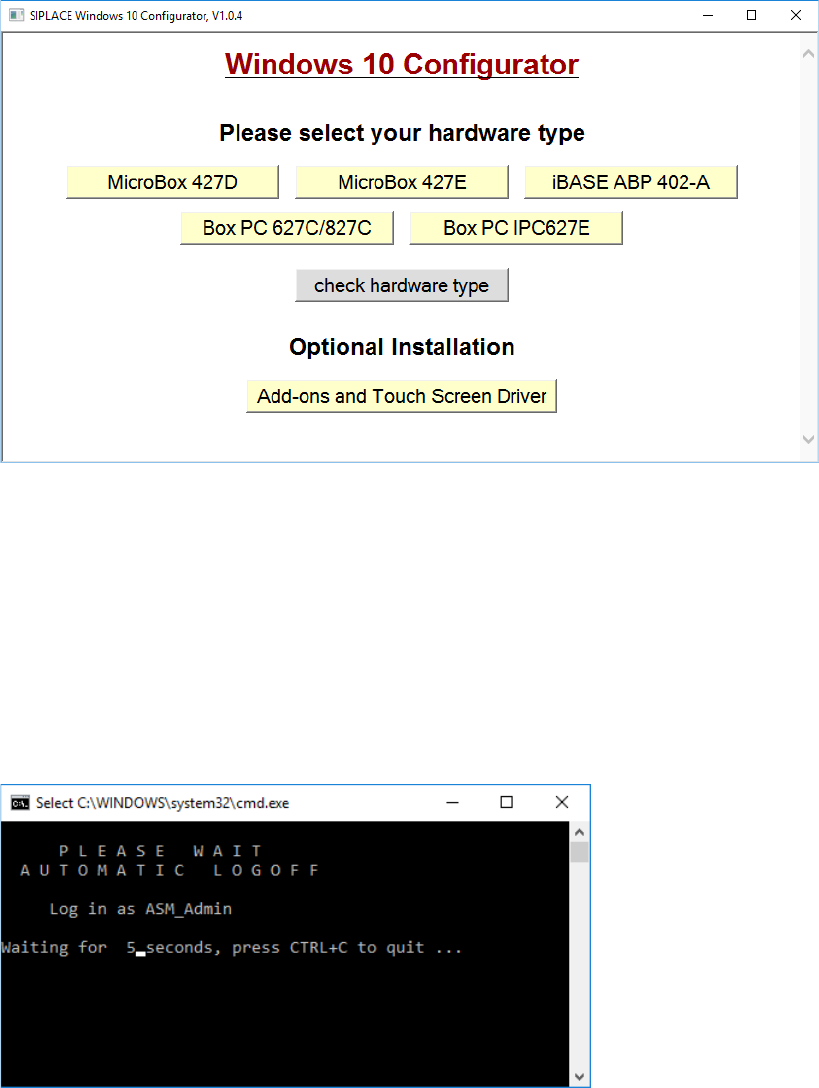
The following window is displayed for Win10:
Figure 4-7: Window "SIPLACE Windows 10 Configurator"
► Click on the required hardware to select it and follow the further instructions displayed in the
succeeding windows.
► If necessary, enter the station IP-address for SIPLACE Pro LAN (required for a station
computer only).
The SIPLACE settings are automatically performed and the computer reboots.
After the reboot, you are logged in as Operator (station computer) or the Windows login window is
displayed (Coplan / BulkFeeder X computer).
At the station computer under Windows Embedded Standard 7, you will be automatically logged
out after a few seconds and prompted to log in as ASM_Admin.
Figure 4-8: Automatic logoff WES7
WES7 / Win10 - Installation Manual 09/2020 Edition
20
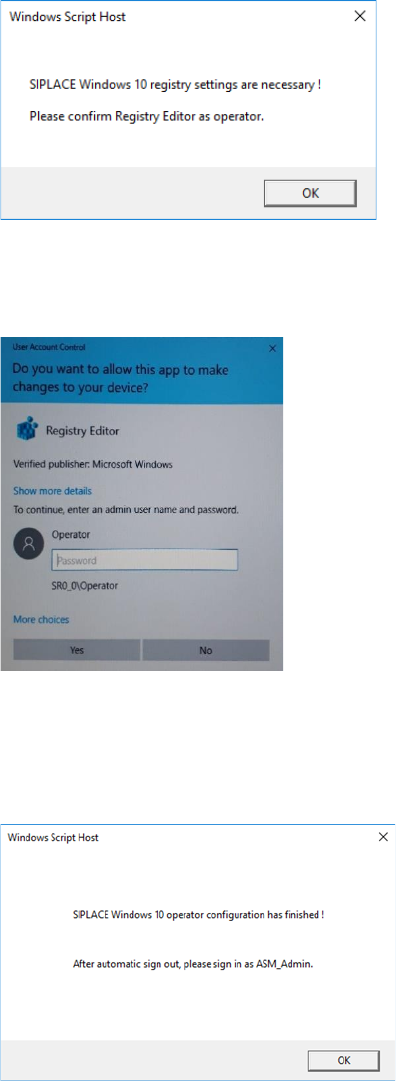
Under Windows 10 IoT, you must wait for the following window (takes a few seconds):
Figure 4-9:Confirming Registry settings Win10
► Click OK.
The following window is displayed:
Figure 4-10: User Account Control Win10
► Enter the operator password.
► Click Yes.
The following window is displayed:
Figure 4-11: Operator configuration Win10 finished
► Click OK.
► Log in as ASM_Admin after the automatic sign out.
WES7 / Win10 - Installation Manual 09/2020 Edition
21
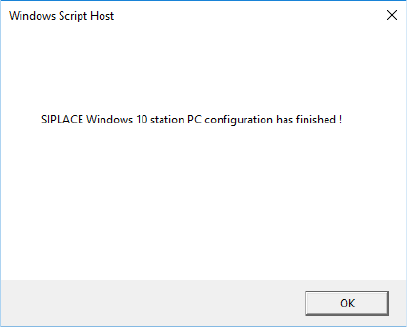
As soon as the following window is displayed, the configuration has finished, and you can close the
window.
Figure 4-12: Operating system configuration Win10 finished
► If the machine is equipped with a Multitouch Monitor or no touch screen is used (Coplan /
BulkFeeder X computer), remove the software CD from the DVD drive or release the USB stick
and remove it from the USB interface.
► If a touch screen driver must be installed, follow the instructions in chapter 5.
The installation and configuration of the Windows operating system (WES7, Win10) is completed
now.
If you have installed the Windows operating system on a station computer:
► Install the SIPLACE machine software as described in the installation manual for the station
software.
If you have installed the Windows operating system on a Coplan / BulkFeeder X computer:
► Follow the instructions in the respective Assembly Instruction for the 3D Coplanarity Module,
item nos.: [00195344-xx] (for X-series), [00196842-xx] (for SX1/SX2) and [00197395-xx] (for
X-series S) or the instructions in the Operating Manual for BulkFeeder X, item no. [00198045-
xx] if you install the Windows operating system on a Coplan or BulkFeeder X computer.
► Install the SIPLACE machine software as described in the installation manual for the station
software.