00198365-03_UM_JTF-ML2_TX12_V1-V2_EN - 第66页
4 Setting up and commissioning 4.3 Configuration of JEDEC tray feeders in SIPLACE Pro 66 User Manual SIPLACE TX V1/V2 Series JEDEC Tray Feeder (JTF-ML2) 11/2019 4.3.5.3 Configuring the JEDEC Tray Feeder on the Table Ther…
4 Setting up and commissioning
4.3 Configuration of JEDEC tray feeders in SIPLACE Pro
User Manual SIPLACE TX V1/V2 Series JEDEC Tray Feeder (JTF-ML2) 11/2019 65
4.3.5 Configuration of the setup – Setup Tree View
4.3.5.1 Head Configurations on the SIPLACE TX 1 and TX2
The SIPLACE JTF-ML/ML2 feeder may only be configured with the following heads:
●
Location 1: SIPLACE CPP_H or TwinHead
●
Location 2: SIPLACE CPP_H
You can perform the table configuration if one of these heads is configured.
4.3.5.2 Table Configuration
After you have configured one of the heads mentioned above, select the necessary table type that
is the prerequisite for setting up a JEDEC tray feeder:
●
JTF-ML Table 40X
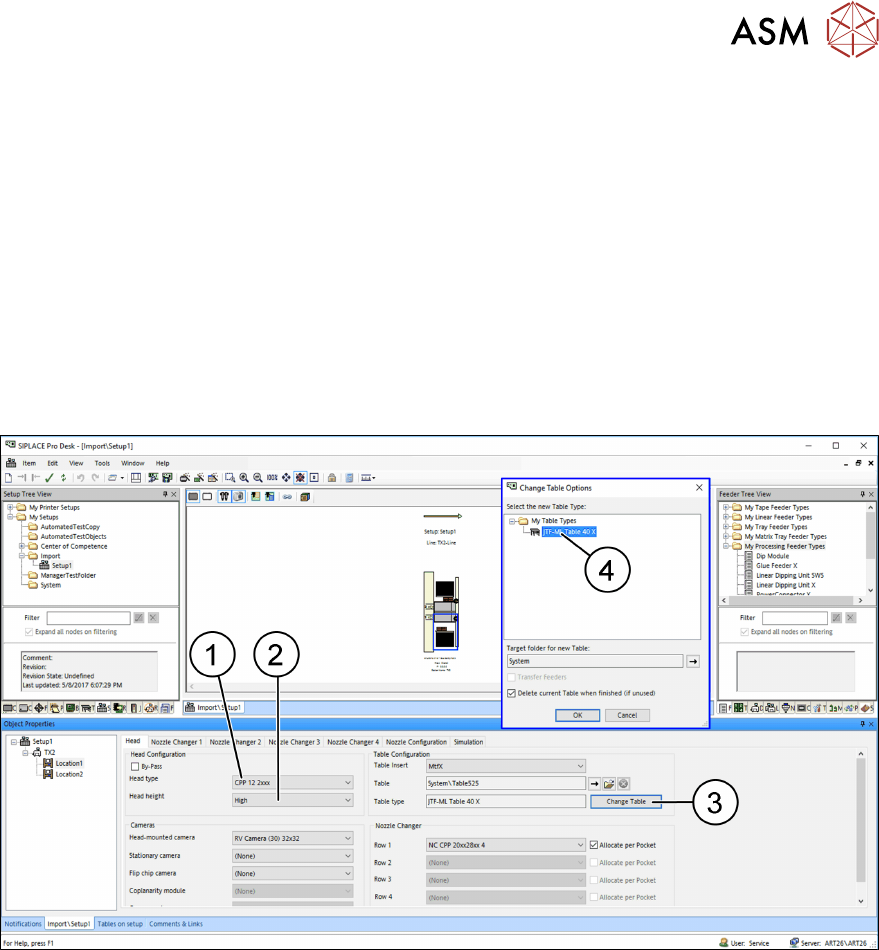
Fig.114: SIPLACE Pro table configurations (example of SIPLACE TX2)
Example:
1. Head type: Choose "CPP 12 2xxx".
2. Head height: Due to selection of CPP 12 2xxx, select High.
3. Table type: Click the button Change Table.
4. Choose the table type and confirm your selection with OK.
– JTF-ML Table 40X
After the table type has been selected, the options in the Camera and Nozzle Changer fields are
automatically disabled. For design reasons, these configuration options are no longer available
after the table type has been selected.
All cameras and nozzle changer configurations that are selectable are displayed as active.
4 Setting up and commissioning
4.3 Configuration of JEDEC tray feeders in SIPLACE Pro
66 User Manual SIPLACE TX V1/V2 Series JEDEC Tray Feeder (JTF-ML2) 11/2019
4.3.5.3 Configuring the JEDEC Tray Feeder on the Table
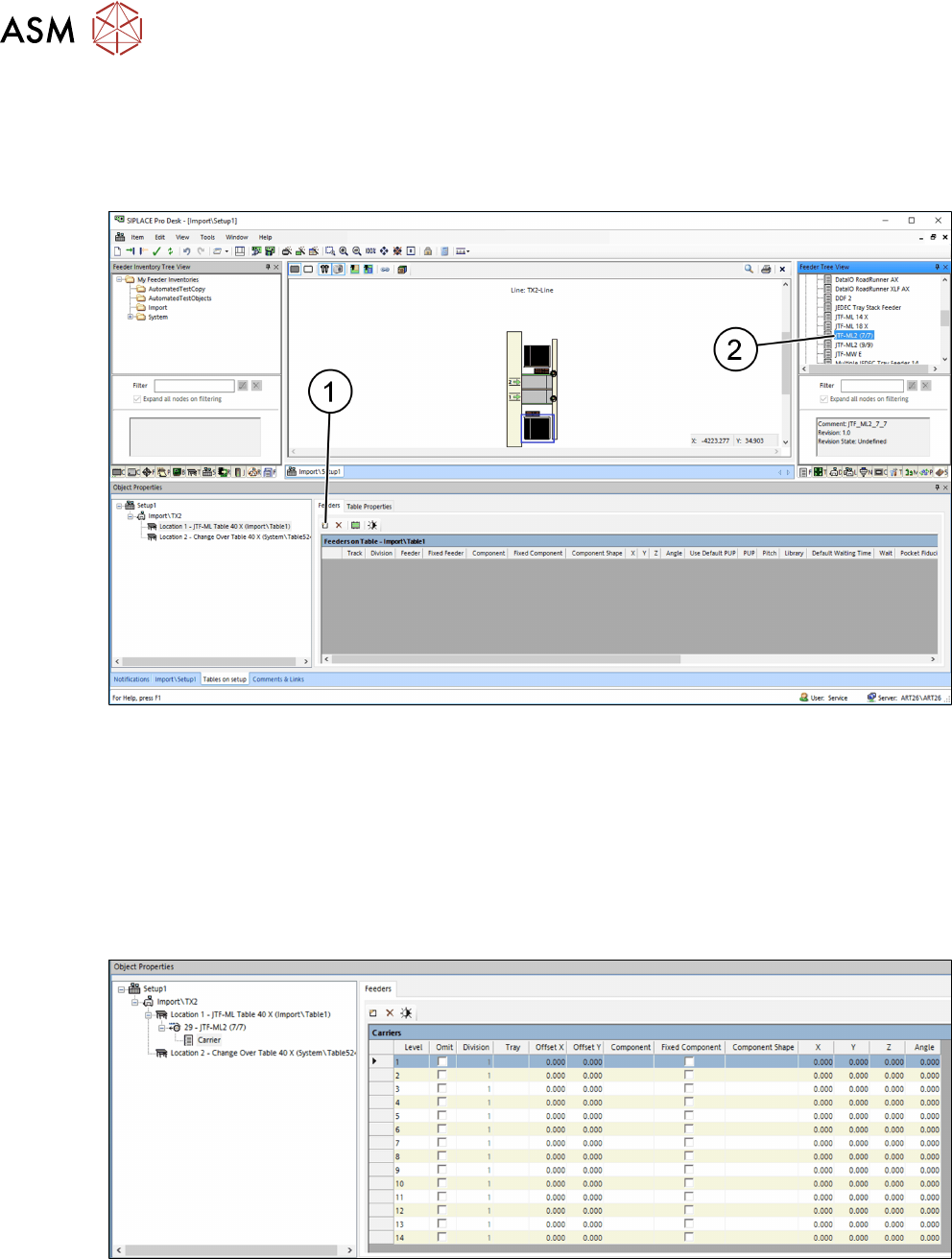
There are two ways to set up the JEDEC tray feeder on the table:
●
Manually dragging the JEDEC tray feeder onto the table (2).
●
By selecting the Insert a new item into the collection (1) menu option.
Fig.115: Configuring the JEDEC Tray Feeder (example of SIPLACETX2)
The JEDEC tray feeder is always set on the track that is allowed for the machine.
This track cannot be changed.
●
Track 29 to 40
JEDEC Tray Feeder – Carrier Level
If a SIPLACE JTF-ML2 (9/9) (for thin trays) was selected, "Carrier" will list the number of trays (18)
as well as their settings and their component occupancy.
Only 14 trays are displayed for a SIPLACE JTF-ML2 (7/7) (for thick trays).
Fig.116: Carrier Level
5 Tasks on the machine
5.1 Displays
User Manual SIPLACE TX V1/V2 Series JEDEC Tray Feeder (JTF-ML2) 11/2019 67
5 Tasks on the machine
This chapter contains a number of subjects that are intended to help you during your daily work on
a SIPLACE line. For example, you are provided with preventative measures that you can take to
minimize the down time on the machine, to obtain the highest possible level of efficiency for the
SIPLACE line during production.
5.1 Displays
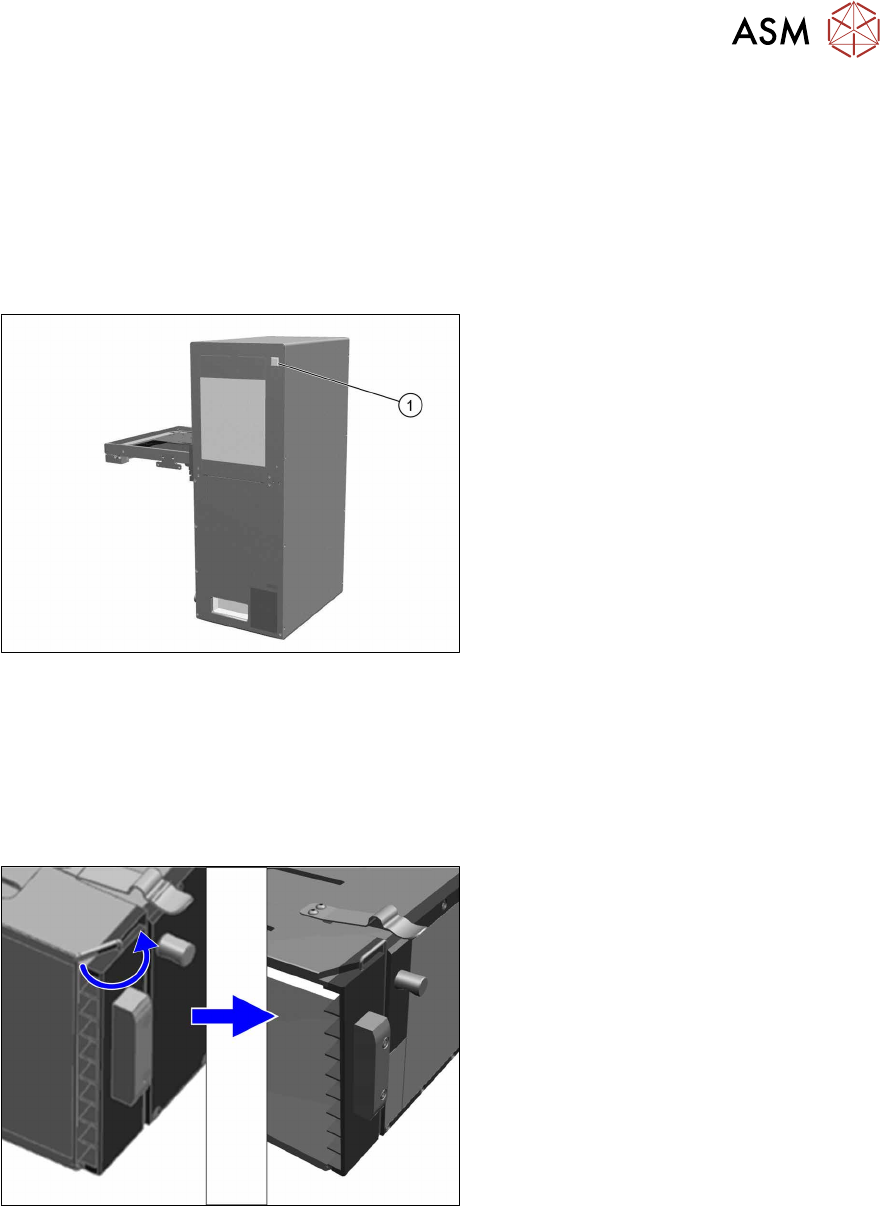
Fig.117: LED display
1. LED indicator
Green = Ready for operation
Red = Error
5.2 Task: Operating the feeder
5.2.1 Locking and unlocking the transportation lock
Unlock the transportation lock
Fig.118: Unlock the transportation lock
To unlock the transportation lock proceed as
follows:
► Slightly lift the hook and turn it side-
ways.