00198352-01_AI_Conveyor_Conversion_Kit_E-by-SIPLACE_EN - 第28页
4 Software Installation 4.3 SIPLACE Pro Machine and Line Configuration Setup Assembly Instructions E by SIPLACE Conveyor Conversion Kit 03/2017 28 Fig.23: Example consisting of three machines Step 4: ► Setup line config…
Assembly Instructions E by SIPLACE
Conveyor Conversion Kit 03/2017
4 Software Installation
4.3 SIPLACE Pro Machine and Line Configuration Setup
27
4.3 SIPLACE Pro Machine and Line Configuration Setup
After hardware conversion, SIRIO station software and Machine calibration proceed with machine
and line configuration on SIPLACE Pro:
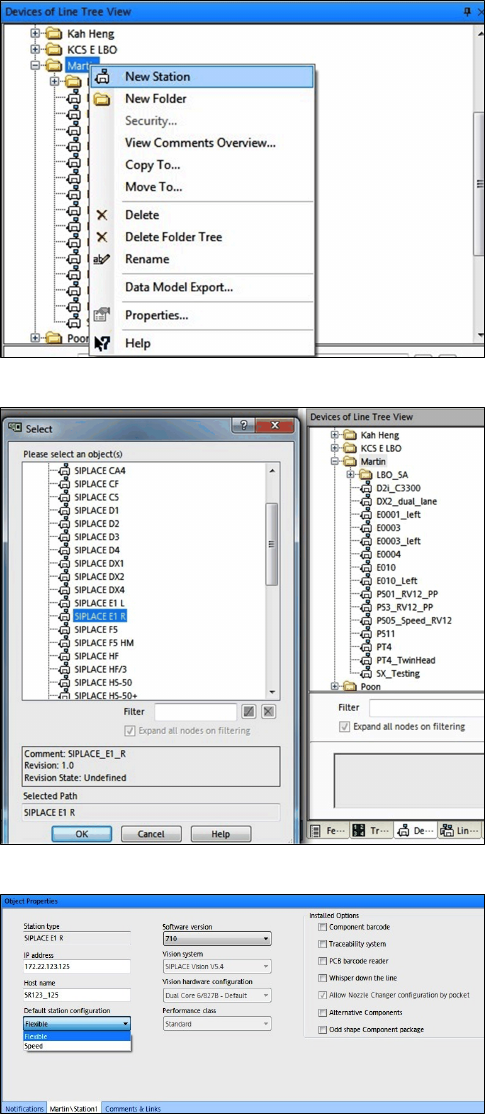
Fig.20: New Station
Step 1:
► Under station line tree view select New Station.
Fig.21: Select conveyor type
Step 2:
► Select SIPLACE E1 R for right fixed conveyor.
► Select SIPLACE E1 L for left fixed conveyor.
Fig.22: Object Properties
Step 3:
► Input the machine IP address, Host name.
Choose Default station configuration (Speed
or Flexible) and Software version.
4 Software Installation
4.3 SIPLACE Pro Machine and Line Configuration Setup
Assembly Instructions E by SIPLACE
Conveyor Conversion Kit 03/2017
28
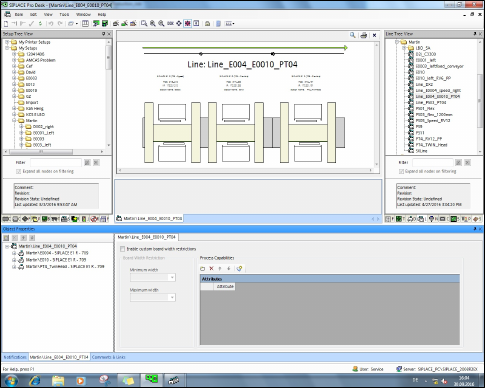
Fig.23: Example consisting of three machines
Step 4:
► Setup line configuration as per machines setup.

Assembly Instructions E by SIPLACE
Conveyor Conversion Kit 03/2017
5 Final Checklist
4.3 SIPLACE Pro Machine and Line Configuration Setup
29
5 Final Checklist
Task Description Status
1 Hardware conversion completed?
2 Correct dip switch set on TSP400?
3 SIRIO station re-installation completed? E1L or E1R selected
4 Stoppers and board sensor condition check?
5 Complete machine calibration and mapping completed?
6 SIPLACE Pro station and line configuration done?
7 Job sent and production started?