00195963-03_MM SWS-EN.pdf - 第25页
25 Gene ral Main tena nce Work Emptying Reject Bin and Va cuu ming the Nozzle Changer Interval Daily Equipment Vacuum cleaner, was te bin, collecting c ontainer Nozzle changer and reject bins Legend [1] Reject b in [2] N…
Interval
Task
Page
Equipment / spare parts
Vacuum system
Checking the vacuum performance, removing
dirt
3.15.1
Ethyl alcohol, lint-free cloth
6 months
Die ejector
Checking the die ejector for vacuum leaks
3.8.9
SWS GUI
Die ejector
Checking the rotary locking for ease-of-move-
ment
3.8.8
None
Elastic couplings of the spindle drives
Checking for correct function, visual check,re-
tightening the fastening
3.10.1
3.10.2
3.10.3
None
Checking the energy chain for Ease-of-Move-
ment and the correct position of the latches
3.7.4
None
Magazine lift
Cleaning the guide of the sliding door
3.13.4
Ethyl alcohol, lint-free cloth
Visual check and cleaning of the machine
interior
3.7.3
Brush, vacuum cleaner, clean-
ing buds, lint-free
1 year
Die ejector
Cleaning the linear guide
3.8.10
SIPLACE cleaning tissue
Die attach unit
Checking the vacuum part for leaks
3.9.5
None
Flip unit
Checking the connected cables and lines for
a secure fit and signs of wear
3.11.7
None
Interval
Task
Page
Equipment / spare parts
PC
Cleaning the PC filter
3.14.1
Filter
PC
Checking the PC fan for correct function
3.14.2
None
Vacuum system
Vacuum pump: Changing the membrane
3.15.3
Membrane of the vacuum
pump
Vacuum system
Checking the valves for leaks
3.15.2
None
If necessary
Die ejector
Checking the ejection needle for breakage
3.8.2.1
3.8.2.2
None
Wafer table
In case of frequent product changes: Check-
ing the O-rings of the wafer support rails for
leaks and, if necessary, replacing and greas-
ing them
3.17.2
UNISILIKON L250L
25
General Maintenance Work
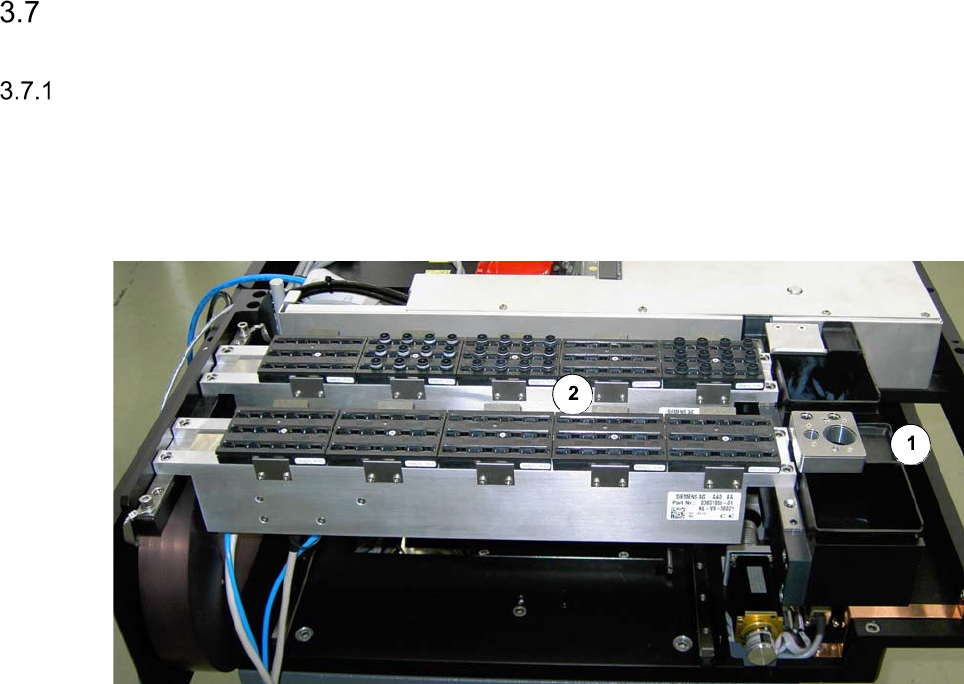
Emptying Reject Bin and Vacuuming the Nozzle Changer
Interval Daily
Equipment Vacuum cleaner, waste bin, collecting container
Nozzle changer and reject bins
Legend
[1] Reject bin
[2] Nozzle changer
Emptying the reject bin
Remove the reject bin and empty it into the collecting container.
We recommend that you empty the reject bin every day, since this will show whether a certain
component is being rejected frequently. Determine the cause of the error using the Track Er-
ror menu or OIS.
Clean around the reject bin with the vacuum cleaner and replace the bin.
The inside of the placement machine should be free of loose components since these can
cause faults if they get caught between moving parts.
Vacuuming the nozzle changer
Keep the vacuum cleaner nozzle at least 1 cm away from the nozzles to prevent any damage.
Vacuum the nozzle changer. The nozzle changers should be free of dirt and loose compo-
nents since these could prevent nozzles being picked up and set down correctly.
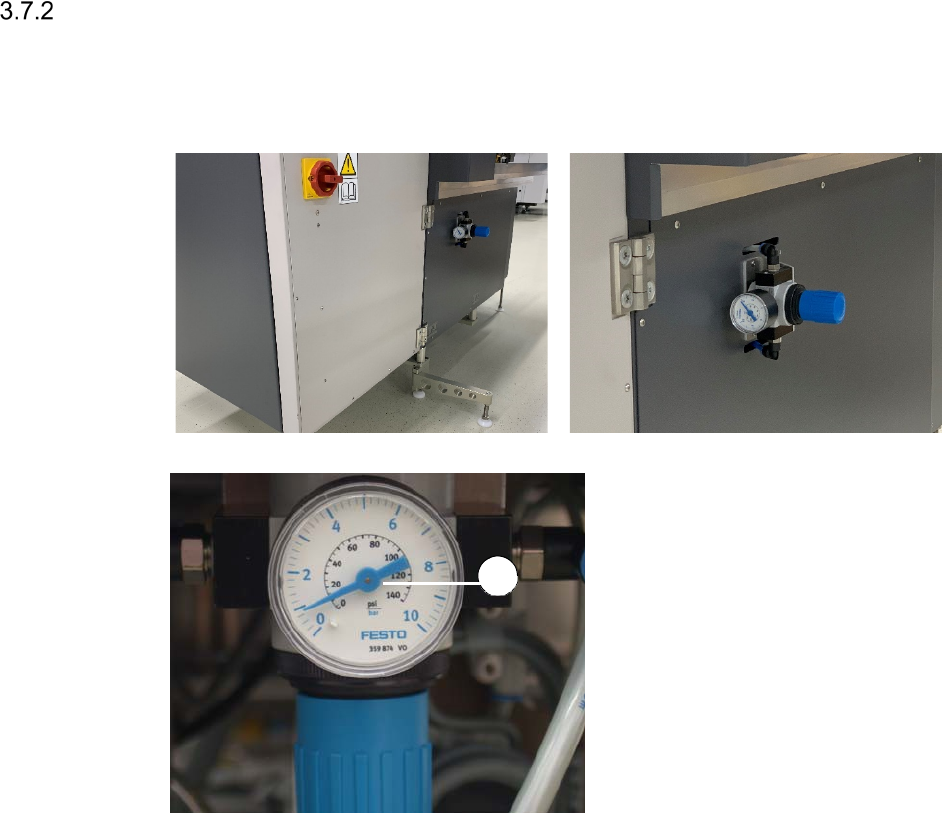
Checking the Exhaust Air Pressure Manometer for Die Attach and Flip Unit
Interval Weekly
Equipment Mirror
Legend
[1] Exhaust air pressure manometer
At the rear side of the SWS, insert a mirror
into the gap between the SWS and the
placement machine.
Check, if the pressure displayed is the
same as the pressure that was set
during commissioning (between 0.5 and
0.8 bar).
1