Nordson_EFD_Centrifuge_Operating_Manual.pdf - 第12页
12 www .nordsonefd.com info@nordsonefd.com USA & Canada 800-556-3484 Europe +44 (0) 1582 666334 Asia +86 (21) 3866 9006 Sales and service of EFD dispensing systems are available worldwide. Operation The unit incorpor…

11
www.nordsonefd.com info@nordsonefd.com USA & Canada 800-556-3484 Europe +44 (0) 1582 666334 Asia +86 (21) 3866 9006
Sales and service of EFD dispensing systems are available worldwide.
Preparation
Before using this centrifuge, the following steps should be checked to make sure the PM5000 is ready
and safe for use in a production setting:
1. Plug power cord in a grounded outlet.
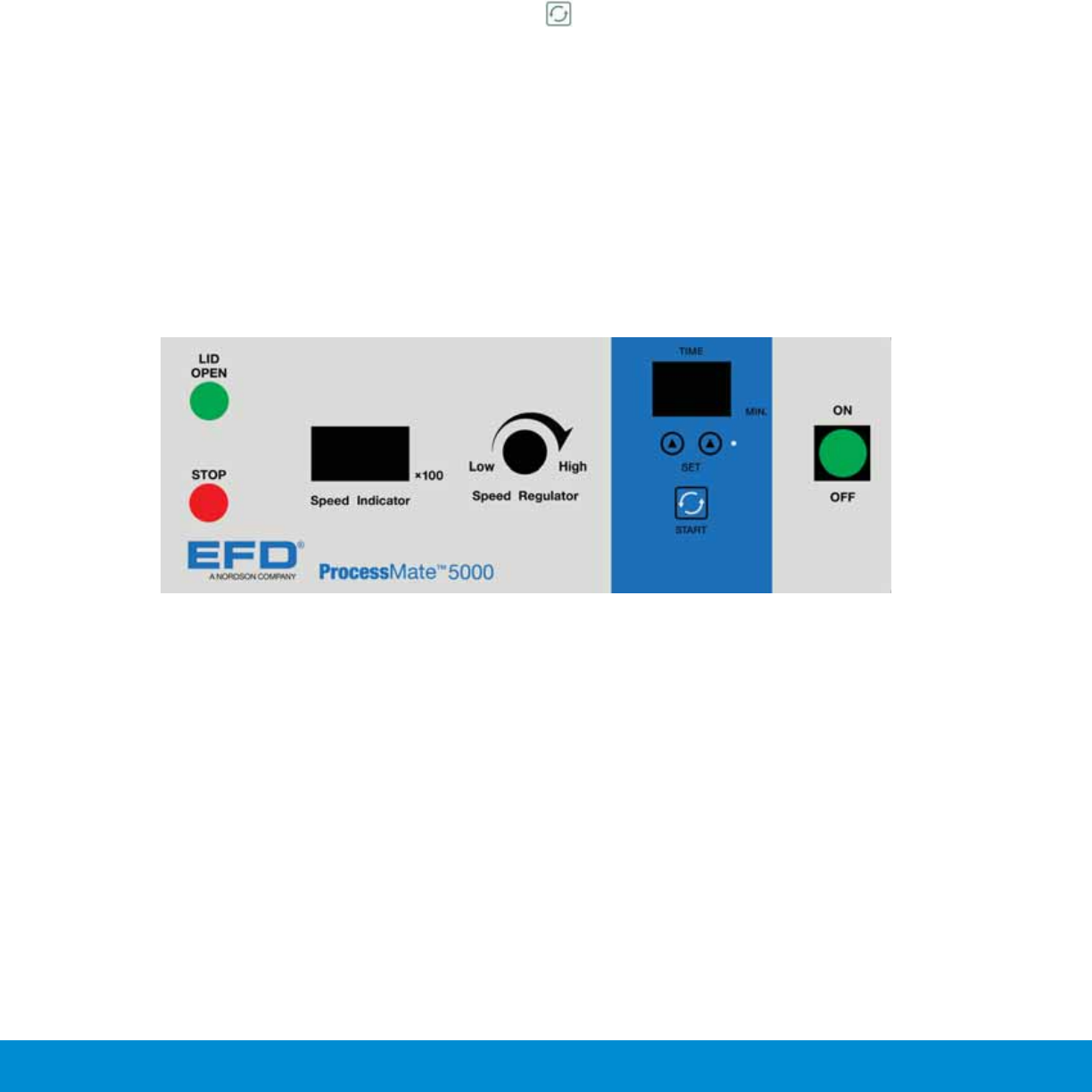
2. Turn Power Switch to ON position.
The power lamp ON/OFF, Speed Indicator and Timer must be illuminated.
3. Press LID OPEN switch then push Lid Release knob on the right hand of the housing to place
contents into the centrifuge.
4. Inspect and check if rotor is screwed on securely.
5. Shut lid and set timer by pressing the corresponding keypads “▲” “▲” to set centrifuge spinning
time. Timer is adjustable from 0 – 99 minutes, and timer will count down displaying remaining time
left of spin cycle.
6. Adjust the RPM by turning the control knob. Once the start button is presses, the RPM may not be
altered or changed unless the spin cycle has timed out or has been reset.
Warning:
The maximum RPM depends on the rotor, size of Syringe barrels and weight of contents.
7. Press STOP switch to verify that the spin cycle may be canceled.
8. While in spin cycle, press LID OPEN key and Lid release button to see if the lid can be opened
while in operation. The safety feature on the PM5000 should not allow you to open the lid until the
rotor comes to a complete stop.
9. Switch off the power to verify that power can be shut off in case of emergency.
If the above procedures work as detailed, the centrifuge is operating as designed and ready for
production use.
Note:
IF the ERROR sign of Err-5 is displayed on screen at any time, the cause is usually due to an
“imbalance rotor”. Check contents within the centrifuge and make sure the syringe barrels are equally
loaded and filled.

12
www.nordsonefd.com info@nordsonefd.com USA & Canada 800-556-3484 Europe +44 (0) 1582 666334 Asia +86 (21) 3866 9006
Sales and service of EFD dispensing systems are available worldwide.
Operation
The unit incorporates many safety features to protect and minimize users the risk of personal injury.
Follow the following operational steps to safely operate PM5000 Centrifuge unit.
1.
Turn On Power
Locate the front control panel. Turn the power switch on the PM5000 to the “On” position. The
switch will light up green when the unit is powered up.
2.
Open Lid
To open lid, press Green “LID OPEN” button. When you hear a “click” sound, proceed to push on the
Lid Release knob located on the right hand side of the PM5000 Centrifuge Cabinet. You will not hear
a “clicking” sound and will not be able to depress the Lid Release knob if;
a. The centrifuge is still in use and / or the rotor is still spinning.
b. If there is no power to the unit.
3.
Placing syringe barrel
The PM5000 Centrifuge can accommodate up to 4 syringe barrels. Before placing syringes into the
centrifuge, make sure the syringes are fill to the same levels of fluid and use correct size sleeves to
secure the barrels onto the rotor. Make sure the centrifuge is either filled with 2 or 4 syringes before
operating. Failure to fill to same levels, spinning without the correct sleeves or placing odd numbers
of syringes i.e. 1 or 3 syringes will result in damage to syringes and unbalanced spin causing the
unit to go into an error mode.
4.
Shut Lid
Shut Lid and make sure the barrels are protruding and coming in contact with the inner side of the lid.
Set speed – Using the speed regulator knob set the speed on speed indicator display to desired
speed. The speed cannot be adjusted or altered once the unit is in operation. To change speed,
simply press the Red “stop” button, allow the rotor to come to a complete stop, reset speed, reset
time and restart spin.
Important Note:
If set RPM exceed the maximum speed for rotor & contents the ERROR Err-8 will display and unit
will shut down the spin cycle. Remove or reduce weight of contents, open and shut Lid, and
re-initiate spin cycle.
13
www.nordsonefd.com info@nordsonefd.com USA & Canada 800-556-3484 Europe +44 (0) 1582 666334 Asia +86 (21) 3866 9006
Sales and service of EFD dispensing systems are available worldwide.
5. Set Time
The PM5000 Centrifuge has a time adjustment from 1 to 99 minutes in increments of 1 minute.
Use the “▲” UP Arrows to set minutes of operation.
6.
Start
Once time and speed is set simply press the start button to start the PM5000 Centrifuge. The
Centrifuge will spin at the speed and duration of the set parameters. Upon completion the unit will
automatically apply a brake on the rotor to slow down and stop the rotor within the centrifuge. Once
the rotor is at a complete stop, a audible buzzer will alarm notifying the user the spin cycle has
completed.
8. The Centrifuge takes approximately 15 – 20 seconds to accelerate to set speed.
9. After the set time has elapsed, the PM5000 will automatically activate the automatic braking system
to slow down and stop rotation of the rotor. The set values of TIME and RPM will reset back to 0,
and 3 audible “beep” alarm will alert you of the completion of the spin cycle.
10. Press LID OPEN button and Lid release knob to open the lid and safely remove contents.
Warning
Do not use flammable and dangerous chemical solution in centrifuge.
Caution
Inspect all components prior to installing this centrifuge.
Note: Always remember to press “LID OPEN” button & Push Lid Release Knob to open lid.