KE2040Instruction Manual Ver2.01,REV04.2003.6.25.pdf - 第458页
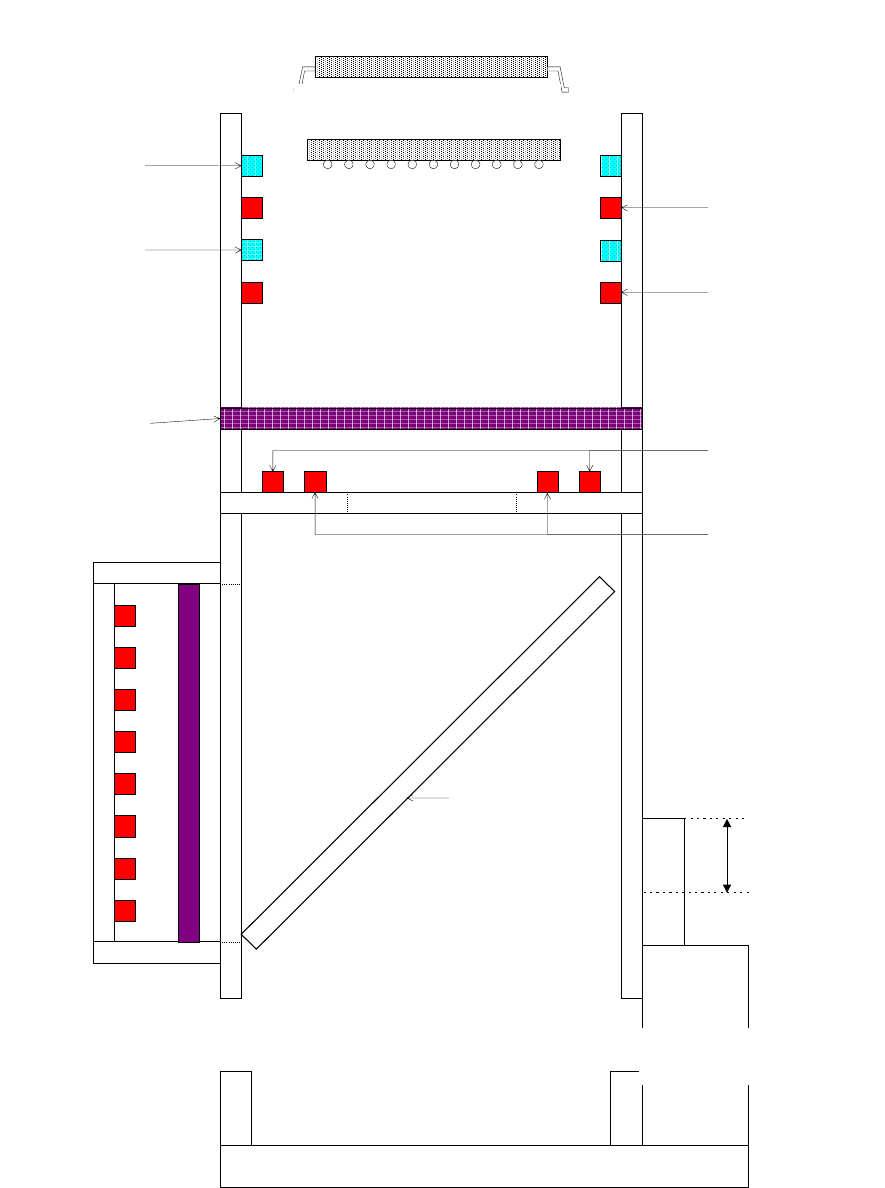
5 − 95 Figure 5.2.6. 2 Back light unit Top View VCS透過照明前後 後 VCS透過照明前後 前 VCS透過照明左右 左 VCS透過照明左右 右 Side V iew VCS透過照明前後 VCS透過照明左右 左 VCS透過照明左右 右 ヘッド透過照明 緑色デフューザ Head back li ght Green diffus er VCS back lights left and ri gh…
5 − 94
青サイド照明1
青サイド照明2
赤サイド照明1
赤サイド照明2
ハーフミラー
同軸照明
VCS下方照明1
VCS下方照明2
赤色デフューザ
QFP、SOP、CONN、PLCC....ETC
(エアシリンダダウン時の相対部品高さ)
エアシリンダ
UP
DOWN
PBGA、PBGA_ALL
(エアシリンダアップ時の相対部品高さ)
Figure 5.2.6.1 Bottom and side light units
(Relative component height when
the air c
y
linder is moved down
)
(Relative component height
when the air c
y
linder is moved
Blue side light 1
Blue side light 2
Red diffuse
r
Coaxial light
Air cylinder
Half mirror
Red side light 1
Red side light 2
VCS bottom light 1
VCS bottom light 2
5 − 95
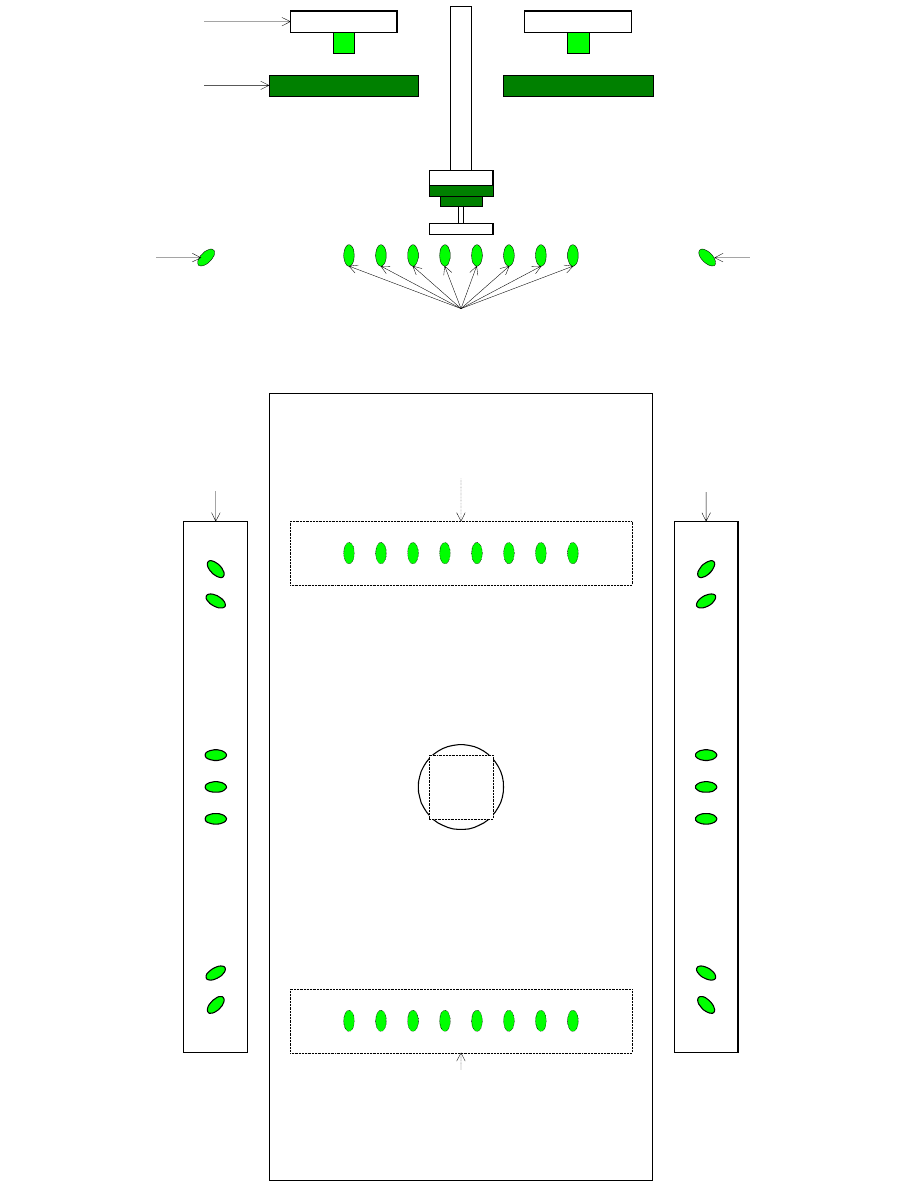
Figure 5.2.6.2 Back light unit
Top View
VCS透過照明前後
後
VCS透過照明前後
前
VCS透過照明左右
左
VCS透過照明左右
右
Side View
VCS透過照明前後
VCS透過照明左右
左
VCS透過照明左右
右
ヘッド透過照明
緑色デフューザ
Head back light
Green diffuser
VCS back lights
left and right
Left
VCS back lights
left and right
L
e
f
t
VCS back lights front and rear
VCS back lights
left and right
Right
VCS back lights front and rear
Front
VCS back lights
left and right
Right
VCS back lights
front and rear
Rear
5 − 96
5.3 Commands
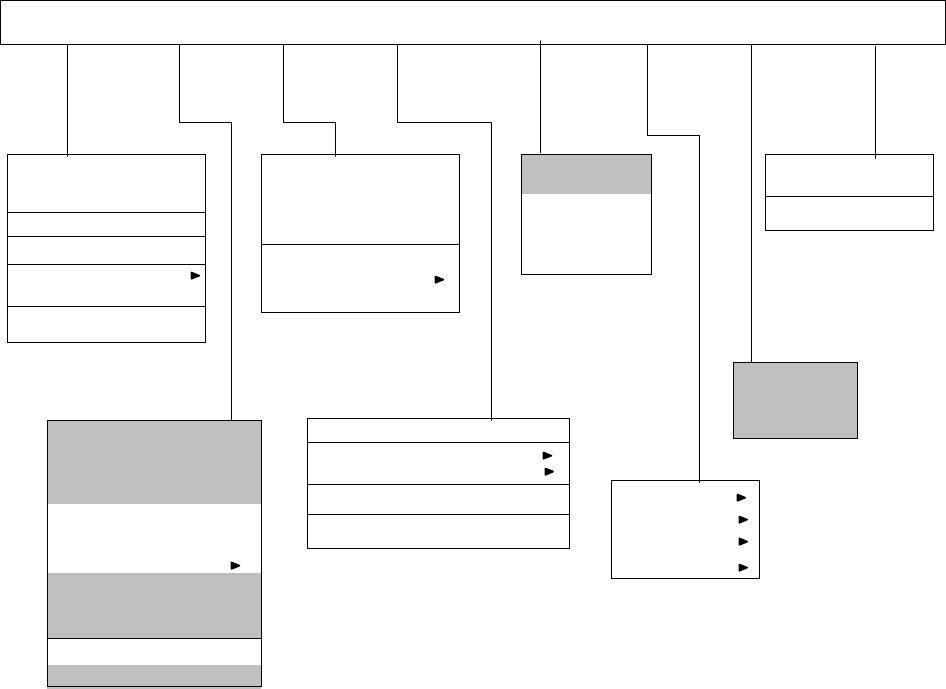
Command list
The commands to be invoked from Vision data are shown below. Commands shown in a
hatched area indicate that they cannot be selected when the input focus is located in Vision
data.
File (F) Edit (E) Data (C) Optimization (O)
Display
(V)
Machine operation Database (D) Help (H)
Create new (N) Ctrl+N
Open (O)… Ctrl+O
Overwrite&save (S) Ctrl+S
Save As (A)…
File information (I)
Print (P)
Environment setting (C)
End of program editing (X)
PWB data (B)
Placement data (P)
Component data (C)
Pick data (I)
Vision data (V)
Data completion status (S)…
Station data (E)
Data coherence check (L)
Component form
Component list
Vision Form
Vision List
Feeder layout…
Tool bar
Command (C)
How to use Help (H)
Version information (A)
Cut (T) Ctrl+X
Copy (C) Ctrl+C
Paste (P) Ctrl+V
Insert line (I)
Double line (U)
Jump (J)… Ctrl+G
Search (S)… Ctrl+F
Search next item (N) F7
Replacement (L)
Cell copy (O) Ctrl+E
Cell paste Ctrl+R
Sort (R)
Change Component Name (H)
Matrix copy (M)
Vision copy (V)
Optimization (O)…
Division placement data (P)
Nozzle layout (N)
Number of components to be fed… (S)
Status display (D)…
Register (B)…
Call list (C)…
Re-search (R)
Transport (T)
Measurement (M)
Confirmation (C)
Management (A)