KE2040Instruction Manual Ver2.01,REV04.2003.6.25.pdf - 第578页
7 − 96 Step ① ① ① ① W hen a board is located on the PW B t ransport path and the PW B tr ansport pat h infor mation indicates t hat there is a boar d on the path when production is inter rupted You cannot select “Continu…
7 − 95
The actual operation to be performed according to your selecting
each item on the “Processing before production begins” dialog box is
described below.
Ⅰ
ⅠⅠ
Ⅰ When there is a continuous production file
Step
No.
Whether
to resume
productio
n
Production
operation
Whether
there is a
board on
the PWB
transport
path
Information on
the PWB
transport path
obtained when
production was
interrupted
Operation after you press
the <START> key
① A board is
located on the
path.
“Load a new PWB.” is not selectable.
② No board
(Normally, the system does not
perform any operation.)
③
Yes
No information After a board is ejected, a new board is
loaded before start of production, and the
system resumes the production (Be
careful to start production).
④
Yes Production
after a board
is loaded
(when you
select “Load
a new
PWB.”)
None After a board is loaded before start of
production, the system resumes the
production.
⑤ A board is
located on the
path.
“Load a new PWB.” is not selectable.
After a board is clamped again, the system
resumes the production without loading a
board before starting production.
⑥ No board
(Normally, the system does not
perform any operation.)
⑦
Yes
No information After a board is clamped again, the system
resumes the production without loading a
board before starting production (Be
careful to start production).
⑧
Yes Production
after a board
is clamped
(when you
select
“Re-clamp
current
PWB”)
None Error (No board)
⑨ A board is
located on the
path.
After a board is ejected, the system loads
a new board before start of production,
and starts new production (Be careful to
start production).
⑩ No board
(Normally, the system does not
perform any operation.)
⑪
Yes
No information After a board is ejected, the system loads
a new board before start of production,
and starts new production (Be careful to
start production).
⑫
No Production
after a board
is loaded
(when you
select “Load
a new
PWB.”)
None After a board is loaded before start of
production, the system starts new
production.
⑬ A board is
located on the
path.
After a board is clamped again, the system
resumes the production without loading a
board before starting production (Be
careful to start production).
⑭ No board
(Normally, the system does not
perform any operation.)
⑮
Yes
No information After a board is clamped, the system starts
new production without loading a new
board before starting production (Be
careful to start production).
⑯
No Production
after a board
is clamped
again (when
you select
“Re-clamp
current
PWB”)
None Error (No board)
7 − 96
Step ①
①①
①
When a board is located on the PWB transport path and the PWB transport path
information indicates that there is a board on the path when production is interrupted
You cannot select “Continue the production.” or “Load a new PWB.”. The system
always selects “Re-clamp current PWB” automatically. (See ⑤ of “I. When there is
a continuous production file”.)
Step ②
②②
②
When a board is located on the PWB transport path and the PWB transport path
information indicates that there is no board on the path when production is interrupted
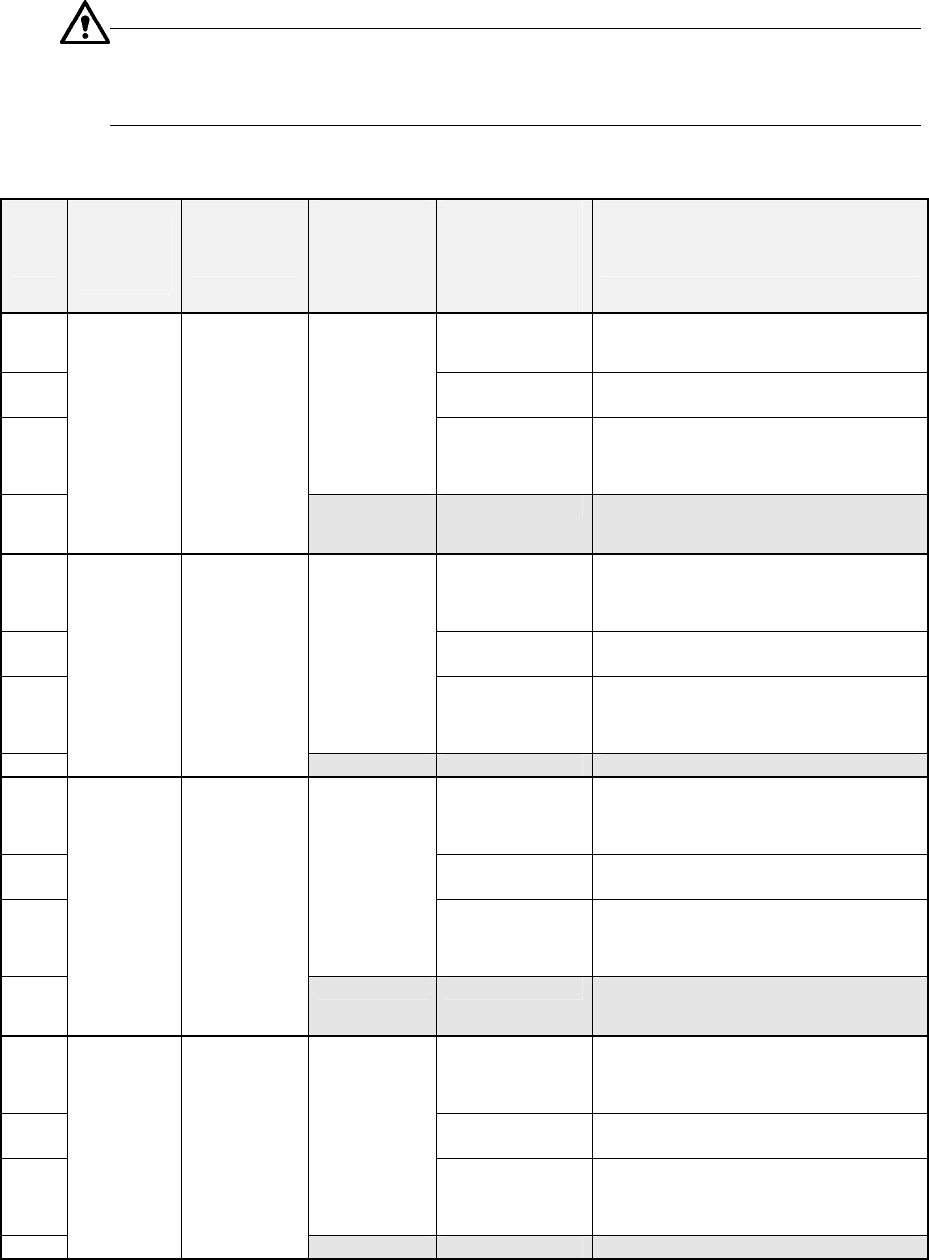
When you select “Continue the production.” and “Load a new PWB.”, the screen
shows the condition of the PWB transport path as illustrated below.
Figure 7.4.14.1.5 ①
①①
① Condition of the PWB transport path
When you execute the selection described above, the “PWB ejecting” dialog box
appears on the screen. Then, after a board is ejected, a new board is loaded before
start of production to continue the production. However, if all of components are
already placed on a board that is located on the PWB transport path when production
is interrupted, the operation described above will not be performed since there is no
continuous production file.
(See ② of “II. When there is no continuous file”.)
Step ③
③③
③.
When there is a board on the PWB transport path, but there is no information on the
PWB transport path when production is interrupted
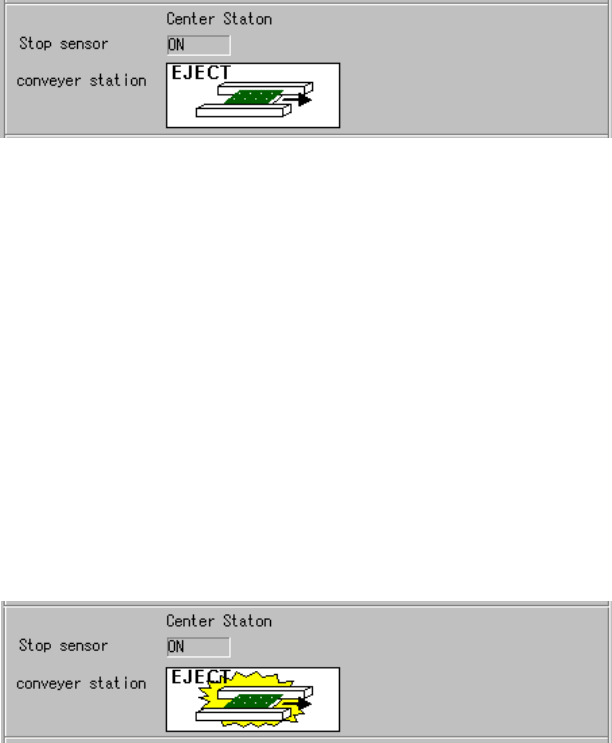
When you select “Continue the production.” and “Load a new PWB.”, the screen
shows the following condition of the PWB transport path:
Figure 7.4.14.1.5 ②
②②
② Condition of the PWB transport path
When you execute the selection described above, the “PWB ejecting” dialog box
appears on the screen. Then, after a board is ejected, a new board is loaded before
start of production to continue the production.
In such a case, since there is no information on the PWB transport path when
production is interrupted, some component(s) may not be placed on the board ejected.
Be careful to eject a board.
7 − 97
Step ④
④④
④.
When there is no board on the PWB transport path and the PWB transport path
information indicates that there is a board on the path when production is interrupted
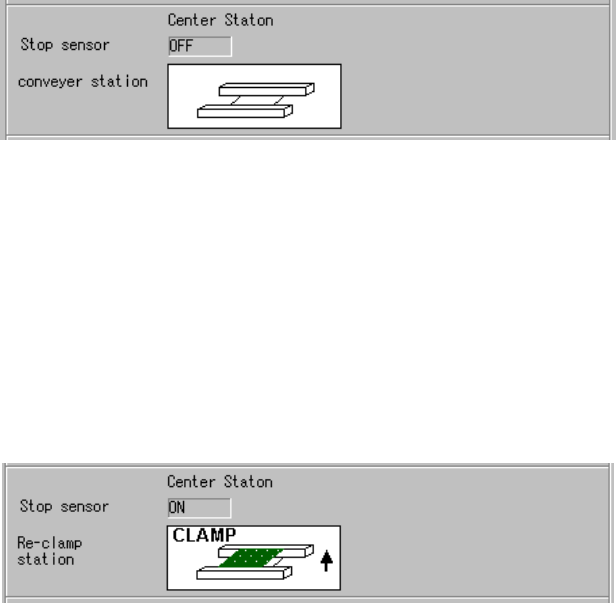
When you select “Continue the production.” and “Load a new PWB.”, the screen
shows the following PWB transport path condition:
Figure 7.4.14.1.5 ③
③③
③ Condition of the PWB transport path
When you execute the selection described above, the system loads a board before
start of production, and resumes the production.
Step ⑤
⑤⑤
⑤.
When there is a board on the PWB transport path, and the PWB transport path
information indicates that there is a board on the path when production is interrupted
When you select “Continue the production.” and “Re-clamp current PWB”, the screen
shows the following PWB transport path condition:
Figure 7.4.14.1.5 ④
④④
④ Condition of the PWB transport path
When you execute the selection described above, the “Re-clamp” dialog box appears
on the screen. After a board is clamped again, the system resumes the production
without loading any board before starting production.
Step ⑥
⑥⑥
⑥.
When there is a board on the PWB transport path and the PWB transport path
information indicates that there is no board when production is interrupted
You cannot select “Continue the production.” and “Re-clamp current PWB”.
The system always selects “Load a new PWB.” automatically.
(See ② of “I. When there is a continuous production file”.)
Step ⑦
⑦⑦
⑦.
When there is a board on the PWB transport path and the PWB transport path
information indicates that there is no board on the path
When you select “Continue the production.” and “Re-clamp current PWB”, the screen
shows the following PWB transport path condition: