KE2040Instruction Manual Ver2.01,REV04.2003.6.25.pdf - 第682页
8 − 38 8.2.2.10. 5 MTC/MTS Device enable W hen you select the "MTC/MTS Device enable" tab, the "MTC/MTS Device enable setting" dialog box appears on the scr een as shown in Figure 8.2.2. 10.5. Figure …
8 − 37
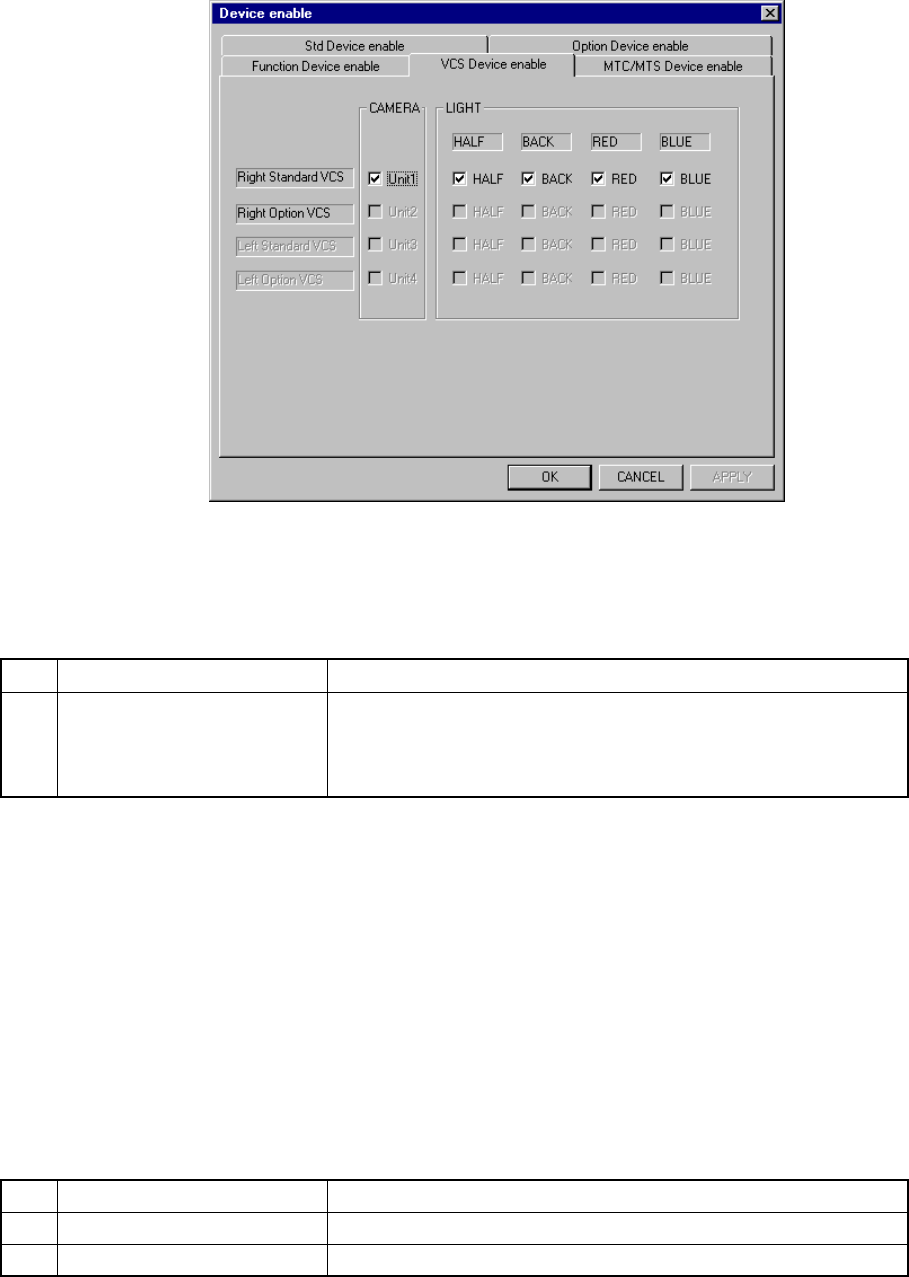
8.2.2.10.4 VCS Device enable
When you select the [VCS Device enable] tab, the “VCS Device setting” dialog box
appears on the screen as shown in Figure 8.2.2.10.4.
Figure 8.2.2.10.4 VCS Device enable setting dialog box
(Screen example when a KE-2020 is used)
(1) Setting items
No. Item Description
1 VCS
Enables or disables an VCS unit.
If a VCS unit malfunctions, disable it on this dialog box. It allows the
machine to pick up/place components on a board without modifying
the production program being used.
If the production program requires the unit above to complete component
placement, Table 8.2.2.10.4 shows whether production is to be performed
actually or not.
(2) Setting the position
- Specify a VCS unit to be used with checking the corresponding check box.
- You cannot select a VCS unit which was not set as an option with the MS
parameter (it is dimmed on the dialog box).
(3) Production operation
Table 8.2.2.10.4 Placement when set to "Unused"
No. Unit Production operation
1 CAMERA A component that is to be recognized with a VCS is skipped.
2 LIGHT A component that is to be recognized with a VCS is skipped.
8 − 38
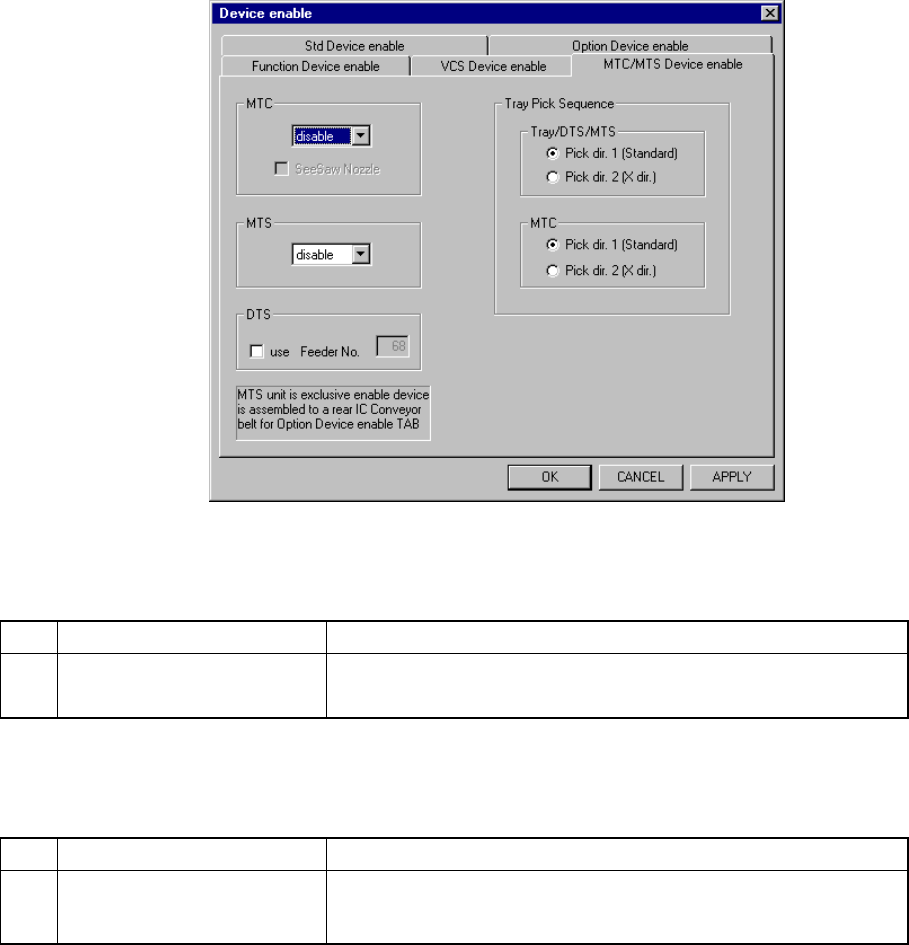
8.2.2.10.5 MTC/MTS Device enable
When you select the "MTC/MTS Device enable" tab, the "MTC/MTS Device enable
setting" dialog box appears on the screen as shown in Figure 8.2.2.10.5.
Figure 8.2.2.10.5 MTC/MTS Device enable setting dialog box
(1) Setting items
No. Item Description
1 MTC/MTS
Enables or disables an MTC/MTS unit.
Set the type of MTS, MTS or DTS to be used here.
If the production program requires the unit above to complete component
placement, Table 8.2.2.10.4 shows whether production is to be performed
actually or not.
No. Item Description
2 Tray Pick Sequence Sets the order tray components are picked up:
sets the direction on which components are to be picked up per
available unit.
If the production program requires the unit above to complete component
placement, see Table 8.2.2.10.6 to check the production operation the system
actually performs.
(2) Setting the position
- Specify the device to be used with the combo box.
- Only when an MTC is equipped with a seesaw nozzle, check the check box
“Seesaw nozzle”
- For a DTS, check the check box "use", then enter the feeder mounting hole
number to the "Feeder No." edit box.
- You cannot connect both the MTC and MTS to the machine at the same
time.
8 − 39
- You cannot connect both the MTS and DTS to the machine at the same
time.
- If you check the rear IC Conveyor belt on the "Option Device enable setting"
dialog box, you cannot set the MTS.
- Specify the menu item “Tray Pick Sequence” according to the following two
groups of units:
①Tray, DTs and MTS
②MTC
- Two types of orders in which tray components are to be picked are available:
click the corresponding radio button:
①Pick dir. 1 (Standard)
②Pick dir. 2 (X dir.)
Default: Pick dir. 1 (Standard)
- You can select either button regardless of the “disable”/”enable” setting of
the menu item “MTC”, “MTS”, or “DTS”.
- Even though the menu item “MTC” or the corresponding unit is set to
“disable”, you can set this menu item.
(3) Production operation
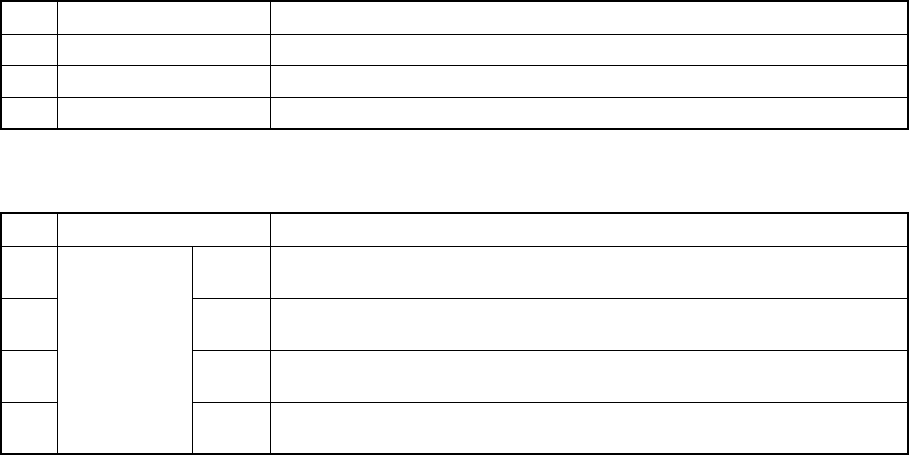
Table 8.2.2.10.5 Placement when set to "Unused"
No. Unit Production operation
1 MTC Components which are fed from the MTC are to be skipped.
2 MTS Components which are fed from the MTS are to be skipped.
3 DTS Components which are fed from the DTS are to be skipped.
Table 8.2.2.10.6 Placement when “Pick dir. 2 (X dir.)” is selected
No. Unit Production operation
1 Tray Starts picking up components from the start position (rear and far side)
toward the right direction when viewed from the front.
2 DTS Starts picking up components from the start position (rear and far side)
toward the right direction when viewed from the front.
3 MTS Starts picking up components from the start position (rear and far side)
toward the right direction when viewed from the front.
Pick-up order
MTC Starts picking up components from the start position (rear and far side)
toward the right direction when viewed from the front.