KE2040Instruction Manual Ver2.01,REV04.2003.6.25.pdf - 第923页
14 − 39 14.6.3 Parts list Table 14.6.1 Parts li st (for the coplanarity unit) No. Part number Part name Remarks 1 E9675729000 Coplanarity check sensor cable 2 E9674729A00 Filter unit (for the photoreceptive side) 3 E9674…
14 − 38
14.6 Coplanarity Sensor (Optional)
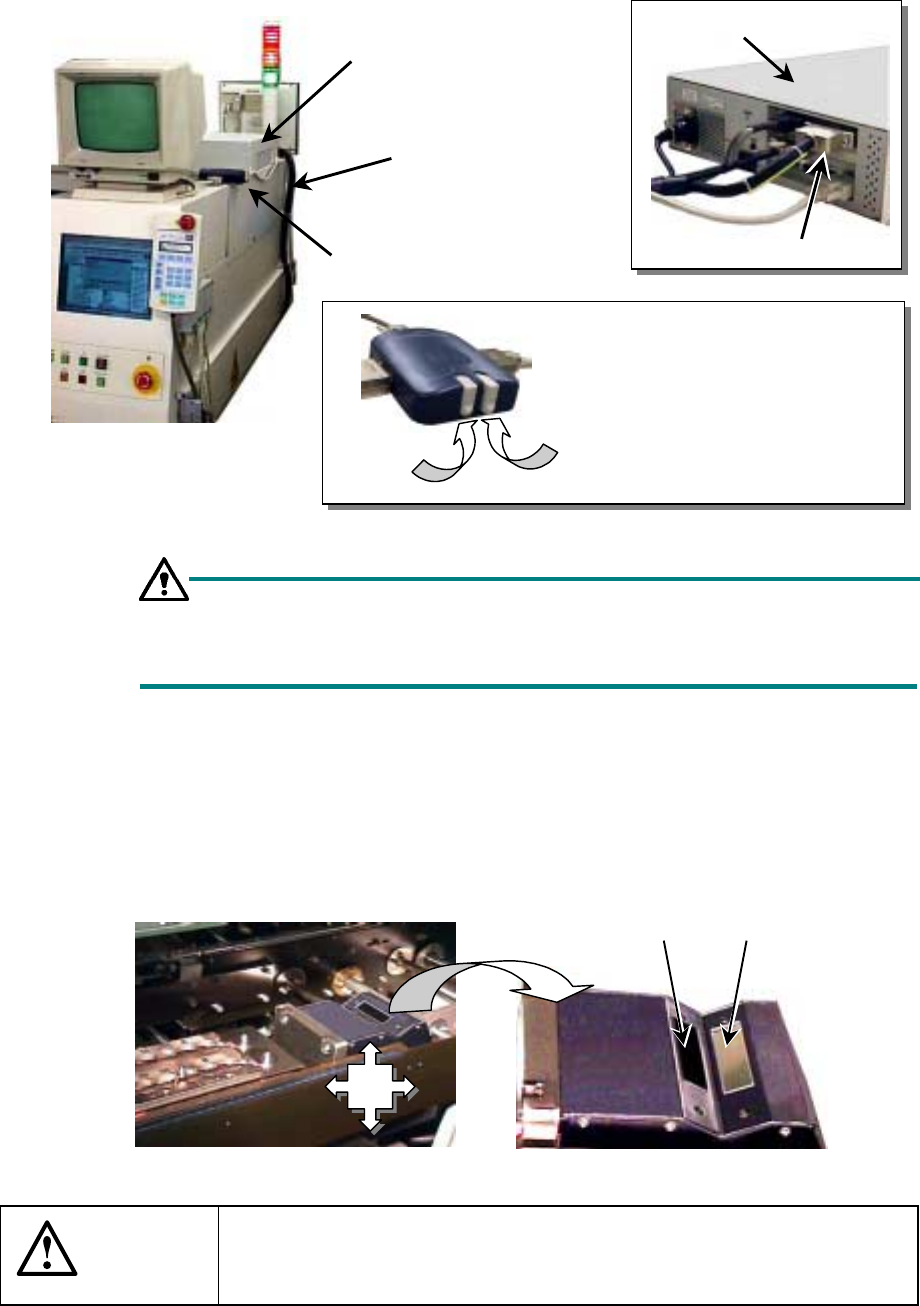
14.6.1 Name of each part
Figure 14.6.1 Explanation of the device
Setting the monitor screen switch
When you turn on the system or operate it normally, set this switch to A.
The menu screen does not appear on the monitor.
14.6.2 Daily maintenance
Check to see if the filter unit (photo-transmitting window/photoreceptive window) gets
soiled. (Check that everyday.)
− Clean the filter unit with dry cloth or gauze.
Figure 14.6.2 Coplanarity unit
CAUTION
Carefully check to see if the filter unit is not soiled. When necessary,
be sure to clean it. It may cause the system to malfunction.
Do not use any alcohol to clean the filter unit.
Coplanarity check
controller
Coplanarity check
sensor cable
Monitor screen switch
Coplanarity check controller
Coplanarity check sensor cable
Explanation of the monitor screen
switch
Side A: Main unit (standard) screen
Side B: Coplanarity check screen
(for maintenance)
Side A
Side B
Photoreceptive
window
Photo-transmitting
window
Where
to
clean

14 − 39
14.6.3 Parts list
Table 14.6.1 Parts list (for the coplanarity unit)
No. Part number Part name Remarks
1 E9675729000 Coplanarity check sensor cable
2 E9674729A00 Filter unit (for the photoreceptive side)
3 E9674729B00 Filter unit (for the photo-transmitting side)
1
SPECIFICATIONS FOR A CE MACHINE
1. Resume Production
If the Maintenance switch is set to “Auto Mode”, and one of the following events occur
during production: the cover is opened, the bank moves down, and the area sensor is
activated, the servo power supply is turned off and the system enters Resume Pause
mode.
In “Resume Pause” mode, if you recover the system from the error condition causing
this mode: the cover is opened or the bank moves down, and press the <START>
switch, the system can resume the current production.
Since a board remains clamped in Resume Pause mode, you can continue the
suspended production without recognizing marks again.
If the system cannot resume the production easily by picking up, recognizing or placing
a component, it discards the component that has not been used for production
completely, and resumes the production by picking up a new component. When the
system does not find any difficulty, it resumes the suspended production.
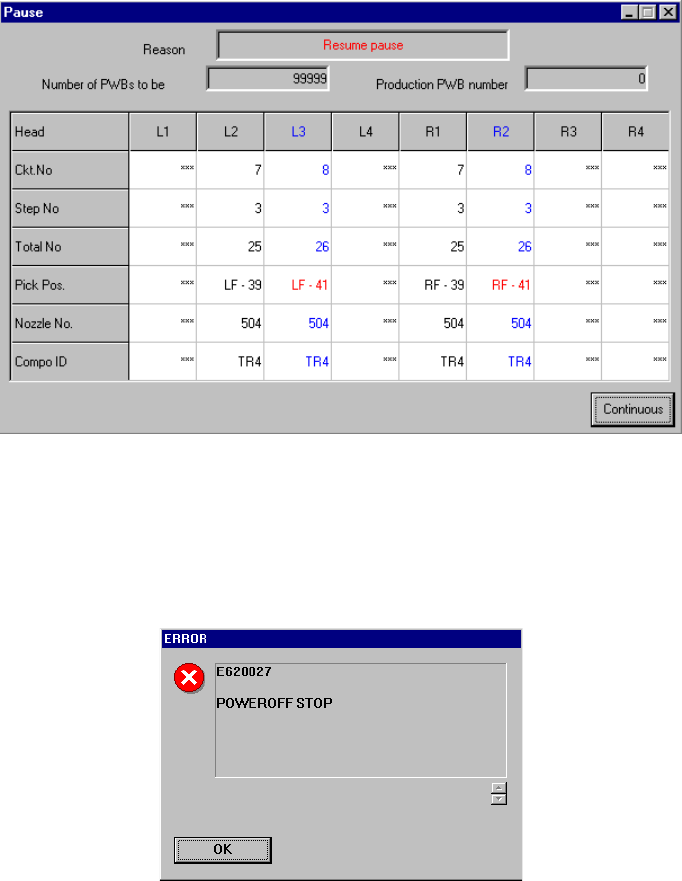
Figure 1.1 “Resume pause” dialog box
If an event causing the system to enter Resume Pause mode occurs when the system
already pauses due to other event, the system enters Resume Pause mode also.
However, the dialog box shown above does not appears, and the “POWEROFF”
message appears as shown in Figure 1.2.
Figure 15.1.2 POWEROFF message