Vision_Series_EN - 第17页
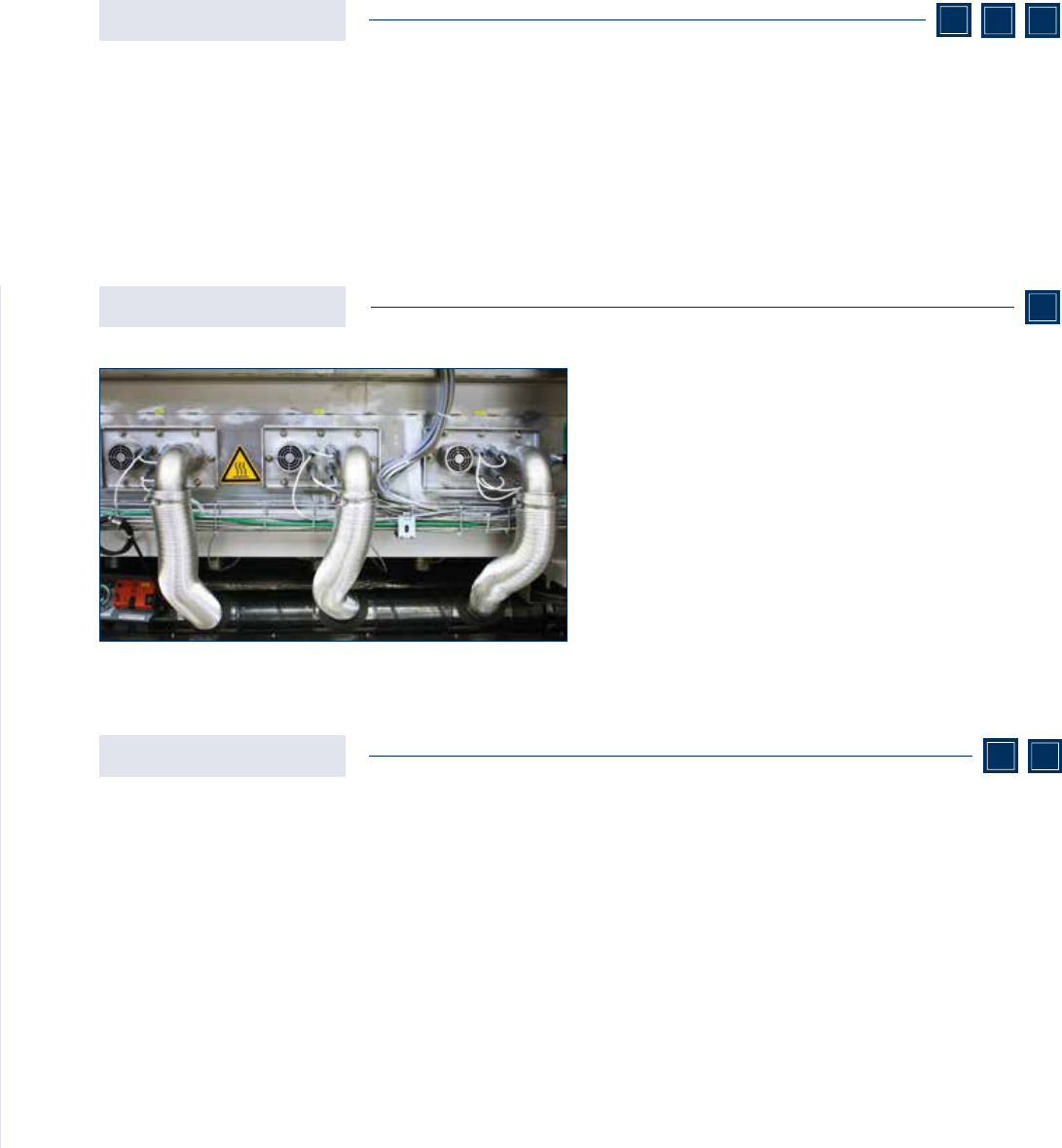
17 In the SSP (Speed Switch Process) the process atmospher e cooling process takes place without impacting the nitr ogen level. Extra pipes are installed in the pr e-heating and peak zones to serve as an outlet through w…

16
Parallel processes
Lead-free and leaded soldering in one system
Do you want to run two different processes alongside one
another in the same reow system while ensuring thermally
sensitive circuit board assembly on top of this? In that case
you will need a great deal of exibility when it comes to
parameter setting. The technical conguration of the dou-
ble-track model from the VisionX-Series enables incredibly
exible process set-ups, thus opening up a wide working
window for soldering. The double-track systems are tted
with two transport tracks which can be asynchronously
operated at varying speeds.
Heating zones which are well thermally isolated from one
another, positioned in a grid of 350 mm both above and
underneath the transport tracks along the length of the
process chamber enable a wide range of reflow proles.
Just one homogeneous heating zone with one dedicated
fan stretches across the width of the process chamber
and both transport tracks in each case. There are abso-
lutely zero thermal barriers between the transport tracks
(gas baffle plate) or split nozzle arrays that could individ-
ually influence the gas flow on the right and left transport
tracks, meaning that the temperature and speed of the
gas flowing on both tracks are the same. If the two tracks
have both leaded and lead-free components mounted,
optimum reflow proles can be achieved by means of
different transport speeds. The VisionX-Series offers the
best conditions for this.
Pb
Pb
17
In the SSP (Speed Switch Process) the process atmosphere
cooling process takes place without impacting the nitrogen
level. Extra pipes are installed in the pre-heating and peak
zones to serve as an outlet through which the cooler ambi-
ent air can be drawn by the internal exhaust system and a
fan upon activation of the SSP, serving to achieve the zones'
target temperature. Quick exhaust is activated when there
is a change of program to a lower temperature prole and
is deactivated once the temperature tolerances have been
reached.
SSP
SSP+
The SSP+ functions according to the same principle as
the SSP in the case of a process change, but an additional
setting possibility distinguishes it from SSP. When it comes
to proles with high temperature differences between the
individual heating zones SSP+ can be used to achieve an op-
timum division of zones. Because temperature can overspill
from a zone with a high temperature into neighbor zones, it
may be necessary to actively cool this on a permanent basis
in order to ensure the relevant temperature prole. Here
the internal exhaust system draws the colder ambient air
through correspondingly installed pipes and, in doing so, en-
sures precision temperature stability in the respective zone.
The spill-over heat from neighbor zones is thus drastically
reduced and optimum zone division guaranteed.
VXP+
Vac
VXP+
Quick Exhaust
Quick exhaust serves to extract process atmosphere rapidly
as a means of achieving the desired temperature change.
Here the process gas in the cooling line is extracted via the in-
ternal exhaust system. Quick exhaust is automatically activat-
ed if there is a change of program to a colder prole. As soon
as the temperature is within the tolerance range specied by
the program, quick exhaust is automatically deactivated.
VXP+
Vac
VXP+ VXS
VXS
Optimised process changeover
Rapid switch to lower temperature proles
Process changes often need to take place during a production shift, where the reow soldering
system requires longer periods to cool from a higher to a lower temperature prole. This is the case
for example when changing from lead-free to leaded solders. For considerably quicker cooling Rehm
offers various options which enable drastic reductions in waiting times.
VisionX-Series | Process changeover
18
1.
2.
3.
4.
5.
6.
ViCON
VisionX
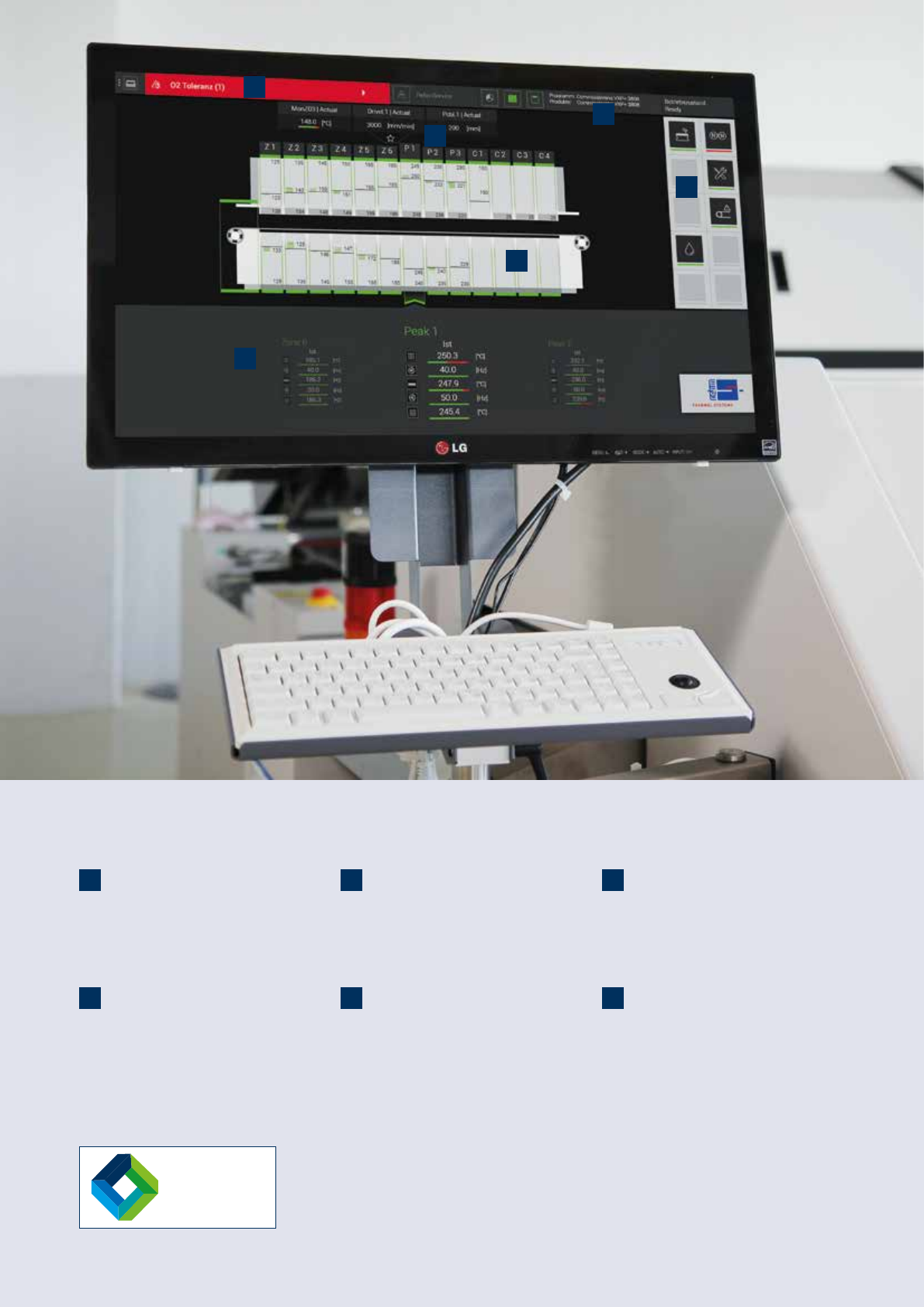
1. Alarms
The top area of the screen gives you a clear
overview where you can view, interpret and
edit alarm messages.
4. Machine view
The machine view offers an overview of the
modular construction of your system, the
current loading situation and the status of the
process zones.
2. Favourites bar
In the favourites bar you can view selected
values. This then appears on the main screen
and on every page in the dened position.
5. Options
Machine options can be set depending on
the system equipment. For this there are
up to ten different options available for your
manufacturing process.
3. Status bar
Colour-contrasting markings in the status
bar provide you with information on the
operating mode of the system.
6. Display area
The display area shows you all prole
parameter actual values, e.g. temperature,
lter or system power consumption.