00193786-02.pdf - 第170页
S I P L A C E G EM S W V e r s i on G EM 505 . 03 SP 1 H O S T I n t e r f a c e M anua l P age 170 o f 241 ©S i e m en s A G, a ll r i gh t s r e s e r v ed V I D C l ass Fo rma t Name a nd Descr ip t ion S t a t e M od…
SIPLACE GEM SW Version GEM 505.03 SP1 HOST Interface Manual
©Siemens AG, all rights reserved page 169 of 241
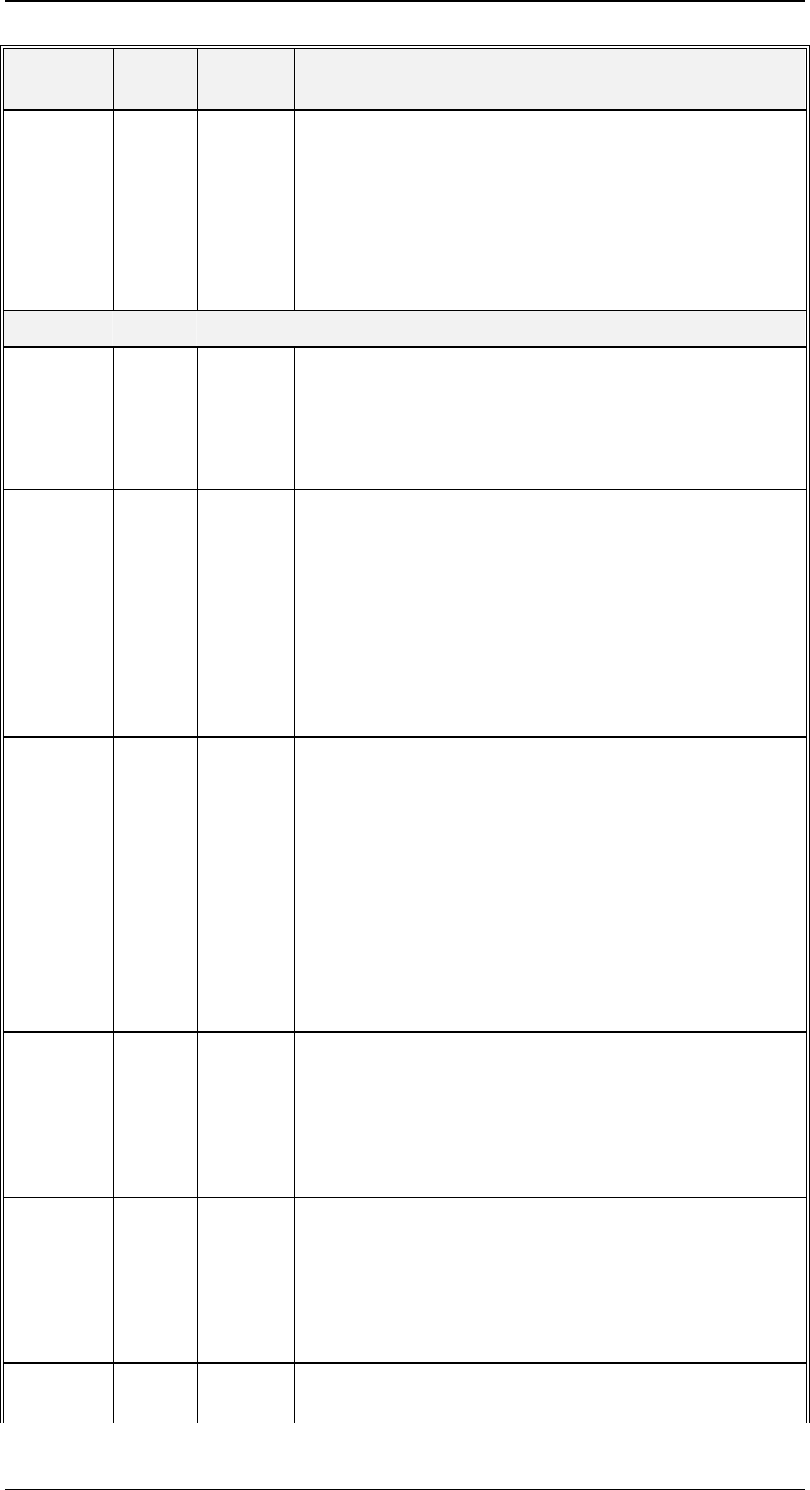
VID Class Forma
t
Name and Description
1002004 EC U1
{ XE CONFIGCONNECT }CONFIGCONNECT.
An EC which controls which SECS message this
Equipment will use for Connect Request.
0 = S1F1
1 = S1F65
2 = S1F13
Control State Model
1002005 EC U1
{ XE INITCONTROLSTATE }INITCONTROLSTATE.
Initial (power-up) control superstate.
1 = Off-Line
2 = On-Line
1002006 SV U1
{ XE CONTROLSTATE }CONTROLSTATE.
The current Control State.
1 = Off-Line/Equipment Off-Line
2 = Off-Line/Attempt On-Line
3 = Off-Line/Host Off-Line
4 = On-Line/Local
5 = On-Line/Remote
1002007 SV U1
{ XE PREVIOUSCONTROLSTATE
}PREVIOUSCONTROLSTATE.
The Control State in effect before the most recent
transition to the current Control State.
1 = Off-Line/Equipment Off-Line
2 = Off-Line/Attempt On-Line
3 = Off-Line/Host Off-Line
4 = On-Line/Local
5 = On-Line/Remote
1002008 EC U1
{ XE ONLINEFAILED }ONLINEFAILED.
The default Control State transition when Attempt On-
Line fails.
1 = Equipment Off-Line
3 = Host Off-Line
1002009 EC U1
{ XE ONLINESUBSTATE }ONLINESUBSTATE.
The default (power-up) online substate of the Control
State Model.
4 = Local
5 = Remote
1002010 EC U1
{ XE OFFLINESUBSTATE }OFFLINESUBSTATE.
The default (power-up) offline substate of the Control
SIPLACE GEM SW Version GEM 505.03 SP1 HOST Interface Manual
Page 170 of 241 ©Siemens AG, all rights reserved
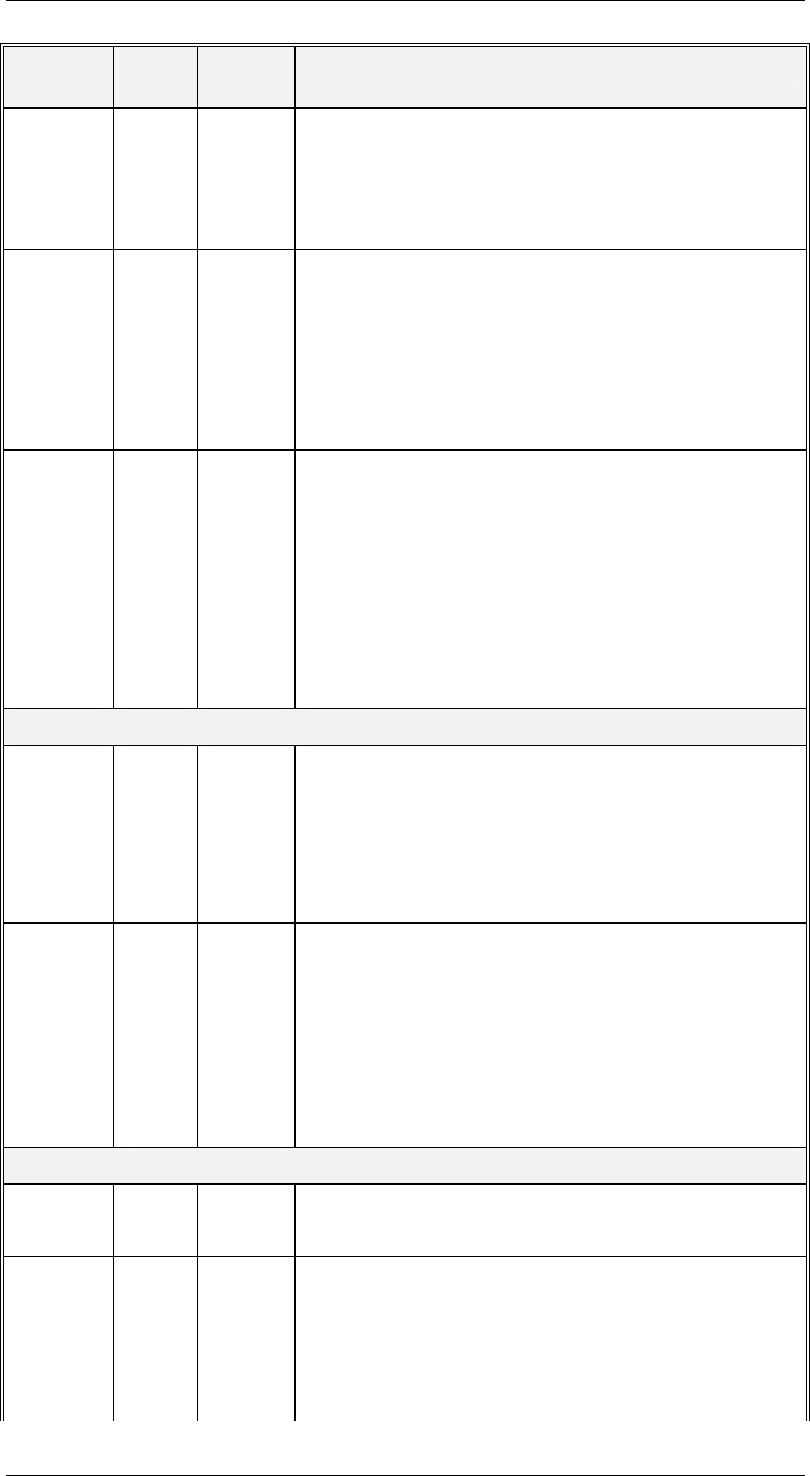
VID Class Forma
t
Name and Description
State Model.
1 = Equipment Off-Line
2 = Attempt On-Line
3 = Host Off-Line
1002056 SV A
{ XE OPERATORCMDINRMOTESTATE
}OPERATORCMDINRMOTESTATE
The last command issued by the Operator while the
Control state is „Remote“.
An empty text indicates that there was no operator
command in remote state since the last start of the
SIPLACE.
1002057 SV U1
{ XE CONTROLMODE }CONTROLMODE
The actual control mode at the SIPLACE. This SV
indicates which software system is allowed to
download placement programs.
1 = none
2 = the „GEM-Host“
3 = the line computer (LCU)
4 = SIPLACE Pro
Process State Model
1002011 SV U1
{ XE PROCESSSTATE }PROCESSSTATE.
The current Process State.
0 = Machine Initialization
1 = Single Function
2 = Processing
1002012 SV U1
{ XE PREVIOUSPROCESSSTATE
}PREVIOUSPROCESSSTATE.
The Process State in effect before the most recent
transition to the current Process State.
0 = Machine initialization
1 = Single Function
2 = Processing
Alarm Management
1002013 SV U4
{ XE ALARMID }ALARMID.
The ALID of the most recent Alarm transition.
1002014 SV U1
{ XE ALARMSTATE }ALARMSTATE.
The Alarm State now in effect for the most recently
transitioned alarm.
0 = Alarm transitioned OFF
1 = Alarm transitioned ON
SIPLACE GEM SW Version GEM 505.03 SP1 HOST Interface Manual
©Siemens AG, all rights reserved page 171 of 241
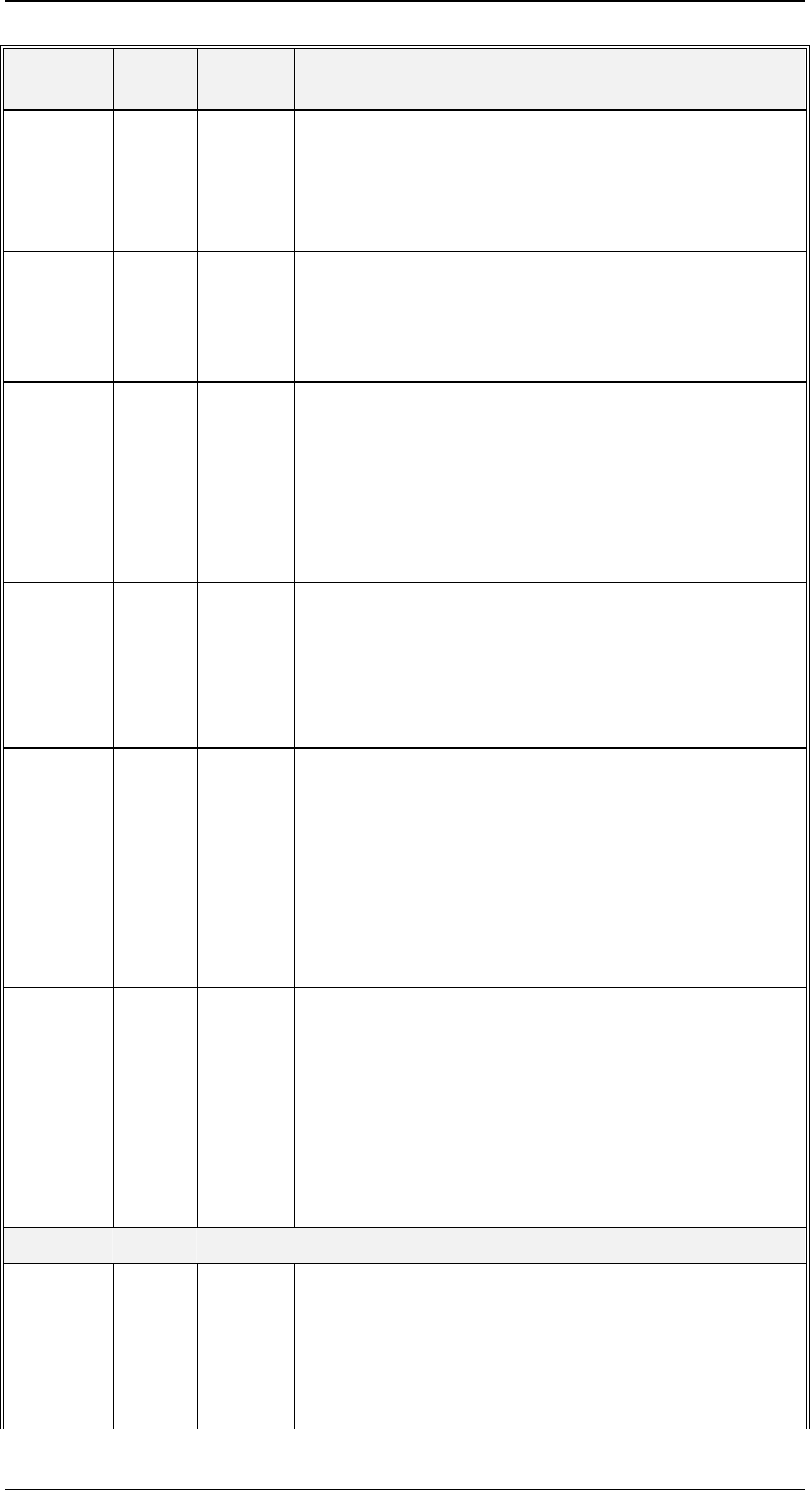
VID Class Forma
t
Name and Description
1002015 SV U4
{ XE ALARMSERIAL }ALARMSERIAL.
The sequence number of the most recent alarm
change (going on or going off). This number starts at
zero at power-up and increments by one for each
alarm transition which occurs.
1002016 DV A[0-40]
{ XE ALARMTEXT }ALARMTEXT.
The Alarm Text (ALTX) for the most recently
transitioned Alarm.
1002018 EC U1
{ XE CONFIGALARMS }CONFIGALARMS.
An EC which controls which Alarm Report message
this Equipment will send.
0 = S5F1
1 = S5F71
2 = S5F73
1002019 EC U1
{ XE WBITS5}WBITS5.
An EC which controls the W-Bit setting used when
sending Alarm Reports (S5F1, S5F71, or S5F73).
0 = W-Bit not set
1 = W-Bit set
1002020 SV L
{ XE ALARMSENABLED }ALARMSENABLED.
A list of all Alarms which are currently enabled.
Format as follows:
<L
<U4 ALID>
...
>
1002021 SV L
{ XE ALARMSSET }ALARMSSET.
A list of all Alarms which are currently in the SET (on)
state. Format as follows:
<L
<U4 ALID>
...
>
Time and date
1002022 SV A
{ XE CLOCK }CLOCK.
The Equipment's current Date and Time in the
following format: YYYYMMDDhhmmsscc.
YYYY = year
MM = month