00193786-02.pdf - 第32页
S I P L A C E G EM S W V e r s i on G EM 505 . 03 SP 1 H O S T I n t e r f a c e M anua l P age 32 o f 241 ©S i e m en s A G, a ll r i gh t s r e s e r v ed 3 . 2 . 2 C on t r o l S tate T r a n s i t i on s C e r t a i …
SIPLACE GEM SW Version GEM 505.03 SP1 HOST Interface Manual
©Siemens AG, all rights reserved page 31 of 241
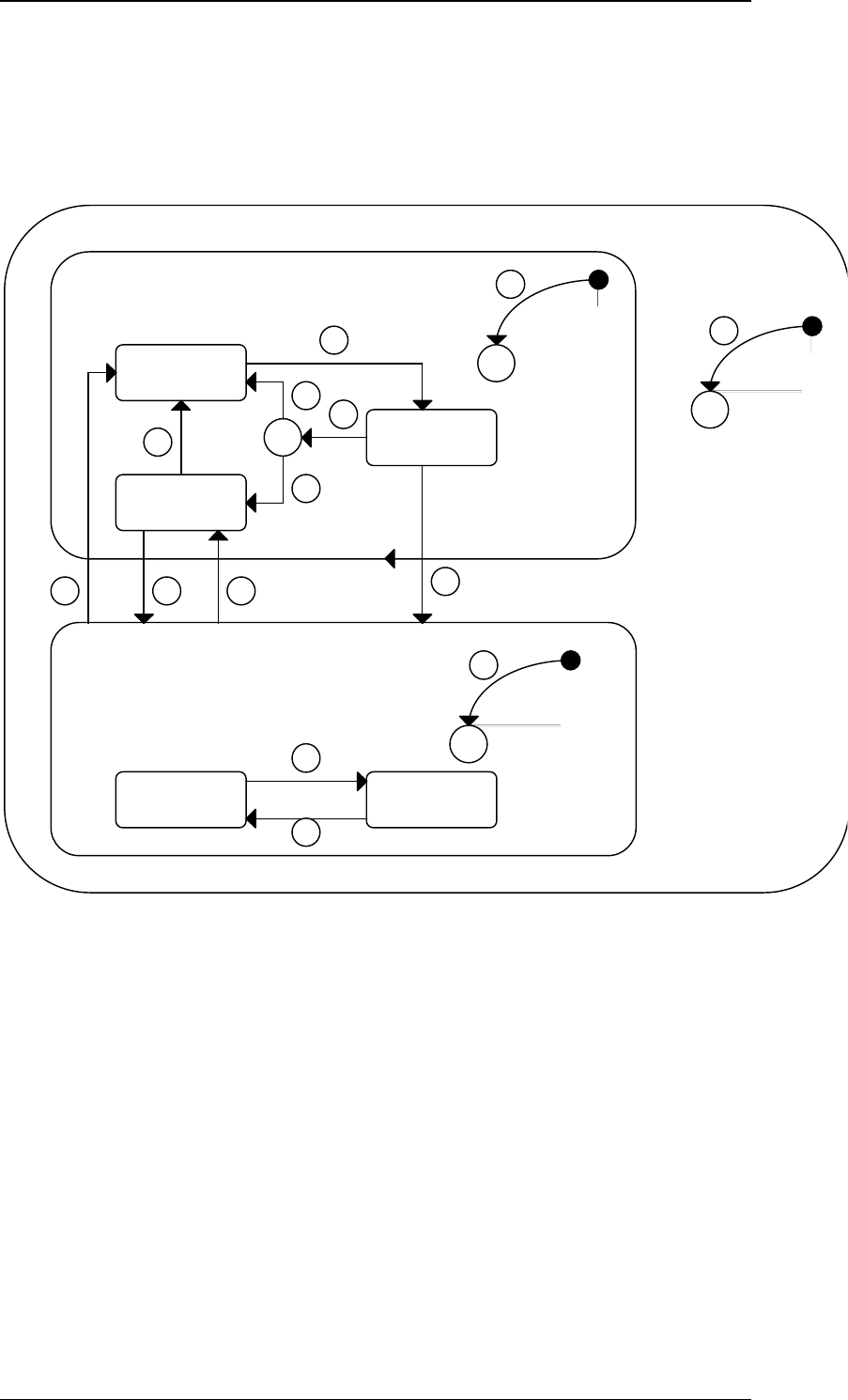
3.2.1 Control Finite State Description
The Control State of the Equipment is illustrated in the Control Finite State Diagram.
The SIPLACE behaves differently and will accept different messages depending on its
current control state. The purpose of this diagram is to make clear to the Host exactly
what is happening at the Equipment. The logic for these states and transitions is the
logic specified in the GEM standard.
Equipment C
Off-Line
Host
Off-Line
C
Attempt
On-Line
3
7
5
6
4 C
1
2
Off-Line
LocalRemote
12
13
C
11
On-Line
14109
Equipment Control States
8
SIPLACE GEM SW Version GEM 505.03 SP1 HOST Interface Manual
Page 32 of 241 ©Siemens AG, all rights reserved
3.2.2 Control State Transitions
Certain state transitions will cause a collection event to be signaled. If the event is
enabled, this event will be sent to the Host along with the appropriate reports if
appropriate. This table lists the state transitions and notes when events will be sent to
the Host.
# From Trigger To Description
1 Unknown Power-Up Conditional This transition is made
to either the Off-Line or
On-Line state,
depending on the EC
{XE
„INITCONTROLSTATE“
}INITCONTROLSTATE
(VID 1002005).
2 Unknown Power-Up Conditional This conditional
transition is governed
by the value of the {XE
„OFFLINESUBSTATE
„}OFFLINESUBSTATE
EC (VID 1002010).
3 Equipment
Off-Line
Operator requests to
go On-Line
Attempt On-
Line
The SIPLACE will
immediately send an
S1F1 to request to go
On-Line.
4 Attempt On-
Line
Unsuccessful On-
Line request
Conditional This transition occurred
because the Host did
not reply to an S1F1
with an S1F2 or
because the S1F1 was
not successfully sent.
5 Conditional
{XE
„ONLINEFAILED
„}ONLINEFAILED
Equipment Constant
configured to
Equipment Off-Line.
Equipment
Off-Line
Equipment will allow the
operator to attempt to
go On-Line again.
6 Conditional
{XE
„ONLINEFAILED
„}ONLINEFAILED
Equipment Constant
configured to Host
Off-Line.
Host Off-
Line
The SIPLACE will
accept a Host initiated
request to go On-Line
by replying to the {XE
„S1F17 „}S1F17 with
{XE „ONLACK
„}ONLACK = 0x00.
7 Host Off-
Line
Operator requests to
go Off-Line
Equipment
Off-Line
A Host request to go
On-Line will not be
accepted.
8 Attempt On-
Line
Successful On-Line
request.
On-Line The Equipment is now
On-Line.
9 On-Line Host puts the
Equipment Off-Line
by sending S1F15
Host Off-
Line
EVENT:
GemEquipmentOFFLIN
E (CEID 1000005).
SIPLACE GEM SW Version GEM 505.03 SP1 HOST Interface Manual
©Siemens AG, all rights reserved page 33 of 241
# From Trigger To Description
and receiving the
S1F16 with
OFLACK = 0x00.
The SIPLACE will
accept a Host initiated
request to go On-Line
by replying to the {XE
„S1F17 „}S1F17 with
{XE „ONLACK
„}ONLACK = 0x00.
10 Host Off-
Line
Successful
completion of {XE
„S1F17 „}S1F17 /
{XE „S1F18 „}S1F18
transaction, with {XE
„ONLACK
„}ONLACK = 0x00.
On-Line The Equipment is now
On-Line.
11 Unknown Entry into On-Line
super-state.
Conditional
(Local or
Remote)
EVENT:
GemControlStateLOCA
L (CEID 1000003) or
GemControlStateREMO
TE (CEID 1000004).
The SIPLACE will
transition to whichever
state is specified in the
EC {XE
„ONLINESUBSTATE
„}ONLINE- SUBSTATE
(VID 1002010).
12 Local Operator or Host
requests to go
Remote.
Remote
EVENT: {XE
„GemControlStateREM
OTE“}GemControlState
REMOTE (CEID
1000004). All
documented messages
will be accepted in this
state, including remote
commands.
13 Remote Operator or Host
requests to go Local.
Local
EVENT: {XE
„GemControlStateLOC
AL“}GemControlStateL
OCAL
(CEID 1000003) .
Remote commands will
be rejected.
14 On-Line Operator requests to
go Off-Line.
Equipment
Off-Line.
EVENT:
GemEquipmentOFFLIN
E (CEID 1000005). A
Host request to go On-
Line will not be
accepted.
3.2.3 Control States{XE "Control States"}
The variable {XE "CONTROLSTATE "}CONTROLSTATE represents the current control
state, and will be one of the following values: