JUKI FX-3R MAINTENANCE GUIDE.pdf - 第129页
FX-3R Maintenance Guide 11-8 d Adjusting the feeder float sensor outside the machine 1) Turn the volume on the light emission side counterclockwise to the minimum position to put the sensor in the shut-down state. 2) Gra…

FX-3R Maintenance Guide
11-7
Rev. 1.00
7) Check that a shielding object with a height of 35.6 mm from the bank support and bank
connection surface does not turn ON the sensor and that a shielding object with a height of
36.0 mm turns ON the sensor.
∗ If a shielding object with a height of 35.6 mm turns ON the sensor, remove the FSD spacer
(E2157729000) and insert the shim. Conversely, if a shielding object with a height of 36.0 mm
does not turn ON the sensor, insert the shim. (At this time, pay special attention so that the
position in the Y direction does not deviate.) After the shim has been inserted, check the height
again and make the adjustment again from step 1).
FX-3R Maintenance Guide
11-8
d Adjusting the feeder float sensor outside the machine
1) Turn the volume on the light emission side counterclockwise to the minimum position to put the
sensor in the shut-down state.
2) Gradually turn the volume clockwise toward the maximum position and stop turning when both
the red and green lamps on the light receiving side are lit.
3) Set the bulk feeder at the left, center, and right positions of the bank to check that the sensor is
not turned OFF.
∗ If the sensor is turned ON (green lamp does not light up correctly), turn the volume to make the
green lamp lit.
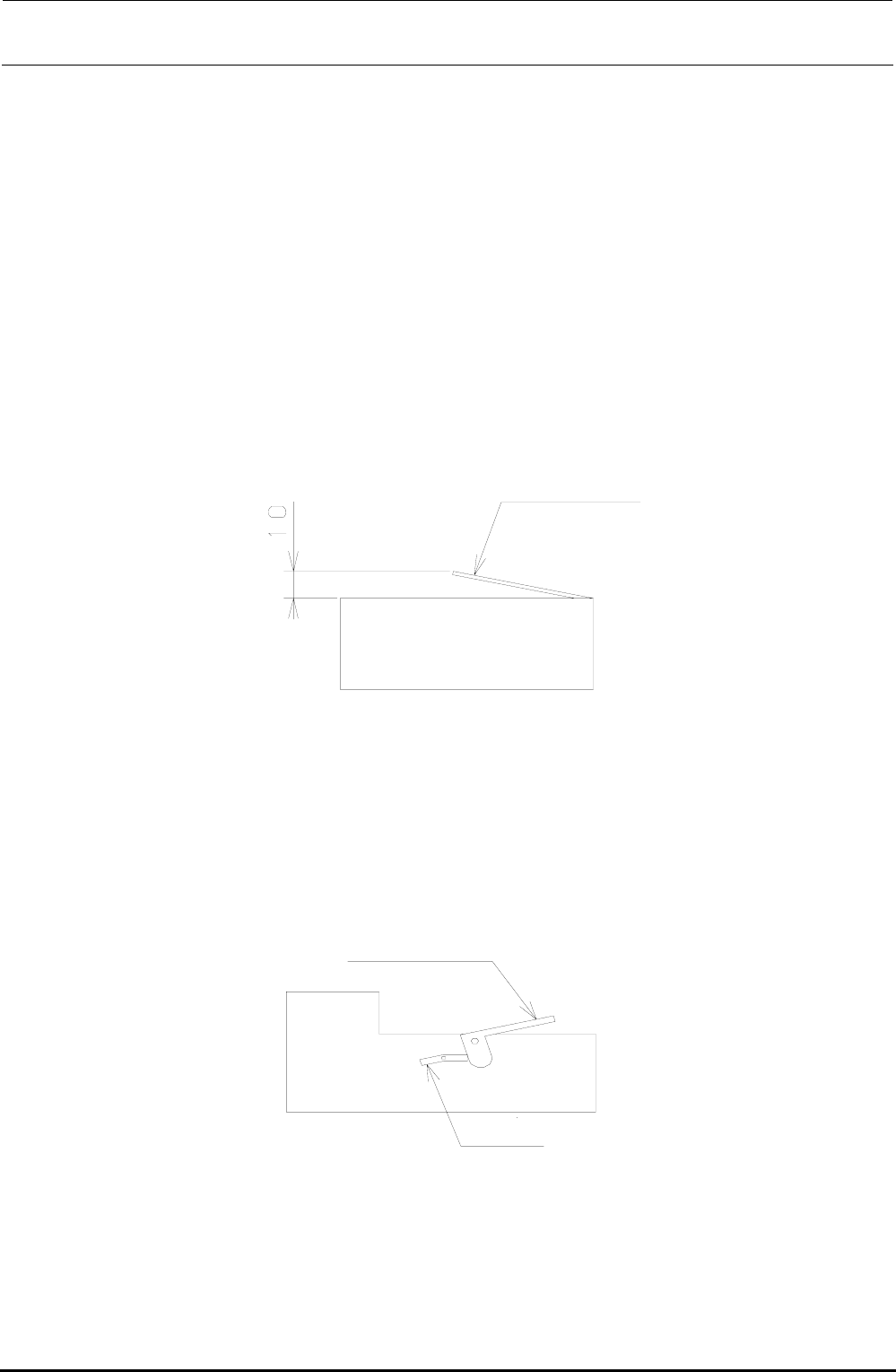
4) Set the NF32 feeder at the same positions as described in step 3) and open the top cover by
hand to check that the sensor is turned OFF when the top cover is raised 10 mm or less.
Raise the cover by hand.
NF32 feeder
Figure 11-10 Adjusting the Feeder Float Sensor
∗ If the volume is turned excessively in step 3), the sensor does not respond even though the
cover of the NF32 feeder is opened.
5) Set the NF16 feeder at the same positions as described in step 3) and open the top cover using
the lever to check that the sensor is turned OFF.
Top cover
Leve
r
N16 feeder
Figure 11-11 Adjusting the Feeder Float Sensor
∗ If the sensor is not turned OFF, move the sensor mounting position back and forth to adjust the
light-axis, and perform the adjustment again from step 1).
Rev. 1.00
FX-3R Maintenance Guide
12-1
DANGER
To prevent any trouble caused by accidental machine start, always
shut-down the power before starting the maintenance and
adjustment work.
[12] OTHER UNITS
12-1. LCD Monitor
12-1-1. Replacing the LCD Monitor
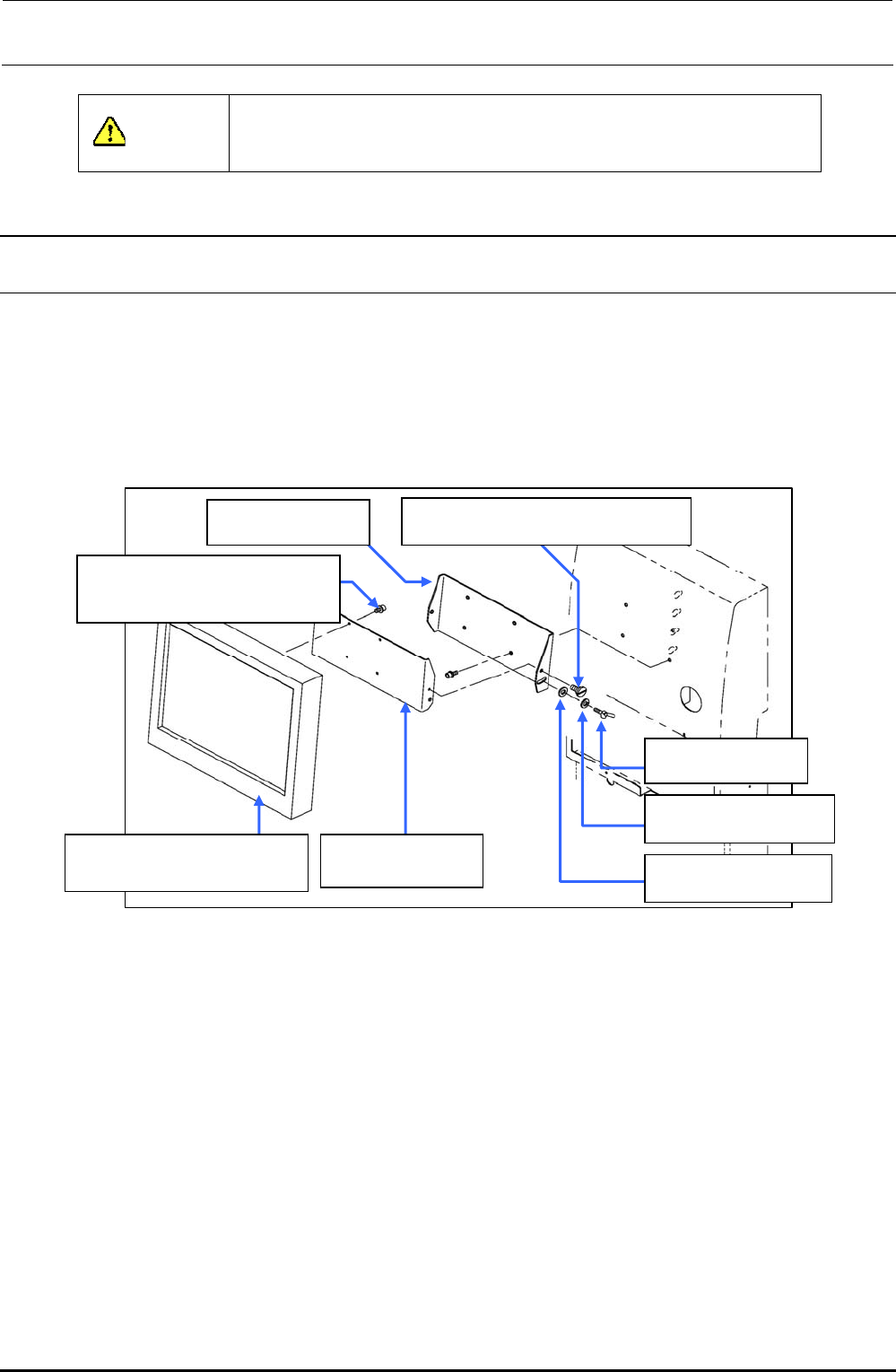
1) Remove the shoulder screws and thumbscrews , and to detach the LCD bracket F
from the LCD bracket R .
2) Remove the SEMS cap bolts to detach the LCD bracket F from the LCD monitor .
3) Reassemble the components in the reverse order of disassembly.
40048083
TECNART’s LCD monitor
40047170
LCD bracket F
SD0640246SP
Shoulder screw D=6.35 H=2.4
SL6041092TN
SEMS cap bolt with washer
M4×10
WP0641601SC
Plain washer M6
WS0610002KN
Spring washer M6
16187007
Thumbscrew
40047171
LCD bracket R
Figure 12-1-1-1 LCD Monitor
Rev. 1.00