JUKI FX-3R MAINTENANCE GUIDE.pdf - 第189页
FX-3R Maintenance Guide 13-20 13-4-5. ETHER-MAIN Board (40048066) [Functions] This ETHER-MAIN board is a host board used to communicate with the ETHER-SLAVE boa rd through the Ethernet. The board is connected to the Comp…

FX-3R Maintenance Guide
13-19
Rev. 1.00
13-4-4. cPCI-8994 Board (40048003)
[Functions]
This cPCI-8994 board is a communication board with the LNC60, a laser sensor.
The cPCI-8994 board performs the communication between the LNC60 and CPU board through
the IEEE1394a-2000 communication standards (also called “FireWire 400”).
Additionally, the power (DC+12V) is supplied to the LNC60 through the communication cable.
In addition to four IEEE 1394 ports, this board contains four RS232C ports to perform the
communication with the CVS or barcode reader.
[DIP switch settings]
There are no DIP switches on the cPCI-8994 board.
[Meaning of LED]
There are no LEDs on the cPCI-8994 board.
[Adjustment items after replacement]
There are no particular adjustment items.
FX-3R Maintenance Guide
13-20
13-4-5. ETHER-MAIN Board (40048066)
[Functions]
This ETHER-MAIN board is a host board used to communicate with the ETHER-SLAVE board
through the Ethernet.
The board is connected to the Compact PCI (hereafter referred to as “cPCI”) bus so as to
access each peripheral I/O from the CPU board. Additionally, the MS parameter backup data is
saved into the FLASH ROM.
[DIP switch settings]
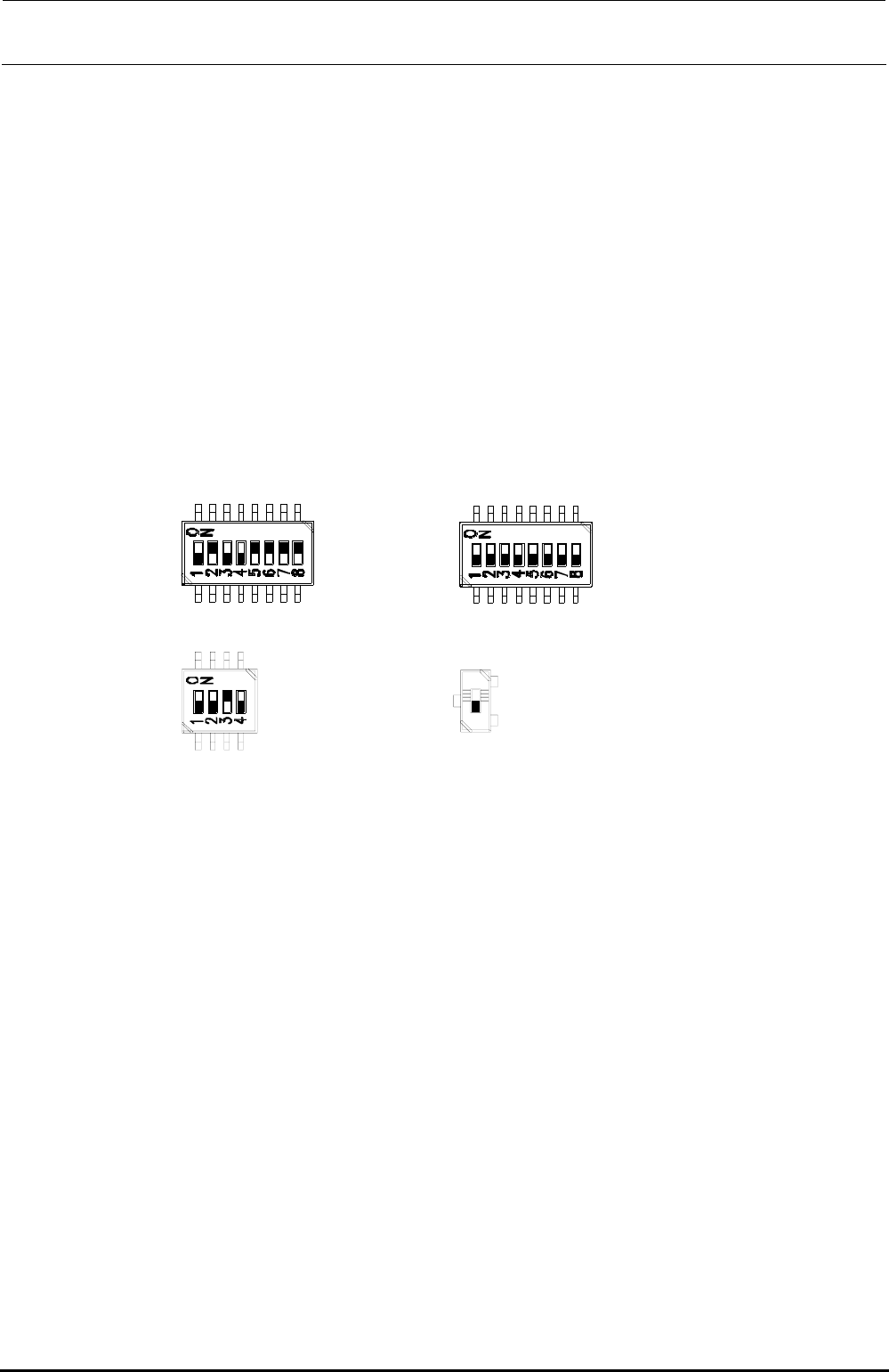
The DIP switches have been set properly at the delivery of the machine. When setting the board
in the control unit, check the DIP switch settings. ( portions show the switch positions.)
SW2-1 :OFF
SW2-2 :ON
SW2-3 :OFF
SW2-4 :OFF
SW2-5 :ON
SW2-6 :ON
SW2-7 :ON
SW2-8 :ON
SW4-1 :OFF
SW4-2 :OFF
SW4-3 :OFF
SW4-4 :OFF
SW4-5 :OFF
SW4-6 :OFF
SW4-7 :OFF
SW4-8 :OFF
SW1-1 :OFF
SW1-2 :OFF
SW1-3 :ON
SW1-4 :OFF
SW5:OFF
Note) SW5 is not mounted
on the board
(40048066).
Figure 13-4-5-1 DIP switches on ETHER-MAIN Board Assembly
[Meaning of LED]
7-segment LED: Shows the operation status of this board.
RUN LED: Lights up when the power is supplied.
EN1: Shows Link/Act of EN1. EN1 → Left station
EN2: Shows Link/Act of EN2. EN2 → Right station
EN3: Shows Link/Act of EN3. EN3 → XY-RELAY board – BASE CARRY board –
FEEDER board
EN4: Shows Link/Act of EN4.
[Adjustment items after replacement]
After that, follow the steps below to update the FLASH memory.
c Select [Options] and [Change User Group], and then select [Serviceman].
d Select [Maintenance] and [MS Parameter Setup].
e Select [Upgrade] and [Ether Main].
f Clicking [Exec.] will start the upgrading process.
Rev. 1.00
FX-3R Maintenance Guide
13-21
13-4-6. IP-X5 Board Assembly (40047528)
[Functions]
This IP-X5 board is an image processing board that processes image data, such as board mark
and IC mark captured by the OCC camera to calculate values necessary for correction of the
board position and/or part position.
[DIP switch settings]
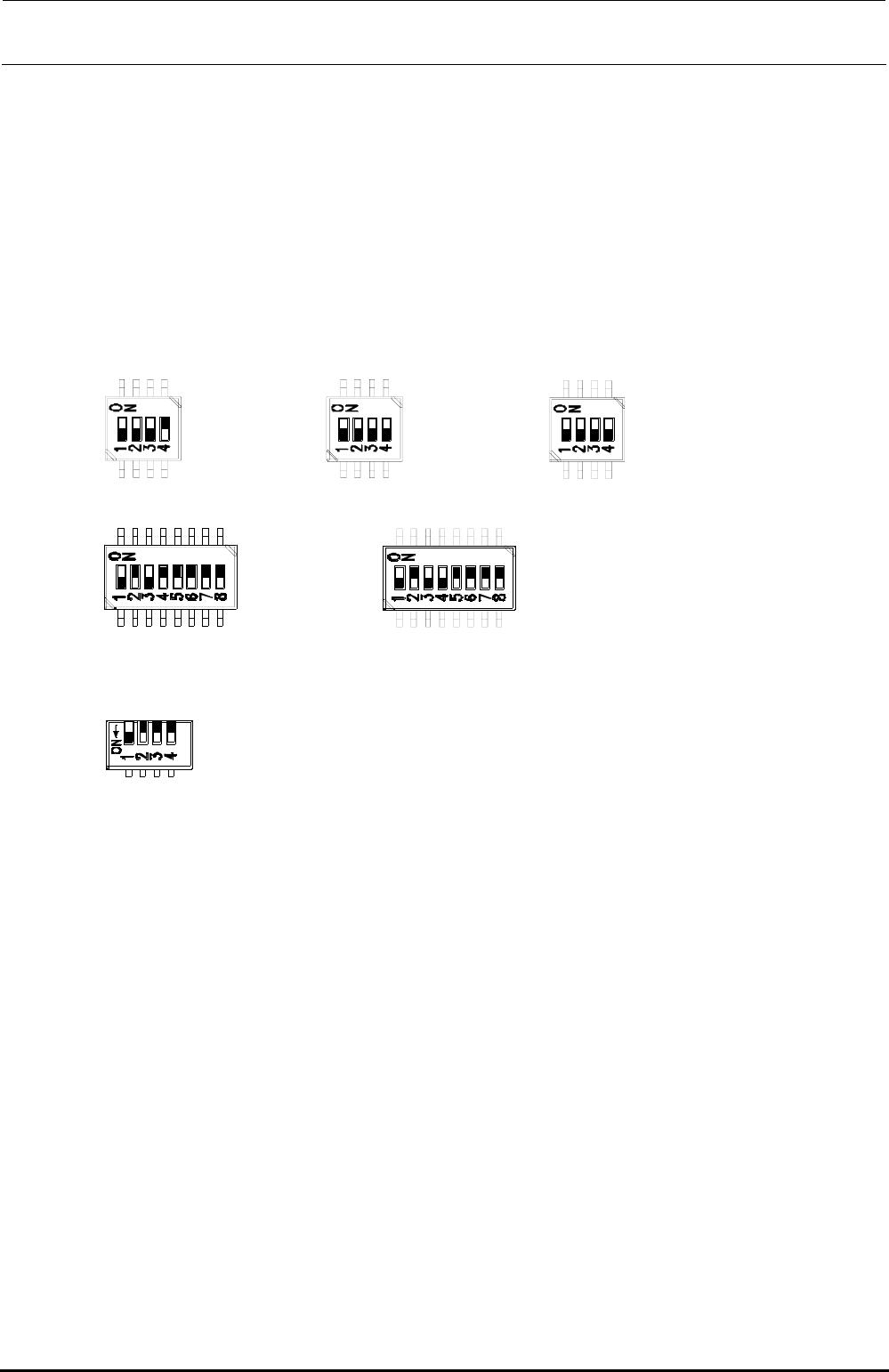
The DIP switches have been set properly at the delivery of the machine. When setting the board
in the control unit, check the DIP switch settings. ( portions show the switch positions.)
SW3-1 :OFF
SW3-2 :OFF
SW3-3 :OFF
SW3-4 :ON
SW6-1 :OFF
SW6-2 :OFF
SW6-3 :OFF
SW6-4 :OFF
SW8-1 :OFF
SW8-2 :OFF
SW8-3 :OFF
SW8-4 :OFF
SW4-1 :OFF
SW4-2 :ON
SW4-3 :OFF
SW4-4 :ON
SW4-5 :ON
SW4-6 :ON
SW4-7 :ON
SW4-8 :ON
SW5-1 :OFF
SW5-2 :ON
SW5-3 :OFF
SW5-4 :OFF
SW5-5 :ON
SW5-6 :ON
SW5-7 :ON
SW5-8 :ON
SW7-1 :OFF
SW7-2 :OFF
SW7-3 :OFF
SW7-4 :OFF
Figure 13-4-6-1 DIP switches on IP-X5 Board Assembly
∗ SW7 is a piano type switch, which is operated from the front panel.
[Front panel switches] ∗ Basically, do not operate these switches.
RESET SW: Resets this board.
ABORT SW: Issues NMI to the CPU.
DIP switch: Changes the settings of the board.
[Adjustment items after replacement]
After that, follow the steps below to update the FLASH memory.
c Select [Options] and [Change User Group], and then select [Serviceman].
d Select [Maintenance] and [MS Parameter Setup].
e Select [Upgrade] and [Display].
f Clicking [Exec.] will start the upgrading process.
Rev. 1.00