KE2010.Instruction Manual.Ver.2.01,Rev.08.pdf - 第1083页
278 * Coplanarity Cable Conne ction Diagram * Cop lanarity Error Screen T he coplanar ity sensor of a KE-2000 s eries m ac hine displays the image indica ting the coplanarity check er ror on the c oplanarity screen if a …
277
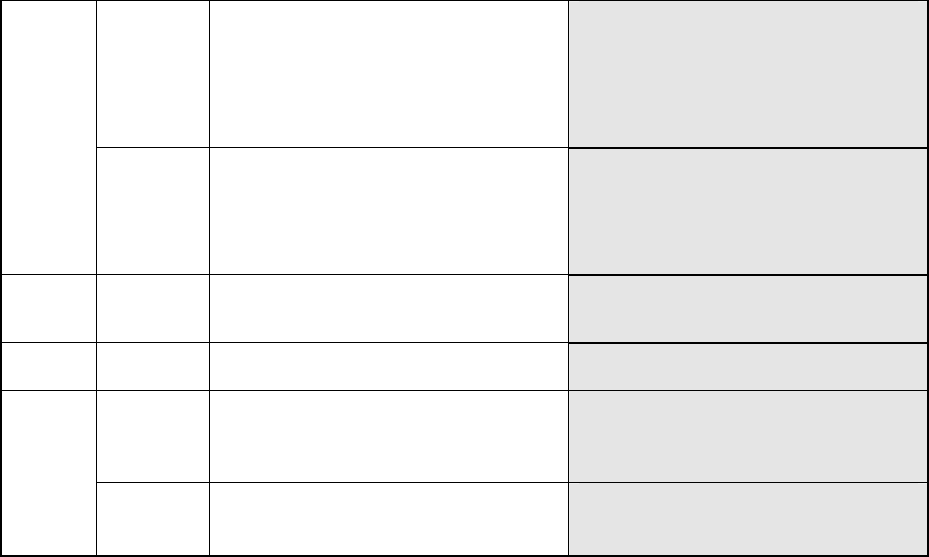
5-3130 The image of a terminal is partially
faded.
− This error may occur if the surface of
a terminal does not reflect laser
sufficiently. If you set the smaller
value to the menu item “Electrode
Brightness Threshold” on the
“COPLA CHECK DATA” screen, this
error may not occur again.
5-3140 The image of a terminal is too bright.
− This error may occur if the surface of
a terminal reflects laser too much.
If you set the smaller value to the
menu item “Laser Strength” on the
“COPLA CHECK DATA” screen, this
error may not occur again.
FSLS 3-3100 The component tilts. − This error may occur if a component
tilts due to a component pick-up
error.
FELS 14-9000 Software operation error − The coplanarity software
malfunctions.
14-14 IP_X board time-out error − The coplanarity software
malfunctions.
− Electric contact of the coplanarity
232C cable*2 may be poor.
None
14 Mounter time-out error
− The IP_X board malfunctions.
− The coplanarity software
malfunctions.
278
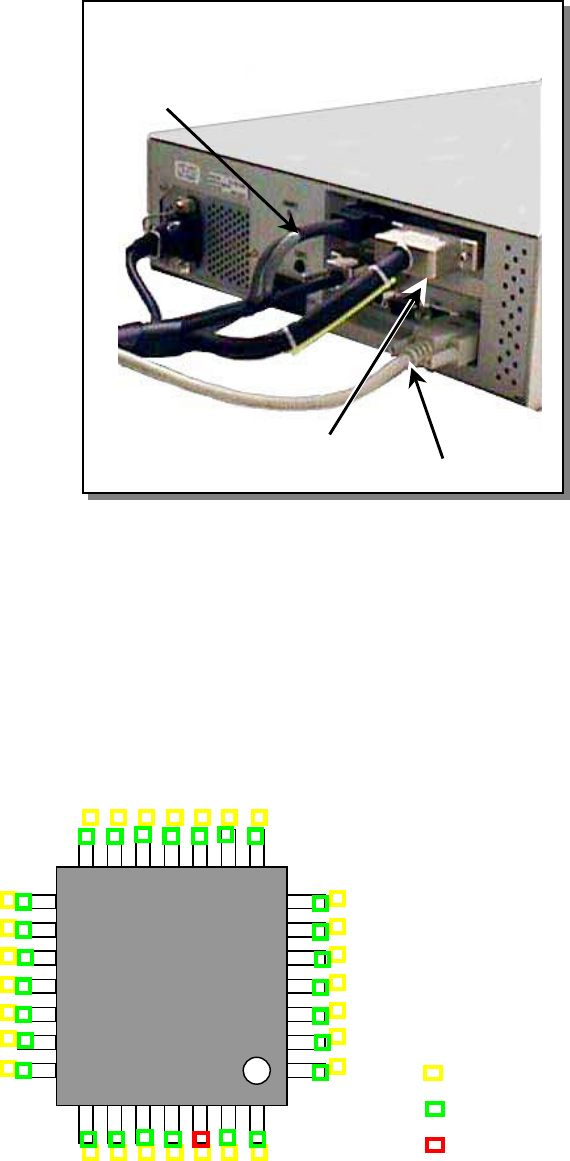
* Coplanarity Cable Connection Diagram
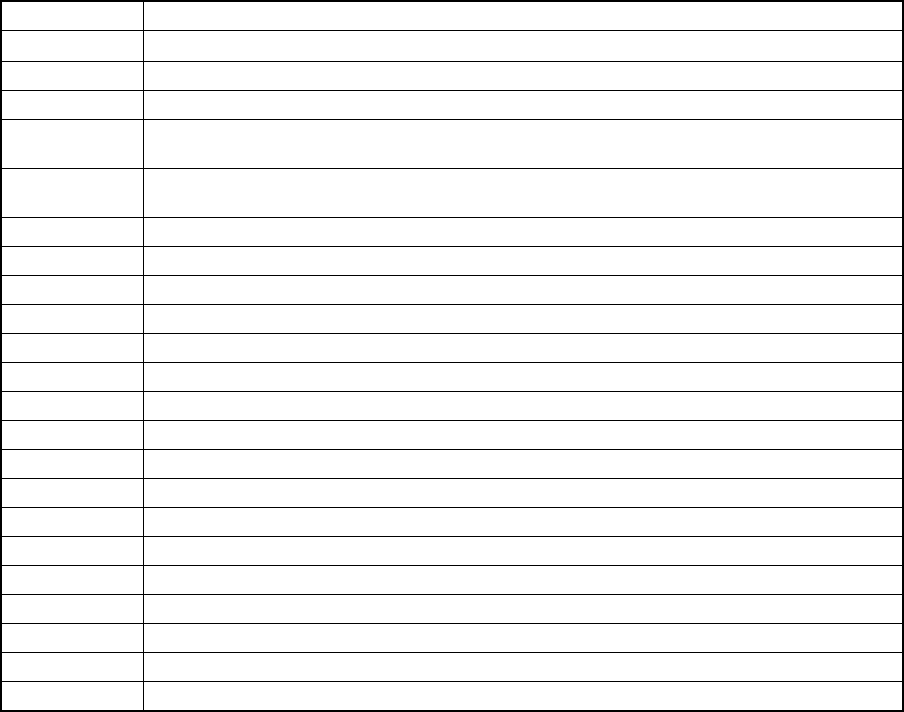
* Coplanarity Error Screen
The coplanarity sensor of a KE-2000 series machine displays the image indicating the
coplanarity check error on the coplanarity screen if a coplanarity error occurs. However,
when the machine finishes a coplanarity check normally, it does not display any image on
the screen so that it cannot affect the cycle time seriously. You can operate the VGA
switch to display such an image on the liquid crystal display monitor
(Front: the screen of the machine Rear: Coplanarity screen).
As shown in the figure below, a yellow rectangle appears on the ideal electrode position
calculated based on the Component data, a green rectangle appears on the electrode that
is checked to be correct, and a red rectangle appears on the electrode on which an error is
detected on the screen. This image is shot from the bottom of the component, but it is
reversed and shown as if the component is shot from the top. The component is supposed
to be checked when its placement angle is 0 degrees.
*3 Coplanarity interface cable
1 Coplanarity sensor cable
*2 Coplanarity 232C cable
Ideal electrode position (yellow)
Normal electrode (green)
Electrode on which an error is detected (red)
1
A. ERROR LIST
This chapter lists error messages and another necessary information displayed on the screen.
Each of error codes is preceded by a letter which identifies the type of the event: E for Error
E 999999 Error codes
Q 999999 Error codes The serial number "999999" represents the content of the event.
Error Messages on Application Management
Error code Message
E100010 Failed to initialize the Windows Socket
E100020 Failed to initialize OLE. Confirm the OLE Library version
E102010 Fatal system error occurred. Abort the process
E102020 You tried to start up, before the end of the previous system program. Exit the system
program, and start again
E102100 There was a fatal failure while starting the KE-2000 system. Avoiding the possible
damages, the system is going to abort the process. (error code = %d)
E102900 System is closing all processes. And getting into the shut-down process. Are you sure?
E105010 Fatal error occurred in constructing memory structure. Abort the process
W105110 The saving program has no name. Please put the name?
W105120 The same named file exists. Do you want to overwrite the file?
E106010 Failed to start the data-manager. Abort the process
W106020 Illegal password. Retrieve the default group settings
E107100 Failed to create asynchronous threads. Abort the process
E108010 Failed to start up MC system. Abort the process
E109110 Fatal error occurred in constructing axes structure. | Abort the process
E109120 Fatal error occurred in initializing axes. Abort the process
E109130 Failed to originate, Please retry
E109210 Failed to initialize DTS
E109220 Error was detected in checking if any nozzles attached
W109221 There are some attached nozzles
W109230 Each I/O is moving to the own safe position, OK?