KE2010.Instruction Manual.Ver.2.01,Rev.08.pdf - 第146页
4 – 39 (3) PWB configurati on 1) Single PW B The PW B which has only one circuit patter n. Figure of the si ngle pattern 2) Multiple PW B matrix The PW B which has multiple circuit pattern s aligned in depth and width an…
4 – 38
4.5 PWB Data
4.5.1 Basic setting
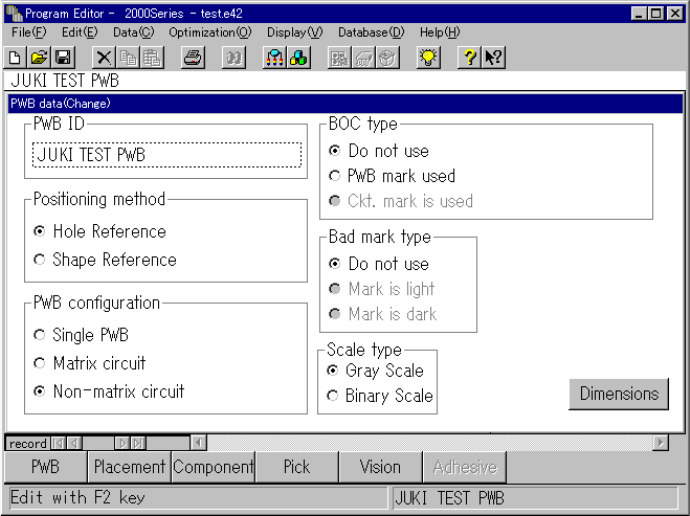
After the Program Editing utility starts up or when you select [Create new] on the File
menu, a program name becomes “UNTITLED”, and the PWB data basic setup screen
as shown in the figure below appears initially.
Use the "PWB ID" edit box to set the PWB ID, and use the corresponding radio button
to set the positioning method, PWB configuration, BOC type and bad mark type.
To set each item, move the cursor over the desired item with a track ball, then click
the button of the desired setting with the left button.
Description of each menu item
(1) PWB ID
Up to 32 alphanumeric characters and symbols can be entered. However, note
that only numbers or only symbols cannot be entered. They shall be combined
with alphabetic characters. When reading the production program, the PWB ID
is displayed as well as the file name of the production program, so enter an ID
which is easy to understand.
(2) Positioning method
1) Hole reference
The PWB has positioning holes, and the reference pins are inserted in the
holes to hold the PWB.
2) Shape reference
After the PWB touches the stopper, the edges of the PWB are fixed
mechanically to hold the PWB.
4 – 39
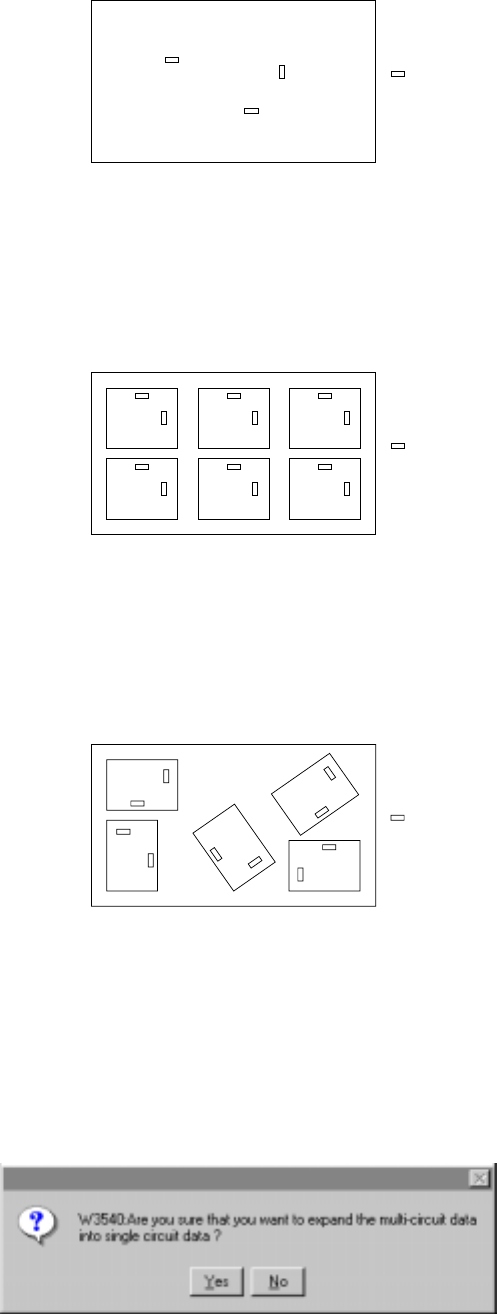
(3) PWB configuration
1) Single PWB
The PWB which has only one circuit pattern.
Figure of the single pattern
2) Multiple PWB matrix
The PWB which has multiple circuit patterns aligned in depth and width and
with a same angle and space.
Figure of the Matrix multiple patterns
3) Multiple PWB non-matrix
The PWB which has multiple circuit patterns but with a different angle and
space among them.
Figure of the Non-matrix multiple patterns
Note that circuits are automatically assigned in the multiple PWB non-matrix
pattern if you change the PWB configuration from the multiple PWB matrix
pattern to the multiple PWB non-matrix pattern after setting the dimensions for
the multiple PWB matrix pattern. If you change the PWB configuration from the
multiple PWB matrix or multiple PWB non-matrix pattern to the single PWB
pattern, a PWB is configured as one circuit, and the confirmation message
appears on the screen.
Component
Component
Component
4 – 40
(4) BOC type
To place a component more precisely, positioning marks may be made on a
board.
Select a BOC type according to the actual positioning mark setting.
1) Not used
Production is carried out without using the BOC mark. (The mark printed on
the PWB and to be used for offsetting the placement point.) See Sections
"1.1.7 Printed circuit board specifications" and 5 " Board Recognition Marks
".
2) PWB mark is used
A set of BOC marks are used for the placement point offset of the entire
PWB area. When the BOC mark is used for a single pattern PWB, select
this item. When a set of BOC marks is used for the entire area of a multi
pattern PWB, select also this item.
3) Circuit mark is used
For a multiple pattern PWB, when the BOC mark of each pattern is used for
the placement point offset of each circuit of the PWB, select this item.
Accuracy of placement is better compared with the placement using the BOC
mark but it takes longer to complete the recognition of all BOC marks.
For a non-matrix multiple pattern PWB, the circuit has to be assigned in 90,
180, 270, or 360 degrees against the reference circuit.
(5) Bad mark type
A bad mark may be made on a multiple pattern board so that no component can
be placed on a defective circuit. To use a bad mark, select the bad mark type
according to the difference of reflection ratio between a bad mark and a board.
1) Not used
Select this item when production is carried out without using bad marks.
(The bad marks are used for recognizing a certain circuit of a multiple pattern
PWB where components are not to be mounted. Normally, sealing or
painting is applied for the bad marks.) For a single pattern PWB, the bad
marks cannot be used, and select this item.
2) Mark is light
Select this item when a bad mark and the PWB are recognized with the bad
mark sensor, and the reflection ratio of the bad mark is higher than that of the
PWB.
3) Mark is dark
Select this item when a bad mark and the PWB are recognized with the bad
mark sensor, and the reflection ratio of the bad mark is lower than that of the
PWB. This item shall be selected particularly when black bad marks are
used on a ceramic board.