KE2010.Instruction Manual.Ver.2.01,Rev.08.pdf - 第234页
4 – 127 b. MTS (tray serve r) Figure 4.8.2. 3.3.3 How to calculate the pick-up positi on on an M TS − W hen y ou open the Pick data input scr een, an asterisk mark "*" appear s in parameter s you do not have to…
4 – 126
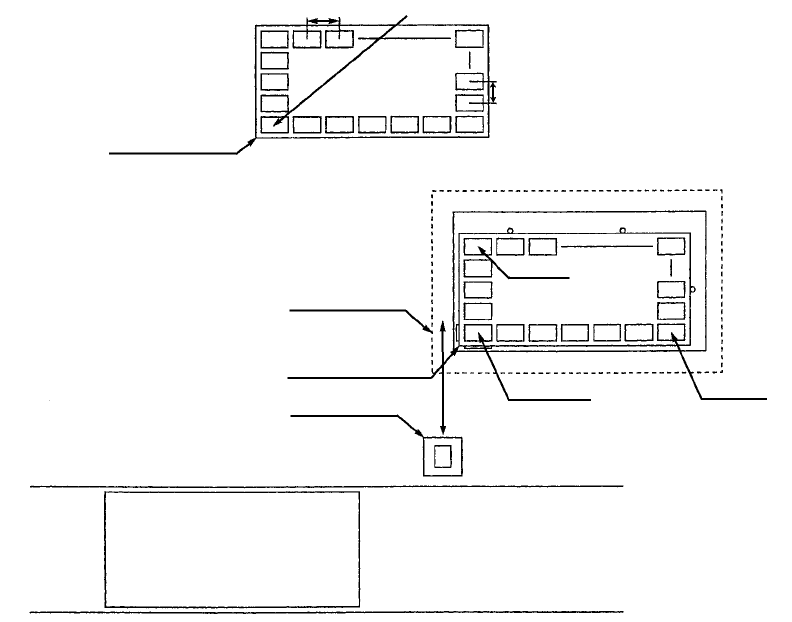
a. MTC (tray changer)
Figure 4.8.2.3.3 How to calculate the pick-up position on an MTC
− When you select an MTC as the parameter "Sply", an asterisk mark "*"
appears in parameters you do not have to enter. The component pick-up
position of an MTC, X1, Y1, Z, X2, Y2, X3 and Y3 are calculated based on the
specifications of a tray stored in Component data and according to the MTC
coordinate system.
− The MTC component pick-up position on the main unit is determined
according to the settings of the Machine Setup menu.
Tray contact position
Pitch X
Pitch Y
Tray contact position
Shuttle
MTC
(TR4, TR6)
PWB PWB transport path
Front of the machine
(X2, Y2)
(X3, Y3) (X1, Y1)
First component position
4 – 127
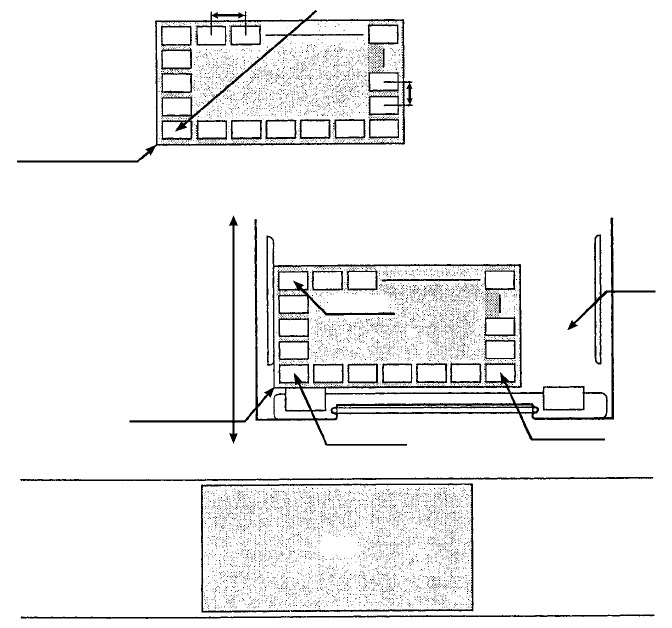
b. MTS (tray server)
Figure 4.8.2.3.3.3 How to calculate the pick-up position on an MTS
− When you open the Pick data input screen, an asterisk mark "*" appears in
parameters you do not have to enter. The component pick-up position on an
MTC, X1, Y1, Z, X2, Y2, X3 and Y3 are calculated, then displayed based on
the specifications of a tray stored in Component data and according to the
main unit coordinate system.
Tray contact position
Pitch X First component position
Pitch Y
Tray contact position
(X2, Y2)
(X3, Y3)
(X1, Y1)
Loading/unloading
MTS (TR5) drawer
PWB PWB transport path
Front of the machine
4 – 128
4.9 Checking Data Completion Status
4.9.1 Data completion status
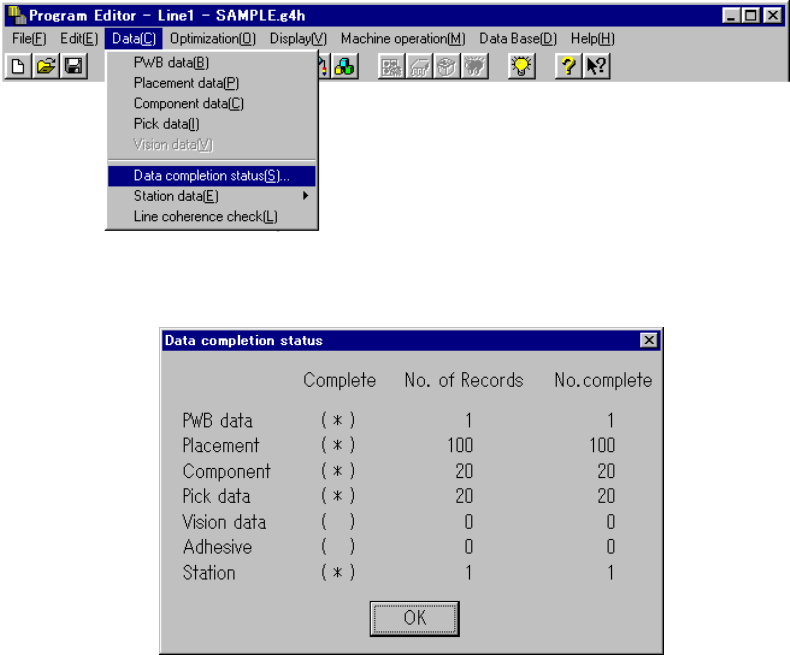
Invoke this command from the Data menu.
When you click the [Data completion status] command, the following dialog box
appears on the screen.
The dialog box shown above displays the number of input records as the menu item
“No. of Records”, the number of completed records as the menu item “No. complete”,
and whether each type data is completed or not as the menu item “Complete”.
Each display item is described below:
① Complete
Displays whether each type of data is completed or not.
(*) data is completed.
( ) data is not completed.
If the value of the menu item “No.of Records” is equal to that of “No. complete”,
the data is handled as “completed”.
② No. of Records
Displays the number of input records regardless of whether each record is
completed or not, that is, displays the total number of records including
incomplete records.
③ No. of complete
Displays the number of records entered completely, that is, displays the number
of records whose necessary items are all entered.
When you click the <OK> button, the machine returns to the data screen from
which you invoked this command.