KE2010.Instruction Manual.Ver.2.01,Rev.08.pdf - 第269页
4 – 162 (3) Area Option Optimization can specif y the area that can be used t o distribute f eeders. W hen the “Area” option is used, t he feeder installation rang e can be switched between the front and the rear for eac…

4 – 161
The Assignments options are described in the table below:
Table 4.10.1.5 Assignments option detailed descriptions
Items to be
set
Function Choices
Nozzle Specifies if the Optimization
utility assigns nozzles.
[Auto arrange nozzles]
The Optimization utility assigns nozzles and ignores
the permanent information/ATC nozzle settings.
[Auto arrange empty nozzle positions]
The Optimization utility assigns additional nozzles if
there are empty ATC slots according to permanent
information/ATC nozzle settings.
[Use permanent nozzle setup from MSL Setup]
Nozzles are assigned according to the permanent
information/ATC nozzle settings. The Optimization
utility does not assign any nozzles.
Pick Data Specifies whether to assign
feeders to the station
specified in the Pick data
“station” section and “supply”
section.
If the supply position is not
changed as a result of
optimization, the pick position
XYZ for those feeders will be
kept.
[Use manual station/position assignments]
Assigns a feeder(s) whose component feeding
position is specified according to that specification.
The Optimization utility assigns feeders when they
are set to “auto selection”.
[Auto assign all data]
Re-assigns all feeders as if they are set to “auto
selection”.
However the permanent feeders are assigned
at the position specified.
Assign several stick components to one stick feeder.
Assign the same type of stick components to one feeder. If this option is not checked, assign
one lane to one feeder to allow simultaneous pick-up of components.
If the lane is specified for a particular component, then the specified lane is used.
Note: The "permanent nozzle" means a nozzle which you set on the Machine Setup
menu.
4 – 162
(3) Area Option
Optimization can specify the area that can be used to distribute feeders.
When the “Area” option is used, the feeder installation range can be switched
between the front and the rear for each program.
By installing the feeders on the feeder trolley ahead of time, you can shorten the
time until the next production start.
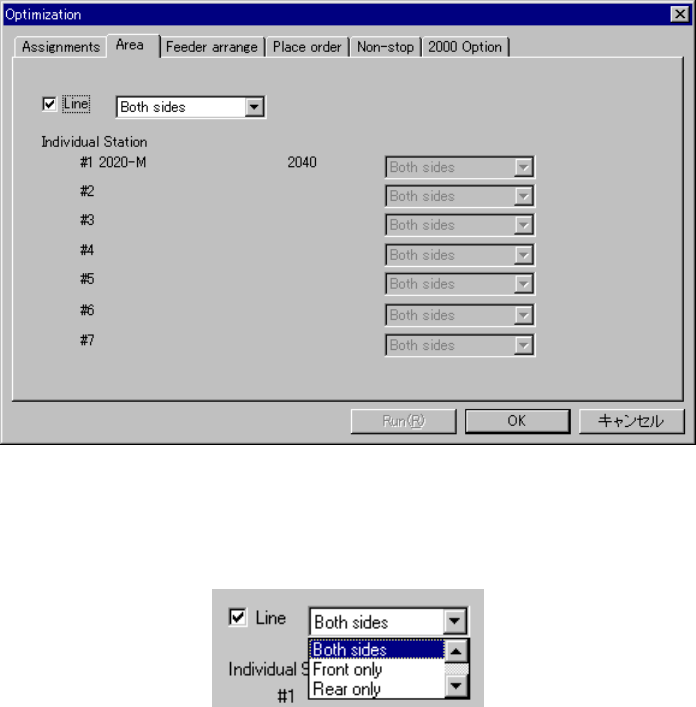
Click on the “Area” Option tab to display the following dialog:
Figure 4.10.1.8 Area Option
When you check the line check box, you can specify the feeder installation range
for the whole line:
Figure 4.10.1.9 Specify area in the line
Both sides Optimization assigns the feeders to both sides.
Front only Optimization assigns the feeders to front side only.
Rear only Optimization assigns the feeder to rear side only.
Front priority Optimization attempts to assign feeders to the front first, but if not
possible, feeders are assigned to the rear .
Rear priority Optimization attempts to assign feeders to the rear first, but if not
possible, feeders are assigned to the front .
4 – 163
(4) Feeder Arrange Option
When you use the “Feeder arrange” option, you can specify the optimization
option for assigning feeders.
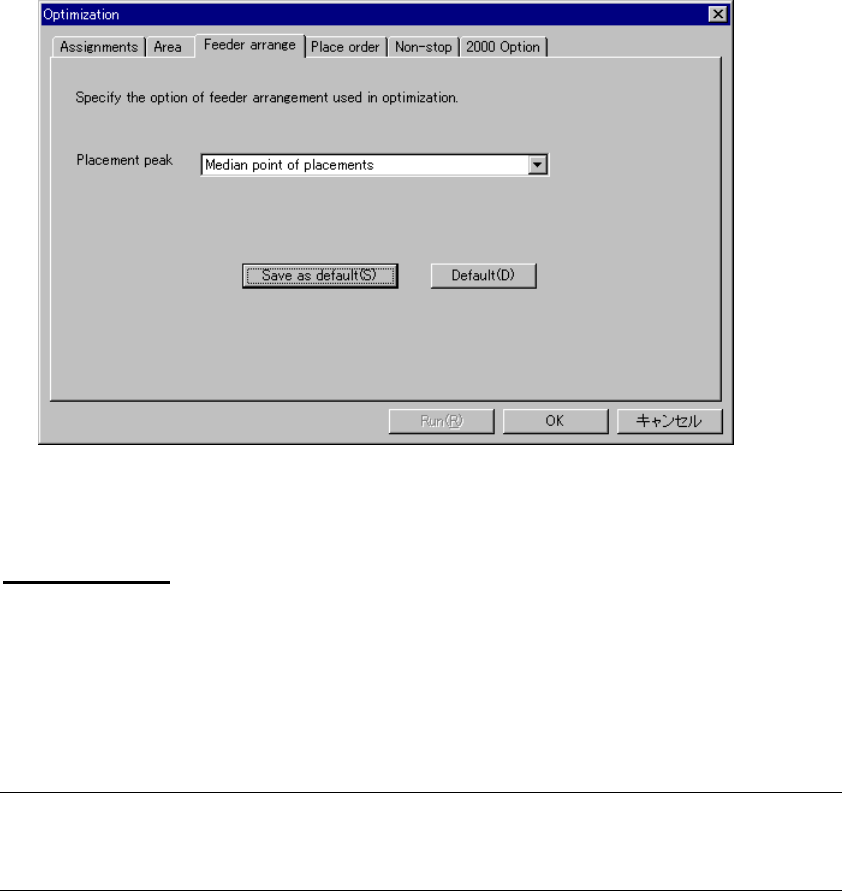
Click on the “Feeder arrange” option tab to display the following dialog box:
Figure 4.10.1.10 Feeder Arrange Option
Placement peak
Specify the starting point for assigning feeders. The choices are:
• Medium point of placement: Arranges feeder in the median (center) of placement
points
• Average point of placement: Arranges feeder in the average point of placement
points
Note: When you check the check box “Arrange feeders according to the placement
peak point is fixed on center of the PWB” on the “2000” option dialog box, this
item is disabled for a KE-2000 series of station.