KE2010.Instruction Manual.Ver.2.01,Rev.08.pdf - 第441页
6 − 65 (3) T rack ing and pick position correct ion of a f eeder where components r un out ① Feeders to be track ed The system can t rack a t ape feeder , stick f eeder, and bulk feeder ; all f eeders where a retry over …
6 − 64
− In the same manner, when the Operation option “Pick and trace before retry.” is
checked, the system picks up a component and tracks this picking-up operation
according to the specified requirements before resuming the suspended
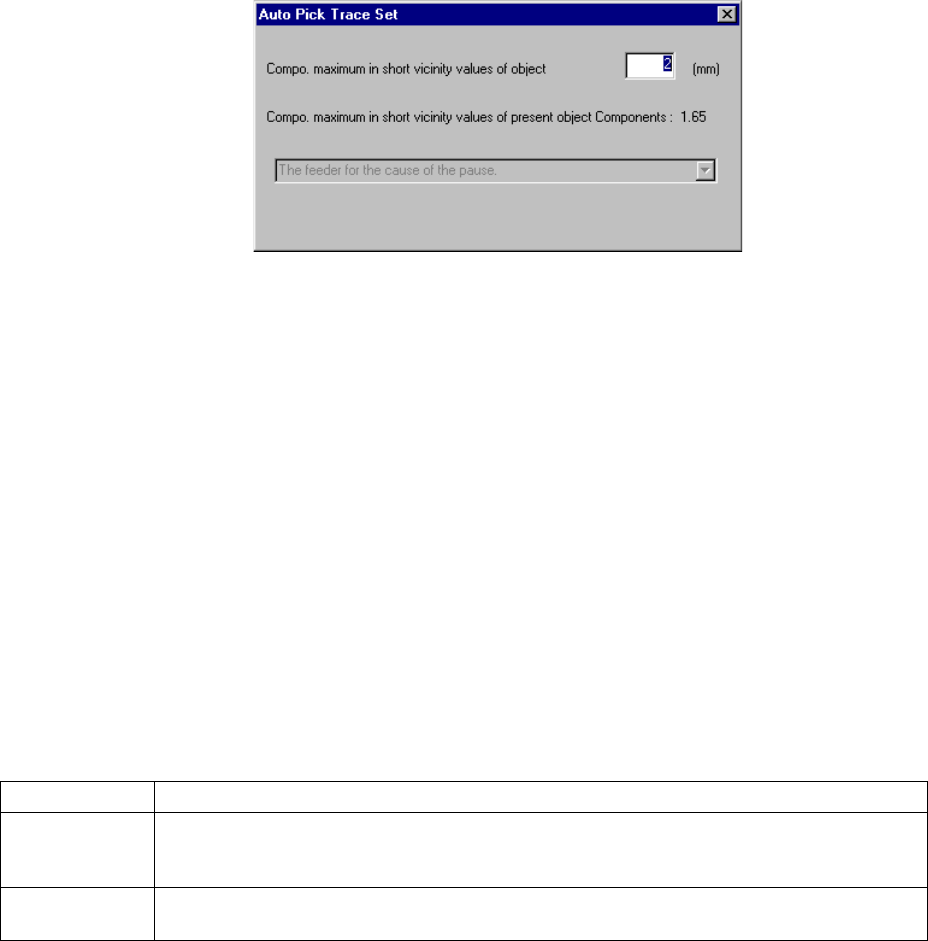
production. Before picking up and tracking a component, the “Auto Pick Trace
Set” dialog box appears on the screen as shown in Figure 6.4.1.3.
Figure 6.4.1.3 “Auto Pick Trace Set” dialog box
Enter the maximum length of the shorter side of a component to be picked up/tracked
in the input area. The system will not pick up and track a component whose shorter
side is longer than the value you specified here.
When you press the <START> switch, the system picks up and tracks a component,
and then resumes the suspended production. When you press the <STOP> switch,
the system enters Pause mode again.
The combo box displayed on the dialog box above indicates the setting of the
Operation option, and you cannot change or select it.
③ Production restart mode
How production restarts when the <START> switch on the operation panel is
pressed differs as shown below, depending on the selection of the radio
button on the dialog box.
Restart mode Operation when production is restarted
Retry Searches all alternative feeders for the runout components, and if all the feeders have run out
of the components, all the feeders are fully loaded with the components. Then, operation
restarts from the current pick and placement cycle.
Skip Skips the components which have been run out, and production starts from the next pick
cycle.
6 − 65
(3) Tracking and pick position correction of a feeder where components run out
① Feeders to be tracked
The system can track a tape feeder, stick feeder, and bulk feeder; all feeders
where a retry over error occurs or components run out. However, it does not
track a feeder which is set as "Unused".
② How to enter Tracking mode
Press one of the CAMERA, HEAD and HMS device keys of the HOD to
activate its function.
③ Other operation
The other operations during this tracking and correction are the same as
those for pick position tracking.
(4) Detailed information
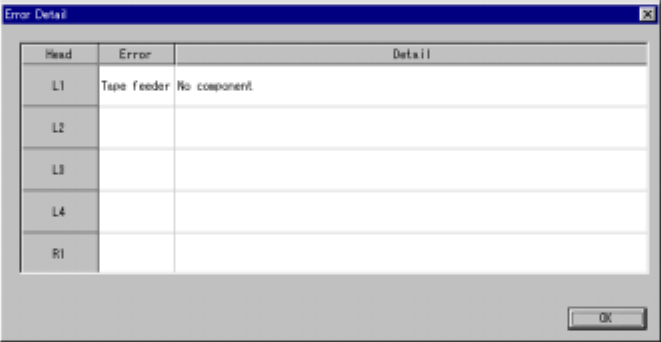
When you click the <Detail> button, the system displays the list of the heads that
cause an error.
Figure 7.4.1.3 “Error Detail” dialog box (Screen example when you use a KE-2020)
6 − 66
* The actually displayed names under the caption “Head” on the screen shown
in Figure 7.4.1.4 vary depending on the model you use.
Model Head names
KE-2010 L1 to L4
KE-2020 L1 to L4, R1
KE-2030 L1 to L4, R1 to R4
KE-2040 L1, R1
− The errors actually displayed under the caption “Error” are the same as those
of a Retry list.
− The detailed description of errors actually displayed under the caption “Detail”
is the same as that of a Retry list.
<OK>: When you click this button, the “Error Detail” dialog box closes.
<START>: When you press this button, the “Error Detail” dialog box and the
component run-out dialog box close and the system resumes
production.
<STOP>: When you press this button, the “Error Detail” dialog box closes, and
the dialog box displayed when you try to abort production opens to
ask you whether to abort production actually.
− Obtaining the coplanarity information (available with a KE-2020/2040 only)
If a coplanarity error occurs, the <Copla Info.> button appears on the “Error
Detail” dialog box.
Figure 6.4.1.5 <Copla Info.> button
When you click this button, the machine obtains the coplanarity information and
shows it on the memo pad.
When you click the line of the head on which a coplanarity error occurs with the
right button, the “Copla Info” pop-up menu appears on the screen.
When you click the corresponding command from this pop-up menu, you can
obtain the coplanarity information and display it on the memo pad also.
If the “Pause” dialog box appears on the screen due to a coplanarity error, this
pop-up menu appears also.