KE2010.Instruction Manual.Ver.2.01,Rev.08.pdf - 第470页
6 − 94 ④ Operat ion inf ormation displayed when the system ejects a board or clamps it again T he system displays the various notes on your selection of the radio but ton “Load a new PW B” or “Produce af ter r e-clamp. ”…
6 − 93
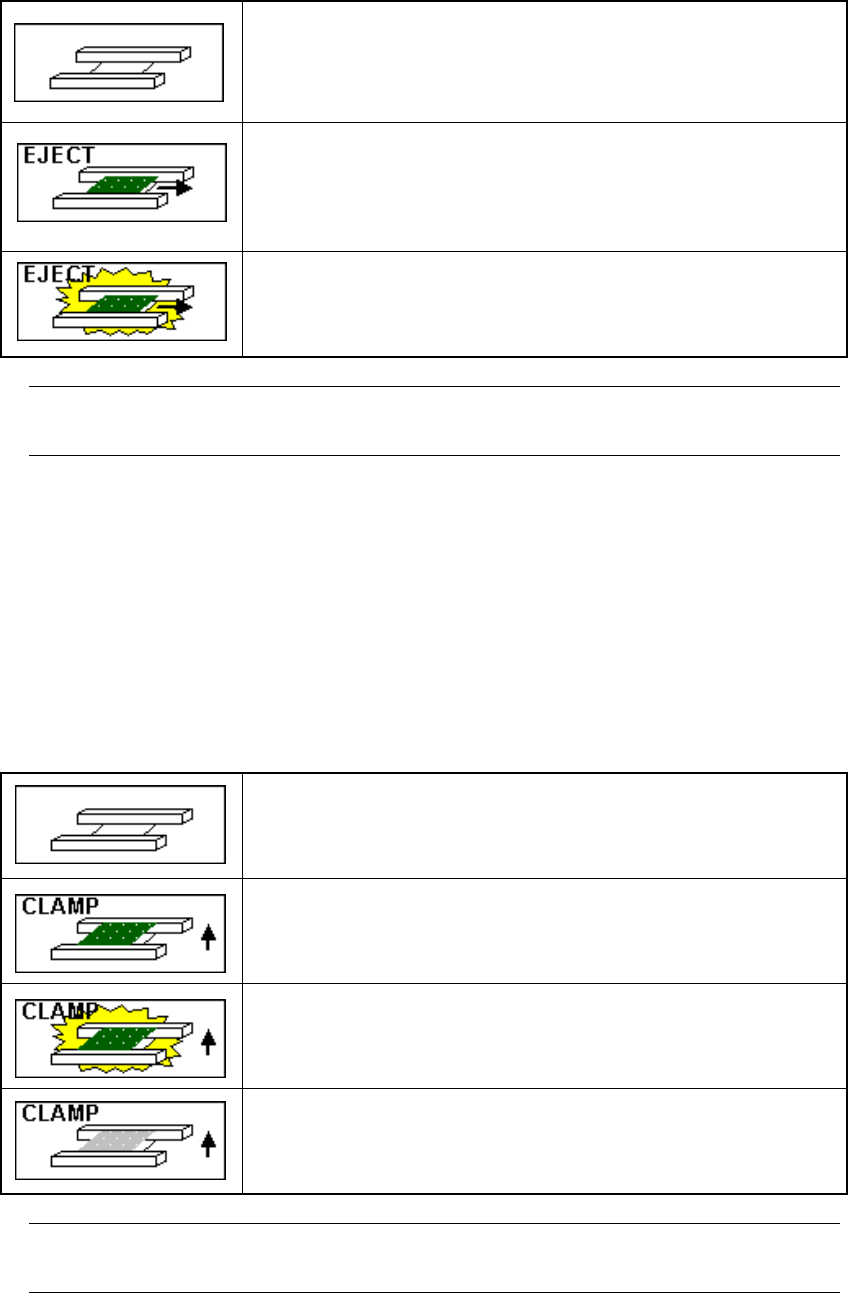
1). When the radio button “Load a new PWB” is selected
The system displays the condition of the PWB transport path detected by the stop
sensor on the screen as the station that is to eject a board.
There is no board on the PWB transport path.
A board is to be ejected from the PWB transport path.
Although a board was detected on the PWB transport path while
production was being interrupted, the system has to eject it since
all of the necessary components are already placed on the
board.
A board is to be ejected from the PWB transport path.
However, some component(s) may not be placed on the board
or may be placed at a wrong position. Be careful to eject the
board.
−
If you click this image, the system moves a board located on the center station
to a position where the system can re-clamp it.
2). When the radio button “Re-clamp current PWB” is selected
The system displays the condition of the PWB transport path detected by the stop
sensor on the screen as the station that is to clamp the board again. Or, if the
system has the information on the PWB transport path obtained when the
previous production was interrupted (that is, if you have not loaded a production
file and not quitted the “Production” screen before resuming the production after
interrupting it), it displays the same condition of the PWB transport path as the
previous condition on the screen when it clamps a board.
There is no board on the PWB transport path.
The system clamps a board on the PWB transport path again.
The system clamps a board on the PWB transport path again.
However, some component(s) may not be placed on a board or
placed at a wrong position of a board. Be careful to clamp a
board again.
The system re-clamps a board that was located on the PWB
transport path when production was interrupted. However,
there is no board on the PWB transport path
−
If you click this image, the system moves a board located on the center station
to a position where the system can re-clamp it.

6 − 94
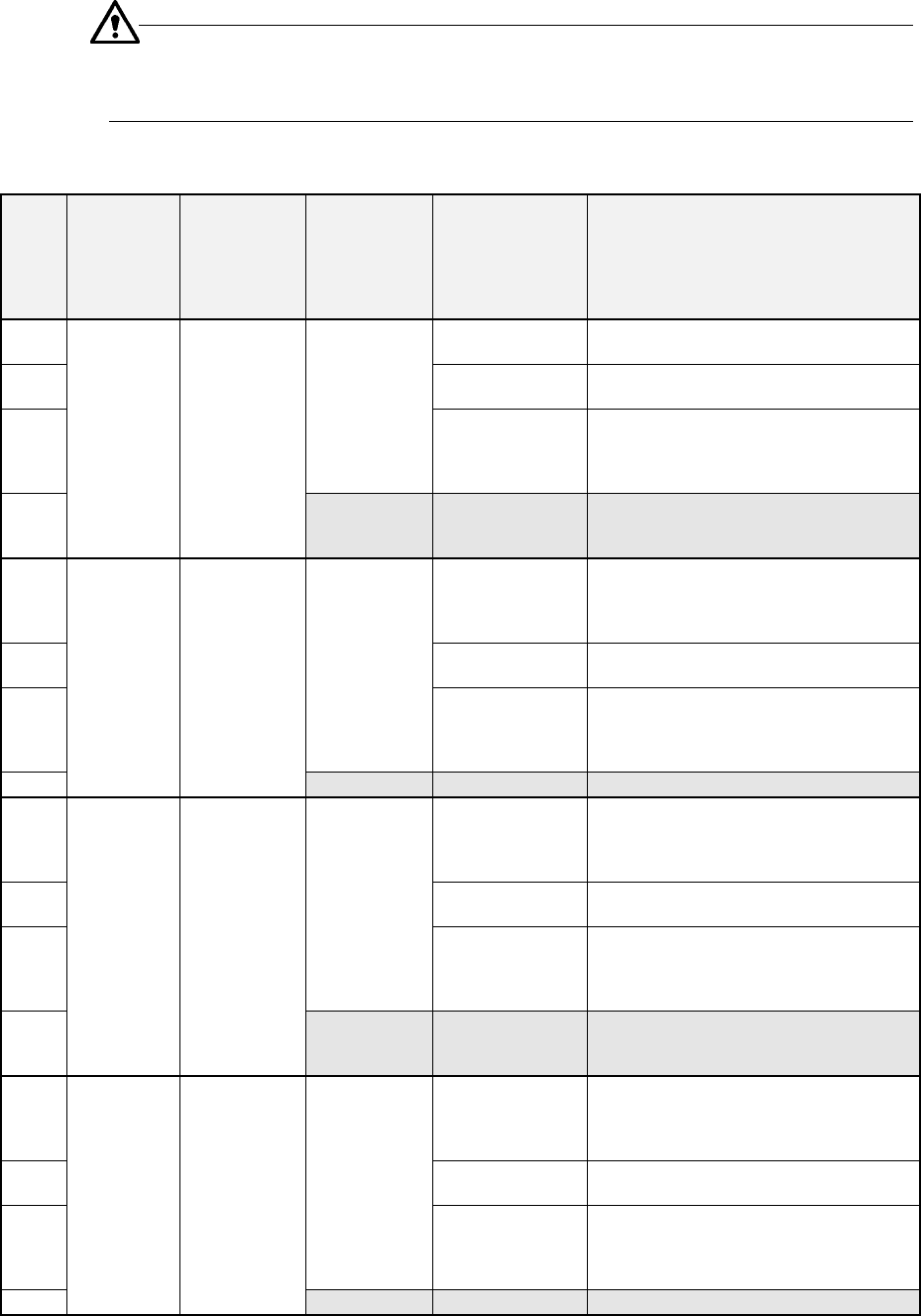
④ Operation information displayed when the system ejects a board or clamps it
again
The system displays the various notes on your selection of the radio button “Load
a new PWB” or “Produce after re-clamp.” and actual operation to be performed
depending on the continuous production information and the condition of the PWB
transport path.
Figure 6.4.14.1.4 Operation information when you are to eject a board or clamp it
again
6 − 95
The actual operation to be performed according to your selecting
each item on the “Processing before production begins” dialog box is
described below.
Ⅰ
ⅠⅠ
Ⅰ When there is a continuous production file
Step
No.
Whether to
resume
production
Production
operation
Whether there
is a board on
the PWB
transport
path
Information on
the PWB
transport path
obtained when
production was
interrupted
Operation after you press
the <START> key
①
A board is located
on the path.
“Load a new PWB” is not selectable.
②
No board
(Normally, the system does not perform
any operation.)
③
Yes
No information
After a board is ejected, a new board is
loaded before start of production, and the
system resumes the production (Be careful
to start production).
④
Yes
Production
after a board is
loaded (when
you select
“Load a new
PWB”)
None
After a board is loaded before start of
production, the system resumes the
production.
⑤
A board is located
on the path.
“Load a new PWB” is not selectable.
After a board is clamped again, the system
resumes the production without loading a
board before starting production.
⑥
No board
(Normally, the system does not perform
any operation.)
⑦
Yes
No information
After a board is clamped again, the system
resumes the production without loading a
board before starting production (Be careful
to start production).
⑧
Yes
Production
after a board is
clamped
(when you
select
“Re-clamp
current PWB”)
None
Error (No board)
⑨
A board is located
on the path.
After a board is ejected, the system loads a
new board before start of production, and
starts new production (Be careful to start
production).
⑩
No board
(Normally, the system does not perform
any operation.)
⑪
Yes
No information
After a board is ejected, the system loads a
new board before start of production, and
starts new production (Be careful to start
production).
⑫
No
Production
after a board is
loaded (when
you select
“Load a new
PWB”)
None
After a board is loaded before start of
production, the system starts new
production.
⑬
A board is located
on the path.
After a board is clamped again, the system
resumes the production without loading a
board before starting production (Be careful
to start production).
⑭
No board
(Normally, the system does not perform
any operation.)
⑮
Yes
No information
After a board is clamped, the system starts
new production without loading a new board
before starting production (Be careful to
start production).
⑯
No
Production
after a board is
clamped again
(when you
select
“Re-clamp
current PWB”)
None
Error (No board)