KE2010.Instruction Manual.Ver.2.01,Rev.08.pdf - 第500页
6 − 124 6.6.2 Display of the production status W hen the <START> switch is pressed and the product ion starts, the status of the production (the sam e as that of the board pr oduction) appears on t he screen. For d…
6 − 123
⑧ Pick tracking
Using the radio button, set whether or not to perform pickup tracking before
blank run by the camera, and also the types of tracking.
⑨ Automatic interval
Enter the interval of automatic run.
6.6.1 Starting the blank run
To start the blank run, press the <START> switch on the operation panel after setting
the desired blank-run conditions.
CAUTION
The head starts to move immediately after the <START> switch is
pressed, and then "Blank run" starts.
To avoid a risk of injury, do not place your hand in the machine, nor
move your face or head close to the machine during operation of the
machine.
Before pressing the <START> switch, check that there is no one who is
working in the machine.
Before pressing the <START> switch, check that there is no one who
can be injured when the head starts to move.
Before pressing the <START> switch, check that there are no obstacles
(tools and jigs) attached or left in the machine.
The green signal lamp lights to indicate that the blank run operation is in progress.
CAUTION
If the feeder bank is never recognized (since the machine is zeroed, or
the bank moves down then up), it may be recognized automatically
before the machine moves to the pick position. Since the head moves
across the feeder while the feeder bank is being recognized, do not
place your hand in the machine, nor move your face or head close to
the machine. Especially, take care when the feeder bank is
recognized not from the menu but during teaching or tracking a pick
position.
6 − 124
6.6.2 Display of the production status
When the <START> switch is pressed and the production starts, the status of the
production (the same as that of the board production) appears on the screen.
For details, see the section "Display of the production status" of the "PWB
production".
Any production management information is not created.
For the item of "Result", the number increases with the increasing number of
produced boards but it is not loaded into the production management information.
The Pause, Stop, and Exit commands used during blank run operation are the same
as those during the board production.
6.6.3 Monitoring by camera
Same as the "Monitoring by camera" of "Trial run".
6 − 125
6.7 Checking
After a component is attached on a head, use each hardware device to perform
various types of inspection.
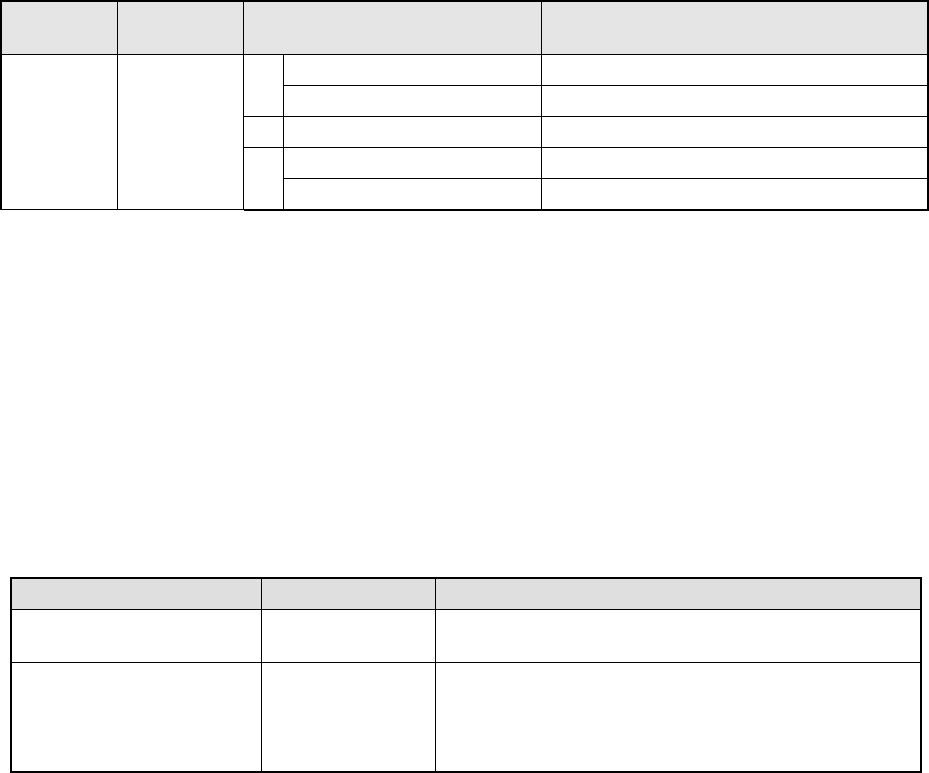
− After selecting the [Tool] command on the Production dialog box, and then the
[Check] command on the “Tool” menu, select the check item on the sub-menu.
Main
menu
Pull-down
menu
Sub-menu Description
Verify Current check Performs a single verification check. *1
1
Verify All check Performs a continuous verification check. *1
2 Laser height check Performs a laser height check.
SOT Current check Performs a single SOT check.
Tool Check
3
SOT All check Performs a continuous SOT check.
*1 Optionally set at the factory.
6.7.1 Single Verification Check/Continuous Verification Check (Optional)
This function is optional and set at the factory.
6.7.1.1 Verification checking function
Two modes: “Continuous check mode” and “Single check mode” are provided,
and functions available in each mode are described below.
Table 6.7.1.1 Check mode and its menu
Tool menu Operation mode Description
Verify Current check Single check Checks each component that caused an error in
Continuous verification mode.
Verify All check Continuous check Checks all components or components that satisfy the
requirements you set in a production program.
◆ In Single mode, the machine can check a component
that failed to be inspected.
6.7.1.2 Operations
①
Head used to pick up a component
The system automatically selects a head that is used to pick up a component.
The system selects and uses a nozzle already attached on a head rather than
one not attached so that the frequency of nozzle replacement can be reduced.
However, the system may use a different head every time it measures a
component depending on the nozzle attachment condition.
②
Applicable components
The system checks a square chip only.