KE2010.Instruction Manual.Ver.2.01,Rev.08.pdf - 第545页
7 − 8 Select the desired f ile, t hen click t he <Open> button. Y ou have reg istered additional nozzle inform ation to t he system at this point . An “ini” f ile that is r egister ed fr om a f loppy disk is to be …
7 − 7
7.2.1.2 Read Nzl. data
This function adds nozzle information on customized nozzles to the system.
The system allows you to read nozzle information in the following two ways:
− Read Nzl. data [FD]: function for reading data from a floppy disk
− Read Nzl. data: function for reading data from a file (where a nozzle is
installed)
7.2.1.2.1 Read Nzl. data [FD]
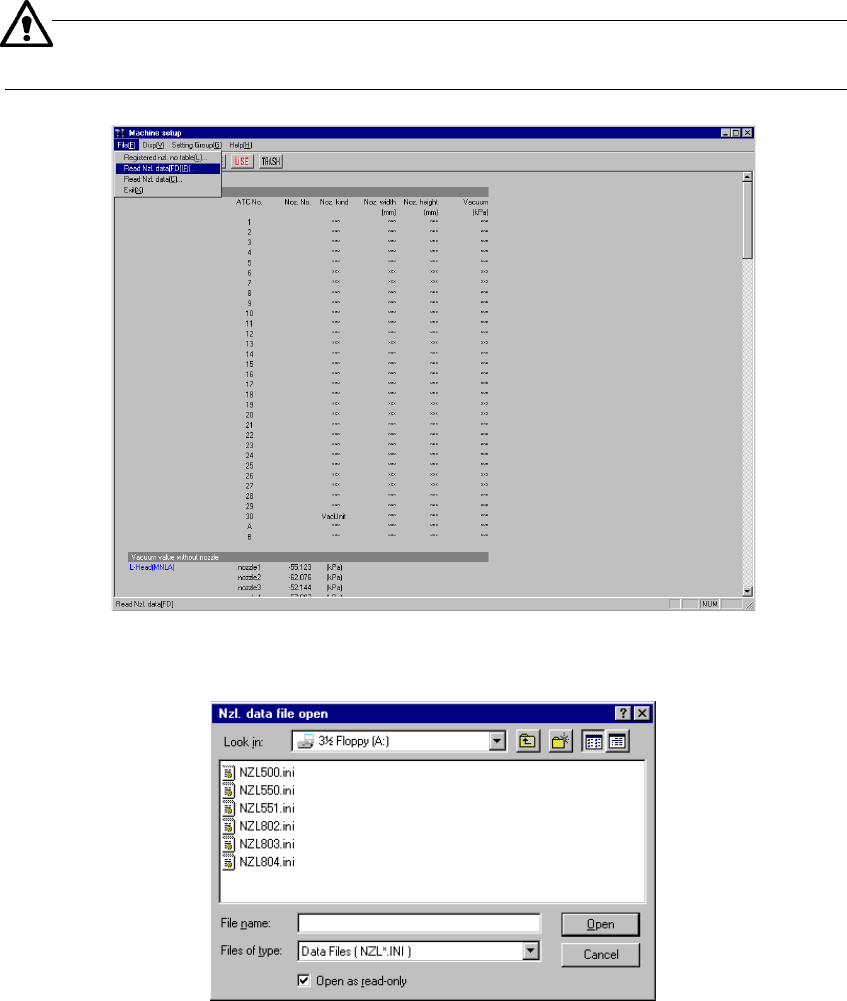
When you select the [Read Nzl. data] command from the “File” menu that is invoked
form the menu bar, the “Nzl. data file open” dialog box (see Figure 7.2.1.2.2)
appears on the screen.
− Additional nozzle information is provided from a floppy disk.
− The format of an additional nozzle information file is “NZL*.INI”, that is, an
INI file format, where * is a three-digit nozzle number.
When you select this menu command, insert the floppy disk on which
additional nozzle information is stored in advance.
Figure 7.2.1.2.1 “Read Nzl. data” menu command
(Screen example when a KE-2020 is used)
Figure 7.2.1.2.2 “Nzl. data file open” dialog box
7 − 8
Select the desired file, then click the <Open> button.
You have registered additional nozzle information to the system at this point.
An “ini” file that is registered from a floppy disk is to be copied into the folder
C:¥JUKI¥DATA¥CUSTOM¥NZL.
− When you click the <Cancel> button, any data is not registered.
− You can check the added nozzle number with the “Registered nzl. no table”
menu command, which is described under Section 7.2.1.1.
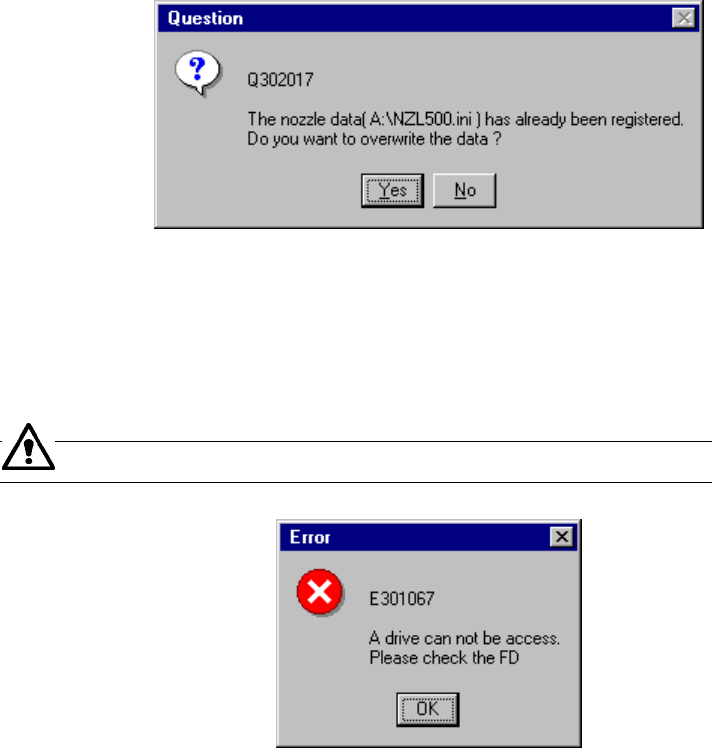
If the specified nozzle information is already registered, the dialog box that asks you
whether to overwrite the existing nozzle information (see Figure 7.2.1.2.3).
− When you select “Yes”, the system updates the existing data with the specified
nozzle information that is stored on a floppy disk.
Figure 7.2.1.2.3 Nozzle information update confirmation dialog box
If no floppy disk is inserted into the drive or if any data is not read due to a failure of
the inserted floppy disk, the system displays the error dialog box (see Figure
7.2.1.2.4) on the screen.
Check the floppy disk drive or contents of the floppy disk.
Figure 7.2.1.2.4 Floppy disk access error dialog box
7 − 9
7.2.1.2.2 Reading nozzle information
The [Read Nzl data [C]] command reads nozzle information from a place (“ini” file
that is for the customized nozzle and stored in the directory
C:¥JUKI¥DATA¥CUSTOM) where a nozzle is installed with the installer on the
Machine Setup menu when you are to use a customized nozzle. See Section
7.2.1.2.1 for the function for reading nozzle information from a floppy disk.
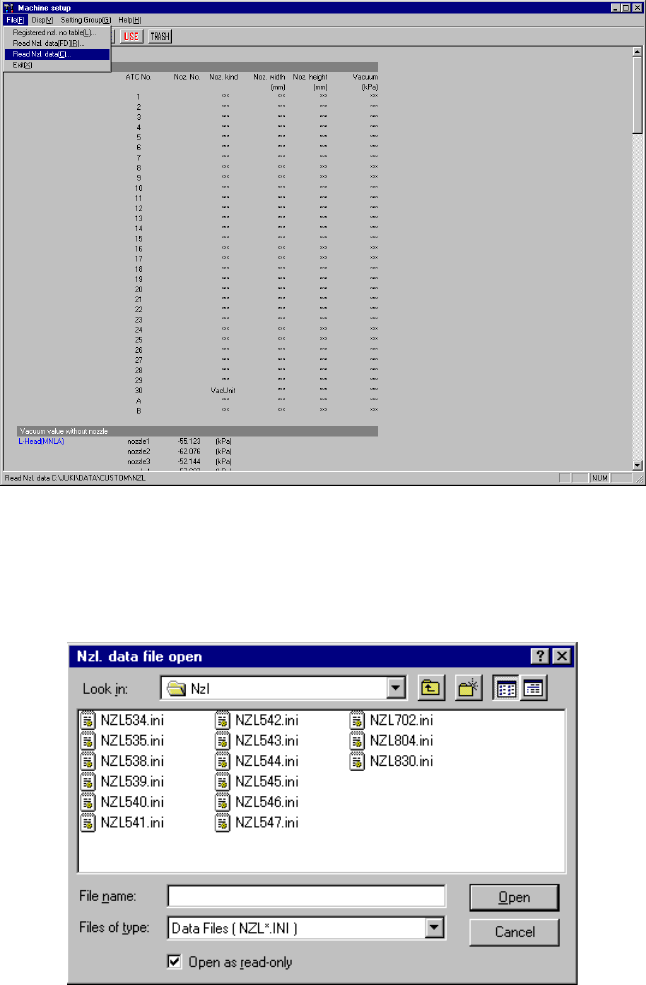
When you select the [File] command on the menu bar, and then the [Read Nzl
data [C]] command on the displayed menu, the system displays the “Nzl. data file
open” dialog box (see Figure 7.2.1.2.5).
Figure 7.2.1.2.5 “Nzl data file open” dialog box (Screen example: KE-2020)
− When this “Nzl data file open” dialog box opens, select the desired file.
“C:¥JUKI¥DATA¥CUSTOM¥NZL” opens by default.
Figure 7.2.1.2.6 “Nzl data file open” dialog box
− Select the desired file and click the <Open> button to register the nozzle.