KE2010.Instruction Manual.Ver.2.01,Rev.08.pdf - 第618页
8 − 29 10) Entrance shutter This item opens/closes the entr ance shutter cylinder . W hen the control item “Ent rance shutter ” is selected, click the <O PEN>, <CLOSE> or <OPEN/ CLOSE> button or press t…
8 − 28
4) Ready out
This item turns on and/ or off the ready OUT signal.
− When the control item “Ready out” is checked, select the <ON>, <OFF>
or <ON/OFF> button or press the F3, F4 or F5 key to control the ready
OUT signal.
5) Board available out
This item turns on and/ or off the board available OUT signal.
− When the control item “Board available out” is checked, select the <ON>,
<OFF> or <ON/OFF> button or press the F3, F4 or F5 key to control
the board available OUT signal.
6) Conveyor in-motor
This item turns on and/or off the transport motor (IN buffer).
− When the control item “Conveyor in-motor “ is selected, click the <ON>,
<OFF> or <ON/OFF> button or press the F3, F4 or F5 key.
− The state display is updated when the transport motor (IN buffer) is
controlled completely.
7) Conveyor center-motor
This item turns on and/ or off the transport motor (Center buffer).
− When the control item “Conveyor center-motor” is selected, click the
<ON>, <OFF> or <ON/OFF> button or press the F3, F4 or F5 key.
− The state display is updated when the transport motor (center buffer) is
controlled completely.
8) Conveyor out-motor
This item turns on and/ or off the transport motor (OUT buffer).
− When the control item “Conveyor out-motor” is selected, click the <ON>,
<OFF> or <ON/OFF> button or press the F3, F4 or F5 key.
− The state display is updated when the transport motor (OUT buffer) is
controlled completely.
9) Support tbl. stp. snsr. (Support table stop sensor)
This item turns on and/or off the support table stopper.
When the control item “Support tbl. stp. snsr.” is selected, click the <ON>,
<OFF> or <ON/OFF> button or press the F3, F4 or F5 key.
The state display is updated when the support table stopper is controlled
completely.
8 − 29
10) Entrance shutter
This item opens/closes the entrance shutter cylinder.
When the control item “Entrance shutter” is selected, click the <OPEN>,
<CLOSE> or <OPEN/CLOSE> button or press the F3, F4 or F5 key.
The state display is updated when the entrance shutter cylinder is
controlled completely.
11) Exit shutter
This item opens/closes the exit shutter cylinder.
− When the control item “Exit shutter” is selected, click the <OPEN>,
<CLOSE> or <OPEN/CLOSE> button or press the F3, F4 or F5 key.
− The state display is updated when the exit shutter cylinder is controlled
completely.
12) PWB detect pin
This item turns on and/or off the PWB detect pin.
When the control item “PWB detect pin” is checked, click the <ON>,
<OFF> or <ON/OFF> button or press the F3, F4 or F5 key.
The state display is updated when the PWB detect pin is controlled
completely.
Note: You cannot set this item with any machine other than a KE-2030.
(3) State display
The state of each sensor and each unit is displayed when the sensor and unit
are controlled completely.
The state of each sensor, signal, and unit is always displayed.
8 − 30
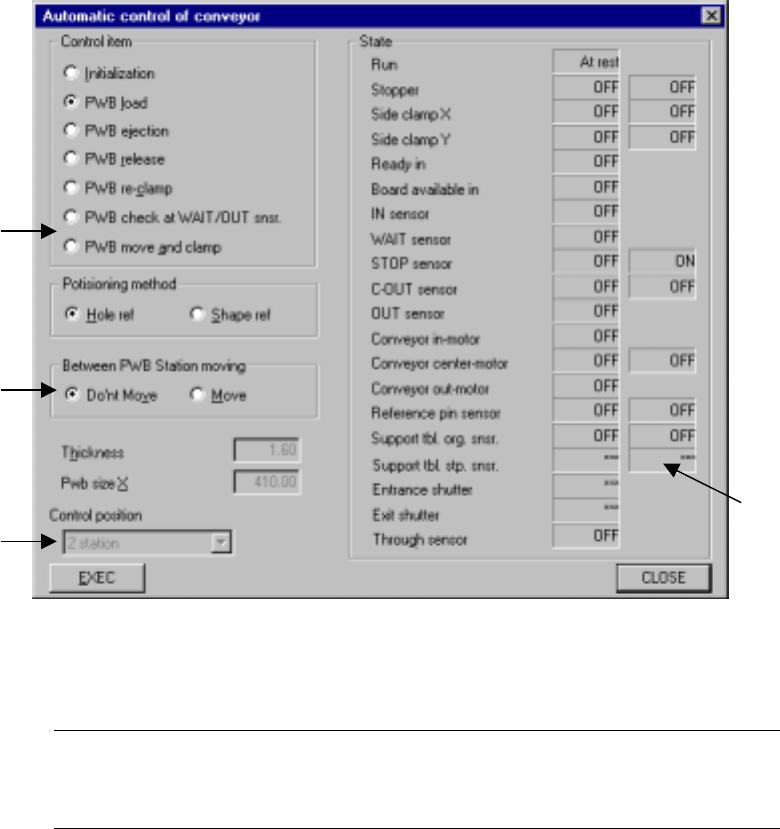
8.3.2 Transport system automatic control
When you select the [Conveyor] command on the [Ctrl] menu, then the [Automatic
control of conveyor] command, the following “Automatic control of conveyor” dialog
box appears on the screen.
Figure 8.3.2 Automatic control of conveyor dialog box
(Screen example when a KE-2030 is used)
Note: *1 The Control item “PWB move and clamp” and the menu items
“Between PWB Station moving” and “Control position” are
displayed with a KE-2030 only.
*1
*1
*1
*1